github.com/justadudewhohacks/face-api.js @0.22.2 sqlite
README
face-api.js


JavaScript face recognition API for the browser and nodejs implemented on top of tensorflow.js core (tensorflow/tfjs-core)
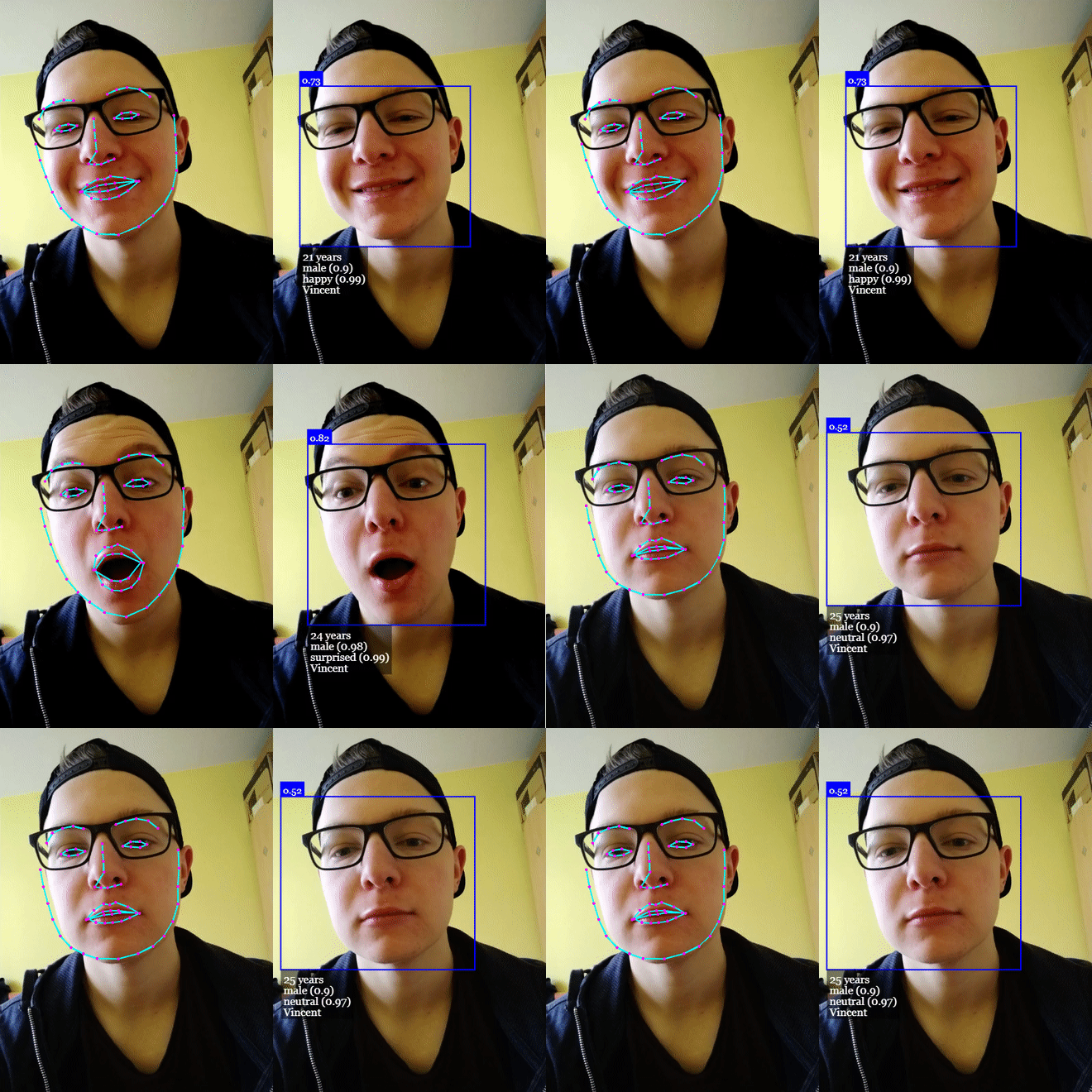
Click me for Live Demos!
Tutorials
- face-api.js — JavaScript API for Face Recognition in the Browser with tensorflow.js
- Realtime JavaScript Face Tracking and Face Recognition using face-api.js’ MTCNN Face Detector
- Realtime Webcam Face Detection And Emotion Recognition - Video
- Easy Face Recognition Tutorial With JavaScript - Video
- Using face-api.js with Vue.js and Electron
- Add Masks to People - Gant Laborde on Learn with Jason
Table of Contents
- Features
- Running the Examples
- face-api.js for the Browser
- face-api.js for Nodejs
- Usage
- Loading the Models
- High Level API
- Displaying Detection Results
- Face Detection Options
- Utility Classes
- Other Useful Utility
- Available Models
- Face Detection
- Face Landmark Detection
- Face Recognition
- Face Expression Recognition
- Age Estimation and Gender Recognition
- API Documentation
Features
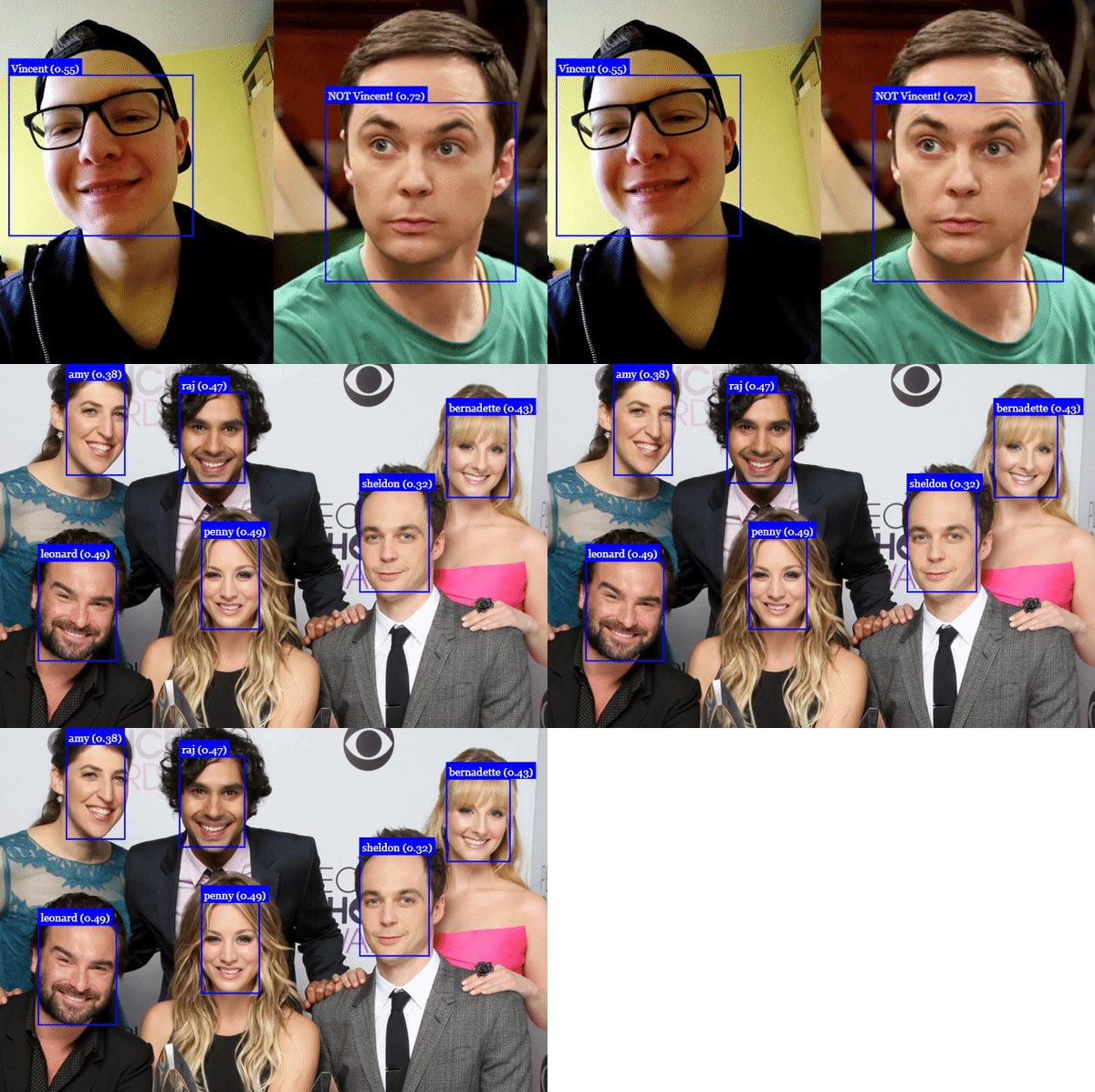
Face Recognition
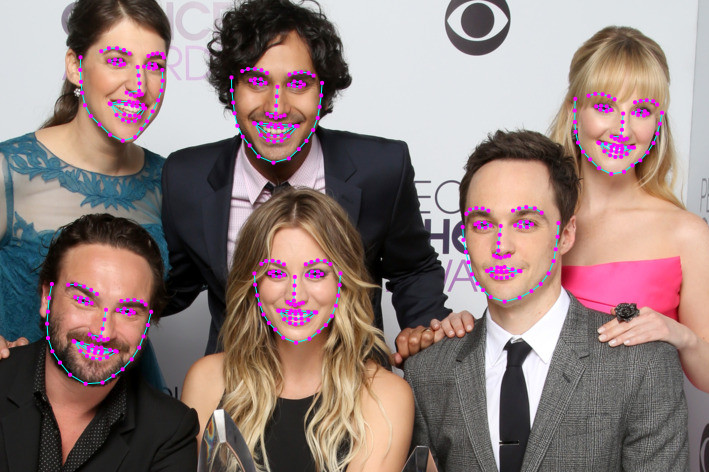
Face Landmark Detection
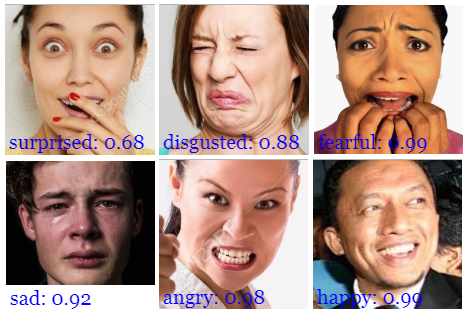
Face Expression Recognition
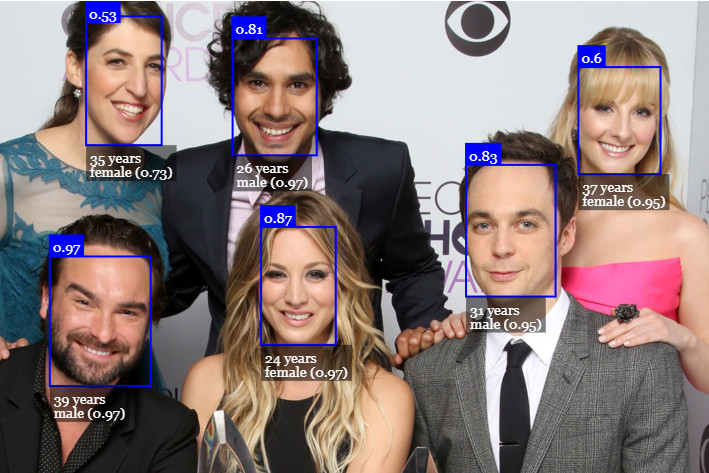
Age Estimation & Gender Recognition
Running the Examples
Clone the repository:
git clone https://github.com/justadudewhohacks/face-api.js.git
Running the Browser Examples
cd face-api.js/examples/examples-browser
npm i
npm start
Browse to http://localhost:3000/.
Running the Nodejs Examples
cd face-api.js/examples/examples-nodejs
npm i
Now run one of the examples using ts-node:
ts-node faceDetection.ts
Or simply compile and run them with node:
tsc faceDetection.ts
node faceDetection.js
face-api.js for the Browser
Simply include the latest script from dist/face-api.js.
Or install it via npm:
npm i face-api.js
face-api.js for Nodejs
We can use the equivalent API in a nodejs environment by polyfilling some browser specifics, such as HTMLImageElement, HTMLCanvasElement and ImageData. The easiest way to do so is by installing the node-canvas package.
Alternatively you can simply construct your own tensors from image data and pass tensors as inputs to the API.
Furthermore you want to install @tensorflow/tfjs-node (not required, but highly recommended), which speeds things up drastically by compiling and binding to the native Tensorflow C++ library:
npm i face-api.js canvas @tensorflow/tfjs-node
Now we simply monkey patch the environment to use the polyfills:
// import nodejs bindings to native tensorflow,
// not required, but will speed up things drastically (python required)
import '@tensorflow/tfjs-node';

// implements nodejs wrappers for HTMLCanvasElement, HTMLImageElement, ImageData
import * as canvas from 'canvas';

import * as faceapi from 'face-api.js';

// patch nodejs environment, we need to provide an implementation of
// HTMLCanvasElement and HTMLImageElement
const { Canvas, Image, ImageData } = canvas
faceapi.env.monkeyPatch({ Canvas, Image, ImageData })
Getting Started
Loading the Models
All global neural network instances are exported via faceapi.nets:
console.log(faceapi.nets)
// ageGenderNet
// faceExpressionNet
// faceLandmark68Net
// faceLandmark68TinyNet
// faceRecognitionNet
// ssdMobilenetv1
// tinyFaceDetector
// tinyYolov2
To load a model, you have to provide the corresponding manifest.json file as well as the model weight files (shards) as assets. Simply copy them to your public or assets folder. The manifest.json and shard files of a model have to be located in the same directory / accessible under the same route.
Assuming the models reside in public/models:
await faceapi.nets.ssdMobilenetv1.loadFromUri('/models')
// accordingly for the other models:
// await faceapi.nets.faceLandmark68Net.loadFromUri('/models')
// await faceapi.nets.faceRecognitionNet.loadFromUri('/models')
// ...
In a nodejs environment you can furthermore load the models directly from disk:
await faceapi.nets.ssdMobilenetv1.loadFromDisk('./models')
You can also load the model from a tf.NamedTensorMap:
await faceapi.nets.ssdMobilenetv1.loadFromWeightMap(weightMap)
Alternatively, you can also create own instances of the neural nets:
const net = new faceapi.SsdMobilenetv1()
await net.loadFromUri('/models')
You can also load the weights as a Float32Array (in case you want to use the uncompressed models):
// using fetch
net.load(await faceapi.fetchNetWeights('/models/face_detection_model.weights'))

// using axios
const res = await axios.get('/models/face_detection_model.weights', { responseType: 'arraybuffer' })
const weights = new Float32Array(res.data)
net.load(weights)
High Level API
In the following input can be an HTML img, video or canvas element or the id of that element.
<img id="myImg" src="https://github.com/justadudewhohacks/face-api.js/raw/0.22.2/images/example.png" />
<video id="myVideo" src="https://github.com/justadudewhohacks/face-api.js/raw/0.22.2/media/example.mp4" />
<canvas id="myCanvas" />
const input = document.getElementById('myImg')
// const input = document.getElementById('myVideo')
// const input = document.getElementById('myCanvas')
// or simply:
// const input = 'myImg'
Detecting Faces
Detect all faces in an image. Returns Array<FaceDetection>:
const detections = await faceapi.detectAllFaces(input)
Detect the face with the highest confidence score in an image. Returns FaceDetection | undefined:
const detection = await faceapi.detectSingleFace(input)
By default detectAllFaces and detectSingleFace utilize the SSD Mobilenet V1 Face Detector. You can specify the face detector by passing the corresponding options object:
const detections1 = await faceapi.detectAllFaces(input, new faceapi.SsdMobilenetv1Options())
const detections2 = await faceapi.detectAllFaces(input, new faceapi.TinyFaceDetectorOptions())
You can tune the options of each face detector as shown here.
Detecting 68 Face Landmark Points
After face detection, we can furthermore predict the facial landmarks for each detected face as follows:
Detect all faces in an image + computes 68 Point Face Landmarks for each detected face. Returns Array<WithFaceLandmarks<WithFaceDetection<{}>>>:
const detectionsWithLandmarks = await faceapi.detectAllFaces(input).withFaceLandmarks()
Detect the face with the highest confidence score in an image + computes 68 Point Face Landmarks for that face. Returns WithFaceLandmarks<WithFaceDetection<{}>> | undefined:
const detectionWithLandmarks = await faceapi.detectSingleFace(input).withFaceLandmarks()
You can also specify to use the tiny model instead of the default model:
const useTinyModel = true
const detectionsWithLandmarks = await faceapi.detectAllFaces(input).withFaceLandmarks(useTinyModel)
Computing Face Descriptors
After face detection and facial landmark prediction the face descriptors for each face can be computed as follows:
Detect all faces in an image + compute 68 Point Face Landmarks for each detected face. Returns Array<WithFaceDescriptor<WithFaceLandmarks<WithFaceDetection<{}>>>>:
const results = await faceapi.detectAllFaces(input).withFaceLandmarks().withFaceDescriptors()
Detect the face with the highest confidence score in an image + compute 68 Point Face Landmarks and face descriptor for that face. Returns WithFaceDescriptor<WithFaceLandmarks<WithFaceDetection<{}>>> | undefined:
const result = await faceapi.detectSingleFace(input).withFaceLandmarks().withFaceDescriptor()
Recognizing Face Expressions
Face expression recognition can be performed for detected faces as follows:
Detect all faces in an image + recognize face expressions of each face. Returns Array<WithFaceExpressions<WithFaceLandmarks<WithFaceDetection<{}>>>>:
const detectionsWithExpressions = await faceapi.detectAllFaces(input).withFaceLandmarks().withFaceExpressions()
Detect the face with the highest confidence score in an image + recognize the face expressions for that face. Returns WithFaceExpressions<WithFaceLandmarks<WithFaceDetection<{}>>> | undefined:
const detectionWithExpressions = await faceapi.detectSingleFace(input).withFaceLandmarks().withFaceExpressions()
You can also skip .withFaceLandmarks(), which will skip the face alignment step (less stable accuracy):
Detect all faces without face alignment + recognize face expressions of each face. Returns Array<WithFaceExpressions<WithFaceDetection<{}>>>:
const detectionsWithExpressions = await faceapi.detectAllFaces(input).withFaceExpressions()
Detect the face with the highest confidence score without face alignment + recognize the face expression for that face. Returns WithFaceExpressions<WithFaceDetection<{}>> | undefined:
const detectionWithExpressions = await faceapi.detectSingleFace(input).withFaceExpressions()
Age Estimation and Gender Recognition
Age estimation and gender recognition from detected faces can be done as follows:
Detect all faces in an image + estimate age and recognize gender of each face. Returns Array<WithAge<WithGender<WithFaceLandmarks<WithFaceDetection<{}>>>>>:
const detectionsWithAgeAndGender = await faceapi.detectAllFaces(input).withFaceLandmarks().withAgeAndGender()
Detect the face with the highest confidence score in an image + estimate age and recognize gender for that face. Returns WithAge<WithGender<WithFaceLandmarks<WithFaceDetection<{}>>>> | undefined:
const detectionWithAgeAndGender = await faceapi.detectSingleFace(input).withFaceLandmarks().withAgeAndGender()
You can also skip .withFaceLandmarks(), which will skip the face alignment step (less stable accuracy):
Detect all faces without face alignment + estimate age and recognize gender of each face. Returns Array<WithAge<WithGender<WithFaceDetection<{}>>>>:
const detectionsWithAgeAndGender = await faceapi.detectAllFaces(input).withAgeAndGender()
Detect the face with the highest confidence score without face alignment + estimate age and recognize gender for that face. Returns WithAge<WithGender<WithFaceDetection<{}>>> | undefined:
const detectionWithAgeAndGender = await faceapi.detectSingleFace(input).withAgeAndGender()
Composition of Tasks
Tasks can be composed as follows:
``` javascript // all faces await faceapi.detectAllFaces(input) await faceapi.detectAllFaces(input).withFaceExpressions() await faceapi.detectAllFaces(input).withFaceLandmarks() await faceapi.detectAllFaces(input).withFaceLandmarks().withFaceExpressions() await faceapi.detectAllFaces(input).withFaceLandmarks().withFaceExpressions().withFaceDescriptors() await faceapi.detectAllFaces(input).withFaceLandmarks().withAgeA
Extension points exported contracts — how you extend this code
IFaceFeatureExtractor (Interface)Core symbols most depended-on inside this repo
disposeShape
Languages
Modules by API surface
Used by 2 indexed graphs manifest dependencies, hub-wide
Dependencies from manifests, versioned
For agents
$ claude mcp add face-api.js \
  -- python -m otcore.mcp_server <graph>