github.com/imoneoi/openchat @3.6.1 sqlite
README
OpenChat: Advancing Open-source Language Models with Mixed-Quality Data

💻Online Demo | 🤗Huggingface | 📃Paper | 💭Discord
- OpenChat is an innovative library of open-source language models, fine-tuned with C-RLFT - a strategy inspired by offline reinforcement learning.
- Our models learn from mixed-quality data without preference labels, delivering exceptional performance on par with
ChatGPT, even with a7Bmodel which can be run on a consumer GPU (e.g. RTX 3090). - Despite our simple approach, we are committed to developing a high-performance, commercially viable, open-source large language model, and we continue to make significant strides toward this vision.

✨ News
-
[2024/05/22] We released the Llama-3 based version OpenChat 3.6 20240522, outperforming official Llama 3 8B Instruct and open-source finetunes/merges.
-
[2024/01/06] We released the second update, OpenChat 3.5 0106, further improved coding and overall performance 🏆.
-
[2023/12/10] We released the first update, OpenChat 3.5 1210, improved coding by 15 points 🚀.
-
[2023/11/01] We released the OpenChat-3.5-7B model, surpassing ChatGPT on various benchmarks 🔥.
-
[2023/09/21] We released our paper OpenChat: Advancing Open-source Language Models with Mixed-Quality Data.
Read more
-
[2023/09/03] We released the OpenChat V3.2 SUPER model.
-
[2023/08/04] We have launched an Online Demo featuring the latest version, OpenChat 3.2.
-
[2023/07/30] We are thrilled to introduce the OpenChat V3 model series, based on Llama 2, and now available for free for commercial use!
-
[2023/07/07] We released the OpenChat V2 model series.
-
[2023/07/01] We released the OpenChat V1 model series.
🏷️ Benchmarks - OpenChat 3.6
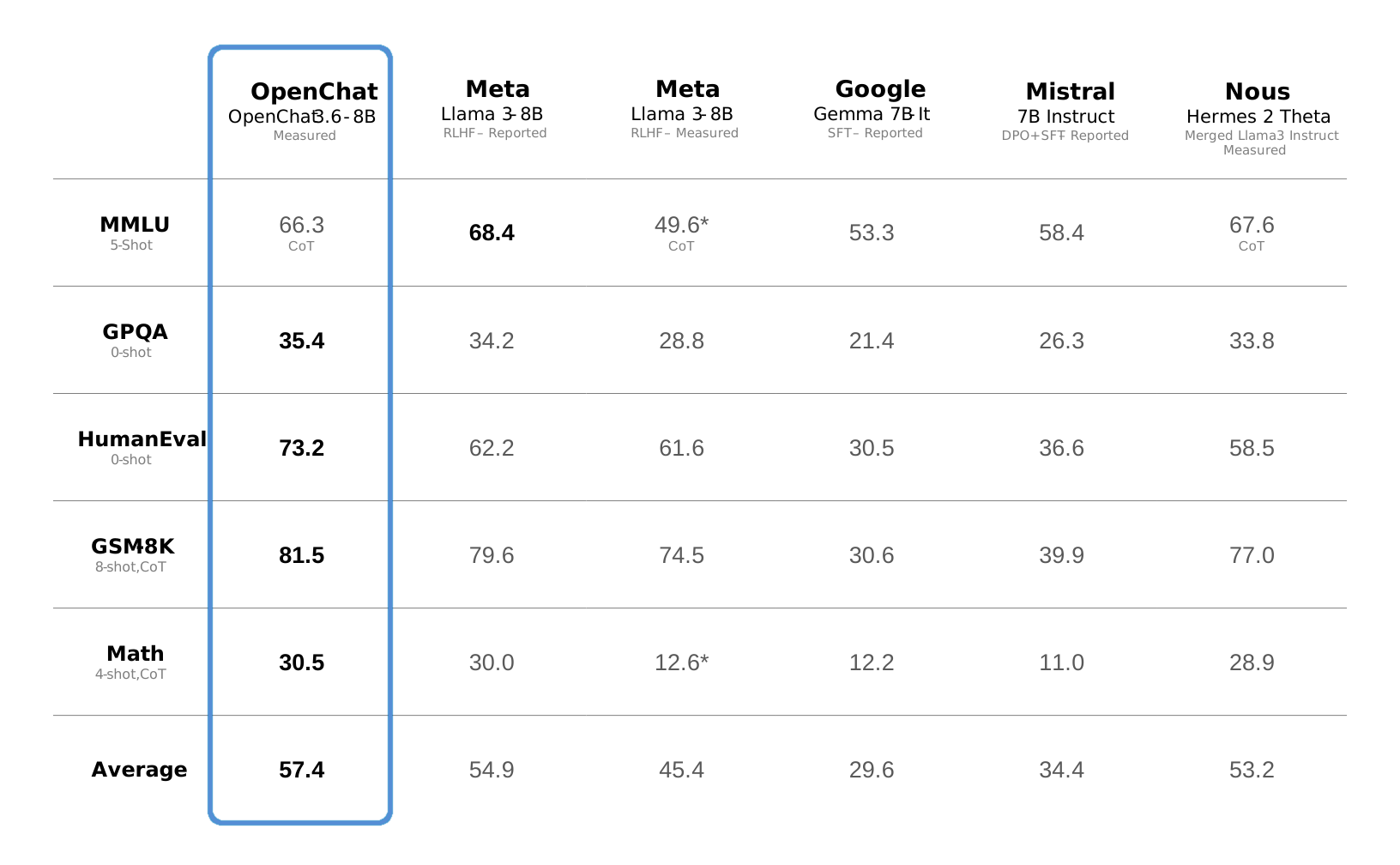
Reproducing benchmarks
Note: Please run the following commands at the base directory of this repository.
python -m ochat.evaluation.run_eval --condition "GPT4 Correct" --model openchat/openchat-3.6-8b-20240522 --eval_sets fs_cothub/mmlu fs_cothub/gsm8k fs_cothub/math
python -m ochat.evaluation.run_eval --condition "GPT4" --model openchat/openchat-3.6-8b-20240522 --eval_sets zs/gpqa
HumanEval is run using the official EvalPlus repository.
🏷️ Benchmarks - OpenChat 3.5
| Model | # Params | Average | MT-Bench | HumanEval | BBH MC | AGIEval | TruthfulQA | MMLU | GSM8K | BBH CoT |
|---|---|---|---|---|---|---|---|---|---|---|
| OpenChat-3.5-0106 | 7B | 64.5 | 7.8 | 71.3 | 51.5 | 49.1 | 61.0 | 65.8 | 77.4 | 62.2 |
| ChatGPT (March)* | ???B | 61.5 | 7.94 | 48.1 | 47.6 | 47.1 | 57.7 | 67.3 | 74.9 | 70.1 |
| OpenHermes 2.5 | 7B | 59.3 | 7.54 | 48.2 | 49.4 | 46.5 | 57.5 | 63.8 | 73.5 | 59.9 |
| OpenOrca Mistral | 7B | 52.7 | 6.86 | 38.4 | 49.4 | 42.9 | 45.9 | 59.3 | 59.1 | 58.1 |
| Zephyr-β^ | 7B | 34.6 | 7.34 | 22.0 | 40.6 | 39.0 | 40.8 | 39.8 | 5.1 | 16.0 |
| Mistral | 7B | - | 6.84 | 30.5 | 39.0 | 38.0 | - | 60.1 | 52.2 | - |
| Open-source SOTA** | 13B-70B | 61.4 | 7.71 | 73.2 | 49.7 | 41.7 | 62.3 | 63.7 | 82.3 | 41.4 |
| WizardLM 70B | WizardCoder 34B | Orca 13B | Orca 13B | Platypus2 70B | WizardLM 70B | MetaMath 70B | Flan-T5 11B |
🔥 OpenChat-3.5-0106 (7B) now outperforms Grok-0 (33B) on all 4 benchmarks and Grok-1 (314B) on average and 3/4 benchmarks.
| License | # Param | Average | MMLU | HumanEval | MATH | GSM8k | |
|---|---|---|---|---|---|---|---|
| OpenChat-3.5-0106 | Apache-2.0 | 7B | 61.0 | 65.8 | 71.3 | 29.3 | 77.4 |
| Grok-0 | Proprietary | 33B | 44.5 | 65.7 | 39.7 | 15.7 | 56.8 |
| Grok-1 | Proprietary | 314B | 55.8 | 73 | 63.2 | 23.9 | 62.9 |
Evaluation details
*: ChatGPT (March) results are from GPT-4 Technical Report, Chain-of-Thought Hub, and our evaluation.
^: Zephyr-β often fails to follow few-shot CoT instructions, likely because it was aligned with only chat data but not trained on few-shot data.
**: Mistral and Open-source SOTA results are taken from reported results in instruction-tuned model papers and official repositories.
All models are evaluated in chat mode (e.g. with the respective conversation template applied). All zero-shot benchmarks follow the same setting as in the AGIEval paper and Orca paper. CoT tasks use the same configuration as Chain-of-Thought Hub, HumanEval is evaluated with EvalPlus, and MT-bench is run using FastChat. To reproduce our results, follow the instructions below.
Reproducing benchmarks
Reasoning and Coding:
Note: Please run the following commands at the base directory of this repository.
python -m ochat.evaluation.run_eval --condition "GPT4 Correct" --model openchat/openchat-3.5-0106 --eval_sets coding fs_cothub/bbh fs_cothub/mmlu zs/agieval zs/bbh_mc_orca zs/truthfulqa_orca
python ochat/evaluation/view_results.py
python ochat/evaluation/convert_to_evalplus.py
Then all humaneval code samples are placed in ochat/evaluation/evalplus_codegen. Use the following command to evaluate an individual code sample named samples.jsonl using Docker as a sandbox.
docker run -v $(pwd):/app ganler/evalplus:latest --dataset humaneval --samples samples.jsonl
Mathematical Reasoning:
Note: Please run the following commands at the base directory of this repository.
python -m ochat.evaluation.run_eval --condition "Math Correct" --model openchat/openchat-3.5-0106 --eval_sets fs_cothub/gsm8k zs/math
python ochat/evaluation/view_results.py
MT-Bench:
Please first launch a local API server, then download FastChat and run the following commands.
Note: Due to non-zero temperature and GPT-4 API changes over time, there might be variations in the results.
cd fastchat/llm_judge
python gen_api_answer.py --model openchat-3.5-0106 --max-tokens 4096 --parallel 128 --openai-api-base http://localhost:18888/v1
python gen_judgment.py --model-list openchat-3.5-0106 --parallel 8 --mode single
⬇️ Installation
pip
pip3 install ochat
[!IMPORTANT] If you are facing package compatibility issues with pip, try the conda method below or check this issue
conda
conda create -y --name openchat python=3.11
conda activate openchat

pip3 install ochat
Windows (WSL 1.x, Ubuntu-22.04)
sudo apt update
sudo apt install build-essential

sudo apt install -y curl
curl -o miniconda.sh https://repo.anaconda.com/miniconda/Miniconda3-latest-Linux-x86_64.sh
bash miniconda.sh

# Restart WSL terminal if the following conda command does not work

conda create -y --name openchat python=3.11
conda activate openchat

pip3 install ochat
From source
Clone this repo and install openchat from source in editable mode
git clone https://github.com/imoneoi/openchat
cd openchat

pip3 install --upgrade pip  # enable PEP 660 support
pip3 install -e .  # Editable mode, you can make changes in this cloned repo
🚀 Deploying API server
⚡ Our API server is ready for production use and compatible with the OpenAI API protocol. It is highly optimized with vLLM and can dynamically batch requests.
📎 Note: For 20 series or older GPUs that do not support bfloat16, add --dtype float16 to the server args.
List of currently supported models
| MODEL_TYPE | MODEL_REPO | License |
|---|---|---|
| openchat_3.6 | openchat/openchat-3.6-8b-20240522 | Llama 3 |
| openchat_3.5 | openchat/openchat-3.5-0106 | Apache 2.0 |
For a single GPU (e.g. RTX 3090, 4090)
python -m ochat.serving.openai_api_server --model MODEL_REPO
For multiple GPUs (tensor parallel)
# N is the number of tensor parallel GPUs
python -m ochat.serving.openai_api_server --model MODEL_REPO --engine-use-ray --worker-use-ray --tensor-parallel-size N
use -h to see more settings
python -m ochat.serving.openai_api_server --model MODEL_REPO -h
Deploy as online service
If you want to deploy the server as an online service, you can use --api-keys sk-KEY1 sk-KEY2 ... to specify allowed API keys and --disable-log-requests --disable-log-stats --log-file openchat.log for logging only to a file. For security purposes, we recommend using an HTTPS gateway in front of the server.
Request example
Once started, the server listens at localhost:18888 for requests and is compatible with the OpenAI ChatCompletion API specifications.
💡 Default Mode (GPT4 Correct): Best for coding, chat and general tasks
curl http://localhost:18888/v1/chat/completions \
  -H "Content-Type: application/json" \
  -d '{
    "model": "MODEL_TYPE",
    "messages": [{"role": "user", "content": "You are a large language model named OpenChat. Write a poem to describe yourself"}]
  }'
🧮 Mathematical Reasoning Mode: Tailored for solving math problems
curl http://localhost:18888/v1/chat/completions \
  -H "Content-Type: application/json" \
  -d '{
    "model": "MODEL_TYPE",
    "condition": "Math Correct",
    "messages": [{"role": "user", "content": "10.3 − 7988.8133 = "}]
  }'
🌐 Web UI - OpenChat-UI
After launching the API server, OpenChat provide user interface that easy to interact with. Click here to check Web UI
🤗 Inference with Transformers
[!WARNING] It's recommended to use our optimized API server for deployment. Inferencing with Transformers will be slower.
💡 Default Mode (GPT4 Correct): Best for coding, chat and general tasks
GPT4 Correct User: Hello<|end_of_turn|>GPT4 Correct Assistant: Hi<|end_of_turn|>GPT4 Correct User: How are you today?<|end_of_turn|>GPT4 Correct Assistant:
🧮 Mathematical Reasoning Mode: Tailored for solving math problems
Math Correct User: 10.3 − 7988.8133=<|end_of_turn|>Math Correct Assistant:
⚠️ Notice: Remember to set <|end_of_turn|> as end of generation token.
The default (GPT4 Correct) template is also available as the integrated tokenizer.chat_template, which can be used instead of manually specifying the template.
🛠️ Training
The OpenChat training system utilizes padding-free training and the Multipack Sampler, achieving a 3~10x speedup compared to the conventional padded training.
Choose a base model
OpenChat supports Llama 3 and Mistral models. Please first choose a base model to fit your needs. Each base model has a corresponding weight repo, model type, and recommended batch size as listed below, they should be filled into BASE_REPO, MODEL_TYPE, and BATCH_SIZE in the following instructions.
| Base Model | Size | Weights (with EOT token) | Model Type | Recommended Batch Size per GPU (8xA100 80GB) |
|---|---|---|---|---|
| Llama 3 | 8B | imone/Llama-3-8B-fixed-special-embedding |
openchat_3.6 |
40960 |
| Mistral | 7B | `imone/Mistral_7B |
Core symbols most depended-on inside this repo
create_error_responseShape
Languages
Modules by API surface
Dependencies from manifests, versioned
For agents
$ claude mcp add openchat \
  -- python -m otcore.mcp_server <graph>