github.com/fastapi/fastapi @0.139.0 sqlite
README

<em>FastAPI framework, high performance, easy to learn, fast to code, ready for production</em>




Documentation: https://fastapi.tiangolo.com
Source Code: https://github.com/fastapi/fastapi
FastAPI is a modern, fast (high-performance), web framework for building APIs with Python based on standard Python type hints.
The key features are:
- Fast: Very high performance, on par with NodeJS and Go (thanks to Starlette and Pydantic). One of the fastest Python frameworks available.
- Fast to code: Increase the speed to develop features by about 200% to 300%. *
- Fewer bugs: Reduce about 40% of human (developer) induced errors. *
- Intuitive: Great editor support. Completion everywhere. Less time debugging.
- Easy: Designed to be easy to use and learn. Less time reading docs.
- Short: Minimize code duplication. Multiple features from each parameter declaration. Fewer bugs.
- Robust: Get production-ready code. With automatic interactive documentation.
- Standards-based: Based on (and fully compatible with) the open standards for APIs: OpenAPI (previously known as Swagger) and JSON Schema.
* estimation based on tests conducted by an internal development team, building production applications.
Sponsors
Keystone Sponsor

Gold Sponsors








Silver Sponsors






Opinions
"[...] I'm using FastAPI a ton these days. [...] I'm actually planning to use it for all of my team's ML services at Microsoft. Some of them are getting integrated into the core Windows product and some Office products."
Kabir Khan - Microsoft (ref)
"We adopted the FastAPI library to spawn a REST server that can be queried to obtain predictions. [for Ludwig]"
Piero Molino, Yaroslav Dudin, and Sai Sumanth Miryala - Uber (ref)
"Netflix is pleased to announce the open-source release of our crisis management orchestration framework: Dispatch! [built with FastAPI]"
Kevin Glisson, Marc Vilanova, Forest Monsen - Netflix (ref)
"If anyone is looking to build a production Python API, I would highly recommend FastAPI. It is beautifully designed, simple to use and highly scalable, it has become a key component in our API first development strategy and is driving many automations and services such as our Virtual TAC Engineer."
Deon Pillsbury - Cisco (ref)
FastAPI Conf
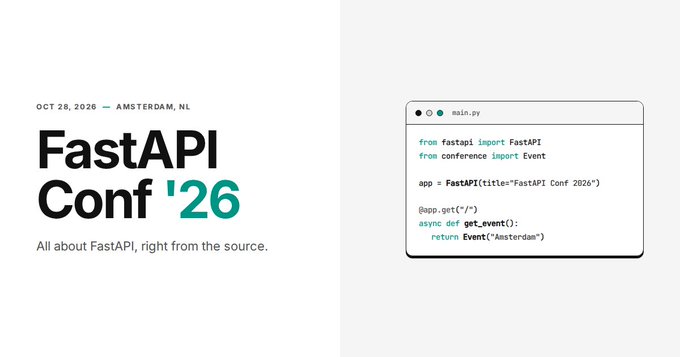
FastAPI Conf '26 is happening on October 28, 2026 in Amsterdam, NL. All about FastAPI, right from the source. 🎤
FastAPI mini documentary
There's a FastAPI mini documentary released at the end of 2025, you can watch it online:

Typer, the FastAPI of CLIs

If you are building a CLI app to be used in the terminal instead of a web API, check out Typer.
Typer is FastAPI's little sibling. And it's intended to be the FastAPI of CLIs. ⌨️ 🚀
Requirements
FastAPI stands on the shoulders of giants:
Installation
Create and activate a virtual environment and then install FastAPI:
$ pip install "fastapi[standard]"

---> 100%
Note: Make sure you put "fastapi[standard]" in quotes to ensure it works in all terminals.
Example
Create it
Create a file main.py with:
from fastapi import FastAPI

app = FastAPI()


@app.get("/")
def read_root():
    return {"Hello": "World"}


@app.get("/items/{item_id}")
def read_item(item_id: int, q: str | None = None):
    return {"item_id": item_id, "q": q}
Or use async def...
If your code uses async / await, use async def:
from fastapi import FastAPI

app = FastAPI()


@app.get("/")
async def read_root():
    return {"Hello": "World"}


@app.get("/items/{item_id}")
async def read_item(item_id: int, q: str | None = None):
    return {"item_id": item_id, "q": q}
Note:
If you don't know, check the "In a hurry?" section about async and await in the docs.
Run it
Run the server with:
$ fastapi dev

 ╭────────── FastAPI CLI - Development mode ───────────╮
 │                                                     │
 │  Serving at: http://127.0.0.1:8000                  │
 │                                                     │
 │  API docs: http://127.0.0.1:8000/docs               │
 │                                                     │
 │  Running in development mode, for production use:   │
 │                                                     │
 │  fastapi run                                        │
 │                                                     │
 ╰─────────────────────────────────────────────────────╯

INFO:     Will watch for changes in these directories: ['/home/user/code/awesomeapp']
INFO:     Uvicorn running on http://127.0.0.1:8000 (Press CTRL+C to quit)
INFO:     Started reloader process [2248755] using WatchFiles
INFO:     Started server process [2248757]
INFO:     Waiting for application startup.
INFO:     Application startup complete.
About the command fastapi dev...
The command fastapi dev reads your main.py file automatically, detects the FastAPI app in it, and starts a server using Uvicorn.
By default, fastapi dev will start with auto-reload enabled for local development.
You can read more about it in the FastAPI CLI docs.
Check it
Open your browser at http://127.0.0.1:8000/items/5?q=somequery.
You will see the JSON response as:
{"item_id": 5, "q": "somequery"}
You already created an API that:
- Receives HTTP requests in the paths
/and/items/{item_id}. - Both paths take
GEToperations (also known as HTTP methods). - The path
/items/{item_id}has a path parameteritem_idthat should be anint. - The path
/items/{item_id}has an optionalstrquery parameterq.
Interactive API docs
Now go to http://127.0.0.1:8000/docs.
You will see the automatic interactive API documentation (provided by Swagger UI):

Alternative API docs
And now, go to http://127.0.0.1:8000/redoc.
You will see the alternative automatic documentation (provided by ReDoc):

Example upgrade
Now modify the file main.py to receive a body from a PUT request.
Declare the body using standard Python types, thanks to Pydantic.
from fastapi import FastAPI
from pydantic import BaseModel

app = FastAPI()


class Item(BaseModel):
    name: str
    price: float
    is_offer: bool | None = None


@app.get("/")
def read_root():
    return {"Hello": "World"}


@app.get("/items/{item_id}")
def read_item(item_id: int, q: str | None = None):
    return {"item_id": item_id, "q": q}


@app.put("/items/{item_id}")
def update_item(item_id: int, item: Item):
    return {"item_name": item.name, "item_id": item_id}
The fastapi dev server should reload automatically.
Interactive API docs upgrade
Now go to http://127.0.0.1:8000/docs.
- The interactive API documentation will be automatically updated, including the new body:
![Swagger UI](https://fastapi.tiangolo.com/img/index/index-03-swagger-02.
Core symbols most depended-on inside this repo
getShape
Languages
Modules by API surface
Used by 129 indexed graphs manifest dependencies, hub-wide
Dependencies from manifests, versioned
For agents
$ claude mcp add fastapi \
  -- python -m otcore.mcp_server <graph>