github.com/2FastLabs/agent-squad @typescript_1.1.1 sqlite
README
Agent Squad
Flexible, lightweight open-source framework for orchestrating multiple AI agents to handle complex conversations.
📦 New Home: Agent Squad has moved! Previously hosted at awslabs/agent-squad, this project is now maintained at 2fastlabs/agent-squad.
Please update your bookmarks, clone URLs, and dependencies accordingly.






🔖 Features
- 🧠 Intelligent intent classification — Dynamically route queries to the most suitable agent based on context and content.
- 🔤 Dual language support — Fully implemented in both Python and TypeScript.
- 🌊 Flexible agent responses — Support for both streaming and non-streaming responses from different agents.
- 📚 Context management — Maintain and utilize conversation context across multiple agents for coherent interactions.
- 🔧 Extensible architecture — Easily integrate new agents or customize existing ones to fit your specific needs.
- 🌐 Universal deployment — Run anywhere - from AWS Lambda to your local environment or any cloud platform.
- 📦 Pre-built agents and classifiers — A variety of ready-to-use agents and multiple classifier implementations available.
What Is Agent Squad ❓
The Agent Squad is a flexible framework for managing multiple AI agents and handling complex conversations. It intelligently routes queries and maintains context across interactions.
The system offers pre-built components for quick deployment, while also allowing easy integration of custom agents and conversation messages storage solutions.
This adaptability makes it suitable for a wide range of applications, from simple chatbots to sophisticated AI systems, accommodating diverse requirements and scaling efficiently.
🏗️ High-level architecture flow diagram
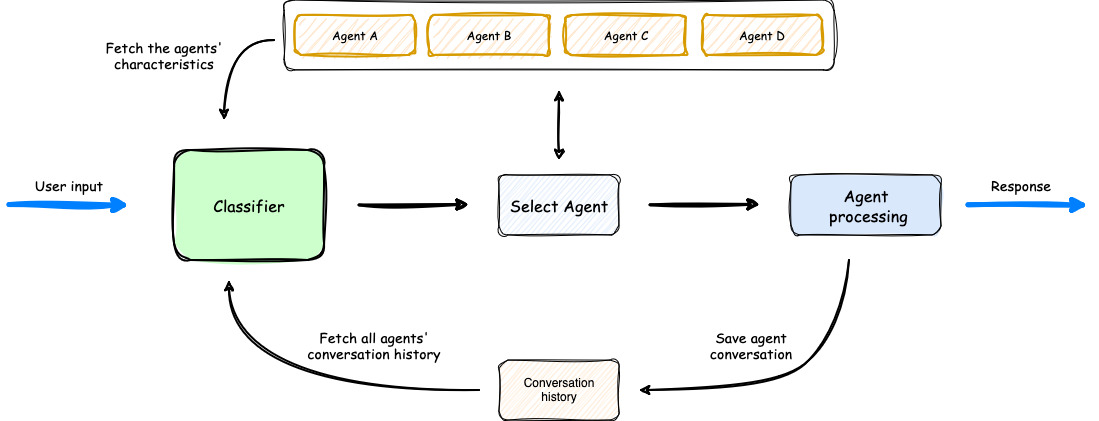
- The process begins with user input, which is analyzed by a Classifier.
- The Classifier leverages both Agents' Characteristics and Agents' Conversation history to select the most appropriate agent for the task.
- Once an agent is selected, it processes the user input.
- The orchestrator then saves the conversation, updating the Agents' Conversation history, before delivering the response back to the user.
 Introducing SupervisorAgent: Agents Coordination
The Agent Squad now includes a powerful new SupervisorAgent that enables sophisticated team coordination between multiple specialized agents. This new component implements a "agent-as-tools" architecture, allowing a lead agent to coordinate a team of specialized agents in parallel, maintaining context and delivering coherent responses.
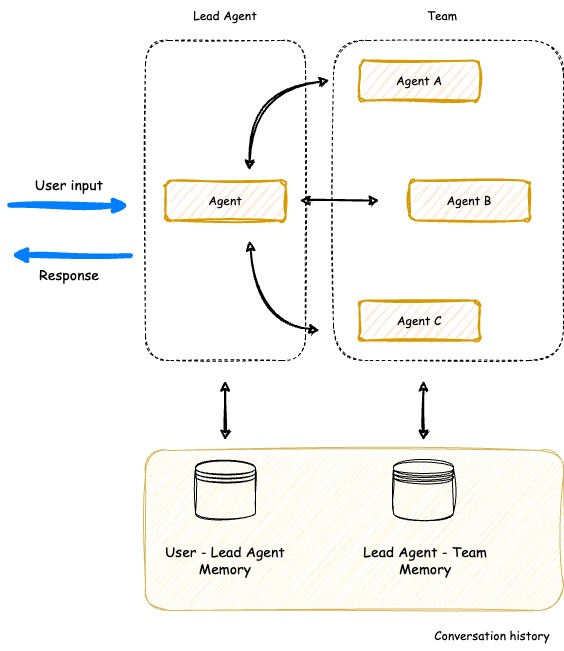
Key capabilities: - 🤝 Team Coordination - Coordinate multiple specialized agents working together on complex tasks - ⚡ Parallel Processing - Execute multiple agent queries simultaneously - 🧠 Smart Context Management - Maintain conversation history across all team members - 🔄 Dynamic Delegation - Intelligently distribute subtasks to appropriate team members - 🤖 Agent Compatibility - Works with all agent types (Bedrock, Anthropic, Lex, etc.)
The SupervisorAgent can be used in two powerful ways: 1. Direct Usage - Call it directly when you need dedicated team coordination for specific tasks 2. Classifier Integration - Add it as an agent within the classifier to build complex hierarchical systems with multiple specialized teams
Here are just a few examples where this agent can be used: - Customer Support Teams with specialized sub-teams - AI Movie Production Studios - Travel Planning Services - Product Development Teams - Healthcare Coordination Systems
Learn more about SupervisorAgent →
💬 Demo App
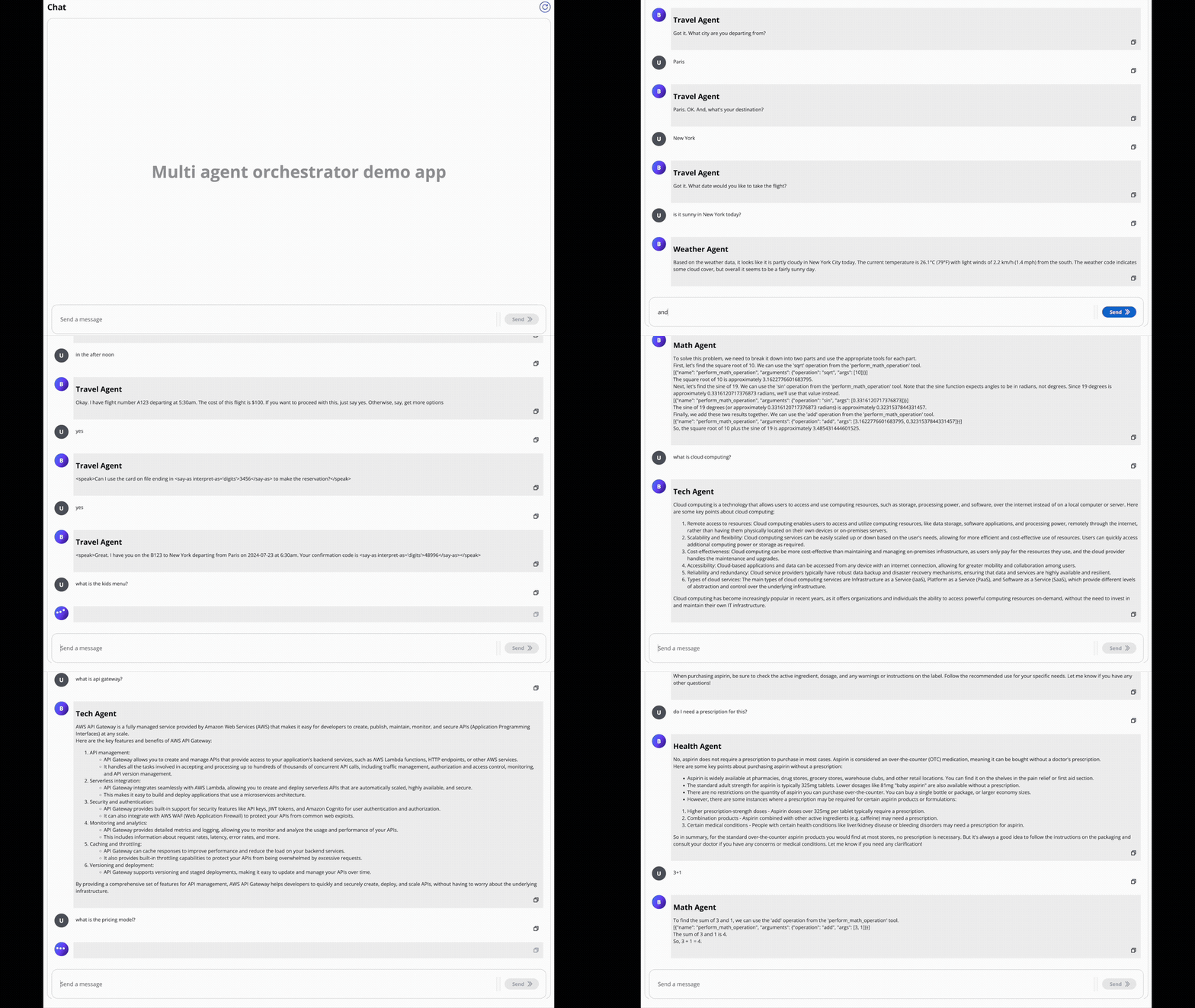
In the screen recording below, we demonstrate an extended version of the demo app that uses 6 specialized agents: - Travel Agent: Powered by an Amazon Lex Bot - Weather Agent: Utilizes a Bedrock LLM Agent with a tool to query the open-meteo API - Restaurant Agent: Implemented as an Amazon Bedrock Agent - Math Agent: Utilizes a Bedrock LLM Agent with two tools for executing mathematical operations - Tech Agent: A Bedrock LLM Agent designed to answer questions on technical topics - Health Agent: A Bedrock LLM Agent focused on addressing health-related queries
Watch as the system seamlessly switches context between diverse topics, from booking flights to checking weather, solving math problems, and providing health information. Notice how the appropriate agent is selected for each query, maintaining coherence even with brief follow-up inputs.
The demo highlights the system's ability to handle complex, multi-turn conversations while preserving context and leveraging specialized agents across various domains.
🎯 Examples & Quick Start
Get hands-on experience with the Agent Squad through our diverse set of examples:
- Demo Applications:
- Streamlit Global Demo: A single Streamlit application showcasing multiple demos, including:
- AI Movie Production Studio
- AI Travel Planner
- Chat Demo App:
- Explore multiple specialized agents handling various domains like travel, weather, math, and health
- E-commerce Support Simulator: Experience AI-powered customer support with:
- Automated response generation for common queries
- Intelligent routing of complex issues to human support
- Real-time chat and email-style communication
- Human-in-the-loop interactions for complex cases
- Sample Projects: Explore our example implementations in the
examplesfolder: chat-demo-app: Web-based chat interface with multiple specialized agentsecommerce-support-simulator: AI-powered customer support systemchat-chainlit-app: Chat application built with Chainlitfast-api-streaming: FastAPI implementation with streaming supporttext-2-structured-output: Natural Language to Structured Databedrock-inline-agents: Bedrock Inline Agents samplebedrock-prompt-routing: Bedrock Prompt Routing sample code
Examples are available in both Python and TypeScript. Check out our documentation for comprehensive guides on setting up and using the Agent Squad framework!
📚 Deep Dives: Stories, Blogs & Podcasts
Discover creative implementations and diverse applications of the Agent Squad:
This article demonstrates how to build a multilingual chatbot using the Agent Squad framework. The article explains how to use an Amazon Lex bot as an agent, along with 2 other new agents to make it work in many languages with just a few lines of code.
This article demonstrates how to build an AI-driven multi-agent system for automated e-commerce customer email support. It covers the architecture and setup of specialized AI agents using the Agent Squad framework, integrating automated processing with human-in-the-loop oversight. The guide explores email ingestion, intelligent routing, automated response generation, and human verification, providing a comprehensive approach to balancing AI efficiency with human expertise in customer support.
This article demonstrates how to build an AI customer call center. It covers the architecture and setup of specialized AI agents using the Agent Squad framework interacting with voice via Amazon Connect and Amazon Lex.
Learn how to scale Amazon Bedrock Agents beyond knowledge base limitations using the Agent Squad framework and InvokeInlineAgent API. This article demonstrates dynamic agent creation and knowledge base selection for enterprise-scale AI applications.
Learn how to enhance Amazon Bedrock Flows with conversation memory and multi-flow orchestration using the Agent Squad framework. This guide shows how to overcome Bedrock Flows' limitations to build more sophisticated AI workflows with persistent memory and intelligent routing between flows.
🎙️ Podcast Discussions
- 🇫🇷 Podcast (French): L'orchestrateur multi-agents : Un orchestrateur open source pour vos agents IA
-
Platforms:
-
🇬🇧 Podcast (English): An Orchestrator for Your AI Agents
- Platforms:
TypeScript Version
Installation
🔄
multi-agent-orchestratorbecomesagent-squad
npm install agent-squad
Usage
The following example demonstrates how to use the Agent Squad with two different types of agents: a Bedrock LLM Agent with Converse API support and a Lex Bot Agent. This showcases the flexibility of the system in integrating various AI services.
```typescript import { AgentSquad, BedrockLLMAgent, LexBotAgent } from "agent-squad";
const orchestrator = new AgentSquad();
// Add a Bedrock LLM Agent with Converse API support orchestrator.addAgent( new BedrockLLMAgent({ name: "Tech Agent", description: "Specializes in technology areas including software development, hardware, AI, cybersecurity, blockchain, cloud computing, emerging tech innovations, and pricing/costs related to technology products and services.", streaming: true }) );
// Add a Lex Bot Agent for handling travel-related queries orchestrator.addAgent( new LexBotAgent({ name: "Travel Agent", description: "Helps users book and manage their flight reservations", botId: process.env.LEX_BOT_ID, botAliasId: process.env.LEX_BOT_ALIAS_ID, localeId: "en_US", }) );
// Example usage const response = await orchestrator.routeRequest( "I want to book a flight", 'user123', 'session456' );
// Handle the response (streaming or non-streaming)
if (response.streaming == true) {
console.log("\n** RESPONSE STREAMING ** \n");
// Send metadata immediately
console.log(> Agent ID: ${response.metadata.agentId});
console.log(`> Agent
Extension points exported contracts — how you extend this code
ToolOutputCurator (Interface)Core symbols most depended-on inside this repo
logShape
Languages
Modules by API surface
Dependencies from manifests, versioned
For agents
$ claude mcp add agent-squad \
  -- python -m otcore.mcp_server <graph>