github.com/chjj/blessed @v0.1.81 sqlite
README
blessed
A curses-like library with a high level terminal interface API for node.js.
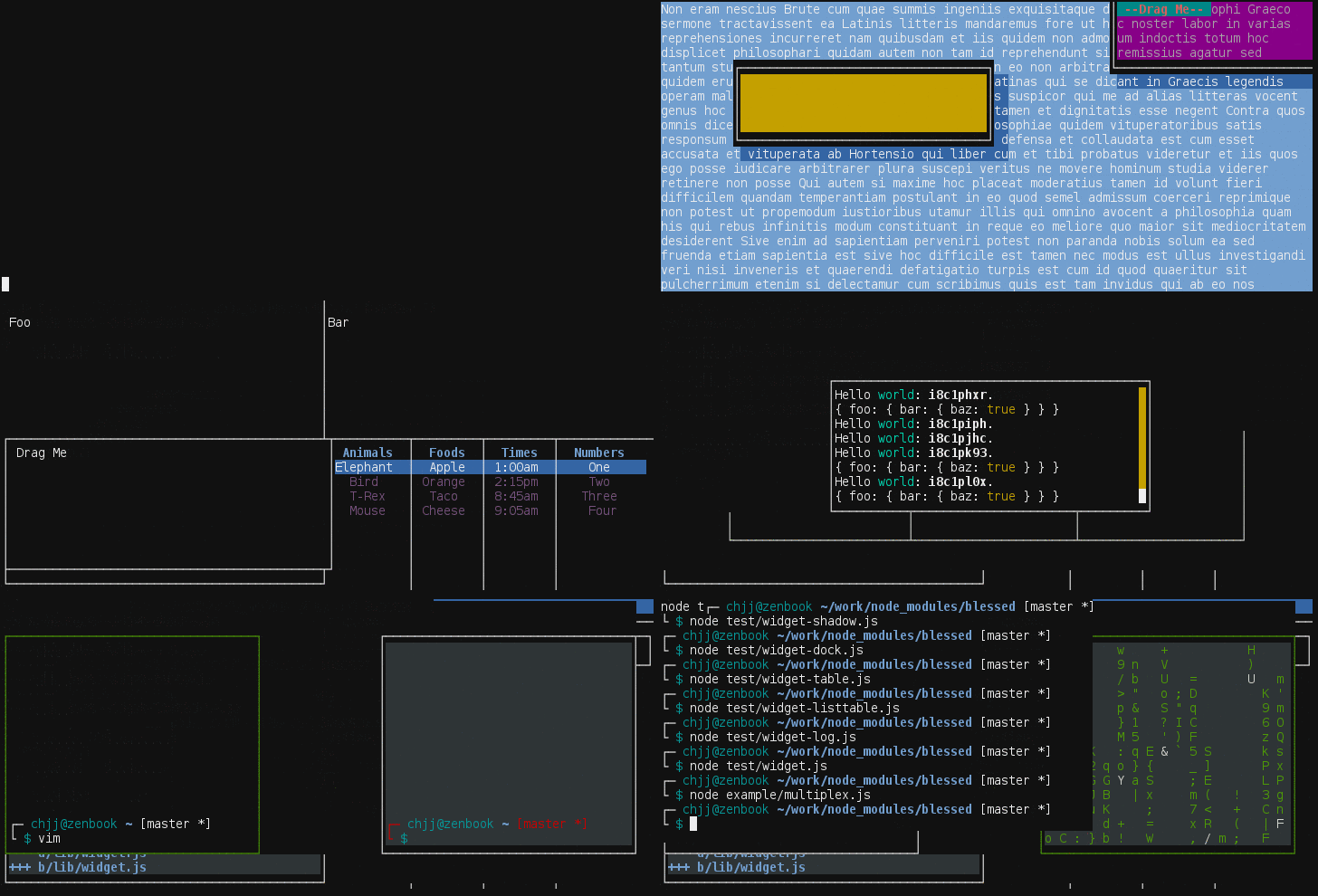
Blessed is over 16,000 lines of code and terminal goodness. It's completely implemented in javascript, and its goal consists of two things:
-
Reimplement ncurses entirely by parsing and compiling terminfo and termcap, and exposing a
Programobject which can output escape sequences compatible with any terminal. -
Implement a widget API which is heavily optimized for terminals.
The blessed renderer makes use of CSR (change-scroll-region), and BCE (back-color-erase). It draws the screen using the painter's algorithm and is sped up with smart cursor movements and a screen damage buffer. This means rendering of your application will be extremely efficient: blessed only draws the changes (damage) to the screen.
Blessed is arguably as accurate as ncurses, but even more optimized in some ways. The widget library gives you an API which is reminiscent of the DOM. Anyone is able to make an awesome terminal application with blessed. There are terminal widget libraries for other platforms (primarily [python][urwid] and [perl][curses-ui]), but blessed is possibly the most DOM-like (dare I say the most user-friendly?).
Blessed has been used to implement other popular libraries and programs. Examples include: the [slap text editor][slap] and [blessed-contrib][contrib]. The blessed API itself has gone on to inspire [termui][termui] for Go.
Install
$ npm install blessed
Example
This will render a box with line borders containing the text 'Hello world!',
perfectly centered horizontally and vertically.
NOTE: It is recommend you use either smartCSR or fastCSR as a
blessed.screen option. This will enable CSR when scrolling text in elements
or when manipulating lines.
var blessed = require('blessed');

// Create a screen object.
var screen = blessed.screen({
  smartCSR: true
});

screen.title = 'my window title';

// Create a box perfectly centered horizontally and vertically.
var box = blessed.box({
  top: 'center',
  left: 'center',
  width: '50%',
  height: '50%',
  content: 'Hello {bold}world{/bold}!',
  tags: true,
  border: {
    type: 'line'
  },
  style: {
    fg: 'white',
    bg: 'magenta',
    border: {
      fg: '#f0f0f0'
    },
    hover: {
      bg: 'green'
    }
  }
});

// Append our box to the screen.
screen.append(box);

// Add a png icon to the box
var icon = blessed.image({
  parent: box,
  top: 0,
  left: 0,
  type: 'overlay',
  width: 'shrink',
  height: 'shrink',
  file: __dirname + '/my-program-icon.png',
  search: false
});

// If our box is clicked, change the content.
box.on('click', function(data) {
  box.setContent('{center}Some different {red-fg}content{/red-fg}.{/center}');
  screen.render();
});

// If box is focused, handle `enter`/`return` and give us some more content.
box.key('enter', function(ch, key) {
  box.setContent('{right}Even different {black-fg}content{/black-fg}.{/right}\n');
  box.setLine(1, 'bar');
  box.insertLine(1, 'foo');
  screen.render();
});

// Quit on Escape, q, or Control-C.
screen.key(['escape', 'q', 'C-c'], function(ch, key) {
  return process.exit(0);
});

// Focus our element.
box.focus();

// Render the screen.
screen.render();
Documentation
Widgets
- Base Nodes
- Node (abstract)
- Screen
- Element (abstract)
- Boxes
- Box
- Text
- Line
- ScrollableBox (deprecated)
- ScrollableText (deprecated)
- BigText
- Lists
- List
- FileManager
- ListTable
- Listbar
- Forms
- Form
- Input (abstract)
- Textarea
- Textbox
- Button
- Checkbox
- RadioSet
- RadioButton
- Prompts
- Prompt
- Question
- Message
- Loading
- Data Display
- ProgressBar
- Log
- Table
- Special Elements
- Terminal
- Image
- ANSIImage
- OverlayImage
- Video
- Layout
Other
Mechanics
- Content & Tags
- Colors
- Attributes
- Alignment
- Escaping
- SGR Sequences
- Style
- Colors
- Attributes
- Transparency
- Shadow
- Effects
- Events
- Event Bubbling
- Poisitioning
- Rendering
- Artificial Cursors
- Multiple Screens
- Server Side Usage
Notes
Widgets
Blessed comes with a number of high-level widgets so you can avoid all the nasty low-level terminal stuff.
Base Nodes
Node (from EventEmitter)
The base node which everything inherits from.
Options:
- screen - The screen to be associated with.
- parent - The desired parent.
- children - An arrray of children.
Properties:
- Inherits all from EventEmitter.
- type - Type of the node (e.g.
box). - options - Original options object.
- parent - Parent node.
- screen - Parent screen.
- children - Array of node's children.
- data, _, $ - An object for any miscellanous user data.
- index - Render index (document order index) of the last render call.
Events:
- Inherits all from EventEmitter.
- adopt - Received when node is added to a parent.
- remove - Received when node is removed from it's current parent.
- reparent - Received when node gains a new parent.
- attach - Received when node is attached to the screen directly or somewhere in its ancestry.
- detach - Received when node is detached from the screen directly or somewhere in its ancestry.
Methods:
- Inherits all from EventEmitter.
- prepend(node) - Prepend a node to this node's children.
- append(node) - Append a node to this node's children.
- remove(node) - Remove child node from node.
- insert(node, i) - Insert a node to this node's children at index
i. - insertBefore(node, refNode) - Insert a node to this node's children before the reference node.
- insertAfter(node, refNode) - Insert a node from node after the reference node.
- detach() - Remove node from its parent.
- emitDescendants(type, args..., [iterator]) - Emit event for element, and recursively emit same event for all descendants.
- get(name, [default]) - Get user property with a potential default value.
- set(name, value) - Set user property to value.
Screen (from Node)
The screen on which every other node renders.
Options:
- program - The blessed
Programto be associated with. Will be automatically instantiated if none is provided. - smartCSR - Attempt to perform CSR optimization on all possible elements (not just full-width ones, elements with uniform cells to their sides). This is known to cause flickering with elements that are not full-width, however, it is more optimal for terminal rendering.
- fastCSR - Do CSR on any element within 20 cols of the screen edge on
either side. Faster than
smartCSR, but may cause flickering depending on what is on each side of the element. - useBCE - Attempt to perform
back_color_eraseoptimizations for terminals that support it. It will also work with terminals that don't support it, but only on lines with the default background color. As it stands with the current implementation, it's uncertain how much terminal performance this adds at the cost of overhead within node. - resizeTimeout - Amount of time (in ms) to redraw the screen after the terminal is resized (Default: 300).
- tabSize - The width of tabs within an element's content.
- autoPadding - Automatically position child elements with border and padding in mind (NOTE: this is a recommended option. It may become default in the future).
- cursor.artificial - Have blessed draw a custom cursor and hide the terminal cursor (experimental).
- cursor.shape - Shape of the cursor. Can be: block, underline, or line.
- cursor.blink - Whether the cursor blinks.
- cursor.color - Color of the color. Accepts any valid color value (
nullis default). - log - Create a log file. See
logmethod. - dump - Dump all output and input to desired file. Can be used together
with
logoption if set as a boolean. - debug - Debug mode. Enables usage of the
debugmethod. Also creates a debug console which will display when pressing F12. It will display all log and debug messages. - ignoreLocked - Array of keys in their full format (e.g.
C-c) to ignore when keys are locked or grabbed. Useful for creating a key that will always exit no matter whether the keys are locked. - dockBorders - Automatically "dock" borders with other elements instead of overlapping, depending on position (experimental). For example: These border-overlapped elements:
┌─────────┌─────────┐
│ box1    │ box2    │
└─────────└─────────┘
Become:
┌─────────┬─────────┐
│ box1    │ box2    │
└─────────┴─────────┘
- ignoreDockContrast - Normally, dockable borders will not dock if the colors or attributes are different. This option will allow them to dock regardless. It may produce some odd looking multi-colored borders though.
- fullUnicode - Allow for rendering of East Asian double-width characters,
utf-16 surrogate pairs, and unicode combining characters. This allows you to
display text above the basic multilingual plane. This is behind an option
because it may affect performance slightly negatively. Without this option
enabled, all double-width, surrogate pair, and combining characters will be
replaced by
'??','?',''respectively. (NOTE: iTerm2 cannot display combining characters properly. Blessed simply removes them from an element's content if iTerm2 is detected). - sendFocus - Send focus events after mouse is enabled.
- warnings - Display warnings (such as the output not being a TTY, similar to ncurses).
- forceUnicode - Force blessed to use unicode even if it is not detected
via terminfo, env variables, or windows code page. If value is
trueunicode is forced. If value isfalsenon-unicode is forced (default:null). - input/output - Input and output streams.
process.stdin/process.stdoutby default, however, it could be anet.Socketif you want to make a program that runs over telnet or something of that nature. - terminal -
TERMname used for terminfo parsing. The$TERMenv variable is used by default. - title - Set the terminal window title if possible.
Properties:
- Inherits all from Node.
- program - The blessed Program object.
- tput - The blessed Tput object (only available if you passed
tput: trueto the Program constructor.) - focused - Top of the focus history stack.
- width - Width of the screen (same as
program.cols). - height - Height of the screen (same as
program.rows). - cols - Same as
screen.width. - rows - Same as
screen.height. - left - Relative left offset, always zero.
- right - Relative right offset, always zero.
- top - Relative top offset, always zero.
- bottom - Relative bottom offset, always zero.
- aleft - Absolute left offset, always zero.
- aright - Absolute right offset, always zero.
- atop - Absolute top offset, always zero.
- abottom - Absolute bottom offset, always zero.
- grabKeys - Whether the focused element grabs all keypresses.
- lockKeys - Prevent keypresses from being received by any element.
- hover - The currently hovered element. Only set if mouse events are bound.
- terminal - Set or get terminal name.
Setcallsscreen.setTerminal()internally. - title - Set or get window title.
Events:
- Inherits all from Node.
- resize - Received on screen resize.
- mouse - Received on mouse events.
- keypress - Received on key events.
- element [name] - Global events received for all elements.
- key [name] - Received on key event for [name].
- focus, blur - Received when the terminal window focuses/blurs. Requires a terminal supporting the focus protocol and focus needs to be passed to program.enableMouse().
- prerender - Received before render.
- render - Received on render.
- warning - Received when blessed notices something untoward (output is not a tty, terminfo not found, etc).
- destroy - Received when the screen is destroyed (only useful when using multiple screens).
Methods:
- Inherits all from Node.
- log(msg, ...) - Write string to the log file if one was created.
- debug(msg, ...) - Same as the log method, but only gets called if the
debugoption was set. - alloc() - Allocate a new pending screen buffer and a new output screen buffer.
- realloc() - R
Core symbols most depended-on inside this repo
readShape
Languages
Modules by API surface
Used by 9 indexed graphs manifest dependencies, hub-wide
For agents
$ claude mcp add blessed \
  -- python -m otcore.mcp_server <graph>