github.com/XuehaiPan/nvitop @v1.7.0 sqlite
README
nvitop







An interactive NVIDIA-GPU process viewer and beyond, the one-stop solution for GPU process management. The full API references host at https://nvitop.readthedocs.io.
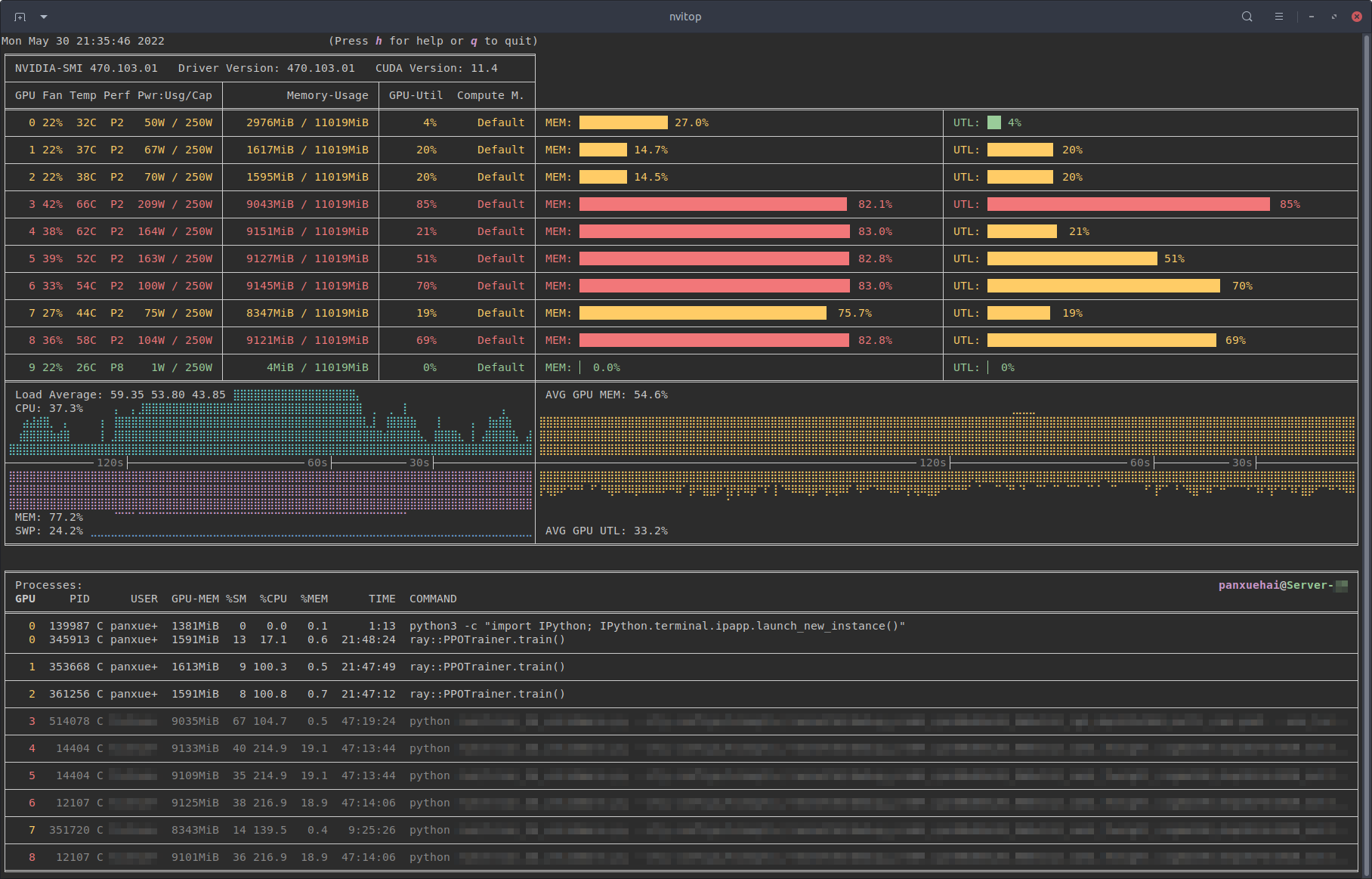
Monitor mode of nvitop.
(TERM: GNOME Terminal / OS: Ubuntu 16.04 LTS (over SSH) / Locale: en_US.UTF-8)
A Grafana dashboard built on top of nvitop-exporter.
Table of Contents
- Features
- Requirements
- Installation
- Usage
- Device and Process Status
- Resource Monitor
- CUDA Visible Devices Selection Tool
- More than a Monitor
- Screenshots
- Changelog
- License
- Copyright Notice
nvitop is an interactive NVIDIA device and process monitoring tool. It has a colorful and informative interface that continuously updates the status of the devices and processes. As a resource monitor, it includes many features and options, such as tree-view, environment variable viewing, process filtering, process metrics monitoring, etc. Beyond that, the package also ships a CUDA device selection tool nvisel for deep learning researchers. It also provides handy APIs that allow developers to write their own monitoring tools. Please refer to section More than a Monitor and the full API references at https://nvitop.readthedocs.io for more information.

Process filtering and a more colorful interface.

Compare to nvidia-smi.
Features
- Informative and fancy output: show more information than
nvidia-smiwith colorized fancy box drawing. - Monitor mode: can run as a resource monitor, rather than print the results only once.
- bar charts and history graphs
- process sorting
- process filtering
- send signals to processes with a keystroke
- tree-view screen for GPU processes and their parent processes
- environment variable screen
- help screen
- mouse support
- Interactive: responsive for user input (from keyboard and/or mouse) in monitor mode. (vs. gpustat & py3nvml)
- Efficient:
- query device status using NVML Python bindings directly, instead of parsing the output of
nvidia-smi. (vs. nvidia-htop) - support sparse query and cache results with
TTLCachefrom cachetools. (vs. gpustat) - display information using the
curseslibrary rather thanprintwith ANSI escape codes. (vs. py3nvml) - asynchronously gather information using multi-threading and correspond to user input much faster. (vs. nvtop)
- Portable: work on both Linux and Windows.
- get host process information using the cross-platform library psutil instead of calling
ps -p <pid>in a subprocess. (vs. nvidia-htop & py3nvml) - written in pure Python, easy to install with
pip. (vs. nvtop) - Integrable: easy to integrate into other applications, more than monitoring. (vs. nvidia-htop & nvtop)

nvitop supports Windows!
(SHELL: PowerShell / TERM: Windows Terminal / OS: Windows 10 / Locale: en-US)
Requirements
- Python 3.8+
- NVIDIA Management Library (NVML)
- nvidia-ml-py
- psutil
- curses* (with
libncursesw)
NOTE: The NVIDIA Management Library (NVML) is a C-based programmatic interface for monitoring and managing various states. The runtime version of the NVML library ships with the NVIDIA display driver (available at Download Drivers | NVIDIA), or can be downloaded as part of the NVIDIA CUDA Toolkit (available at CUDA Toolkit | NVIDIA Developer). The lists of OS platforms and NVIDIA-GPUs supported by the NVML library can be found in the NVML API Reference.
This repository contains a Bash script to install/upgrade the NVIDIA drivers for Ubuntu Linux. For example:
git clone --depth=1 https://github.com/XuehaiPan/nvitop.git && cd nvitop

# Change to tty3 console (required for desktop users with GUI (tty2))
# Optional for SSH users
sudo chvt 3  # or use keyboard shortcut: Ctrl-LeftAlt-F3

bash install-nvidia-driver.sh --package=nvidia-driver-595  # install the R595 driver from ppa:graphics-drivers
bash install-nvidia-driver.sh --latest                     # install the latest driver from ppa:graphics-drivers
bash install-nvidia-driver.sh --latest --open              # install the latest open-kernel-module driver

NVIDIA driver installer for Ubuntu Linux.
Run bash install-nvidia-driver.sh --help for more information.
* The curses library is a built-in module of Python on Unix-like systems, and it is supported by a third-party package called windows-curses on Windows using PDCurses. Inconsistent behavior of nvitop may occur on different terminal emulators on Windows, such as missing mouse support.
Installation
It is highly recommended to install nvitop in an isolated virtual environment. Simple installation and run via uvx (a.k.a. uv tool run) or pipx:
uvx nvitop
# or
pipx run nvitop
You can also set this command as an alias in your shell startup file, e.g.:
# For Bash
echo 'alias nvitop="uvx nvitop"' >> ~/.bashrc

# For Zsh
echo 'alias nvitop="uvx nvitop"' >> ~/.zshrc

# For Fish
mkdir -p ~/.config/fish
echo 'alias nvitop="uvx nvitop"' >> ~/.config/fish/config.fish

# For PowerShell
New-Item -Path (Split-Path -Parent -Path $PROFILE.CurrentUserAllHosts) -ItemType Directory -Force
'Function nvitop { uvx nvitop @Args }' >> $PROFILE.CurrentUserAllHosts
or
# For Bash
echo 'alias nvitop="pipx run nvitop"' >> ~/.bashrc

# For Zsh
echo 'alias nvitop="pipx run nvitop"' >> ~/.zshrc

# For Fish
mkdir -p ~/.config/fish
echo 'alias nvitop="pipx run nvitop"' >> ~/.config/fish/config.fish

# For PowerShell
New-Item -Path (Split-Path -Parent -Path $PROFILE.CurrentUserAllHosts) -ItemType Directory -Force
'Function nvitop { pipx run nvitop @Args }' >> $PROFILE.CurrentUserAllHosts
Install from PyPI (
pip3 install --upgrade nvitop
Install from conda-forge (
conda install -c conda-forge nvitop
Install the latest version from GitHub (
pip3 install --upgrade pip setuptools
pip3 install git+https://github.com/XuehaiPan/nvitop.git
Or, clone this repo and install manually:
git clone --depth=1 https://github.com/XuehaiPan/nvitop.git && cd nvitop
pip3 install .
NOTE: If you encounter the "nvitop: command not found" error after installation, please check whether you have added the Python console script path (e.g., "${HOME}/.local/bin") to your PATH environment variable. Alternatively, you can use python3 -m nvitop.

MIG Device Support.
Usage
Device and Process Status
Query the device and process status. The output is similar to nvidia-smi, but has been enriched and colorized.
# Query the status of all devices
$ nvitop -1  # or use `python3 -m nvitop -1`

# Specify query devices (by integer indices)
$ nvitop -1 -o 0 1  # only show <GPU 0> and <GPU 1>

# Only show devices in `CUDA_VISIBLE_DEVICES` (by integer indices or UUID strings)
$ nvitop -1 -ov

# Only show GPU processes with the compute context (type: 'C' or 'C+G')
$ nvitop -1 -c
When the -1 switch is on, the result will be displayed ONLY ONCE (same as the default behavior of nvidia-smi). This is much faster and has lower resource usage. See Command Line Options for more command options.
There is also a CLI tool called nvisel that ships with the nvitop PyPI package. See CUDA Visible Devices Selection Tool for more information.
Resource Monitor
Run as a resource monitor:
```bash
Monitor mode (when the display mode is omitted, NVITOP_MONITOR_MODE will be used)
$ nvitop # or use python3 -m nvitop
Automatically configure the display mode according to the terminal size
$ nvitop -m auto # shortcut: a key
Arbitrarily display as full mode
$ nvitop -m full # shortcut: f key
Arbitrarily display as compact mode
$ nvitop -m compact # shortcut: c key
Specify query devices (by integer indices)
$ nvitop -o 0 1 # only sh
Core symbols most depended-on inside this repo
addstrShape
Languages
Modules by API surface
Used by 1 indexed graphs manifest dependencies, hub-wide
Dependencies from manifests, versioned
For agents
$ claude mcp add nvitop \
  -- python -m otcore.mcp_server <graph>