github.com/UniversalRobots/Universal_Robots_ROS2_Driver @6.0.0
Chat with this repoBrowse by type
What it actually does AI analysis from the code graph — generated when you open this
README
Universal Robots ROS2 Driver
Universal Robots has become a dominant supplier of lightweight, robotic manipulators for industry, as well as for scientific research and education.

This is one of the very first ROS2 manipulator drivers. Some of the new features are enabled by ROS2 and include decreased latency, improved security, and more flexibility regarding middleware configuration. The package contains launch files to quickly get started using the driver as a standalone version or in combination with MoveIt2
This driver is developed on top of Universal_Robots_Client_Library and support some key cobot functionalities like; pause at emergency stop, safeguard stop, automatic speed scaling to avoid violate the safety setting and manually speed scaling from the teach pendant. In addition the externalControl URCap makes it possible to include ROS2 behaviors in the robot program.
The driver is compatible across the entire line of UR robots -- from 3 kg payload to 30 kg payload and includes all robots with PolyScope X, PolyScope 5 or CB3 controller.
Check also presentations and videos about this driver.
Release Status
| ROS2 Distro | Humble | Jazzy | Kilted | Lyrical | Rolling |
|---|---|---|---|---|---|
| Branch | humble | jazzy | kilted | main | main |
| Release status |
|
|
|
|
|
The table above shows the build status for each package of this repo from the ROS buildfarm.
A more detailed build status shows the state of all CI workflows inside this repo. Please note that the detailed view is intended for developers, while the one here should give end users an overview of the current released state.
EOL distros
The following distributions are End-Of-Line (EOL). Branches for these exist and released packages are probably available for an unknown amount of time, but it is recommended to upgrade to a supported distribution. For EOL distributions the nightly binary builds from our CI are shown. EOL distributions will receive no more updates and may be lacking features.



Packages in the Repository:
ur- Meta-package that provides a single point of installation for the released packages.ur_calibration- tool for extracting calibration information from a real robot.ur_controllers- implementations of controllers specific for UR robots.ur_dashboard_msgs- package defining messages used by dashboard node.ur_moveit_config- example MoveIt configuration for UR robots.ur_robot_driver- driver / hardware interface for communication with UR robots.
System Requirements
Please see the requirements for the Universal_Robots_Client_Library, as this driver is build on top of Universal_Robots_Client_Library.
Note: A fundamental requirement for the driver is using Linux. Currently, there is no support for any other OS.
Getting Started
For getting started, you'll basically need three steps:
-
Install the driver
bash
   sudo apt-get install ros-rolling-ur
See the installation instructions for more details and source-build instructions. -
Start & Setup the robot. Once you've installed the driver, setup the robot to be able to communicate with this driver correctly.
Please do this step carefully and extract the calibration as explained here. Otherwise the TCP's pose will not be correct inside the ROS ecosystem.
If no real robot is required, you can use a simulated robot that will behave almost exactly like the real robot.
- Start the driver. See the usage documentation for details.
bash
   # Replace ur5e with one of ur3, ur3e, ur5, ur5e, ur7e, ur10, ur10e, ur12e, ur16e, ur8long, ur15, ur18, ur20, ur30
   # Replace the IP address with the IP address of your actual robot / URSim
   ros2 launch ur_robot_driver ur_control.launch.py ur_type:=ur5e robot_ip:=192.168.56.101
- Unless started in headless mode: Run the external_control program by pressing
playon the teach pendant.
MoveIt! support
MoveIt! support is built-in into this driver already. Watch MoveIt in action with the Universal Robots ROS2 driver:
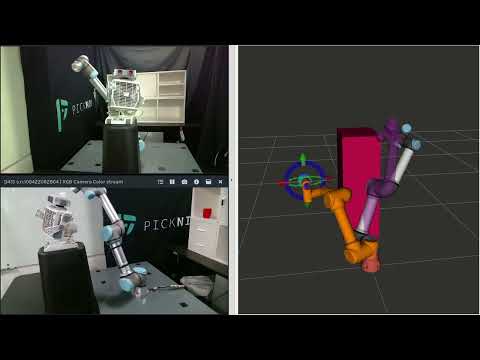
The video shows free-space trajectory planning around a modeled collision scene object using the MoveIt2 MotionPlanning widget for Rviz2.
See the MoveIt! section of the Usage guide for details.
Expected Changes in the Near Future
- Trajector
Core symbols most depended-on inside this repo
Shape
Languages
Modules by API surface
For agents
$ claude mcp add Universal_Robots_ROS2_Driver \
  -- python -m otcore.mcp_server <graph>