github.com/Sayi/poi-tl @v1.12.2 sqlite
README
poi-tl(poi-template-language)





A better way to generate word(docx) with template,based on Apache POI。
What is poi-tl
FreeMarker or Velocity generates new html pages or configuration files based on text template and data. poi-tl is a Word template engine that generates new documents based on Word template and data.
The Word template has rich styles. Poi-tl will perfectly retain the styles in the template in the generated documents. You can also set styles for the tags. The styles of the tags will be applied to the replaced text, so you can focus on the template design.
poi-tl is a "logic-less" template engine. There is no complicated control structure and variable assignment, only tags, some tags can be replaced with text, pictures, tables, etc., some tags will hide certain some document content, while other tags will loop a series of document content.
"Powerful" constructs like variable assignment or conditional statements make it easy to modify the look of an application within the template system exclusively... however, at the cost of separation, turning the templates themselves into part of the application logic.
poi-tl supports custom functions (plug-ins), functions can be executed anywhere in the Word template, do anything anywhere in the document is the goal of poi-tl.
| Feature | Description |
|---|---|
| :white_check_mark: Text | Render the tag as text |
| :white_check_mark: Picture | Render the tag as a picture |
| :white_check_mark: Table | Render the tag as a table |
| :white_check_mark: Numbering | Render the tag as a numbering |
| :white_check_mark: Chart | Bar chart (3D bar chart), column chart (3D column chart), area chart (3D area chart), line chart (3D line chart), radar chart, pie chart (3D pie Figure) and other chart rendering |
| :white_check_mark: If Condition | Hide or display certain document content (including text, paragraphs, pictures, tables, lists, charts, etc.) according to conditions |
| :white_check_mark: Foreach Loop | Loop through certain document content (including text, paragraphs, pictures, tables, lists, charts, etc.) according to the collection |
| :white_check_mark: Loop table row | Loop to copy a row of the rendered table |
| :white_check_mark: Loop table column | Loop copy and render a column of the table |
| :white_check_mark: Loop ordered list | Support the loop of ordered list, and support multi-level list at the same time |
| :white_check_mark: Highlight code | Word highlighting of code blocks, supporting 26 languages and hundreds of coloring styles |
| :white_check_mark: Markdown | Convert Markdown to a word document |
| :white_check_mark: Word attachment | Insert attachment in Word |
| :white_check_mark: Word Comments | Complete support comment, create comment, modify comment, etc. |
| :white_check_mark: Word SDT | Complete support structured document tag |
| :white_check_mark: Textbox | Tag support in text box |
| :white_check_mark: Picture replacement | Replace the original picture with another picture |
| :white_check_mark: bookmarks, anchors, hyperlinks | Support setting bookmarks, anchors and hyperlinks in documents |
| :white_check_mark: Expression Language | Fully supports SpringEL expressions and can extend more expressions: OGNL, MVEL... |
| :white_check_mark: Style | The template is the style, and the code can also set the style |
| :white_check_mark: Template nesting | The template contains sub-templates, and the sub-templates then contain sub-templates |
| :white_check_mark: Merge | Word merge Merge, you can also merge in the specified position |
| :white_check_mark: custom functions (plug-ins) | Plug-in design, execute function anywhere in the document |
TOC
- Maven
- Quick start
- Tags
- Text
- Picture
- Table
- Numbering
- Sections
- Nesting
- Documentation and examples
- Contributing
- FAQ
Maven
<dependency>
  <groupId>com.deepoove</groupId>
  <artifactId>poi-tl</artifactId>
  <version>1.12.2</version>
</dependency>
NOTE: poi-tl
1.12.xrequires POI version5.2.2+.
Quick start
Start with a deadly simple example: replace {{title}} with "poi-tl template engine".
- Create a new document
template.docx, including the content{{title}} - TDO mode: Template + data-model = output
//The core API uses a minimalist design, only one line of code is required
XWPFTemplate.compile("template.docx").render(new HashMap<String, Object>(){{
         put("title", "poi-tl template engine");
}}).writeToFile("out_template.docx");
Open the out_template.docx document, everything is as you wish.
Tags
The tag consists of two curly braces, {{title}} is a tag, {{?title}} is also a tag, title is the name of the tag, and ? identifies the type of tag. Next, we Let’s see what tag types are there.
Text
The text tag is the most basic tag type in the Word template. {{name}} will be replaced by the value of key name in the data model. If the key is not exist, the tag will be cleared(The program can configure whether to keep the tag or throw an exception).
The style of the text tag will be applied to the replaced text, as shown in the following example.
Code:
put("name", "Mama");
put("thing", "chocolates");
Template:
{{name}} always said life was like a box of {{thing}}.
Output:
Mama always said life was like a box of chocolates.
Picture
The image tag starts with @, for example, {{@logo}} will look for the value with the key of logo in the data model, and then replace the tag with the image. The data corresponding to the image tag can be a simple URL or Path string, or a structure containing the width and height of the image.
Code:
put("watermelon", "assets/watermelon.png");
put("watermelon", "http://x/lemon.png");
put("lemon", Pictures.ofLocal("sob.jpeg", PictureType.JPEG).size(24, 24).create());
Template:
Fruit Logo:
watermelon {{@watermelon}}
lemon {{@lemon}}
banana {{@banana}}
Output:
Fruit Logo:
watermelon 🍉
lemon 🍋
banana 🍌
Table
The table tag starts with #, such as {{#table}}, it will be rendered as a Word table with N rows and N columns. The value of N depends on the data of the table tag.
Code:
put("table", Tables.of(new String[][] {
                new String[] { "Song name", "Artist" }
            }).border(BorderStyle.DEFAULT).create());
Template:
{{#table}}
Output:
| Song name | Artist |
Numbering
The list tag corresponds to Word's symbol list or numbered list, starting with *, such as {{*number}}.
Code:
put("list", Numberings.create("Plug-in grammar",
                  "Supports word text, pictures, table...",
                  "Template, not just template, but also style template"));
Template:
{{*list}}
Output:
● Plug-in grammar
● Supports word text, pictures, table...
● Templates, not just templates, but also style templates
Sections
A section is composed of two tags before and after, the start tag is identified by ?, and the end tag is identified by /, such as {{?section}} as the start tag of the sections block, {{/section} } is the end tag, and section is the name of this section.
Sections are very useful when processing a series of document elements. Document elements (text, pictures, tables, etc.) located in a section can be rendered zero, one or N times, depending on the value of the section.
False Values or Empty collection
If the value of the section is null, false or an empty collection, all document elements located in the section will not be displayed, similar to the condition of the if statement is false.
Datamodel:
{
  "announce": false
}
Template:
Made it,Ma!{{?announce}}Top of the world!{{/announce}}
Made it,Ma!
{{?announce}}
Top of the world!🎋
{{/announce}}
Output:
Made it,Ma!
Made it,Ma!
Non-False Values and Not a collection
If the value of the section is not null, false, and is not a collection, all document elements in the section will be rendered once, similar to the condition of the if statement is true.
Datamodel:
{
  "person": { "name": "Sayi" }
}
Template:
{{?person}}
  Hi {{name}}!
{{/person}}
Output:
Hi Sayi!
Non-Empty collection
If the value of the section is a non-empty collection, the document elements in the section will be looped once or N times, depending on the size of the collection, similar to the foreach syntax.
Datamodel:
{
  "songs": [
    { "name": "Memories" },
    { "name": "Sugar" },
    { "name": "Last Dance" }
  ]
}
Template:
{{?songs}}
{{name}}
{{/songs}}
Output:
Memories
Sugar
Last Dance
In the loop, a special tag {{=#this}} can be used to directly refer to the object of the current iteration.
Datamodel:
{
  "produces": [
    "application/json",
    "application/xml"
  ]
}
Template:
{{?produces}}
{{=#this}}
{{/produces}}
Output:
application/json
application/xml
Nesting
Nesting is the merging of another Word template in a Word template, which can be understood as import, include or word document merging, marked with +, such as {{+nested}}.
Code:
class AddrModel {
  String addr;
  public AddrModel(String addr) {
    this.addr = addr;
  }
}

List<AddrModel> subData = new ArrayList<>();
subData.add(new AddrModel("Hangzhou,China"));
subData.add(new AddrModel("Shanghai,China"));
put("nested", Includes.ofLocal("sub.docx").setRenderModel(subData).create());
Two Word Template:
main.docx:
Hello, World
{{+nested}}
sub.docx:
Address: {{addr}}
Output:
Hello, World
Address: Hangzhou,China
Address: Shanghai,China
Documentation and examples
- Basic Example
- Table Example
- Sections and chart Example
- Textbox Example
- Comment Example
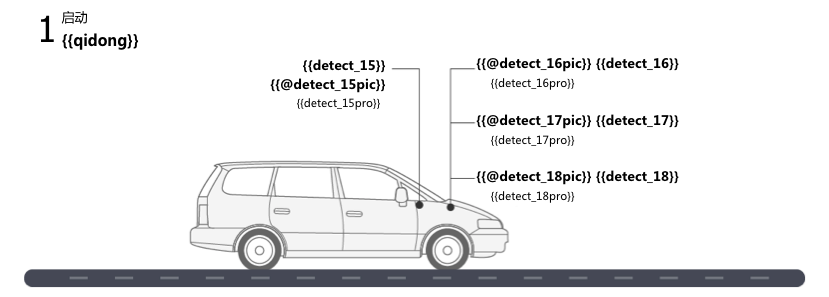
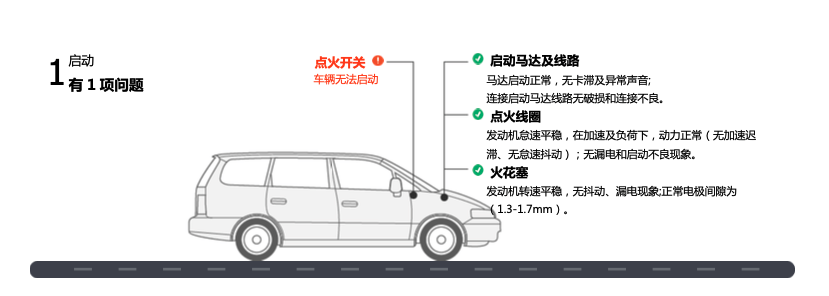
- Example: Write Resume
- Example: Highlighting Code
- Example: Convert Markdown to word
- Example: Convert Swagger to word
For more examples and the source code of all examples, see JUnit testcases.
Contributing
You can join this project in many ways, not limited to the following ways: * Feedback problems encountered in use * Share the joy of success * Update and improve documentation * Solve and discuss issues
FAQ
See FAQ.
Extension points exported contracts — how you extend this code
RenderPolicy (Interface)Core symbols most depended-on inside this repo
createShape
Languages
Modules by API surface
Used by 3 indexed graphs manifest dependencies, hub-wide
Dependencies from manifests, versioned
For agents
$ claude mcp add poi-tl \
  -- python -m otcore.mcp_server <graph>