github.com/Cinnamon/kotaemon @v0.12.0 sqlite
README
kotaemon
An open-source clean & customizable RAG UI for chatting with your documents. Built with both end users and developers in mind.

Live Demo #1 | Live Demo #2 | Online Install | Colab Notebook (Local RAG)
User Guide | Developer Guide | Feedback | Contact






Introduction
This project serves as a functional RAG UI for both end users who want to do QA on their documents and developers who want to build their own RAG pipeline.
+----------------------------------------------------------------------------+
| End users: Those who use apps built with `kotaemon`.                       |
| (You use an app like the one in the demo above)                            |
|     +----------------------------------------------------------------+     |
|     | Developers: Those who built with `kotaemon`.                   |     |
|     | (You have `import kotaemon` somewhere in your project)         |     |
|     |     +----------------------------------------------------+     |     |
|     |     | Contributors: Those who make `kotaemon` better.    |     |     |
|     |     | (You make PR to this repo)                         |     |     |
|     |     +----------------------------------------------------+     |     |
|     +----------------------------------------------------------------+     |
+----------------------------------------------------------------------------+
For end users
- Clean & Minimalistic UI: A user-friendly interface for RAG-based QA.
- Support for Various LLMs: Compatible with LLM API providers (OpenAI, AzureOpenAI, Cohere, etc.) and local LLMs (via
ollamaandllama-cpp-python). - Easy Installation: Simple scripts to get you started quickly.
For developers
- Framework for RAG Pipelines: Tools to build your own RAG-based document QA pipeline.
- Customizable UI: See your RAG pipeline in action with the provided UI, built with Gradio
.
- Gradio Theme: If you use Gradio for development, check out our theme here: kotaemon-gradio-theme.
Key Features
-
Host your own document QA (RAG) web-UI: Support multi-user login, organize your files in private/public collections, collaborate and share your favorite chat with others.
-
Organize your LLM & Embedding models: Support both local LLMs & popular API providers (OpenAI, Azure, Ollama, Groq).
-
Hybrid RAG pipeline: Sane default RAG pipeline with hybrid (full-text & vector) retriever and re-ranking to ensure best retrieval quality.
-
Multi-modal QA support: Perform Question Answering on multiple documents with figures and tables support. Support multi-modal document parsing (selectable options on UI).
-
Advanced citations with document preview: By default the system will provide detailed citations to ensure the correctness of LLM answers. View your citations (incl. relevant score) directly in the in-browser PDF viewer with highlights. Warning when retrieval pipeline return low relevant articles.
-
Support complex reasoning methods: Use question decomposition to answer your complex/multi-hop question. Support agent-based reasoning with
ReAct,ReWOOand other agents. -
Configurable settings UI: You can adjust most important aspects of retrieval & generation process on the UI (incl. prompts).
-
Extensible: Being built on Gradio, you are free to customize or add any UI elements as you like. Also, we aim to support multiple strategies for document indexing & retrieval.
GraphRAGindexing pipeline is provided as an example.

Installation
If you are not a developer and just want to use the app, please check out our easy-to-follow User Guide. Download the
.zipfile from the latest release to get all the newest features and bug fixes.
System requirements
- Python >= 3.10
- Docker: optional, if you install with Docker
- Unstructured if you want to process files other than
.pdf,.html,.mhtml, and.xlsxdocuments. Installation steps differ depending on your operating system. Please visit the link and follow the specific instructions provided there.
With Docker (recommended)
-
We support both
lite&fullversion of Docker images. Withfullversion, the extra packages ofunstructuredwill be installed, which can support additional file types (.doc,.docx, ...) but the cost is larger docker image size. For most users, theliteimage should work well in most cases. -
To use the
fullversion.shell docker run \ -e GRADIO_SERVER_NAME=0.0.0.0 \ -e GRADIO_SERVER_PORT=7860 \ -v ./ktem_app_data:/app/ktem_app_data \ -p 7860:7860 -it --rm \ ghcr.io/cinnamon/kotaemon:main-full -
To use the
fullversion with bundled Ollama for local / private RAG.shell # change image name to docker run <...> ghcr.io/cinnamon/kotaemon:main-ollama -
To use the
liteversion.
shell
    # change image name to
    docker run <...> ghcr.io/cinnamon/kotaemon:main-lite
- We currently support and test two platforms:
linux/amd64andlinux/arm64(for newer Mac). You can specify the platform by passing--platformin thedocker runcommand. For example:
shell
   # To run docker with platform linux/arm64
   docker run \
   -e GRADIO_SERVER_NAME=0.0.0.0 \
   -e GRADIO_SERVER_PORT=7860 \
   -v ./ktem_app_data:/app/ktem_app_data \
   -p 7860:7860 -it --rm \
   --platform linux/arm64 \
   ghcr.io/cinnamon/kotaemon:main-lite
-
Once everything is set up correctly, you can go to
http://localhost:7860/to access the WebUI. -
We use GHCR to store docker images, all images can be found here.
Without Docker
- Clone the repository:
shell
   git clone https://github.com/Cinnamon/kotaemon
   cd kotaemon
-
Setup the environment:
-
Option 1: Using uv (recommended)
shell
  uv sync --python 3.10
  source .venv/bin/activate
- Option 2: Using conda
```shell conda create -n kotaemon python=3.10 conda activate kotaemon
pip install -e "libs/kotaemon[all]" pip install -e "libs/ktem" ```
- Create a
.envfile in the root of this project. Use.env.exampleas a template.
The .env file is there to serve use cases where users want to pre-config the models before starting up the app (e.g. deploy the app on HF hub). The file will only be used to populate the db once upon the first run, it will no longer be used in consequent runs.
- (Optional) To enable in-browser
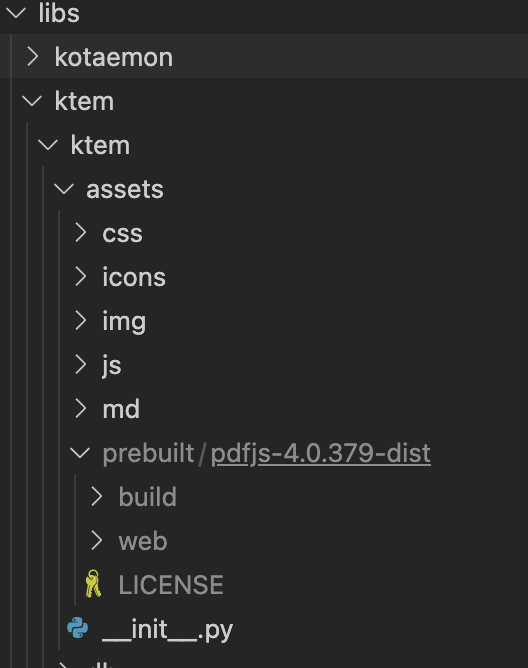
PDF_JSviewer, download PDF_JS_DIST then extract it tolibs/ktem/ktem/assets/prebuilt.
- Start the web server:
shell
   python app.py
- The app will be automatically launched in your browser.
- Default username and password are both
admin. You can set up additional users directly through the UI.

- Check the
Resourcestab andLLMs and Embeddingsand ensure that yourapi_keyvalue is set correctly from your.envfile. If it is not set, you can set it there.
Setup GraphRAG
[!NOTE] Official MS GraphRAG indexing only works with OpenAI or Ollama API. We recommend most users to use NanoGraphRAG implementation for straightforward integration with Kotaemon.
Setup Nano GRAPHRAG
- Install nano-GraphRAG:
pip install nano-graphrag nano-graphraginstall might introduce version conflicts, see this issue- To quickly fix:
pip uninstall hnswlib chroma-hnswlib && pip install chroma-hnswlib - Launch Kotaemon with
USE_NANO_GRAPHRAG=trueenvironment variable. - Set your default LLM & Embedding models in Resources setting and it will be recognized automatically from NanoGraphRAG.
Setup LIGHTRAG
- Install LightRAG:
pip install git+https://github.com/HKUDS/LightRAG.git LightRAGinstall might introduce version conflicts, see this issue- To quickly fix:
pip uninstall hnswlib chroma-hnswlib && pip install chroma-hnswlib - Launch Kotaemon with
USE_LIGHTRAG=trueenvironment variable. - Set your default LLM & Embedding models in Resources setting and it will be recognized automatically from LightRAG.
Setup MS GRAPHRAG
- Non-Docker Installation: If you are not using Docker, install GraphRAG with the following command:
shell
  pip install "graphrag<=0.3.6" future
- Setting Up API KEY: To use the GraphRAG retriever feature, ensure you set the
GRAPHRAG_API_KEYenvironment variable. You can do this directly in your environment or by adding it to a.envfile. - Using Local Models and Custom Settings: If you want to use GraphRAG with local models (like
Ollama) or customize the default LLM and other configurations, set theUSE_CUSTOMIZED_GRAPHRAG_SETTINGenvironment variable to true. Then, adjust your settings in thesettings.yaml.examplefile.
Setup Local Models (for local/private RAG)
See Local model setup.
Setup multimodal document parsing (OCR, table parsing, figure extraction)
These options are available:
- Azure Document Intelligence (API)
- Adobe PDF Extract (API)
- Docling (local, open-source) – see integrations/docling.md for Kotaemon-specific setup.
- PaddleOCR (local, open-source) – see integrations/paddle_ocr.md for Kotaemon-specific setup.
Select corresponding loaders in Settings -> Retrieval Settings -> File loader
Customize your application
-
By default, all application data is stored in the
./ktem_app_datafolder. You can back up or copy this folder to transfer your installation to a new machine. -
For advanced users or specific use cases, you can customize these files:
-
flowsettings.py .env
flowsettings.py
This file contains the configuration of your application. You can use the example here as the starting point.
Notable settings
# setup your preferred document store (with full-text search capabilities)
KH_DOCSTORE=(Elasticsearch | LanceDB | SimpleFileDocumentStore)

# setup your preferred vectorstore (for vector-based search)
KH_VECTORSTORE=(ChromaDB | LanceDB | InMemory | Milvus | Qdrant)

# Enable / disable multimodal QA
KH_REASONINGS_USE_MULTIMODAL=True

# Setup your new reasoning pipeline or modify existing one.
KH_REASONINGS = [
    "ktem.reasoning.simple.FullQAPipeline",
    "ktem.reasoning.simple.FullDecomposeQAPipeline",
    "ktem.reasoning.react.ReactAgentPipeline",
    "ktem.reasoning.rewoo.RewooAgentPipeline",
]
.env
This file provides another way to configure your models and credentials.
<summa
Core symbols most depended-on inside this repo
updateShape
Languages
Modules by API surface
Dependencies from manifests, versioned
For agents
$ claude mcp add kotaemon \
  -- python -m otcore.mcp_server <graph>