github.com/BurntSushi/ripgrep @15.1.0
Chat with this repoWhat it actually does AI analysis from the code graph — generated when you open this
README
ripgrep (rg)
ripgrep is a line-oriented search tool that recursively searches the current
directory for a regex pattern. By default, ripgrep will respect gitignore rules
and automatically skip hidden files/directories and binary files. (To disable
all automatic filtering by default, use rg -uuu.) ripgrep has first class
support on Windows, macOS and Linux, with binary downloads available for every
release. ripgrep is similar to
other popular search tools like The Silver Searcher, ack and grep.



Dual-licensed under MIT or the UNLICENSE.
CHANGELOG
Please see the CHANGELOG for a release history.
Documentation quick links
- Installation
- User Guide
- Frequently Asked Questions
- Regex syntax
- Configuration files
- Shell completions
- Building
- Translations
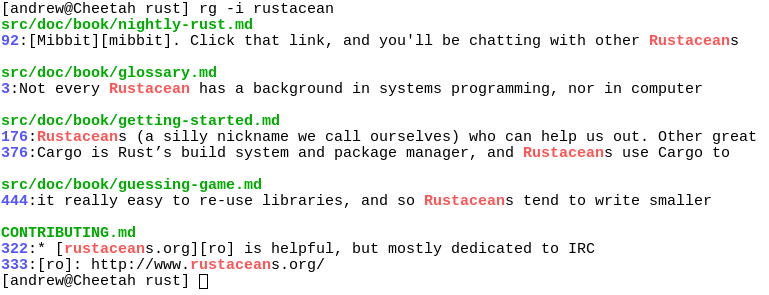
Screenshot of search results
Quick examples comparing tools
This example searches the entire
Linux kernel source tree
(after running make defconfig && make -j8) for [A-Z]+_SUSPEND, where
all matches must be words. Timings were collected on a system with an Intel
i9-12900K 5.2 GHz.
Please remember that a single benchmark is never enough! See my blog post on ripgrep for a very detailed comparison with more benchmarks and analysis.
| Tool | Command | Line count | Time |
|---|---|---|---|
| ripgrep (Unicode) | rg -n -w '[A-Z]+_SUSPEND' |
536 | 0.082s (1.00x) |
| hypergrep | hgrep -n -w '[A-Z]+_SUSPEND' |
536 | 0.167s (2.04x) |
| git grep | git grep -P -n -w '[A-Z]+_SUSPEND' |
536 | 0.273s (3.34x) |
| The Silver Searcher | ag -w '[A-Z]+_SUSPEND' |
534 | 0.443s (5.43x) |
| ugrep | ugrep -r --ignore-files --no-hidden -I -w '[A-Z]+_SUSPEND' |
536 | 0.639s (7.82x) |
| git grep | LC_ALL=C git grep -E -n -w '[A-Z]+_SUSPEND' |
536 | 0.727s (8.91x) |
| git grep (Unicode) | LC_ALL=en_US.UTF-8 git grep -E -n -w '[A-Z]+_SUSPEND' |
536 | 2.670s (32.70x) |
| ack | ack -w '[A-Z]+_SUSPEND' |
2677 | 2.935s (35.94x) |
Here's another benchmark on the same corpus as above that disregards gitignore files and searches with a whitelist instead. The corpus is the same as in the previous benchmark, and the flags passed to each command ensure that they are doing equivalent work:
| Tool | Command | Line count | Time |
|---|---|---|---|
| ripgrep | rg -uuu -tc -n -w '[A-Z]+_SUSPEND' |
447 | 0.063s (1.00x) |
| ugrep | ugrep -r -n --include='*.c' --include='*.h' -w '[A-Z]+_SUSPEND' |
447 | 0.607s (9.62x) |
| GNU grep | grep -E -r -n --include='*.c' --include='*.h' -w '[A-Z]+_SUSPEND' |
447 | 0.674s (10.69x) |
Now we'll move to searching on single large file. Here is a straight-up
comparison between ripgrep, ugrep and GNU grep on a file cached in memory
(~13GB, OpenSubtitles.raw.en.gz, decompressed):
| Tool | Command | Line count | Time |
|---|---|---|---|
| ripgrep (Unicode) | rg -w 'Sherlock [A-Z]\w+' |
7882 | 1.042s (1.00x) |
| ugrep | ugrep -w 'Sherlock [A-Z]\w+' |
7882 | 1.339s (1.28x) |
| GNU grep (Unicode) | LC_ALL=en_US.UTF-8 egrep -w 'Sherlock [A-Z]\w+' |
7882 | 6.577s (6.31x) |
In the above benchmark, passing the -n flag (for showing line numbers)
increases the times to 1.664s for ripgrep and 9.484s for GNU grep. ugrep
times are unaffected by the presence or absence of -n.
Beware of performance cliffs though:
| Tool | Command | Line count | Time |
|---|---|---|---|
| ripgrep (Unicode) | rg -w '[A-Z]\w+ Sherlock [A-Z]\w+' |
485 | 1.053s (1.00x) |
| GNU grep (Unicode) | LC_ALL=en_US.UTF-8 grep -E -w '[A-Z]\w+ Sherlock [A-Z]\w+' |
485 | 6.234s (5.92x) |
| ugrep | ugrep -w '[A-Z]\w+ Sherlock [A-Z]\w+' |
485 | 28.973s (27.51x) |
And performance can drop precipitously across the board when searching big files for patterns without any opportunities for literal optimizations:
| Tool | Command | Line count | Time |
|---|---|---|---|
| ripgrep | rg '[A-Za-z]{30}' |
6749 | 15.569s (1.00x) |
| ugrep | ugrep -E '[A-Za-z]{30}' |
6749 | 21.857s (1.40x) |
| GNU grep | LC_ALL=C grep -E '[A-Za-z]{30}' |
6749 | 32.409s (2.08x) |
| GNU grep (Unicode) | LC_ALL=en_US.UTF-8 grep -E '[A-Za-z]{30}' |
6795 | 8m30s (32.74x) |
Finally, high match counts also tend to both tank performance and smooth out the differences between tools (because performance is dominated by how quickly one can handle a match and not the algorithm used to detect the match, generally speaking):
| Tool | Command | Line count | Time |
|---|---|---|---|
| ripgrep | rg the |
83499915 | 6.948s (1.00x) |
| ugrep | ugrep the |
83499915 | 11.721s (1.69x) |
| GNU grep | LC_ALL=C grep the |
83499915 | 15.217s (2.19x) |
Why should I use ripgrep?
- It can replace many use cases served by other search tools because it contains most of their features and is generally faster. (See the FAQ for more details on whether ripgrep can truly replace grep.)
- Like other tools specialized to code search, ripgrep defaults to
recursive search and does automatic
filtering. Namely, ripgrep won't search files
ignored by your
.gitignore/.ignore/.rgignorefiles, it won't search hidden files and it won't search binary files. Automatic filtering can be disabled withrg -uuu. - ripgrep can search specific types of files.
For example,
rg -tpy foolimits your search to Python files andrg -Tjs fooexcludes JavaScript files from your search. ripgrep can be taught about new file types with custom matching rules. - ripgrep supports many features found in
grep, such as showing the context of search results, searching multiple patterns, highlighting matches with color and full Unicode support. Unlike GNU grep, ripgrep stays fast while supporting Unicode (which is always on). - ripgrep has optional support for switching its regex engine to use PCRE2.
Among other things, this makes it possible to use look-around and
backreferences in your patterns, which are not supported in ripgrep's default
regex engine. PCRE2 support can be enabled with
-P/--pcre2(use PCRE2 always) or--auto-hybrid-regex(use PCRE2 only if needed). An alternative syntax is provided via the--engine (default|pcre2|auto)option. - ripgrep has rudimentary support for replacements, which permit rewriting output based on what was matched.
- ripgrep supports searching files in text encodings
other than UTF-8, such as UTF-16, latin-1, GBK, EUC-JP, Shift_JIS and more.
(Some support for automatically detecting UTF-16 is provided. Other text
encodings must be specifically specified with the
-E/--encodingflag.) - ripgrep supports searching files compressed in a common format (brotli,
bzip2, gzip, lz4, lzma, xz, or zstandard) with the
-z/--search-zipflag. - ripgrep supports arbitrary input preprocessing filters which could be PDF text extraction, less supported decompression, decrypting, automatic encoding detection and so on.
- ripgrep can be configured via a configuration file.
In other words, use ripgrep if you like speed, filtering by default, fewer bugs and Unicode support.
Why shouldn't I use ripgrep?
Despite initially not wanting to add every feature under the sun to ripgrep, over time, ripgrep has grown support for most features found in other file searching tools. This includes searching for results spanning across multiple lines, and opt-in support for PCRE2, which provides look-around and backreference support.
At this point, the primary reasons not to use ripgrep probably consist of one or more of the following:
- You need a portable and ubiquitous tool. While ripgrep works on Windows, macOS and Linux, it is not ubiquitous and it does not conform to any standard such as POSIX. The best tool for this job is good old grep.
- There still exists some other feature (or bug) not listed in this README that you rely on that's in another tool that isn't in ripgrep.
- There is a performance edge case where ripgrep doesn't do well where another tool does do well. (Please file a bug report!)
- ripgrep isn't possible to install on your machine or isn't available for your platform. (Please file a bug report!)
Is it really faster than everything else?
Generally, yes. A large number of benchmarks with detailed analysis for each is available on my blog.
Summarizing, ripgrep is fast because:
- It is built on top of
Rust's regex engine.
Rust's regex engine uses finite automata, SIMD and aggressive literal
optimizations to make searching very fast. (PCRE2 support can be opted into
with the
-P/--pcre2flag.) - Rust's regex library maintains performance with full Unicode support by building UTF-8 decoding directly into its deterministic finite automaton engine.
- It supports searching with either memory maps or by searching incrementally with an intermediate buffer. The former is better for single files and the latter is better for large directories. ripgrep chooses the best searching strategy for you automatically.
- Applies your ignore patterns in
.gitignorefiles using aRegexSet. That means a single file path can be matched against multiple glob patterns simultaneously. - It uses a lock-free parallel recursive directory iterator, courtesy of
crossbeamandignore.
Feature comparison
Andy Lester, author of ack, has published an excellent table comparing the features of ack, ag, git-grep, GNU grep and ripgrep: https://beyondgrep.com/feature-comparison/
Note that ripgrep has grown a few significant new features recently that are not yet present in Andy's table. This includes, but is not limited to, configuration files, passthru, support for searching compressed files, multiline search and opt-in fancy regex support via PCRE2.
Playground
If you'd like to try ripgrep before installing, there's an unofficial playground and an interactive tutorial.
If you have any questions about these, please open an issue in the tutorial repo.
Installation
The binary name for ripgrep is rg.
Archives of precompiled binaries for ripgrep are available for Windows, macOS and Linux. Linux and Windows binaries are static executables. Users of platforms not explicitly mentioned below are advised to download one of these archives.
If you're a macOS Homebrew or a Linuxbrew user, then you can install ripgrep from homebrew-core:
$ brew install ripgrep
If you're a MacPorts user, then you can install ripgrep from the official ports:
$ sudo port install ripgrep
If you're a Windows Chocolatey user, then you can install ripgrep from the official repo:
$ choco install ripgrep
If you're a Windows Scoop user, then you can install ripgrep from the official bucket:
$ scoop install ripgrep
If you're a Windows Winget user, then you can install ripgrep from the winget-pkgs repository:
$ winget install BurntSushi.ripgrep.MSVC
If you're an Arch Linux user, then you can install ripgrep from the official repos:
$ sudo pacman -S ripgrep
If you're a Gentoo user, you can install ripgrep from the official repo:
$ sudo emerge sys-apps/ripgrep
If you're a Fedora user, you can install ripgrep from official repositories.
$ sudo dnf install ripgrep
If you're an openSUSE user, ripgrep is included in **openS
Extension points exported contracts — how you extend this code
Matcher (Interface)Core symbols most depended-on inside this repo
parse_low_rawShape
Languages
Modules by API surface
Used by 20 indexed graphs manifest dependencies, hub-wide
For agents
$ claude mcp add ripgrep \
  -- python -m otcore.mcp_server <graph>