github.com/BrutPitt/imGuIZMO.quat @v4.0
Chat with this repoBrowse by type
What it actually does AI analysis from the code graph — generated when you open this
README
imGuIZMO.quat v4.0 WiP
v4.0 Work in Progress
Currently are maintained both v3.0 in ImGuUIZMO.quat folder and the new v4.0 WiP imguizmo_quat
To make improvements, I am intervened simultaneously on the 3 components ImGuIZMOquat and also on vGizmo3D (the engine) and vgMath (optional math library)
Please feel free to report any malfunction, also via direct e-mail (if you don't have account on Github): addresses are in the source code*
The NEW easy_examples (WebGPU / Vulkan / OpenGL ) added refer to the latter: soon a beta will be released and everything will be adequate to v4.0
also  uses imGuIZMO.quat
With imGuIZMOquat you can manipulate objects starting from $\color{red}{\textbf{ only 4 code lines!}}$ (read below)
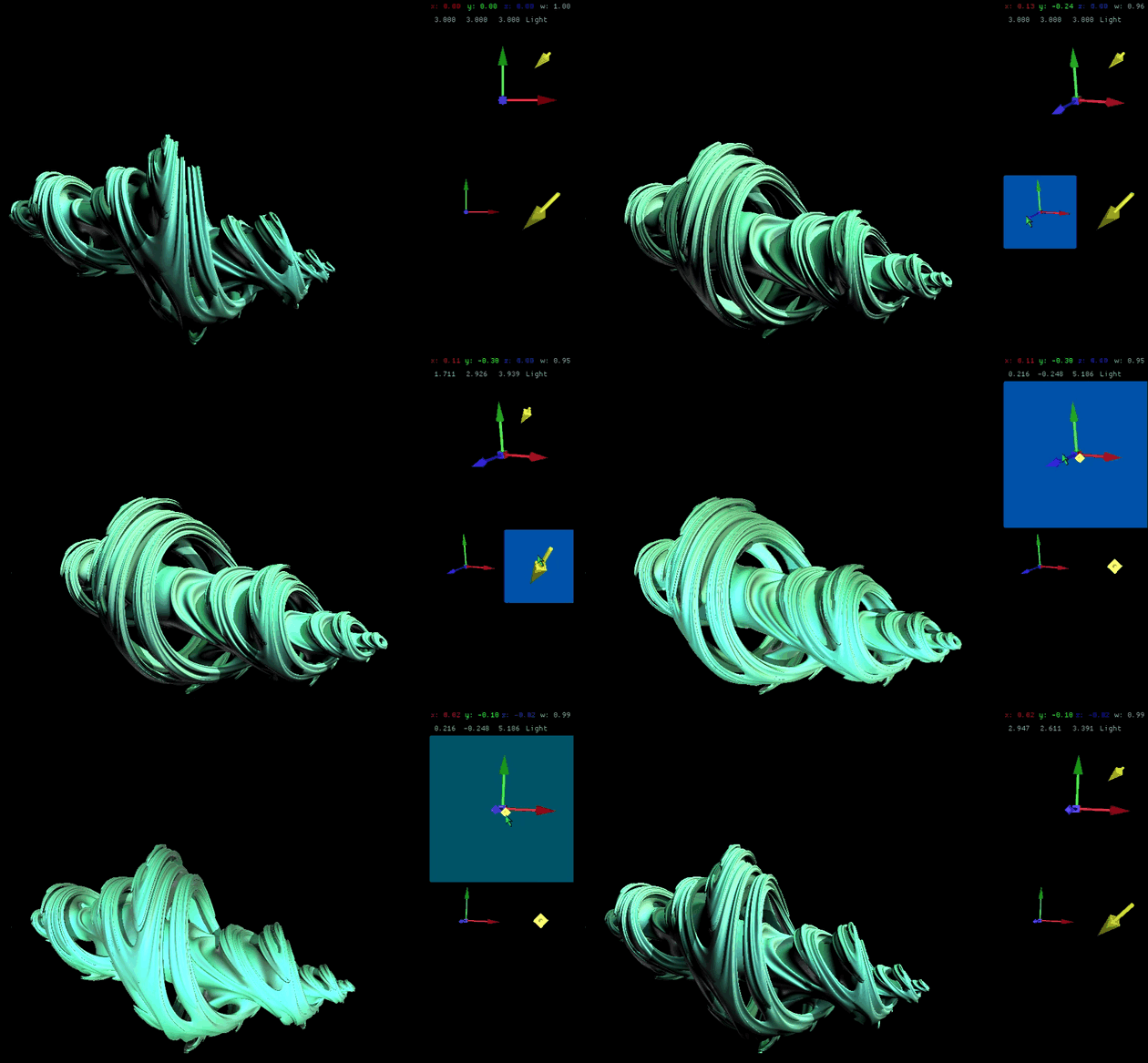
imGuIZMOquat is a ImGui widget: it provides a way to rotate and move (pan/dolly) models, lights, objects, cameras (etc), with mouse, adding $\color{red}{\textbf{only 4 code lines!}}$ to your code. It uses quaternions algebra, internally, to manage rotations, and offers the possibility (also) to interfacing with vec3, vec4, mat3x3 or mat4x4
NEW WebGPU / WebGL2 live demo examples
You can run/try WebGPU / WGPU examples of imGuIZMO_quat from following links:
-
NEW v4.0 WiP WebGPU lighted cube example - from new examples ( WebGPU / Vulkan / OpenGL )\ also displayed in full resizable canvas (w/o instructions and mouse buttons helper)
-
NEW v4.0 WiP WebGPU cube example - from new easy_examples ( WebGPU / Vulkan / OpenGL )\ also displayed in full resizable canvas (w/o instructions and mouse buttons helper)
It's necessary to use a browser with WebGPU* capabilities: e.g. Chrome-Canary, FireFox Nightly, Safari Technology Preview ...
You can run/try WebGL 2 examples of imGuIZMO from following links:
- NEW v4.0 WiP lighted cube example - from new LightCube example ( WebGPU / Vulkan / OpenGL )
- NEW v4.0 WiP cube example - from new easy_examples ( WebGPU / Vulkan / OpenGL )
- imGuIZMO.quat used together virtualGizmo3D direct 3D mouse/screen manipulator
- imGuIZMO.quat manipulator (only), now with 3D Pan/Dolly (move/zoom) features - *since v3.0
- A different example: imGuIZMO.quat + virtualGizmo3D used to manipulate axes
It's necessary to use a browser with WebGL2* capabilities
*imGuIZMO.quat was originally developed (and currently used) for my glChAoS.P project: consult the source code for more examples.
Mouse buttons and key modifiers
These are all mouse and keyModifiers controls internally used: - leftButton & drag -> free rotation axes - rightButton & drag -> free rotation spot (used only in Axes+Spot widget)* - middleButton / bothButtons & drag -> move together axes & spot (used only in Axes+Spot widget)*
Based on the widget TYPE it can also (in alternative): - or Rotation around a fixed axis (default) - leftButton+SHIFT & drag -> rotation around X - leftButton+CTRL & drag -> rotation around Y - leftButton+ALT|SUPER & drag -> rotation around Z - or Pan & Dolly (move / zoom) - since v3.0* - Shft+leftButton -> Dolly/Zoom - Wheel -> Dolly/Zoom - Ctrl+leftButton** -> Pan/Move
*you can change default key modifier for Pan/Dolly movements, read below
Technical notes
imGuIZMO.quat is written in C++ (C++11) and consist of two files imGuIZMOquat.h and imGuIZMOuat.cpp, uses vGizmo.h virtualGizmo3D (my header only screen manipulator tool in Immediate Mode) and vgMath a compact (my single file header only) vectors/matrices/quaternions tool/lib that makes imGuIZMO.quat standalone.
No other files or external libraries are required, except ImGui (of course).
In alternative to vgMath, if prefer a larger/complete library, is also possible to interface imGuIZMO.quat with glm mathematics library simply adding a #define (**Please, read Configure ImGuIZMO.quad section.)
How to implement imGuIZMOquat
How to use imGuIZMO.quat in your code to manipulate an object: starting to include imGuIZMOquat.h file in your code.
#include "imGuIZMOquat.h"
You can think of declaring an object of type quat (quaternion), global or static or as member of your class, to maintain track of rotations:
// For imGuIZMO, declare static or global variable or member class quaternion
    quat qRot = quat(1.f, 0.f, 0.f, 0.f);
In your ImGui window you call/declare a widget...
ImGui::gizmo3D("##gizmo1", qRot /*, size, mode */);
Finally in your render function (or where you prefer) you can get back the transformations matrix
    mat4 modelMatrix = mat4_cast(qRot);
    // now you have modelMatrix with rotation then can build MV and MVP matrix
now we have modelMatrix with rotation then we can build MVP matrix (taken from basic_example #01)
Pan & Dolly - v3.0
From ver. 3.0 you can use all widgets also to "move" the objects, using Pan (x,y) & Dolly (z):
    // declare static or global variable or member class (quat -> rotation)
    quat qRot = quat(1.f, 0.f, 0.f, 0.f);
    // declare static or global variable or member class (vec3 -> Pan/Dolly)
    vec3 PanDolly(0.f);
In your ImGui window you call/declare a widget...
    // Call new function available from v.3.0 imGuIZMO.quat
    ImGui::gizmo3D("##gizmo1", PanDolly, qRot /*, size,  mode */);
    // PanDolly returns/changes (x,y,z) values, depending on Pan(x,y,0)/Dolly(0,0,z) movements
In your render function (or where you prefer) you can get back the transformations matrix: translate and rotation
    // if you need a "translation" matrix with Pan/Dolly values
    mat4 translateMatrix(translate(mat4(1.f), vec4(PanDolly, 1.f)));

    mat4 modelMatrix = mat4_cast(qRot);
    // now you have modelMatrix with rotation then can build MV and MVP matrix
now we have modelMatrix with rotation then we can build MVP matrix (taken from basic_example #03)
Widget types
Axes mode:
    quat qt = getRotation();
// get/setRotation are helper funcs that you have ideally defined to manage your global/member objs
    if(ImGui::gizmo3D("##gizmo1", qt /*, size,  mode */)) {  setRotation(qt); }
    // or explicitly
    static vec4 dir;
    ImGui::gizmo3D("##Dir1", dir, 100, imguiGizmo::mode3Axes|guiGizmo::cubeAtOrigin);

    // Default size: ImGui::GetFrameHeightWithSpacing()*4
    // Default mode: guiGizmo::mode3Axes|guiGizmo::cubeAtOrigin -> 3 Axes with cube @ origin
Directional arrow: ** WARNING ** changed behavior
// get/setLigth are helper funcs that you have ideally defined to manage your global/member objs
    if(ImGui::gizmo3D("##Dir1", light /*, size,  mode */) {}
    // or explicitly
    if(ImGui::gizmo3D("##Dir1", light, 100, imguiGizmo::modeDirection)  {}}

    // Default arrow color is YELLOW: ImVec4(1.0, 1.0, 0.0, 1.0);
*The vector direction should no longer be changed: now you can use it directly
The old behavior can be enabled by IMGUIZMO_HAS_NEGATIVE_VEC3_LIGHT define in the imguizmo_config.h file or via "compiler define" -D option
Directional plane:
    static vec3 dir(1.0, 0.0, 0.0);
    if(ImGui::gizmo3D("##Dir1", dir, 100,  imguiGizmo::modeDirPlane)  { }

    // Default direction color is same of default arrow color: YELLOW -> ImVec4(1.0, 1.0, 0.0, 1.0);
    // Default plane color is: ImVec4(0.0f, 0.5f, 1.0f, STARTING_ALPHA_PLANE);
Axes + spot: ** WARNING ** changed behavior
// I assume, for a vec3, a direction starting from origin, so if you use a vec3 to identify
// get/setLigth get/setRotation are helper funcs that you have ideally defined to manage your global/member objs
    if(ImGui::gizmo3D("##gizmo1", qt, light /*, size,  mode */))  {   }
    // Default size: ImGui::GetFrameHeightWithSpacing()*4
    // Default mode: guiGizmo::mode3Axes|guiGizmo::cubeAtOrigin -> 3 Axes with cube @ origin
    // Default spot color is same of default arrow color: YELLOW -> ImVec4(1.0, 1.0, 0.0, 1.0);
*The vector direction should no longer be changed: now you can use it directly
The old behavior can be enabled by IMGUIZMO_HAS_NEGATIVE_VEC3_LIGHT define in the imguizmo_config.h file or via "compiler define" -D option
Added since version 3.0
To each of the functions listed above was added a vec3 parameter, as second parameter, to get the object movement: Pan/Dolly, so the Axes mode function becomes:
Axes mode + Pan/Dolly:
    quat qt = getRotation();
    vec3 pos = getPosition();
// get/setRotation and get/setPosition are helper funcs that you have ideally defined to manage your global/member objs
    if(ImGui::gizmo3D("##gizmo1", pos, qt /*, size,  mode */)) {  setRotation(qt); setPosition(pos); }
    // or explicitly
    static quat q(1.f, 0.f, 0.f, 0.f);
    static vec3 pos(0.f);
    ImGui::gizmo3D("##Dir1", pos, q, 100, imguiGizmo::mode3Axes|guiGizmo::cubeAtOrigin);

    // Default size: ImGui::GetFrameHeightWithSpacing()*4
    // Default mode: guiGizmo::mode3Axes|guiGizmo::cubeAtOrigin -> 3 Axes with cube @ origin
... and so on, for all listed above functions: *look the new function prototypes, below.
Prototypes
All possible widget calls (rotations only):
IMGUI_API bool gizmo3D(const char*, quat&, float=IMGUIZMO_DEF_SIZE, const int=imguiGizmo::mode3Axes|imguiGizmo::cubeAtOrigin);
IMGUI_API bool gizmo3D(const char*, vec4&, float=IMGUIZMO_DEF_SIZE, const int=imguiGizmo::mode3Axes|imguiGizmo::cubeAtOrigin);
IMGUI_API bool gizmo3D(const char*, vec3&, float=IMGUIZMO_DEF_SIZE, const int=imguiGizmo::modeDirection);

IMGUI_API bool gizmo3D(const char*, quat&, quat&, float=IMGUIZMO_DEF_SIZE, const int=imguiGizmo::modeDual|imguiGizmo::cubeAtOrigin);
IMGUI_API bool gizmo3D(const char*, quat&, vec4&, float=IMGUIZMO_DEF_SIZE, const int=imguiGizmo::modeDual|imguiGizmo::cubeAtOrigin);
IMGUI_API bool gizmo3D(const char*, quat&, vec3&, float=IMGUIZMO_DEF_SIZE, const int=imguiGizmo::modeDual|imguiGizmo::cubeAtOrigin);
from v.3.0 have been added other calls that pass/return Pan/Dolly (x,y,z) position: same as above, but with vec3 (Pan/Dolly position) as second parameter:
//with Pan & Dolly feature
IMGUI_API bool gizmo3D(const char*, vec3&, quat&, float=IMGUIZMO_DEF_SIZE, const int=imguiGizmo::mode3Axes|imguiGizmo::cubeAtOrigin);
IMGUI_API bool gizmo3D(const char*, vec3&, vec4&, float=IMGUIZMO_DEF_SIZE, const int=imguiGizmo::mode3Axes|imguiGizmo::cubeAtOrigin);
IMGUI_API bool gizmo3D(const char*, vec3&, vec3&, float=IMGUIZMO_DEF_SIZE, const int=imguiGizmo::modeDirection);

IMGUI_API bool gizmo3D(const char*, vec3&, quat&, quat&, float=IMGUIZMO_DEF_SIZE, const int=imguiGizmo::modeDual|imguiGizmo::cubeAtOrigin);
IMGUI_API bool gizmo3D(const char*, vec3&, quat&, vec4&, float=IMGUIZMO_DEF_SIZE, const int=imguiGizmo::modeDual|imguiGizmo::cubeAtOrigin);
IMGUI_API bool gizmo3D(const char*, vec3&, quat&, vec3&, float=IMGUIZMO_DEF_SIZE, const int=imguiGizmo::modeDual|imguiGizmo::cubeAtOrigin);
For for more details, more customizations, or how to change sizes, color, thickness, etc... examine the attached example source code
Core symbols most depended-on inside this repo
Shape
Languages
Modules by API surface
For agents
$ claude mcp add imGuIZMO.quat \
  -- python -m otcore.mcp_server <graph>