github.com/soxoj/maigret @main
Chat with this repoWhat it actually does AI analysis from the code graph — generated when you open this
README
Maigret
<a href="https://pypi.org/project/maigret/">
    <img alt="Maigret 的 PyPI 版本" src="https://img.shields.io/pypi/v/maigret?style=flat-square" />
</a>
<a href="https://pepy.tech/project/maigret">
  <img alt="Maigret 总下载量" src="https://static.pepy.tech/badge/maigret" />
  <img alt="Maigret 月下载量" src="https://static.pepy.tech/badge/maigret/month" />
</a>


<a href="https://github.com/soxoj/maigret">
    <img alt="Maigret 项目访问量" src="https://komarev.com/ghpvc/?username=maigret&color=brightgreen&label=views&style=flat-square" />
</a>
<a href="https://github.com/soxoj/maigret">
    <img alt="所需最低 Python 版本:3.10+" src="https://img.shields.io/badge/Python-3.10%2B-brightgreen?style=flat-square" />
</a>
<a href="https://github.com/soxoj/maigret/blob/main/LICENSE">
    <img alt="Maigret 的开源许可证" src="https://img.shields.io/github/license/soxoj/maigret?style=flat-square" />
</a>


<img src="https://raw.githubusercontent.com/soxoj/maigret/main/static/maigret.png" height="300" alt="Maigret logo"/>


<a href="https://codewiki.google/github.com/soxoj/maigret">
    <img alt="向 Code Wiki 询问 Maigret" src="https://img.shields.io/badge/Code_Wiki-ask_about_repo-yellow?logo=googlegemini" />
</a>
<a href="https://deepwiki.com/soxoj/maigret">
    <img alt="向 DeepWiki 询问 Maigret" src="https://img.shields.io/badge/DeepWiki-ask_about_repo-yellow" />
</a>


<a href="https://github.com/soxoj/maigret/raw/main/README.md">English</a> · <b>简体中文</b>
Maigret 仅凭一个用户名,就能在大量站点上查找其账号,并从网页中收集所有可获取的公开信息,为目标人物生成一份档案。无需任何 API 密钥。AI 画像(演示)。
赞助商
RapidProxy 提供高性能住宅代理,适用于 Twitter 抓取、Selenium 自动化以及网页数据提取。
9000 万+ IP · 智能轮换 · 反封锁 · 流量永不过期
特别优惠:免费试用,套餐低至 $0.65/GB。使用优惠码 RAPID10 可享 9 折。

VaultProxies — 当运维团队厌倦了被限流、被标记、被识别时所选用的代理网络。
企业级轮换 · 高可用 · 抗限流路由
特别优惠:套餐 $1/GB 起,低至 $0.50/GB。使用优惠码 50OFF 可享 5 折。

9Proxy 提供住宅代理,低至 $0.018/IP 或 $0.68/GB。覆盖 90+ 国家超 2000 万 IP,支持长效或轮换会话,可通过桌面或移动端应用管理。
目录
一分钟上手
请先确认本机的 Python 版本不低于 3.10。
pip install maigret
maigret YOUR_USERNAME
不想本地安装?可以试试社区 Telegram 机器人,或者使用云端 Shell。
想要一个 Web 界面?参见启动方式。
延伸阅读:快速入门。
核心特性
- 支持 3000+ 站点(完整列表见 sites.md)。默认仅检查访问量排名前 500 的站点;加上
-a可全量扫描,或使用--tags按分类/国家筛选。 - 可作为 Python 库嵌入到自己的项目中——直接
import maigret即可在代码里发起搜索(参见库使用文档)。 - 通过 socid_extractor 从个人主页和站点 API 中提取账号所有者的所有可获取信息,包括指向其他账号的链接。
- 基于已发现的用户名和其他 ID,执行递归搜索。
- 支持按标签(站点分类、国家)进行筛选。
- 能够检测并部分绕过封锁、审查和 CAPTCHA。
- 每次运行时(每 24 小时一次)从 GitHub 拉取一份自动更新的站点数据库;离线时会回退到内置数据库。
- 可访问 Tor 与 I2P 站点;支持检查域名。
- 自带一个 Web 界面,可在同一页面将结果以图谱方式浏览,并下载各种格式的报告。
- 可选的 AI 分析模式(
--ai),通过 OpenAI 兼容 API 将原始搜索结果整理成一份简短的调查摘要。
完整特性列表请见特性文档。
谁在使用
基于 Maigret 构建的专业 OSINT 与社交媒体分析工具:
演示
视频

报告示例
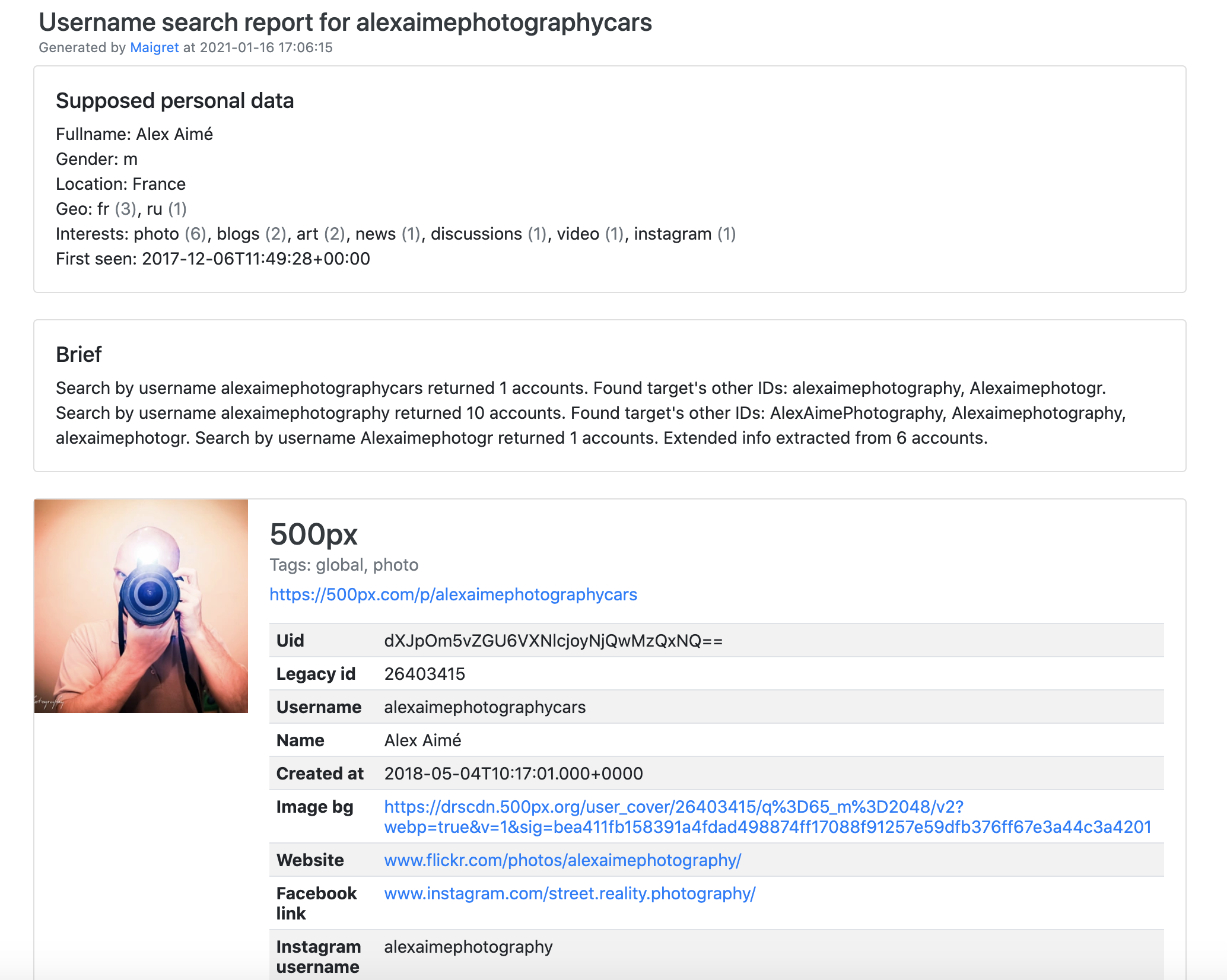
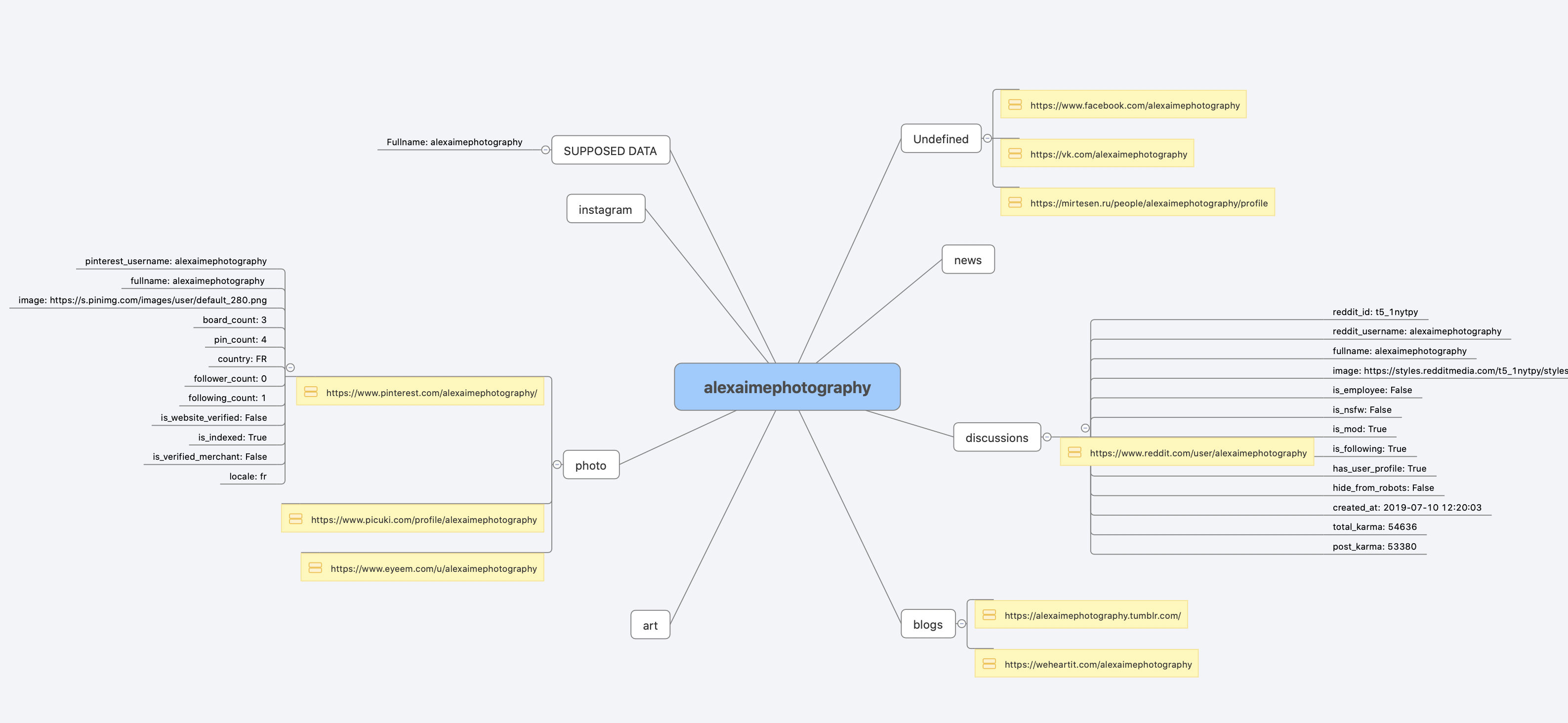
安装
如果你已经按一分钟上手的步骤跑通了,就无需再装。下面列出几种可选的安装方式。
什么都不想装?直接用社区 Telegram 机器人。
Windows
从 Releases 下载 maigret_standalone.exe。有两种启动方式:
- 双击运行 —— Maigret 会询问用户名、执行一次默认搜索,并在结束时停留,方便你查看报告链接。
- 从终端运行 —— 打开命令提示符(按
Win+R,输入cmd,回车)或 PowerShell,以便传入额外参数:
cd %USERPROFILE%\Downloads
maigret_standalone.exe USERNAME
maigret_standalone.exe USERNAME --html       :: 同时保存 HTML 报告
maigret_standalone.exe --help                :: 列出所有选项
视频指引:https://youtu.be/qIgwTZOmMmM。
云端 Shell
通过云端 Shell 或 Jupyter Notebook 在浏览器里运行 Maigret:



本地安装(pip)
# 从 PyPI 安装
pip3 install maigret

# 使用
maigret username
从源码安装
# 也可以克隆仓库后手动安装
git clone https://github.com/soxoj/maigret && cd maigret

# 构建并安装
pip3 install .

# 使用
maigret username
Docker
官方提供两个镜像变体:
soxoj/maigret:latest—— CLI 模式(默认)soxoj/maigret:web—— 自动启动 Web 界面
# 拉取官方镜像(CLI)
docker pull soxoj/maigret

# CLI 用法
docker run -v /mydir:/app/reports soxoj/maigret:latest username --html

# Web UI(在 http://localhost:5000 打开)
docker run -p 5000:5000 soxoj/maigret:web

# 自定义 Web UI 端口
docker run -e PORT=8080 -p 8080:8080 soxoj/maigret:web

# 手动构建
docker build -t maigret .                  # CLI 镜像(默认 target)
docker build --target web -t maigret-web . # Web UI 镜像
故障排查
构建报错?请见故障排查指南。
PDF 报告(--pdf)是可选扩展 —— 通过 pip install 'maigret[pdf]' 安装。在 Linux/macOS 上还需要系统级图形库;各操作系统的安装步骤详见 PDF 报告章节。
使用
示例
# 生成 HTML、PDF、XMind 8 报告
maigret user --html
maigret user --pdf
maigret user --xmind # 与 XMind 2022+ 不兼容

# 机器可读的导出格式
maigret user --json ndjson   # 行分隔 JSON(也支持 --json simple)
maigret user --csv
maigret user --txt
maigret user --graph         # 交互式 D3 图谱(HTML)
maigret user --neo4j         # Neo4j Cypher 脚本(图数据库)

# 仅在带有 photo 与 dating 标签的站点上搜索
maigret user --tags photo,dating

# 仅在带有 us 标签的站点上搜索
maigret user --tags us

# 同时在所有站点上搜索三个用户名
maigret user1 user2 user3 -a

# AI 辅助调查摘要(需要 OPENAI_API_KEY)
maigret user --ai
--neo4j 会生成结果图谱的 *_neo4j.cypher 脚本;可用 cypher-shell -u neo4j -p <password> < report_user_neo4j.cypher 导入,或粘贴到 Neo4j Browser 中。重复导入是幂等的。详见 Neo4j 导出文档。
完整选项请运行 maigret --help。文档:命令行选项、更多示例。遇到 403 或超时?参见 TROUBLESHOOTING.md。
Web 界面
Maigret 内置一个 Web UI,提供结果图谱视图和报告下载。
Web 界面截图
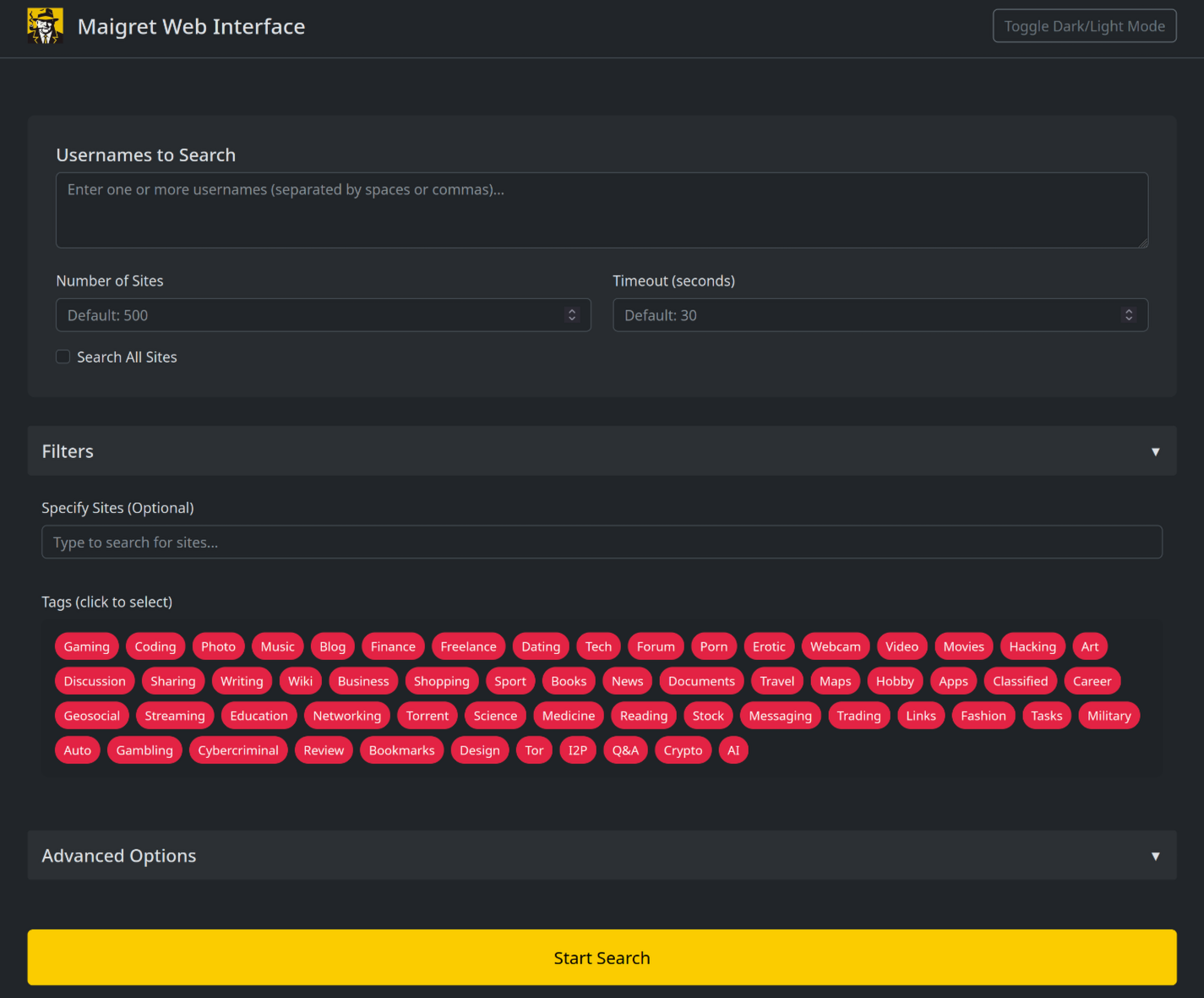
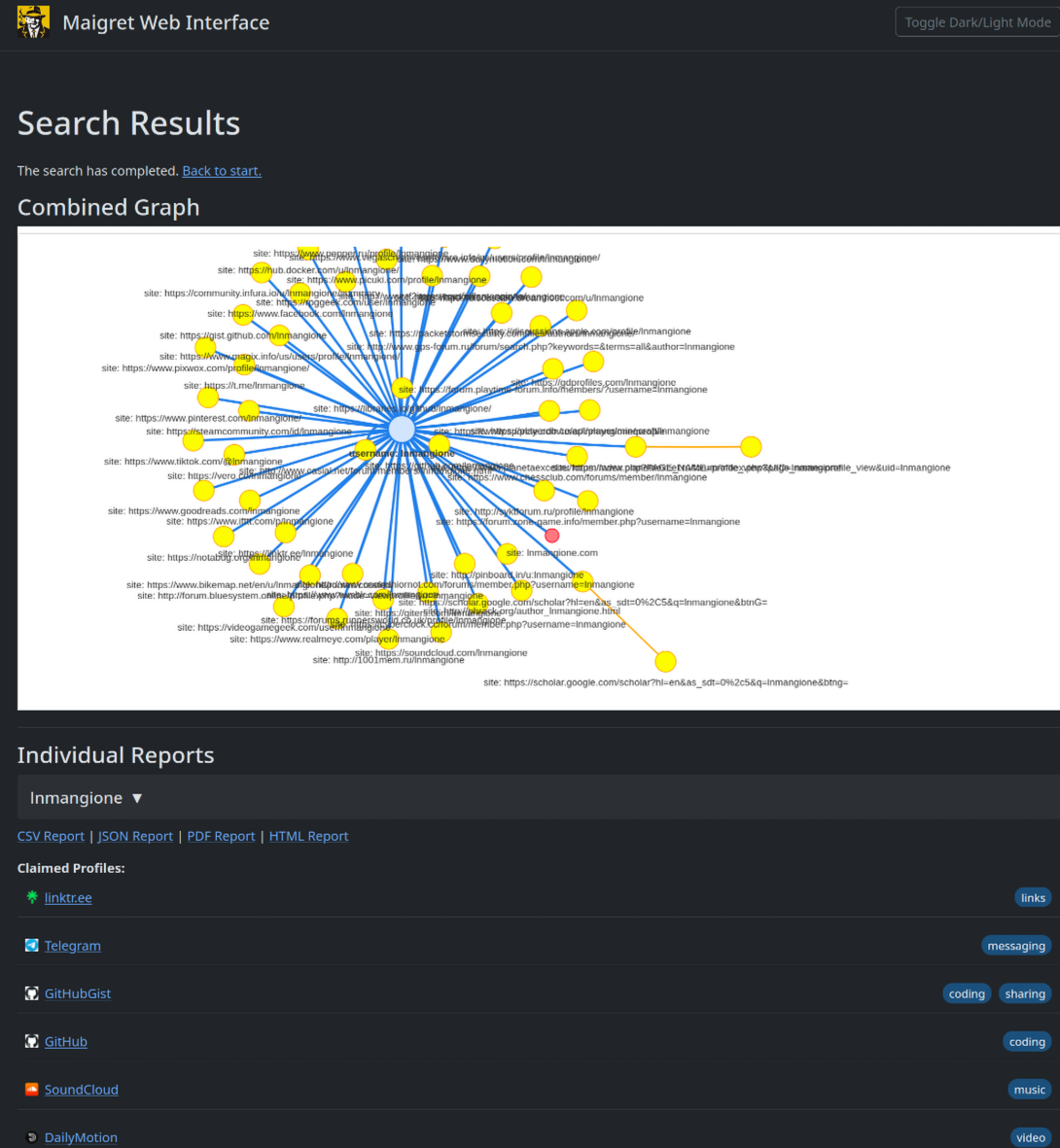
maigret --web 5000
在浏览器中打开 http://127.0.0.1:5000,输入用户名即可查看结果。
Python 库
Maigret 可以嵌入到你自己的 Python 项目里使用。 CLI 只是对一个异步函数的薄包装,你完全可以直接调用它——构建自定义流水线、把结果接入自家工具,或将其嵌入更大的 OSINT 工作流。
完整示例(包含异步用法和按标签筛选站点)请参见库使用指南。
常用 CLI 参数
--parse URL—— 解析一个个人主页,从中提取 ID/用户名,并以此为起点发起递归搜索。--permute—— 基于两个或更多输入生成可能的用户名变体(例如john doe→johndoe、j.doe…)并对其逐一搜索。--self-check [--auto-disable]—— 维护者用于核对数据库的工具:针对线上站点验证usernameClaimed/usernameUnclaimed配对是否仍然有效。--ai/--ai-model—— 启用 AI 分析,将搜索结果交给 OpenAI 兼容 API,并把简短的调查摘要流式输出到终端。
AI 分析

--ai 会先收集搜索结果、在内存中构建 Markdown 报告,再将其发送到一个 OpenAI 兼容的 chat completion 接口,生成一份简短、克制的调查摘要(最可能的真实姓名、所在地、职业、兴趣、语言、置信度以及后续线索)。开启该模式后,逐站点的进度输出会被静默,模型的输出会以流式方式打印到 stdout。
export OPENAI_API_KEY=sk-...
maigret user --ai

# 切换到其它模型
maigret user --ai --ai-model gpt-4o-mini
API key 也可以写入 settings.json 的 openai_api_key 字段。接口地址默认为 https://api.openai.com/v1,通过在 settings.json 中设置 openai_api_base_url,可以指向任何 OpenAI 兼容的服务(Azure OpenAI、OpenRouter、本地推理服务等)。完整选项见配置文档。
Tor / I2P / 代理
Maigret 支持通过代理、Tor 或 I2P 转发请求——这对访问 .onion / .i2p 站点,以及绕过会拦截数据中心 IP 的 WAF 都很有用。
# 任意 HTTP/SOCKS 代理
maigret user --proxy socks5://127.0.0.1:1080

# Tor(默认网关 socks5://127.0.0.1:9050)
maigret user --tor-proxy socks5://127.0.0.1:9050

# I2P(默认网关 http://127.0.0.1:4444)
maigret user --i2p-proxy http://127.0.0.1:4444
请先启动 Tor / I2P 守护进程再运行上述命令——Maigret 不会替你管理这些网关。
Cloudflare 绕过
实验特性。 Cloudflare webgate 仍在积极开发中;配置项、CLI 行为以及命中该机制的站点集合都可能发生变化,不保证向后兼容。
数据库中有一部分站点需要真实浏览器才能通过 JavaScript 挑战。Maigret 可以将这些检查转交给本地运行的 FlareSolverr:
docker run -d -p 8191:8191 --name flaresolverr ghcr.io/flaresolverr/flaresolverr:latest
maigret --cloudflare-bypass <username>
该功能为按需启用(命令行加 --cloudflare-bypass,或在 settings.json 中设置 cloudflare_bypass.enabled),并且只对 protection 字段匹配的站点生效。后端选项与配置详见功能文档。
参与贡献
请精确地在 data.json 里新增或修复站点(不要使用 json.load/json.dump 整体读写),然后运行 ./utils/update_site_data.py 重新生成 sites.md 和数据库元数据,再提交 Pull Request。更多细节见 CONTRIBUTING 指南 和开发文档。版本历史见 CHANGELOG.md。
商业使用
开源版本的 Maigret 采用 MIT 许可证,可不受限制地用于商业用途——但站点检查会随时间失效,需要持续维护。
如果你有更严肃的商业需求——希望使用每日更新的站点数据库或用户名查询 API——欢迎联系:📧 maigret@soxoj.com
- 私有站点数据库 —— 5000+ 站点,每日更新(独立于公开开源数据库)
- 用户名查询 API —— 将 Maigret 集成进你的产品
关于
免责声明
仅供教育与合法用途。 使用者需自行承担遵守所在司法辖区相关法律(GDPR、CCPA 等)的责任。作者不对任何滥用行为负责。
反馈
提交 issue · GitHub Discussions · Telegram
SOWEL 分类
涉及到的 OSINT 技术: - SOTL-2.2. Search For Accounts On Other Platforms - SOTL-6.1. Check Logins Reuse To Find Another Account - SOTL-6.2. Check Nicknames Reuse To Find Another Account
许可证
MIT © Maigret
Core symbols most depended-on inside this repo
colorShape
Languages
Modules by API surface
Dependencies from manifests, versioned
For agents
$ claude mcp add maigret \
  -- python -m otcore.mcp_server <graph>