github.com/yokoffing/Betterfox @152.0 sqlite
README





:warning: Do not trust sites that claim to be Betterfox. This page is the only official source.
Betterfox
about:config tweaks to enhance Mozilla Firefox.
Made for everyday browsing
Make Firefox more private and secure — without using third-party code.
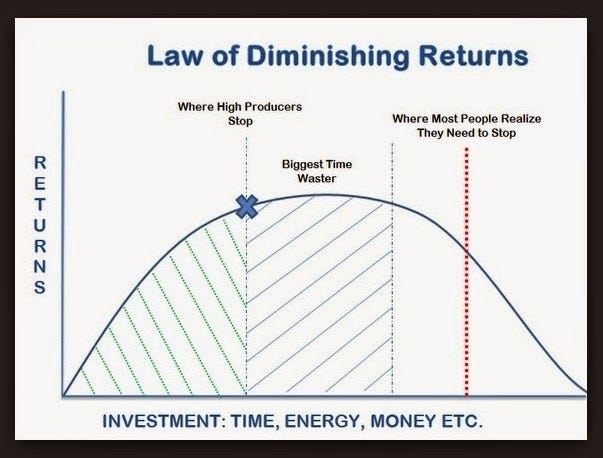
Betterfox is an opinionated preference list inspired by the law of diminishing returns and the minimum effective dose.
Required reading
0) Create a backup profile.
1) Download the user.js file here (Right click > Save Link As…).
2) Review both Common Overrides and Optional Hardening to make any necessary changes.
3) Open Firefox. In the URL bar, type about:profiles and press Enter.
4) For the profile you want to use, click Open Folder in the Root Directory section.
5) Move the user.js file into the folder.
After restarting Firefox: 1) Get an ad blocker like uBlock Origin with our recommended filters. 2) Enable DNS-level protection with your chosen provider to further protect against security threats, ads, and trackers.
Simple goals
1) Minimalism: get what isn't needed out of the way 2) Efficiency: unleash Firefox's ability to be fast and performant 3) Privacy: protect your data without causing site breakage
Simple configs
Securefox, Peskyfox, and Smoothfox are guides to settings within Firefox. The user.js — a configuration file that controls Firefox settings — is curated from these guides.
| List | Description |
|---|---|
| user.js | All the essentials. None of the breakage. This is your user.js. |
| Securefox | Protect user data without causing site breakage. |
| Peskyfox | Provide a clean, distraction-free browsing experience. |
| Smoothfox |
(optional) | Get Edge-like smooth scrolling on your favorite browser — or choose something more your style. |
Recognition
Browser Integration
[!IMPORTANT] While the browsers listed below incorporate Betterfox to some extent, they often modify it in ways that reduce its effectiveness. For optimal results, apply the
user.jsfile even when using Firefox forks.
- Zen | files (July 2024)
- FireDragon | files (Jan 2024?)
- Midori | files (Dec 2023?)
- Mercury | files (Sep 2023)
- Waterfox | files (Sep 2023)
- Floorp 1 2 | files (Apr 2023)
- Pulse | files (Dec 2021)
- Ghostery Private Browser 1 2 | files (Feb 2021)
YouTube
- A Better Firefox (Mar 2025)
- Ditch Chrome for One Of These BETTER BROWSERS! (Aug 2024)
- The ULTIMATE Browser Tier List (Mar 2023)
- I Hate Firefox. But I'm Still Switching Back to It. (Nov 2022)
- [Español] Optimize and Accelerate Firefox (Nov 2022)
- How To Improve Firefox Performance (Dec 2021)
Podcasts
- [Italian] Digitalia.fm | 1:41:35–1:42:41 (July 2023)
- GhoSTORIES with Franz & Pete | 17:05–18:40 (Feb 2021)
Articles
- How I Set Up Firefox for True Privacy (Oct 2025)
- Phishing Bank Logins Over Plain HTTP in 2025 (Oct 2025)
- [Español] Firefox is an excellent browser, but this small modification makes it much faster and more private (Jan 2025)
- Browsers for Daily Use (Jan 2024)
- Avoiding Manifest V3 – Escaping the Ad-Pocalypse (Dec 2023)
- [German] Pulse Browser Review: Firefox fork with Turbo tweaks and Opera sidebar (Apr 2023)
- 2023 Browser Showdown: Comparing Chrome, Brave, Firefox, Vivaldi, and Opera (Jan 2023)
Guides
- FMHY Browser Tools: Privacy Tweaks
- Firefox-UI-Fix
- Narsil/desktop_user.js
- pyllyukko/user.js comparator
Reviews
- “I use this one ... The performance is absolutely amazing. There’s definitely a huge difference when it comes to loading sites.” - DIRIKtv
- "BetterFox ... will provide good-enough privacy and help with performance." - Qdoit12Super
- "...drastically changed the experience with Firefox for me. Improved speed, security, smoothness, and removed clutter." - AppDate
- "Firefox with uBlock Origin extension and tuned with Betterfox is faster than Safari." - cugeloid
- "I don't think I could use Firefox without Betterfox." - Professional_Fun4616
- "The best collection of tweaks available." - AuRiMaS
- "FF is now much snappier!" - whotheff
- "...the experience is so good now I don’t think I’ll go back to any of the chromium based browsers." - Mr_Compromise
Support
If you like the project, leave a :star: (top right) and become a stargazer!
Credit
- Betterfox mirrors the ongoing work provided by arkenfox. Additionally, this repository includes content reproduced or adapted from other sources. Credit for overlapping material goes to the original authors.
- Appreciation goes to the Firefox team and developers working on Bugzilla, fighting for the open web.
- Thanks to Denperidge for adding
install.pyfor advanced users in v.131. - A special thanks to Alex Kontos of Waterfox for his collaboration in v.116.
- Many thanks to the 2021 Ghostery team for testing Betterfox at scale in its early days.
Core symbols most depended-on inside this repo
list_releasesShape
Languages
Modules by API surface
For agents
$ claude mcp add Betterfox \
  -- python -m otcore.mcp_server <graph>