hub / github.com/yihong0618/running_page
github.com/yihong0618/running_page @v2.99 sqlite
722 symbols
2,467 edges
108 files
115 documented · 16%
README
Note
- clone or Fork before vercel 404 need to pull the latest code
- python in README means python3 python
- use v2.0 need change vercel setting from gatsby to vite
- 2023.09.26 garmin need secret_string(and in Actions) get
bash
     python run_page/get_garmin_secret.py ${email} ${password}
     # if cn
     python run_page/get_garmin_secret.py ${email} ${password} --is-cn
- 2024.09.29: Added
Elevation Gainfield, If you forked the project before this update, please run the following command: - To resolve errors:
sqlalchemy.exc.OperationalError: (sqlite3.OperationalError) no such column: activities.elevation_gain - If you don't have a local environment, set
RUN_TYPEtodb_updaterin the.github/workflows/run_data_sync.ymlfile once then change back.
bash
     python run_page/db_updater.py
- For old data: To include
Elevation Gainfor past activities, perform a full reimport. - To show the 'Elevation Gain' column, modify
SHOW_ELEVATION_GAINinsrc/utils/const.ts - note:
Elevation Gainmay be inaccurate. You can use Strava's "Correct Elevation" or Garmin's "Elev Corrections" feature for more precise data. - 本项目现在默认使用 MapCN(免费)。如果你选择使用 Mapbox,请获取你自己的 token。请勿使用项目维护者的 token - 查看此 issue 和 issue #1055

这里是白银越野赛全部 21 位逝者的故事
R.I.P. 希望大家都能健康顺利的跑过终点,逝者安息。
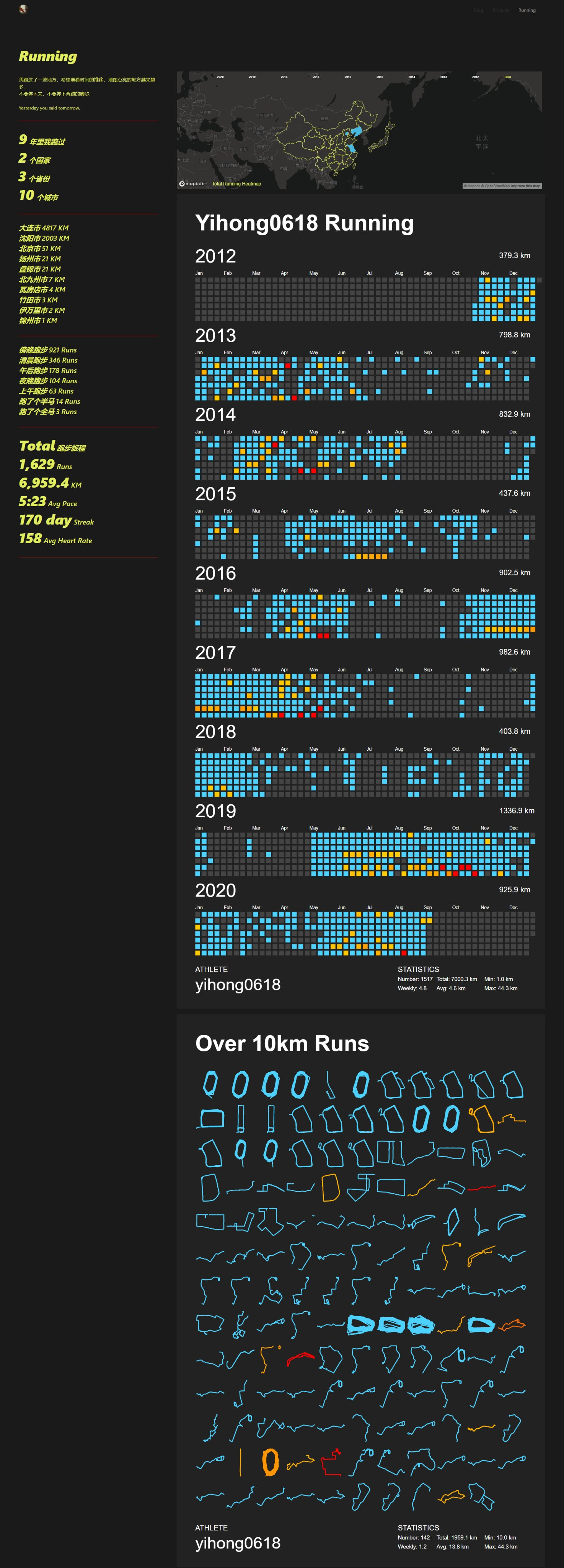
打造个人跑步主页
GIF 展示

大家的跑步主页展示
Running page runners
它是怎么工作的
特性
- GitHub Actions 自动同步跑步数据,生成展示页面
- 支持 Vercel(推荐)和 GitHub Pages 自动部署
- React Hooks
- Mapbox 进行地图展示
- Nike、Strava、佳明(佳明中国)及 Keep 等,自动备份 GPX 数据,方便备份及上传到其它软件
- 支持终端界面(TUI)本地浏览运动数据
因为数据存在 gpx 和 data.db 中,理论上支持几个软件一起,你可以把之前各类 App 的数据都同步到这里(建议本地同步,之后 Actions 选择正在用的 App)
如果你不想公开数据,可以选择
Strava的模糊处理,或private仓库。
缩放地图彩蛋
支持
- Strava
- New Way To Sync Nike Run Club :NFC 同步的新方式
- Nike Run Club
- Garmin
- Garmin-cn
- Keep
- 悦跑圈 :限制单个设备,无法自动化
- 郁金香运动
- GPX
- TCX
- FIT
- 佳明国内同步国际
- Tcx+Strava(upload all tcx data to strava)
- Tcx+Garmin(upload all tcx data to Garmin)
- Gpx+Strava(upload all gpx data to strava)
- Nike+Strava(Using NRC Run, Strava backup data)
- Garmin_to_Strava(Using Garmin Run, Strava backup data)
- Strava_to_Garmin(Using Strava Run, Garmin backup data)
- Coros 高驰
- iGPSPORT迹驰
- Komoot
- Onelap
- Intervals.icu
视频教程
下载
git clone https://github.com/yihong0618/running_page.git --depth=1
安装及测试 (node >= 20 python >= 3.11)
pip3 install -r requirements.txt
npm install -g corepack && corepack enable && pnpm install
pnpm develop
访问 http://localhost:5173/ 查看
TUI(终端界面)
你可以在终端中使用内置的 Textual TUI 浏览运动数据。
# 使用 make
make tui

# 或直接用 uv 运行
uv run run_page

# 或指定自定义的 activities.json 路径
uv run run_page /path/to/your/activities.json
TUI 中的键盘快捷键:
1/2– 切换列表和统计视图←/→– 切换年份↑/↓– 选择活动y– 循环切换年份t– 循环切换运动类型q– 退出
Docker
```bash
NRC
docker build -t running_page:latest . --build-arg app=NRC --build-arg nike_refresh_token=""
Garmin
docker build -t running_page:
Extension points exported contracts — how you extend this code
YearStatAccumulator (Interface)(no doc)
src/components/YearStat/index.tsx
IViewState (Interface)
(no doc)
src/utils/geoUtils.ts
ISiteMetadataResult (Interface)
(no doc)
src/static/site-metadata.ts
ProcessedActivities (Interface)
(no doc)
src/hooks/useActivities.ts
YearStatSummary (Interface)
(no doc)
src/components/YearStat/index.tsx
Activity (Interface)
(no doc)
src/utils/utils.ts
ICity (Interface)
(no doc)
src/static/city.ts
ILightsProps (Interface)
(no doc)
src/components/RunMap/LightsControl.tsx
Core symbols most depended-on inside this repo
appendcalled by 245
run_page/gpxtrackposter/track.py
add
called by 65
run_page/gpxtrackposter/year_range.py
extend
called by 21
run_page/gpxtrackposter/value_range.py
lower
called by 19
run_page/gpxtrackposter/value_range.py
adjust_time
called by 13
run_page/utils.py
upper
called by 13
run_page/gpxtrackposter/value_range.py
m2u
called by 13
run_page/gpxtrackposter/poster.py
load
called by 12
run_page/generator/__init__.py
Shape
Languages
Python75%
TypeScript25%
Modules by API surface
run_page/tui/app.py78 symbols
run_page/tui/data.py43 symbols
run_page/joyrun_sync.py37 symbols
src/components/ActivityList/index.tsx34 symbols
run_page/komoot_sync.py27 symbols
run_page/garmin_sync.py27 symbols
run_page/codoon_sync.py22 symbols
src/utils/utils.ts19 symbols
run_page/gpxtrackposter/track.py17 symbols
run_page/generator/__init__.py17 symbols
run_page/oppo_sync.py16 symbols
run_page/nike_sync.py15 symbols
Dependencies from manifests, versioned
@eslint-react/eslint-plugin5.7.0 · 1×
@eslint/js10.0.1 · 1×
@mapbox/mapbox-gl-language1.0.1 · 1×
@mapbox/polyline1.2.1 · 1×
@math.gl/web-mercator4.1.0 · 1×
@svgr/plugin-svgo8.1.0 · 1×
@tailwindcss/vite4.2.4 · 1×
@types/geojson7946.0.16 · 1×
@types/mapbox__polyline1.0.5 · 1×
@types/node25.6.0 · 1×
@types/react19.2.14 · 1×
@types/react-dom19.2.3 · 1×
For agents
$ claude mcp add running_page \
  -- python -m otcore.mcp_server <graph>