github.com/yihong0618/GitHubPoster @v3.1 sqlite
README
GitHubPoster
Make everything a GitHub svg poster and skyline!
svg in README examples

Circular

Skyline
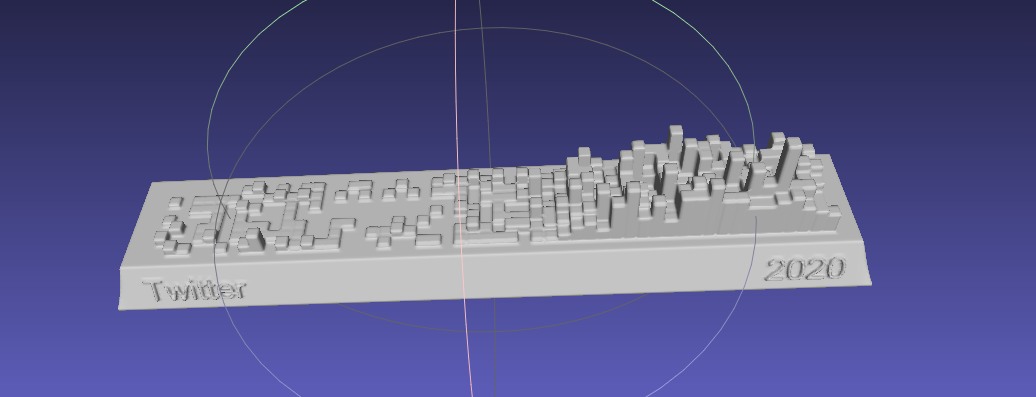
Support
- Strava
- Nintendo Switch
- GPX
- Duolingo
- Issue
- YouTube
- Bilibili
- GitHub
- GitLab
- Kindle
- WakaTime
- Dota2
- Nike
- Notion
- Garmin
- Forest
- Json
- Multiple
- Jike
- Summary
- Todoist
- OpenLanguage
- Apple Health
- ChatGPT
- NeoDB
- AutoSleep
Download
git clone https://github.com/yihong0618/GitHubPoster.git
pip install
pip3 install -U 'github_poster[all]'
Install(Python3.6+)
pip3 install -r requirements.txt
Use
The generated svg is in OUT_FOLDER, named with type (for now)
Different types are used as specified below:
--year 2021: You can specify a year (default) or a year range--year 2012-2021--special-number1 10 -- special_number2 20: By default, the number of different colors is automatically generated (special colors), you can also specify the color--special-color1 pink --special-color2 '#33C6A4': You can also specify the color--with-animation: You can add animation (add GOGOGO animation)--animation-time 14: you can control the animation time (default is 10s), use with--with-animation--with-skyline: You can save skylinestlfile (default skyline year is to_year),--skyline-with-name: set to print user name on model, use with--with-skyline--is-circular: With this command, the svg will be circular and with animation--without-type-name: Support for hiding the name of the build type in the title---stand-with-ukraine
Other parameters can be found with python3 -m github_poster <type> --help
GPX
Make your GPX GitHub poster
mv gpx files to GPX_FOLDER then run the code
python3 -m github_poster gpx --gpx_dir ~/blog/GPX_OUT/ --year 2013-2021
or pip
github_poster github_poster gpx --gpx_dir ~/blog/GPX_OUT/ --year 2013-2021
Strava
Make your Strava GitHub poster
- Sign in/Sign up Strava account
-
Open after successful Signin Strava Developers -> Create & Manage Your App
-
Create
My API Application: Enter the following information
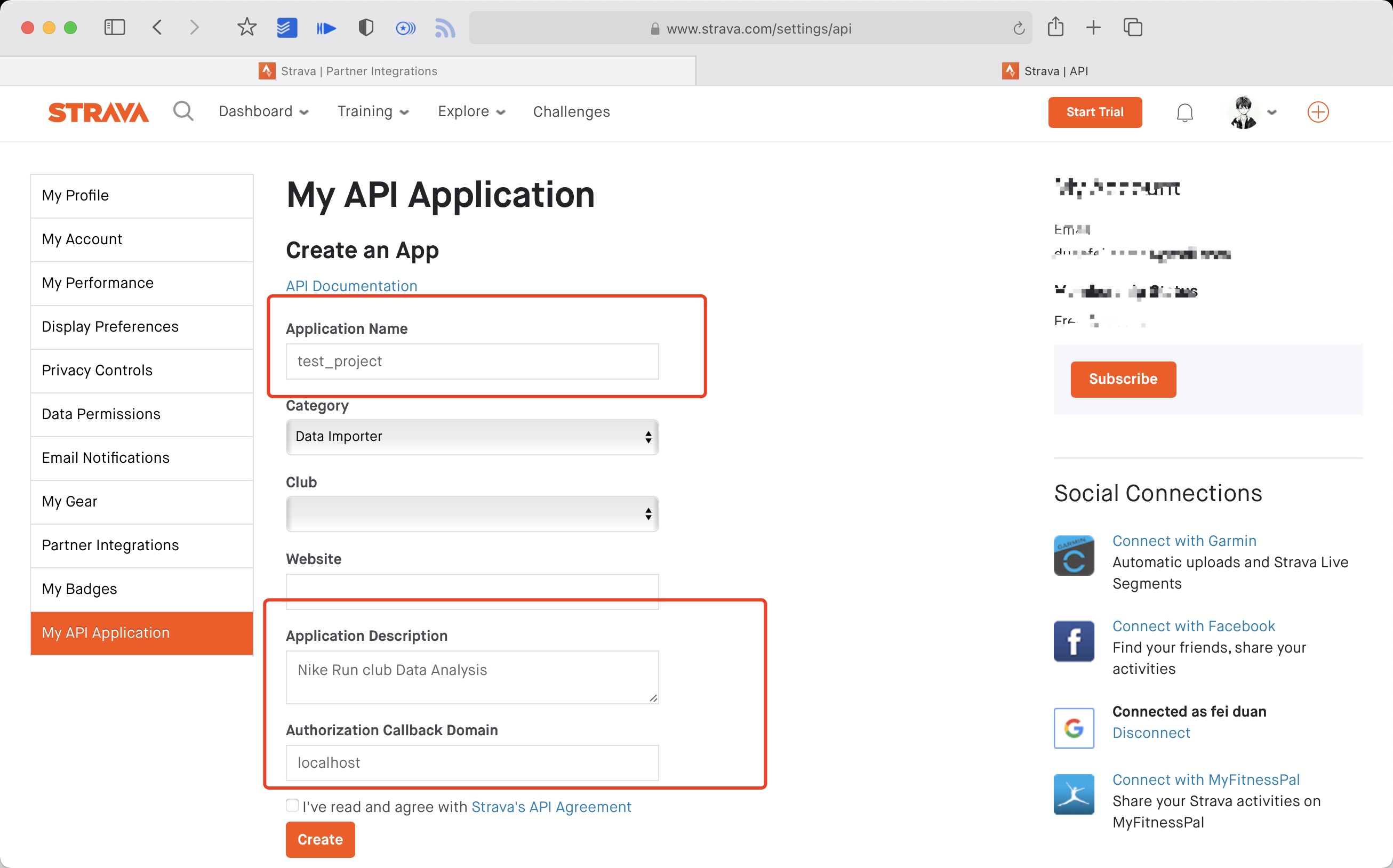 Created successfully:

- Use the link below to request all permissions: Replace
${your_id}in the link withMy API ApplicationClient ID
https://www.strava.com/oauth/authorize?client_id=${your_id}&response_type=code&redirect_uri=http://localhost/exchange_token&approval_prompt=force&scope=read_all,profile:read_all,activity:read_all,profile:write,activity:write
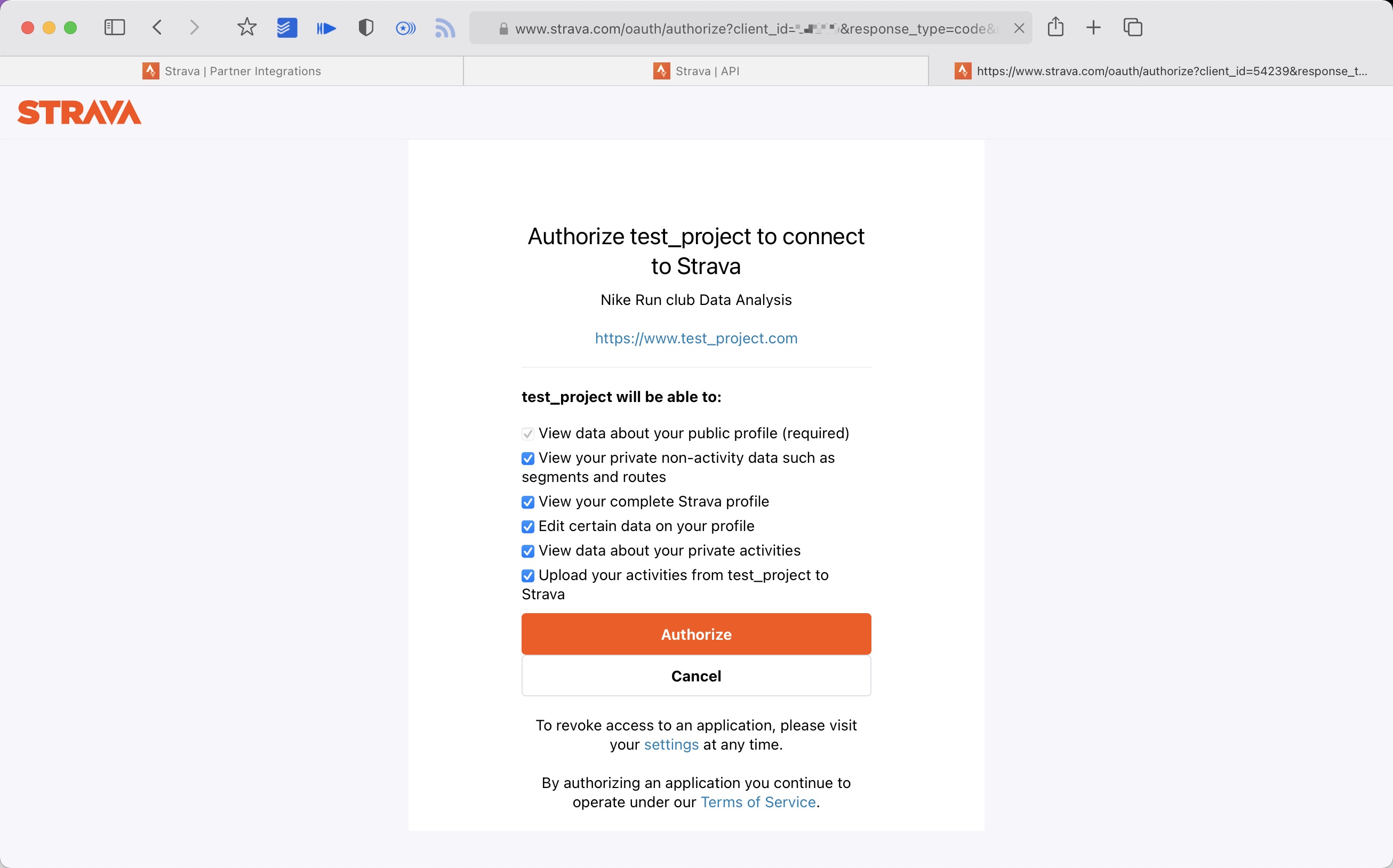
- Get the
codevalue in the link
example:
http://localhost/exchange_token?state=&code=1dab37edd9970971fb502c9efdd087f4f3471e6e&scope=read,activity:write,activity:read_all,profile:write,profile:read_all,read_all
code value:
1dab37edd9970971fb502c9efdd087f4f3471e6
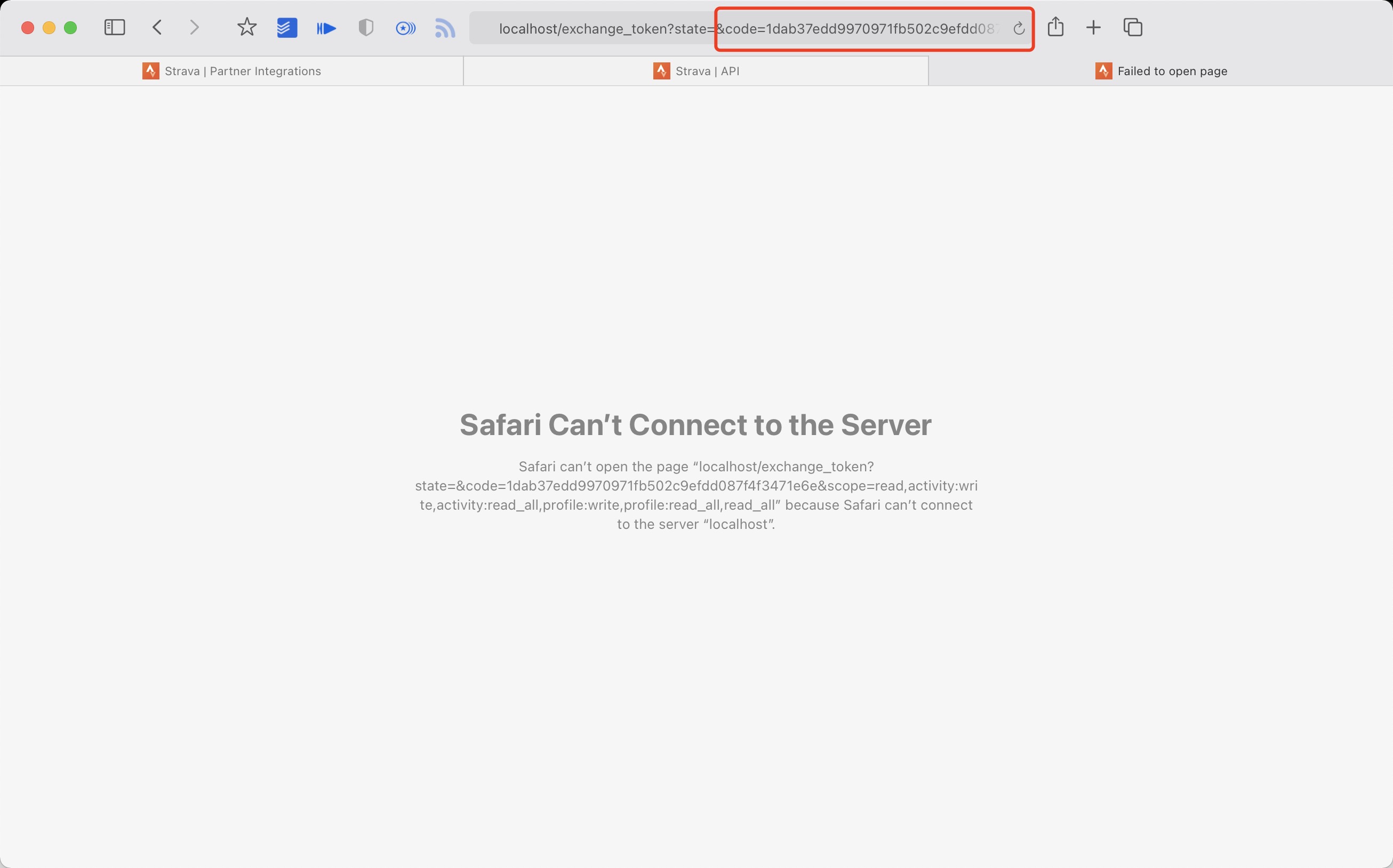
- Use
Client_id、Client_secret、Codegetrefresch_token: Execute inTerminal/iTerm
curl -X POST https://www.strava.com/oauth/token \
-F client_id=${Your Client ID} \
-F client_secret=${Your Client Secret} \
-F code=${Your Code} \
-F grant_type=authorization_code
example:
curl -X POST https://www.strava.com/oauth/token \
-F client_id=12345 \
-F client_secret=b21******d0bfb377998ed1ac3b0 \
-F code=d09******b58abface48003 \
-F grant_type=authorization_code

python3 -m github_poster --strava_client_id  ${client_id} --strava_client_secret ${client_secret} --strava_refresh_token ${refresh_token} --year 2012-2021
or pip
github_poster --strava_client_id  ${client_id} --strava_client_secret ${client_secret} --strava_refresh_token ${refresh_token} --year 2012-2021
NS
Make your Nintendo Switch GitHub poster
From APP(Nintendo Switch Parent Controls) using mitmproxy to get the session_token and devide _id
python3 -m github_poster ns --ns_session_token ${session_token} --ns_device_id ${device_id} --year 2020-2021
or pip
github_poster ns --ns_session_token ${session_token} --ns_device_id ${device_id} --year 2020-2021
Duolingo
Make your Duolingo GitHub poster
- login duolingo in broswer
- console
document.cookie.match(new RegExp('(^| )jwt_token=([^;]+)'))[0].slice(11)get duolingo_jwt
Find your duolingo id, F12 from XHR

python3 -m github_poster duolingo --duolingo_user_name ${duolingo_user_name}  --duolingo_jwt ${duolingo_jwt}  --year 2015-2021
or
github_poster duolingo --duolingo_user_name ${duolingo_user_name} --duolingo_jwt ${duolingo_jwt} --year 2015-2021
Issue
Make your Issue GitHub poster
Like my issue
    python3 -m github_poster issue --issue_number ${issue_number} --repo_name ${repo_name} --token ${github_token}
or
github_poster issue --issue_number ${issue_number} --repo_name ${repo_name} --token ${github_token}
LeetCode
Make your LeetCode GitHub poster
Find your LeetCode Cookie
python3 -m github_poster leetcode --leetcode_cookie ${leetcode_cookie} --year 2019-2021
or
github_poster leetcode --leetcode_cookie ${leetcode_cookie} --year 2019-2021
Youtube
Make your YouTube GitHub poster
Use Google History Takeout to download YouTube history data,choose json format,mv watch-history.json to IN-FOLDER then run the code
python3 -m github_poster youtube --year 2015-2021
or
github_poster youtube --year 2015-2021
Bilibili
Make your Bilibili GitHub poster
Find your Bilibili (XHR) cookie
python3 -m github_poster bilibili --cookie "${bilibili-cookie}"
or
github_poster bilibili --cookie "${bilibili-cookie}"
GitHub
Make your GitHub GitHub poster
Get your GitHub Name (in the url)
python3 -m github_poster github --github_user_name "${github_user_name}" --with-skyline
or
github_poster github --github_user_name "${github_user_name}" --with-skyline
GitLab
Make your GitLab GitLab poster
Get your GitLab Name (in the url)
python3 -m github_poster gitlab --gitlab_user_name "${gitlab_user_name}"
or
github_poster gitlab --gialab_user_name "${gitlab_user_name}"
For self-managed GitLab, specify the base url of your instance. You should use _gitlab_session from Cookies if sign in required.
s
python3 -m github_poster gitlab --gitlab_user_name "${gitlab_user_name}" --base_url "https://your-gitlab.com" --session "${gitlab_session}"
or
github_poster gitlab --gitlab_user_name "${gitlab_user_name}" --base_url "https://your-gitlab.com" --session "${gitlab_session}"
Kindle
Make your Kindle GitHub poster
Find your Amazon Cookie
python3 -m github_poster kindle --kindle_cookie ${kindle_cookie} --cn --year 2018-2021
or
github_poster kindle --kindle_cookie ${kindle_cookie} --cn --year 2018-2021
WakaTime
Make your WakaTime poster
Find your own WakaTime API Key at: WakaTime API Key
python -m github_poster wakatime --wakatime_key="your_wakatime_api_key" --year 2019-2021
or
github_poster wakatime --wakatime_key="your_wakatime_api_key" --year 2019-2021
Dota2
Make your Dota2 poster
Find your dota2_id, eg:Dendi's ID 70388657
Check your dota2_id(steamid32): https://steamid.xyz/.
Check your game data: https://api.opendota.com/api/players/{dota2_id}/matches.
more info: https://docs.opendota.com/#section/Introduction
python -m github_poster dota2 --dota2_id="your dota2 id" --year 2017-2018
or
github_poster dota2 --dota2_id="your dota2 id" --year 2017-2018
Nike
Make your Nike poster
ALL need to do outside GFW

-
Login from this website, open F12 -> XHR -> get the
refresh_tokenfrom login api. -
copy this
refresh_tokenand use it in GitHub Secrets or in command line
python3 -m github_poster nike --nike_refresh_token="your nike_refresh_token" --year 2012-2021
or
github_poster nike --nike_refresh_token="your nike_refresh_token" --year 2012-2021
Notion
Make your Notion poster
Get Notion Internal Integration Token(notion_token), see here for more details.
- Sign in Notion developers site
- Click 'New integration' to create a new token
- You can see
Internal Integration TokenbelowSecretsafter submit
Get Notion Database ID(database_id), see here for more details.
- Open the database as a full page in Notion
- Use the
Sharemenu toCopy link, and you'll get a URL looks likehttps://www.notion.so/{workspace_name}/{database_id}?v={view_id} - The part that corresponds to
{database_id}is the ID of your Notion Database
Note:The database need a property which type is Date, the value of it will be used to generate the poster.
The name of the date property should be set as option prop_name's value,default value is Datetime
python3 -m github_poster notion --notion_token="your notion_token" --database_id="your database_id" --prop_name="your prop_name"
or
github_poster notion --notion_token="your notion_token" --database_id="your database_id" --prop_name="your prop_name"
Garmin
Make your Garmin poster
需要填写 Garmin 的账号和密码
python3 -m github_poster garmin --garmin_user_name ${user_name} --garmin_password ${pass_word} --year 2016-2021 --special-color1 blue --special-color2 pink --me yihong0618 --cn
or
github_poster garmin --garmin_user_name ${user_name} --garmin_password ${pass_word} --year 2016-2021 --special-color1 blue --special-color2 pink --me yihong0618 --cn
Forest
Make your Forest GitHub poster
Need to add your Forest email and password
python3 -m github_poster forest --forest_email ${user_name} --forest_password ${pass_word} --year 2016-2021 --special-color1 blue --me yihong0618
or
github_poster forest --forest_email ${user_name} --forest_password ${pass_word} --year 2016-2021 --special-color1 blue --me yihong0618
Json
Make your Json(source data) types poster
make sure your json file format is like data.json in examples
python3 -m github_poster json --json_file "your json data file" --year 2019-2021 --me PythonHunter
or
github_poster json --json_file "your json data file" --year 2019-2021 --me PythonHunter
Multiple
Make your Multiple types poster
support multiple types
python3 -m github_poster multiple  --types "github, strava"  --github_user_name "github user name" --strava_client_id  "your strava client id"  --strava_client_secret "your strava client secret"  --strava_refresh_token "your strava refresh token"  --year 2020-2021
or
github_poster multiple  --types "github, strava" --github_user_name "github user name" --strava_client_id  "your strava client id"  --strava_client_secret "your strava client secret"  --strava_refresh_token "your strava refresh token"  --year 2020-2021
Summary
Make your Summary types poster
support summary types
Core symbols most depended-on inside this repo
make_special_numberShape
Languages
Modules by API surface
For agents
$ claude mcp add GitHubPoster \
  -- python -m otcore.mcp_server <graph>