github.com/yemount/pose-animator @main
Chat with this repoWhat it actually does AI analysis from the code graph — generated when you open this
README
Pose Animator
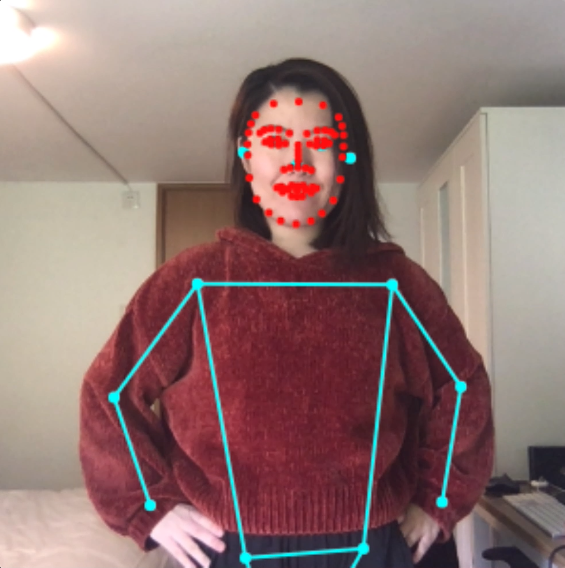
Pose Animator takes a 2D vector illustration and animates its containing curves in real-time based on the recognition result from PoseNet and FaceMesh. It borrows the idea of skeleton-based animation from computer graphics and applies it to vector characters.
This is running in the browser in realtime using TensorFlow.js. Check out more cool TF.js demos here.
This is not an officially supported Google product.


In skeletal animation a character is represented in two parts: 1. a surface used to draw the character, and 1. a hierarchical set of interconnected bones used to animate the surface.
In Pose Animator, the surface is defined by the 2D vector paths in the input SVG files. For the bone structure, Pose Animator provides a predefined rig (bone hierarchy) representation, designed based on the keypoints from PoseNet and FaceMesh. This bone structure’s initial pose is specified in the input SVG file, along with the character illustration, while the real time bone positions are updated by the recognition result from ML models.

// TODO: Add blog post link. For more details on its technical design please check out this blog post.
Demo 1: Camera feed
The camera demo animates a 2D avatar in real-time from a webcam video stream.
Demo 2: Static image
The static image demo shows the avatar positioned from a single image.
Build And Run
Install dependencies and prepare the build directory:
yarn
To watch files for changes, and launch a dev server:
yarn watch
Platform support
Demos are supported on Desktop Chrome and iOS Safari.
It should also run on Chrome on Android and potentially more Android mobile browsers though support has not been tested yet.
Animate your own design
- Download the sample skeleton SVG here.
- Create a new file in your vector graphics editor of choice. Copy the group named ‘skeleton’ from the above file into your working file. Note:
- Do not add, remove or rename the joints (circles) in this group. Pose Animator relies on these named paths to read the skeleton’s initial position. Missing joints will cause errors.
- However you can move the joints around to embed them into your illustration. See step 4.
- Create a new group and name it ‘illustration’, next to the ‘skeleton’ group. This is the group where you can put all the paths for your illustration.
- Flatten all subgroups so that ‘illustration’ only contains path elements.
- Composite paths are not supported at the moment.
- The working file structure should look like this:
[Layer 1]
    |---- skeleton
    |---- illustration
          |---- path 1
          |---- path 2
          |---- path 3
- Embed the sample skeleton in ‘skeleton’ group into your illustration by moving the joints around.
- Export the file as an SVG file.
- Open Pose Animator camera demo. Once everything loads, drop your SVG file into the browser tab. You should be able to see it come to life :D

Core symbols most depended-on inside this repo
setShape
Languages
Modules by API surface
Dependencies from manifests, versioned
For agents
$ claude mcp add pose-animator \
  -- python -m otcore.mcp_server <graph>