github.com/xdan/datetimepicker @2.5.20 sqlite
README
PLEASE. Help me update documentation.
Doc.tpl This file will be automatically displayed on the site
Installation
npm install jquery-datetimepicker
OR
yarn add jquery-datetimepicker
datetimepicker
==============
!!! The latest version of the options 'lang' obsolete. The language setting is now global. !!!
Use this:
jQuery.datetimepicker.setLocale('en');
jQuery Plugin Date and Time Picker
DateTimePicker

DatePicker

TimePicker

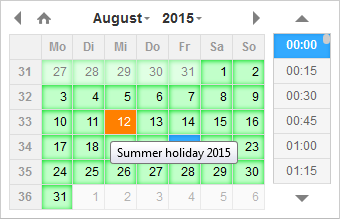
Options to highlight individual dates or periods


JS Build help
Requires Node and NPM Download and install node.js.
Install:
- Install
bowerglobally withnpm install -g bower. - Run
npm install. npm will look atpackage.jsonand automatically install the necessary dependencies. - Run
bower install, which installs front-end packages defined inbower.json.
Notice: If you use Bower v1.5.2, you will get error: The "main" field cannot contain minified files
You can regress to version 1.3.12
npm uninstall bower -gnpm install -g bower@1.3.12
Build:
First install npm requirements: npm install -g uglifycss concat-cli
Then build the files: npm run build
When build completed, you'll have the following files: - build/jquery.datetimepicker.full.js - browser file - build/jquery.datetimepicker.full.min.js - browser minified file - build/jquery.datetimepicker.min.js - amd module style minified file
Core symbols most depended-on inside this repo
$Shape
Languages
Modules by API surface
Dependencies from manifests, versioned
For agents
$ claude mcp add datetimepicker \
  -- python -m otcore.mcp_server <graph>