github.com/vt-vl-lab/3d-photo-inpainting @main sqlite
README
[CVPR 2020] 3D Photography using Context-aware Layered Depth Inpainting

[Paper] [Project Website] [Google Colab]
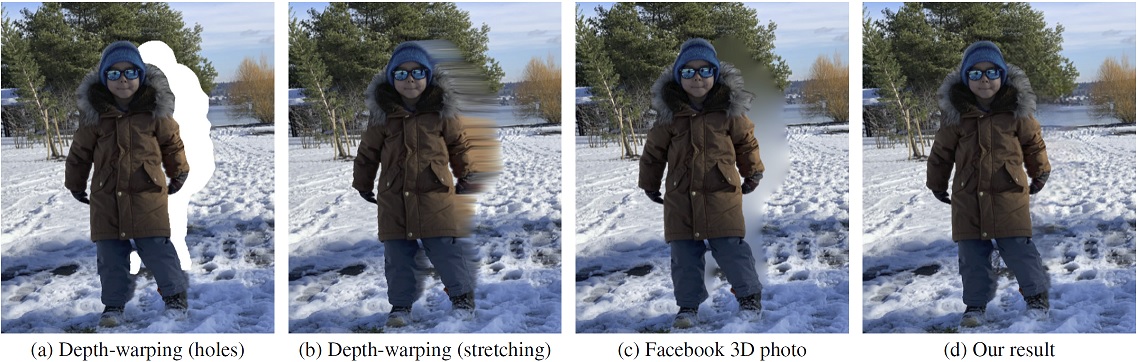
We propose a method for converting a single RGB-D input image into a 3D photo, i.e., a multi-layer representation for novel view synthesis that contains hallucinated color and depth structures in regions occluded in the original view. We use a Layered Depth Image with explicit pixel connectivity as underlying representation, and present a learning-based inpainting model that iteratively synthesizes new local color-and-depth content into the occluded region in a spatial context-aware manner. The resulting 3D photos can be efficiently rendered with motion parallax using standard graphics engines. We validate the effectiveness of our method on a wide range of challenging everyday scenes and show fewer artifacts when compared with the state-of-the-arts.
3D Photography using Context-aware Layered Depth Inpainting
Meng-Li Shih, Shih-Yang Su, Johannes Kopf, and Jia-Bin Huang
In IEEE Conference on Computer Vision and Pattern Recognition (CVPR), 2020.
Prerequisites
- Linux (tested on Ubuntu 18.04.4 LTS)
- Anaconda
- Python 3.7 (tested on 3.7.4)
- PyTorch 1.4.0 (tested on 1.4.0 for execution)
and the Python dependencies listed in requirements.txt
- To get started, please run the following commands:
bash
    conda create -n 3DP python=3.7 anaconda
    conda activate 3DP
    pip install -r requirements.txt
    conda install pytorch==1.4.0 torchvision==0.5.0 cudatoolkit==10.1.243 -c pytorch
- Next, please download the model weight using the following command:
bash
    chmod +x download.sh
    ./download.sh
Quick start
Please follow the instructions in this section.
This should allow to execute our results.
For more detailed instructions, please refer to DOCUMENTATION.md.
Execute
- Put
.jpgfiles (e.g., test.jpg) into theimagefolder.- E.g.,
image/moon.jpg
- E.g.,
- Run the following command
bash python main.py --config argument.yml- Note: The 3D photo generation process usually takes about 2-3 minutes depending on the available computing resources.
- The results are stored in the following directories:
- Corresponding depth map estimated by MiDaS
- E.g.
depth/moon.npy,depth/moon.png - User could edit
depth/moon.pngmanually.- Remember to set the following two flags as listed below if user wants to use manually edited
depth/moon.pngas input for 3D Photo.depth_format: '.png'require_midas: False
- Remember to set the following two flags as listed below if user wants to use manually edited
- E.g.
- Inpainted 3D mesh (Optional: User need to switch on the flag
save_ply)- E.g.
mesh/moon.ply
- E.g.
- Rendered videos with zoom-in motion
- E.g.
video/moon_zoom-in.mp4
- E.g.
- Rendered videos with swing motion
- E.g.
video/moon_swing.mp4
- E.g.
- Rendered videos with circle motion
- E.g.
video/moon_circle.mp4
- E.g.
- Rendered videos with dolly zoom-in effect
- E.g.
video/moon_dolly-zoom-in.mp4 - Note: We assume that the object of focus is located at the center of the image.
- E.g.
- Corresponding depth map estimated by MiDaS
- (Optional) If you want to change the default configuration. Please read
DOCUMENTATION.mdand modifiedargument.yml.
License
This work is licensed under MIT License. See LICENSE for details.
If you find our code/models useful, please consider citing our paper:
@inproceedings{Shih3DP20,
  author = {Shih, Meng-Li and Su, Shih-Yang and Kopf, Johannes and Huang, Jia-Bin},
  title = {3D Photography using Context-aware Layered Depth Inpainting},
  booktitle = {IEEE Conference on Computer Vision and Pattern Recognition (CVPR)},
  year = {2020}
}
Acknowledgments
- We thank Pratul Srinivasan for providing clarification of the method Srinivasan et al. CVPR 2019.
- We thank the author of Zhou et al. 2018, Choi et al. 2019, Mildenhall et al. 2019, Srinivasan et al. 2019, Wiles et al. 2020, Niklaus et al. 2019 for providing their implementations online.
- Our code builds upon EdgeConnect, MiDaS and pytorch-inpainting-with-partial-conv
Core symbols most depended-on inside this repo
catShape
Languages
Modules by API surface
Dependencies from manifests, versioned
For agents
$ claude mcp add 3d-photo-inpainting \
  -- python -m otcore.mcp_server <graph>