github.com/vouch/vouch-proxy @v0.48.0 sqlite
README
Vouch Proxy


An SSO solution for Nginx using the auth_request module. Vouch Proxy can protect all of your websites at once.
Vouch Proxy supports many OAuth and OIDC login providers and can enforce authentication to...
- GitHub
- GitHub Enterprise
- IndieAuth
- Okta
- Slack
- ADFS
- Azure AD
- Alibaba / Aliyun iDaas
- AWS Cognito
- Twitch
- Discord
- SecureAuth
- Gitea
- Keycloak
- OAuth2 Server Library for PHP
- HomeAssistant
- OpenStax
- Ory Hydra
- Nextcloud
- Pocket ID
- most other OpenID Connect (OIDC) providers
Please do let us know when you have deployed Vouch Proxy with your preffered IdP or library so we can update the list.
If Vouch is running on the same host as the Nginx reverse proxy the response time from the /validate endpoint to Nginx should be less than 1ms.
Table of Contents
- What Vouch Proxy Does...
- Installation and Configuration
- Vouch Proxy "in a path"
- Additional Nginx Configurations
- Configuration via Environmental Variables
- Tips, Tricks and Advanced Configurations
- Scopes and Claims
- Running from Docker
- Kubernetes Nginx Ingress
- Compiling from source and running the binary
- /login and /logout endpoint redirection
- Troubleshooting, Support and Feature Requests (Read this before submitting an issue at GitHub)
- I'm getting an infinite redirect loop which returns me to my IdP (Google/Okta/GitHub/...)
- Okay, I looked at the issues and have tried some things with my configs but it's still not working
- Contributing to Vouch Proxy
- Advanced Authorization Using OpenResty
- The flow of login and authentication using Google Oauth
What Vouch Proxy Does
Vouch Proxy (VP) forces visitors to login and authenticate with an IdP (such as one of the services listed above) before allowing them access to a website.
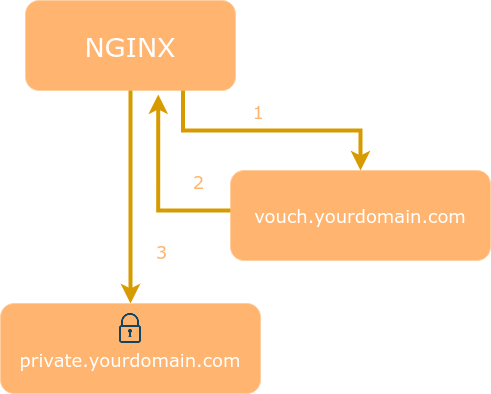
VP can also be used as a Single Sign On (SSO) solution to protect all web applications in the same domain.
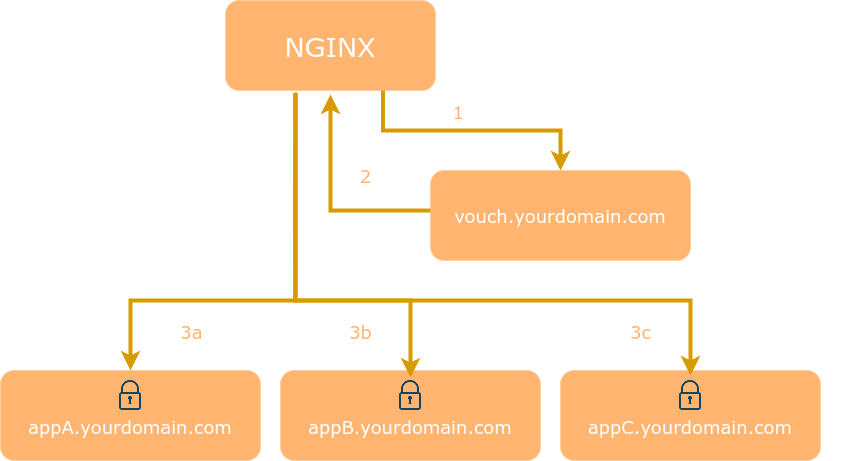
After a visitor logs in Vouch Proxy allows access to the protected websites for several hours. Every request is checked by VP to ensure that it is valid.
VP can send the visitor's email, name and other information which the IdP provides (including access tokens) to the web application as HTTP headers. VP can be used to replace application user management entirely.
Installation and Configuration
Vouch Proxy relies on the ability to share a cookie between the Vouch Proxy server and the application it's protecting. Typically this will be done by running Vouch on a subdomain such as vouch.yourdomain.com with apps running at app1.yourdomain.com and app2.yourdomain.com. The protected domain is .yourdomain.com and the Vouch Proxy cookie must be set in this domain by setting vouch.domains to include yourdomain.com or sometimes by setting vouch.cookie.domain to yourdomain.com.
cp ./config/config.yml_example_$OAUTH_PROVIDER ./config/config.yml- create OAuth credentials for Vouch Proxy at google or github, etc
- be sure to direct the callback URL to the Vouch Proxy
/authendpoint - configure Nginx...
The following Nginx config assumes..
- Nginx,
vouch.yourdomain.comandprotectedapp.yourdomain.comare running on the same server - both domains are served as
httpsand have valid certs (if not, change tolisten 80and set vouch.cookie.secure tofalse)
server {
    listen 443 ssl http2;
    server_name protectedapp.yourdomain.com;
    root /var/www/html/;

    ssl_certificate /etc/letsencrypt/live/protectedapp.yourdomain.com/fullchain.pem;
    ssl_certificate_key /etc/letsencrypt/live/protectedapp.yourdomain.com/privkey.pem;

    # send all requests to the `/validate` endpoint for authorization
    auth_request /validate;

    location = /validate {
      # forward the /validate request to Vouch Proxy
      proxy_pass http://127.0.0.1:9090/validate;
      # be sure to pass the original host header
      proxy_set_header Host $http_host;

      # Vouch Proxy only acts on the request headers
      proxy_pass_request_body off;
      proxy_set_header Content-Length "";

      # optionally add X-Vouch-User as returned by Vouch Proxy along with the request
      auth_request_set $auth_resp_x_vouch_user $upstream_http_x_vouch_user;

      # optionally add X-Vouch-IdP-Claims-* custom claims you are tracking
      #    auth_request_set $auth_resp_x_vouch_idp_claims_groups $upstream_http_x_vouch_idp_claims_groups;
      #    auth_request_set $auth_resp_x_vouch_idp_claims_given_name $upstream_http_x_vouch_idp_claims_given_name;
      # optinally add X-Vouch-IdP-AccessToken or X-Vouch-IdP-IdToken
      #    auth_request_set $auth_resp_x_vouch_idp_accesstoken $upstream_http_x_vouch_idp_accesstoken;
      #    auth_request_set $auth_resp_x_vouch_idp_idtoken $upstream_http_x_vouch_idp_idtoken;

      # these return values are used by the @error401 call
      auth_request_set $auth_resp_jwt $upstream_http_x_vouch_jwt;
      auth_request_set $auth_resp_err $upstream_http_x_vouch_err;
      auth_request_set $auth_resp_failcount $upstream_http_x_vouch_failcount;

      # Vouch Proxy can run behind the same Nginx reverse proxy
      # may need to comply to "upstream" server naming
      # proxy_pass http://vouch.yourdomain.com/validate;
      # proxy_set_header Host $http_host;
    }

    # if validate returns `401 not authorized` then forward the request to the error401block
    error_page 401 = @error401;

    location @error401 {
        # redirect to Vouch Proxy for login
        return 302 https://vouch.yourdomain.com/login?url=$scheme://$http_host$request_uri&vouch-failcount=$auth_resp_failcount&X-Vouch-Token=$auth_resp_jwt&error=$auth_resp_err;
        # you usually *want* to redirect to Vouch running behind the same Nginx config proteced by https
        # but to get started you can just forward the end user to the port that vouch is running on
        # return 302 http://vouch.yourdomain.com:9090/login?url=$scheme://$http_host$request_uri&vouch-failcount=$auth_resp_failcount&X-Vouch-Token=$auth_resp_jwt&error=$auth_resp_err;
    }

    location / {
      # forward authorized requests to your service protectedapp.yourdomain.com
      proxy_pass http://127.0.0.1:8080;
      # you may need to set these variables in this block as per https://github.com/vouch/vouch-proxy/issues/26#issuecomment-425215810
      #    auth_request_set $auth_resp_x_vouch_user $upstream_http_x_vouch_user;
      #    auth_request_set $auth_resp_x_vouch_idp_claims_groups $upstream_http_x_vouch_idp_claims_groups;
      #    auth_request_set $auth_resp_x_vouch_idp_claims_given_name $upstream_http_x_vouch_idp_claims_given_name;

      # set user header (usually an email)
      proxy_set_header X-Vouch-User $auth_resp_x_vouch_user;
      # optionally pass any custom claims you are tracking
      #     proxy_set_header X-Vouch-IdP-Claims-Groups $auth_resp_x_vouch_idp_claims_groups;
      #     proxy_set_header X-Vouch-IdP-Claims-Given_Name $auth_resp_x_vouch_idp_claims_given_name;
      # optionally pass the accesstoken or idtoken
      #     proxy_set_header X-Vouch-IdP-AccessToken $auth_resp_x_vouch_idp_accesstoken;
      #     proxy_set_header X-Vouch-IdP-IdToken $auth_resp_x_vouch_idp_idtoken;
    }
}
If Vouch is configured behind the same nginx reverseproxy (perhaps so you can configure ssl) be sure to pass the Host header properly, otherwise the JWT cookie cannot be set into the domain
server {
    listen 443 ssl http2;
    server_name vouch.yourdomain.com;
    ssl_certificate /etc/letsencrypt/live/vouch.yourdomain.com/fullchain.pem;
    ssl_certificate_key /etc/letsencrypt/live/vouch.yourdomain.com/privkey.pem;

    location / {
      proxy_pass http://127.0.0.1:9090;
      # be sure to pass the original host header
      proxy_set_header Host $http_host;
    }
}
Vouch Proxy "in a path"
As of v0.33.0 Vouch Proxy can be served within an Nginx location (path) by configuring vouch.document_root: /vp_in_a_path
This avoids the need to setup a separate domain for Vouch Proxy such as vouch.yourdomain.com. For example VP login will be served from https://protectedapp.yourdomain.com/vp_in_a_path/login
server {
    listen 443 ssl http2;
    server_name protectedapp.yourdomain.com;

    ssl_certificate /etc/letsencrypt/live/protectedapp.yourdomain.com/fullchain.pem;
    ssl_certificate_key /etc/letsencrypt/live/protectedapp.yourdomain.com/privkey.pem;

    # This location serves all Vouch Proxy endpoints as /vp_in_a_path/$uri
    #   including /vp_in_a_path/validate, /vp_in_a_path/login, /vp_in_a_path/logout, /vp_in_a_path/auth, /vp_in_a_path/auth/$STATE, etc
    location /vp_in_a_path {
      proxy_pass http://127.0.0.1:9090; # must not! have a slash at the end
      proxy_set_header Host $http_host;
      proxy_pass_request_body off;
      proxy_set_header Content-Length "";

      # these return values are used by the @error401 call
      auth_request_set $auth_resp_jwt $upstream_http_x_vouch_jwt;
      auth_request_set $auth_resp_err $upstream_http_x_vouch_err;
      auth_request_set $auth_resp_failcount $upstream_http_x_vouch_failcount;
    }

    # if /vp_in_a_path/validate returns `401 not authorized` then forward the request to the error401block
    error_page 401 = @error401;

    location @error401 {
        # redirect to Vouch Proxy for login
        return 302 https://protectedapp.yourdomain.com/vp_in_a_path/login?url=$scheme://$http_host$request_uri&vouch-failcount=$auth_resp_failcount&X-Vouch-Token=$auth_resp_jwt&error=$auth_resp_err;
    }

    location / {
      auth_request /vp_in_a_path/validate;
      proxy_pass http://127.0.0.1:8080;
      # see the Nginx config above for additional headers which can be set from Vouch Proxy
    }
}
Additional Nginx Configurations
Additional Nginx configurations can be found in the examples directory.
Configuring via Environmental Variables
Here's a minimal setup using Google's OAuth...
```bash VOUCH_DOMAINS=yourdomain.com \ OAUTH_PROVIDER=google \ OAUTH_CLIENT_ID=1234 \ OAUTH_CLIENT_SECRET=secretsecret \ OAUTH_CALLBACK_URL=https://vouch.yourdomain.com/auth
Extension points exported contracts — how you extend this code
UserI (Interface)Core symbols most depended-on inside this repo
HeaderShape
Languages
Modules by API surface
Dependencies from manifests, versioned
For agents
$ claude mcp add vouch-proxy \
  -- python -m otcore.mcp_server <graph>