github.com/vllm-project/vllm-omni @v0.22.0 sqlite
README
<img alt="vllm-omni" src="https://raw.githubusercontent.com/vllm-project/vllm-omni/refs/heads/main/docs/source/logos/vllm-omni-logo.png" width=55%>
Easy, fast, and cheap omni-modality model serving for everyone
| Documentation | DeepWiki | User Forum | Developer Slack | WeChat | Paper | Slides |

Latest News 🔥 - [2026/05] We released 0.20.0 - refreshes the serving/runtime stack for large-scale omni workloads, and improves diffusion model performance, quantization, and hardware readiness across CUDA, ROCm, MUSA, NPU, and XPU backends. - [2026/03] We released 0.18.0 - strengthens the core runtime through a large entrypoint refactor and scheduler/runtime cleanups, expands unified quantization and diffusion execution, broadens multimodal model coverage, and improves production readiness across audio, omni, image, video, RL, and multi-platform deployments. - [2026/03] Check out our first public project deepdive at the vLLM Hong Kong Meetup! - [2026/03] vllm-omni-skills is a community-driven collection of AI assistant skills that help developers work with vLLM-Omni more effectively. These skills can be used with popular agentic AI coding assistants like Cursor IDE, Claude, Codex, and more. - [2026/02] We released 0.16.0 - A major alignment + capability release that rebases onto upstream vLLM v0.16.0 and significantly expands performance, distributed execution, and production readiness across Qwen3-Omni / Qwen3-TTS, Bagel, MiMo-Audio, GLM-Image and the Diffusion (DiT) image/video stack—while also improving platform coverage (CUDA / ROCm / NPU / XPU), CI quality, and documentation. - [2026/02] We released 0.14.0 - This is the first stable release of vLLM-Omni that expands Omni’s diffusion / image-video generation and audio / TTS stack, improves distributed execution and memory efficiency, and broadens platform/backend coverage (GPU/ROCm/NPU/XPU). It also brings meaningful upgrades to serving APIs, profiling & benchmarking, and overall stability. Please check our latest paper for architecture design and performance results. - [2025/11] vLLM community officially released vllm-project/vllm-omni in order to support omni-modality models serving.
About
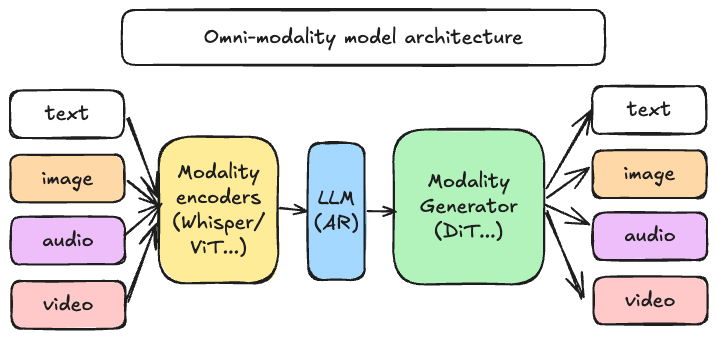
vLLM was originally designed to support large language models for text-based autoregressive generation tasks. vLLM-Omni is a framework that extends its support for omni-modality model inference and serving:
- Omni-modality: Text, image, video, and audio data processing
- Non-autoregressive Architectures: extend the AR support of vLLM to Diffusion Transformers (DiT) and other parallel generation models
-
Heterogeneous outputs: from traditional text generation to multimodal outputs
vLLM-Omni is fast with:
- State-of-the-art AR support by leveraging efficient KV cache management from vLLM
- Pipelined stage execution overlapping for high throughput performance
- Fully disaggregation based on OmniConnector and dynamic resource allocation across stages
vLLM-Omni is flexible and easy to use with:
- Heterogeneous pipeline abstraction to manage complex model workflows
- Seamless integration with popular Hugging Face models
- Tensor, pipeline, data and expert parallelism support for distributed inference
- Streaming outputs
- OpenAI-compatible API server
vLLM-Omni seamlessly supports most popular open-source models on HuggingFace, including:
- Omni-modality models (e.g. Qwen-Omni)
- Multi-modality generation models (e.g. Qwen-Image)
Getting Started
Visit our documentation to learn more.
Contributing
We welcome and value any contributions and collaborations. Please check out Contributing to vLLM-Omni for how to get involved.
Citation
If you use vLLM-Omni for your research, please cite our paper:
@article{yin2026vllmomni,
  title={vLLM-Omni: Fully Disaggregated Serving for Any-to-Any Multimodal Models},
  author={Peiqi Yin, Jiangyun Zhu, Han Gao, Chenguang Zheng, Yongxiang Huang, Taichang Zhou, Ruirui Yang, Weizhi Liu, Weiqing Chen, Canlin Guo, Didan Deng, Zifeng Mo, Cong Wang, James Cheng, Roger Wang, Hongsheng Liu},
  journal={arXiv preprint arXiv:2602.02204},
  year={2026}
}
Join the Community
Feel free to ask questions, provide feedbacks and discuss with fellow users of vLLM-Omni in #sig-omni slack channel at slack.vllm.ai or vLLM user forum at discuss.vllm.ai.
Star History
License
Apache License 2.0, as found in the LICENSE file.
Core symbols most depended-on inside this repo
add_argumentShape
Languages
Modules by API surface
For agents
$ claude mcp add vllm-omni \
  -- python -m otcore.mcp_server <graph>