github.com/trentm/node-bunyan @2.0.5 sqlite
README


Bunyan is a simple and fast JSON logging library for node.js services:
var bunyan = require('bunyan');
var log = bunyan.createLogger({name: "myapp"});
log.info("hi");
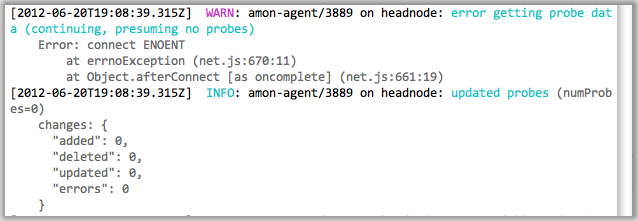
and a bunyan CLI tool for nicely viewing those logs:
Manifesto: Server logs should be structured. JSON's a good format. Let's do
that. A log record is one line of JSON.stringify'd output. Let's also
specify some common names for the requisite and common fields for a log
record (see below).
Table of Contents
- Current Status
- Installation
- Features
- Introduction
- Constructor API
- Log Method API
- CLI Usage
- Streams Introduction
- log.child
- Serializers
- src
- Levels
- Level suggestions
- Log Record Fields
- Core fields
- Recommended/Best Practice Fields
- Other fields to consider
- Streams
- Adding a Stream
- stream errors
- stream type:
stream - stream type:
file - stream type:
rotating-file - stream type:
raw raw+ RingBuffer Stream- third-party streams
- Runtime log snooping via DTrace
- DTrace examples
- Runtime environments
- Browserify
- Webpack
- Versioning
- License
- See Also
Current Status
Stable. I do my best to follow semver: i.e. you should only need to worry about code breaking for a major version bump. Bunyan currently supports node 0.10 and greater. Follow @trentmick for updates to Bunyan.
There is an email discussion list bunyan-logging@googlegroups.com, also as a forum in the browser.
Active branches:
- "1.x" is for 1.x maintenance work, if any. 1.x releases are still "latest" in
npm.
- "master" is currently for coming Bunyan 2.x work. For now, 2.x releases are
published to npm with the "beta" tag, meaning that npm install bunyan is
still 1.x for now. To install 2.x use npm install bunyan@2 or
npm install bunyan@beta.
Installation
npm install bunyan
Tip: The bunyan CLI tool is written to be compatible (within reason) with
all versions of Bunyan logs. Therefore you might want to npm install -g bunyan
to get the bunyan CLI on your PATH, then use local bunyan installs for
node.js library usage of bunyan in your apps.
Tip: Installing without optional dependencies can dramatically reduce
bunyan's install size. dtrace-provider is used for dtrace features,
mv is used for RotatingFileStream, and moment is used for local time.
If you don't need these features, consider installing with the
--no-optional flag.
Features
- elegant log method API
- extensible streams system for controlling where log records go (to a stream, to a file, log file rotation, etc.)
bunyanCLI for pretty-printing and filtering of Bunyan logs- simple include of log call source location (file, line, function) with
src: true - lightweight specialization of Logger instances with
log.child - custom rendering of logged objects with "serializers"
- Runtime log snooping via DTrace support
- Support for a few runtime environments: Node.js, Browserify, Webpack, NW.js.
Introduction
Like most logging libraries you create a Logger instance and call methods named after the logging levels:
// hi.js
var bunyan = require('bunyan');
var log = bunyan.createLogger({name: 'myapp'});
log.info('hi');
log.warn({lang: 'fr'}, 'au revoir');
All loggers must provide a "name". This is somewhat akin to the log4j logger "name", but Bunyan doesn't do hierarchical logger names.
Bunyan log records are JSON. A few fields are added automatically: "pid", "hostname", "time" and "v".
$ node hi.js
{"name":"myapp","hostname":"banana.local","pid":40161,"level":30,"msg":"hi","time":"2013-01-04T18:46:23.851Z","v":0}
{"name":"myapp","hostname":"banana.local","pid":40161,"level":40,"lang":"fr","msg":"au revoir","time":"2013-01-04T18:46:23.853Z","v":0}
Constructor API
var bunyan = require('bunyan');
var log = bunyan.createLogger({
    name: <string>,                     // Required
    level: <level name or number>,      // Optional, see "Levels" section
    stream: <node.js stream>,           // Optional, see "Streams" section
    streams: [<bunyan streams>, ...],   // Optional, see "Streams" section
    serializers: <serializers mapping>, // Optional, see "Serializers" section
    src: <boolean>,                     // Optional, see "src" section

    // Any other fields are added to all log records as is.
    foo: 'bar',
    ...
});
Log Method API
The example above shows two different ways to call log.info(...). The
full API is:
log.info();     // Returns a boolean: is the "info" level enabled?
                // This is equivalent to `log.isInfoEnabled()` or
                // `log.isEnabledFor(INFO)` in log4j.

log.info('hi');                     // Log a simple string message (or number).
log.info('hi %s', bob, anotherVar); // Uses `util.format` for msg formatting.

log.info({foo: 'bar'}, 'hi');
                // The first field can optionally be a "fields" object, which
                // is merged into the log record.

log.info(err);  // Special case to log an `Error` instance to the record.
                // This adds an "err" field with exception details
                // (including the stack) and sets "msg" to the exception
                // message.
log.info(err, 'more on this: %s', more);
                // ... or you can specify the "msg".

log.info({foo: 'bar', err: err}, 'some msg about this error');
                // To pass in an Error *and* other fields, use the `err`
                // field name for the Error instance **and ensure your logger
                // has a `err` serializer.** One way to ensure the latter is:
                //      var log = bunyan.createLogger({
                //          ...,
                //          serializers: bunyan.stdSerializers
                //      });
                // See the "Serializers" section below for details.
Note that this implies you cannot blindly pass any object as the first
argument to log it because that object might include fields that collide with
Bunyan's core record fields. In other words,
log.info(mywidget) may not yield what you expect. Instead of a string
representation of mywidget that other logging libraries may give you, Bunyan
will try to JSON-ify your object. It is a Bunyan best practice to always give a
field name to included objects, e.g.:
log.info({widget: mywidget}, ...)
This will dove-tail with Bunyan serializer support, discussed later.
The same goes for all of Bunyan's log levels: log.trace, log.debug,
log.info, log.warn, log.error, and log.fatal. See the levels
section below for details and suggestions.
CLI Usage
Bunyan log output is a stream of JSON objects. This is great for processing,
but not for reading directly. A bunyan tool is provided for
pretty-printing bunyan logs and for filtering (e.g.
| bunyan -c 'this.foo == "bar"'). Using our example above:
$ node hi.js | ./node_modules/.bin/bunyan
[2013-01-04T19:01:18.241Z]  INFO: myapp/40208 on banana.local: hi
[2013-01-04T19:01:18.242Z]  WARN: myapp/40208 on banana.local: au revoir (lang=fr)
See the screenshot above for an example of the default coloring of rendered
log output. That example also shows the nice formatting automatically done for
some well-known log record fields (e.g. req is formatted like an HTTP request,
res like an HTTP response, err like an error stack trace).
One interesting feature is filtering of log content, which can be useful for digging through large log files or for analysis. We can filter only records above a certain level:
$ node hi.js | bunyan -l warn
[2013-01-04T19:08:37.182Z]  WARN: myapp/40353 on banana.local: au revoir (lang=fr)
Or filter on the JSON fields in the records (e.g. only showing the French records in our contrived example):
$ node hi.js | bunyan -c 'this.lang == "fr"'
[2013-01-04T19:08:26.411Z]  WARN: myapp/40342 on banana.local: au revoir (lang=fr)
See bunyan --help for other facilities.
Streams Introduction
By default, log output is to stdout and at the "info" level. Explicitly that looks like:
var log = bunyan.createLogger({
    name: 'myapp',
    stream: process.stdout,
    level: 'info'
});
That is an abbreviated form for a single stream. You can define multiple streams at different levels.
var log = bunyan.createLogger({
  name: 'myapp',
  streams: [
    {
      level: 'info',
      stream: process.stdout            // log INFO and above to stdout
    },
    {
      level: 'error',
      path: '/var/tmp/myapp-error.log'  // log ERROR and above to a file
    }
  ]
});
More on streams in the Streams section below.
log.child
Bunyan has a concept of a child logger to specialize a logger for a
sub-component of your application, i.e. to create a new logger with
additional bound fields that will be included in its log records. A child
logger is created with log.child(...).
In the following example, logging on a "Wuzzle" instance's this.log will
be exactly as on the parent logger with the addition of the widget_type
field:
var bunyan = require('bunyan');
var log = bunyan.createLogger({name: 'myapp'});

function Wuzzle(options) {
    this.log = options.log.child({widget_type: 'wuzzle'});
    this.log.info('creating a wuzzle')
}
Wuzzle.prototype.woos = function () {
    this.log.warn('This wuzzle is woosey.')
}

log.info('start');
var wuzzle = new Wuzzle({log: log});
wuzzle.woos();
log.info('done');
Running that looks like (raw):
$ node myapp.js
{"name":"myapp","hostname":"myhost","pid":34572,"level":30,"msg":"start","time":"2013-01-04T07:47:25.814Z","v":0}
{"name":"myapp","hostname":"myhost","pid":34572,"widget_type":"wuzzle","level":30,"msg":"creating a wuzzle","time":"2013-01-04T07:47:25.815Z","v":0}
{"name":"myapp","hostname":"myhost","pid":34572,"widget_type":"wuzzle","level":40,"msg":"This wuzzle is woosey.","time":"2013-01-04T07:47:25.815Z","v":0}
{"name":"myapp","hostname":"myhost","pid":34572,"level":30,"msg":"done","time":"2013-01-04T07:47:25.816Z","v":0}
And with the bunyan CLI (using the "short" output mode):
$ node myapp.js  | bunyan -o short
07:46:42.707Z  INFO myapp: start
07:46:42.709Z  INFO myapp: creating a wuzzle (widget_type=wuzzle)
07:46:42.709Z  WARN myapp: This wuzzle is woosey. (widget_type=wuzzle)
07:46:42.709Z  INFO myapp: done
A more practical example is in the
node-restify web framework.
Restify uses Bunyan for its logging. One feature of its integration, is that
if server.use(restify.requestLogger()) is used, each restify request handler
includes a req.log logger that is:
log.child({req_id: <unique request id>}, true)
Apps using restify can then use req.log and have all such log records
include the unique request id (as "req_id"). Handy.
Serializers
Bunyan has a concept of "serializer" functions to produce a JSON-able object from a JavaScript object, so you can easily do the following:
log.info({req: <request object>}, 'something about handling this request');
and have the req entry in the log record be just a reasonable subset of
<request object> fields (or computed data about those fields).
A logger instance can have a serializers mapping of log record field name
("req" in this example) to a serializer function. When creating the log record,
Bunyan will call the serializer function for top-level fields of that name. An
example:
function reqSerializer(req) {
    return {
        method: req.method,
        url: req.url,
        headers: req.headers
    };
}
var log = bunyan.createLogger({
    name: 'myapp',
    serializers: {
        req: reqSerializer
    }
});
Typically serializers are added to a logger at creation time via:
var log = bunyan.createLogger({
    name: 'myapp',
    serializers: {
        foo: function fooSerializer(foo) { ... },
        ...
    }
});

// or
var log = bunyan.createLogger({
    name: 'myapp',
    serializers: bunyan.stdSerializers
});
Serializers can also be added after creation via <logger>.addSerializers(...),
e.g.:
```js var log = bunyan.createLogger({name: 'myapp'}); log.addSerializers({req: r
Core symbols most depended-on inside this repo
runShape
Languages
Modules by API surface
Dependencies from manifests, versioned
For agents
$ claude mcp add node-bunyan \
  -- python -m otcore.mcp_server <graph>