github.com/torchgeo/torchgeo @v0.9.0 sqlite
README

TorchGeo is a PyTorch domain library, similar to torchvision, providing datasets, samplers, transforms, and pre-trained models specific to geospatial data.
The goal of this library is to make it simple:
- for machine learning experts to work with geospatial data, and
- for remote sensing experts to explore machine learning solutions.
Community:





Packaging:



Testing:


Installation
The recommended way to install TorchGeo is with pip:
pip install torchgeo
For conda and spack installation instructions, see the documentation.
Documentation
You can find the documentation for TorchGeo on ReadTheDocs. This includes API documentation, contributing instructions, and several tutorials. For more details, check out our paper, blog post, and YouTube channel.
<a href="https://www.youtube.com/watch?v=0HfykJa-foE">
    <img src="https://img.youtube.com/vi/0HfykJa-foE/0.jpg" style="width:49%;">
</a>
<a href="https://www.youtube.com/watch?v=ET8Hb_HqNJQ">
    <img src="https://img.youtube.com/vi/ET8Hb_HqNJQ/0.jpg" style="width:49%;">
</a>
Example Usage
The following sections give basic examples of what you can do with TorchGeo.
First we'll import various classes and functions used in the following sections:
from lightning.pytorch import Trainer
from torch.utils.data import DataLoader

from torchgeo.datamodules import InriaAerialImageLabelingDataModule
from torchgeo.datasets import CDL, Landsat7, Landsat8, VHR10, stack_samples
from torchgeo.samplers import RandomGeoSampler
from torchgeo.trainers import SemanticSegmentationTask
Geospatial datasets and samplers
Many remote sensing applications involve working with geospatial datasets—datasets with geographic metadata. These datasets can be challenging to work with due to the sheer variety of data. Geospatial imagery is often multispectral with a different number of spectral bands and spatial resolution for every satellite. In addition, each file may be in a different coordinate reference system (CRS), requiring the data to be reprojected into a matching CRS.
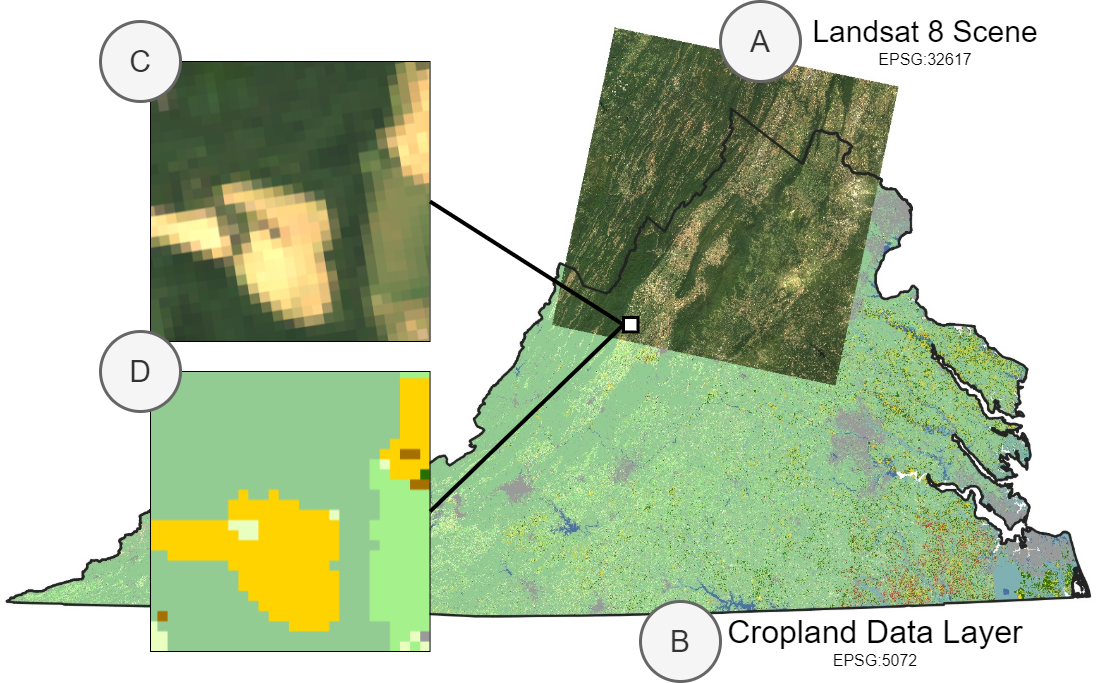
In this example, we show how easy it is to work with geospatial data and to sample small image patches from a combination of Landsat and Cropland Data Layer (CDL) data using TorchGeo. First, we assume that the user has Landsat 7 and 8 imagery downloaded. Since Landsat 8 has more spectral bands than Landsat 7, we'll only use the bands that both satellites have in common. We'll create a single dataset including all images from both Landsat 7 and 8 data by taking the union between these two datasets.
landsat7 = Landsat7(paths="...", bands=["B1", ..., "B7"])
landsat8 = Landsat8(paths="...", bands=["B2", ..., "B8"])
landsat = landsat7 | landsat8
Next, we take the intersection between this dataset and the CDL dataset. We want to take the intersection instead of the union to ensure that we only sample from regions that have both Landsat and CDL data. Note that we can automatically download and checksum CDL data. Also note that each of these datasets may contain files in different coordinate reference systems (CRS) or resolutions, but TorchGeo automatically ensures that a matching CRS and resolution is used.
cdl = CDL(paths="...", download=True, checksum=True)
dataset = landsat & cdl
This dataset can now be used with a PyTorch data loader. Unlike benchmark datasets, geospatial datasets often include very large images. For example, the CDL dataset consists of a single image covering the entire continental United States. In order to sample from these datasets using geospatial coordinates, TorchGeo defines a number of samplers. In this example, we'll use a random sampler that returns 256 x 256 pixel images and 10,000 samples per epoch. We also use a custom collation function to combine each sample dictionary into a mini-batch of samples.
sampler = RandomGeoSampler(dataset, size=256, length=10000)
dataloader = DataLoader(dataset, batch_size=128, sampler=sampler, collate_fn=stack_samples)
This data loader can now be used in your normal training/evaluation pipeline.
for batch in dataloader:
    image = batch["image"]
    mask = batch["mask"]

    # train a model, or make predictions using a pre-trained model
Many applications involve intelligently composing datasets based on geospatial metadata like this. For example, users may want to:
- Combine datasets for multiple image sources and treat them as equivalent (e.g., Landsat 7 and 8)
- Combine datasets for disparate geospatial locations (e.g., Chesapeake NY and PA)
These combinations require that all queries are present in at least one dataset, and can be created using a UnionDataset. Similarly, users may want to:
- Combine image and target labels and sample from both simultaneously (e.g., Landsat and CDL)
- Combine datasets for multiple image sources for multimodal learning or data fusion (e.g., Landsat and Sentinel)
These combinations require that all queries are present in both datasets, and can be created using an IntersectionDataset. TorchGeo automatically composes these datasets for you when you use the intersection (&) and union (|) operators.
Benchmark datasets
TorchGeo includes a number of benchmark datasets—datasets that include both input images and target labels. This includes datasets for tasks like image classification, regression, semantic segmentation, object detection, instance segmentation, change detection, and more.
If you've used torchvision before, these datasets should seem very familiar. In this example, we'll create a dataset for the Northwestern Polytechnical University (NWPU) very-high-resolution ten-class (VHR-10) geospatial object detection dataset. This dataset can be automatically downloaded, checksummed, and extracted, just like with torchvision.
from torch.utils.data import DataLoader

from torchgeo.datamodules.utils import collate_fn_detection
from torchgeo.datasets import VHR10

# Initialize the dataset
dataset = VHR10(root="...", download=True, checksum=True)

# Initialize the dataloader with the custom collate function
dataloader = DataLoader(
    dataset,
    batch_size=128,
    shuffle=True,
    num_workers=4,
    collate_fn=collate_fn_detection,
)

# Training loop
for batch in dataloader:
    image = batch["image"]  # list of images
    bbox_xyxy = batch["bbox_xyxy"]  # list of boxes
    label = batch["label"]  # list of labels
    mask = batch["mask"]  # list of masks

    # train a model, or make predictions using a pre-trained model

All TorchGeo datasets are compatible with PyTorch data loaders, making them easy to integrate into existing training workflows. The only difference between a benchmark dataset in TorchGeo and a similar dataset in torchvision is that each dataset returns a dictionary with keys for each PyTorch Tensor.
Pre-trained Weights
Pre-trained weights have proven to be tremendously beneficial for transfer learning tasks in computer vision. Practitioners usually utilize models pre-trained on the ImageNet dataset, containing RGB images. However, remote sensing data often goes beyond RGB with additional multispectral channels that can vary across sensors. TorchGeo is the first library to support models pre-trained on different multispectral sensors, and adopts torchvision's multi-weight API. A summary of currently available weights can be seen in the docs. To create a timm Resnet-18 model with weights that have been pretrained on Sentinel-2 imagery, you can do the following:
import timm
from torchgeo.models import ResNet18_Weights

weights = ResNet18_Weights.SENTINEL2_ALL_MOCO
model = timm.create_model("resnet18", in_chans=weights.meta["in_chans"], num_classes=10)
model.load_state_dict(weights.get_state_dict(progress=True), strict=False)
These weights can also directly be used in TorchGeo Lightning modules that are shown in the following section via the weights argument. For a notebook example, see this tutorial.
Reproducibility with Lightning
In order to facilitate direct comparisons between results published in the literature and further reduce the boilerplate code needed to run experiments with datasets in TorchGeo, we have created Lightning datamodules with well-defined train-val-test splits and trainers for various tasks like classification, regression, and semantic segmentation. These datamodules show how to incorporate augmentations from the kornia library, include preprocessing transforms (with pre-calculated channel statistics), and let users easily experiment with hyperparameters related to the data itself (as opposed to the modeling process). Training a semantic segmentation model on the Inria Aerial Image Labeling dataset is as easy as a few imports and four lines of code.
datamodule = InriaAerialImageLabelingDataModule(root="...", batch_size=64, num_workers=6)
task = SemanticSegmentationTask(
    model="unet",
    backbone="resnet50",
    weights=True,
    in_channels=3,
    task="binary",
    loss="bce",
)
trainer = Trainer(default_root_dir="...")

trainer.fit(model=task, datamodule=datamodule)

TorchGeo also supports command-line interface training using LightningCLI. It can be invoked in two ways:
# If torchgeo has been installed
torchgeo
# If torchgeo has been installed, or if it has been cloned to the current directory
python3 -m torchgeo
It supports command-line configuration or YAML/JSON config files. Valid options can be found from the help messages:
# See valid stages
torchgeo --help
# See valid trainer options
torchgeo fit --help
# See valid model options
torchgeo fit --model.help ClassificationTask
# See valid data options
torchgeo fit --data.help EuroSAT100DataModule
Using the following config file:
trainer:
  max_epochs: 20
model:
  class_path: ClassificationTask
  init_args:
    model: 'resnet18'
    in_channels: 13
    num_classes: 10
data:
  class_path: EuroSAT100DataModule
  init_args:
    batch_size: 8
  dict_kwargs:
    download: true
we can see the script in action:
```sh
Train and validate a model
torchgeo fit --config config.yaml
Validate-only
torchgeo validate --config config.yaml --ckpt_pat
Core symbols most depended-on inside this repo
existsShape
Languages
Modules by API surface
For agents
$ claude mcp add torchgeo \
  -- python -m otcore.mcp_server <graph>