github.com/schmich/instascan @1.0.0 sqlite
README
 Instascan
Real-time webcam-driven HTML5 QR code scanner.
Installing
Note: Chrome requires HTTPS when using the WebRTC API. Any pages using this library should be served over HTTPS.
NPM
npm install --save instascan
const Instascan = require('instascan');
Bower
Pending. Drop a note if you need Bower support.
Minified
Copy instascan.min.js from the releases page and load with:
<script type="text/javascript" src="https://github.com/schmich/instascan/raw/1.0.0/instascan.min.js"></script>
Example
<!DOCTYPE html>
<html>
  <head>
    <title>Instascan</title>
    <script type="text/javascript" src="https://github.com/schmich/instascan/raw/1.0.0/instascan.min.js"></script>
  </head>
  <body>
    <video id="preview"></video>
    <script type="text/javascript">
      let scanner = new Instascan.Scanner({ video: document.getElementById('preview') });
      scanner.addListener('scan', function (content, image) {
        console.log(content);
      });

      Instascan.Camera.getCameras().then(function (cameras) {
        if (cameras.length > 0) {
          scanner.start(cameras[0]);
        }
      });
    </script>
  </body>
</html>
API
let scanner = new Instascan.Scanner(opts)
- Create a new scanner with options.
opts.continuous: Whether to scan continuously for QR codes. Iffalse, usescanner.scanto manually scan. Defaulttrue.opts.video: The HTML element to use for the camera's video preview. Must be a<video>element. When the camera is active, this element will have theactiveCSS class, otherwise, it will have theinactiveclass. By default, an invisible element will be created to host the video.opts.mirror: Whether to horizontally mirror the video preview. This is helpful when trying to scan a QR code with a user-facing camera. Defaulttrue.opts.captureImage: Whether to include the scanned image data as part of the scan result. See thescanevent for format details. Defaultfalse.opts.backgroundScan: Only applies to continuous mode. Whether to actively scan when the tab is not active. Whenfalse, this reduces CPU usage when the tab is not active. Defaultfalse.opts.refractoryPeriod: Only applies to continuous mode. The period, in milliseconds, before the same QR code will be recognized in succession. Default5000.opts.scanPeriod: Only applies to continuous mode. The period, in rendered frames, between scans. A lower scan period increases CPU usage but makes scan response faster. Default1(i.e. analyze every frame).
scanner.start(camera)
- Activate
cameraand start scanning using it as the source. Returns promise. - This must be called in order to use
scanner.scanor receivescanevents. camera: Instance ofInstascan.CamerafromInstascan.Camera.getCameras.- Continuation:
function (), called when camera is active and scanning has started.
scanner.stop()
- Stop scanning and deactivate the camera. Returns promise.
- Continuation:
function (), called when camera and scanning have stopped.
let result = scanner.scan()
- Scan video immediately for a QR code.
- QR codes recognized with this method are not raised via the
scanevent. - If no QR code is detected,
resultisnull. result.content: Scanned content decoded from the QR code.result.image: Undefined ifscanner.captureImageisfalse, otherwise, see thescanevent for format.
scanner.addListener('scan', callback)
- Raised when a QR code is scanned using the camera in continuous mode (see
scanner.continuous). callback:function (content, image)content: Scanned content decoded from the QR code.image:nullifscanner.captureImageisfalse, otherwise, a base64-encoded WebP-compressed data URI of the camera frame used to decode the QR code.
scanner.addListener('active', callback)
- Raised when the scanner becomes active as the result of
scanner.startor the tab gaining focus. - If
opts.videoelement was specified, it will have theactiveCSS class. callback:function ()
scanner.addListener('inactive', callback)
- Raised when the scanner becomes inactive as the result of
scanner.stopor the tab losing focus. - If
opts.videoelement was specified, it will have theinactiveCSS class. callback:function ()
Instascan.Camera.getCameras()
- Enumerate available video devices. Returns promise.
- Continuation:
function (cameras), called when cameras are available. cameras: Array ofInstascan.Camerainstances available for use.
camera.id
- Unique camera ID provided by the browser.
- These IDs are stable and can be persisted across instances of your application (e.g. in localStorage).
camera.name
- Camera name, including manufacturer and model, e.g. "Microsoft LifeCam HD-3000".
- Can be
nullif the user has not yet allowed camera access, e.g. on first launch of the app.
Compatibility
Instascan works with any browser that supports the getUserMedia API, which currently includes Chome, Firefox, Opera, and Edge. IE and Safari are not supported.
Performance
Many factors affect how quickly and reliably Instascan can detect QR codes.
If you control creation of the QR code, consider the following:
- A larger physical code is better. A 2" square code is better than a 1" square code.
- Flat, smooth, matte surfaces are better than curved, rough, glossy surfaces.
- Include a sufficient quiet zone, the white border surrounding QR code. The quiet zone should be at least four times the width of an individual element in your QR code.
- A simpler code is better. You can use this QR code generator to see how your input affects complexity.
- For the same length, numeric content is simpler than ASCII content, which is simpler than Unicode content.
- Shorter content is simpler. If you're encoding a URL, consider using a shortener such as goo.gl or bit.ly.
When scanning, consider the following:
- QR code orientation doesn't matter.
- Higher resolution video is better, but is more CPU intensive.
- Direct, orthogonal scanning is better than scanning at an angle.
- Blurry video greatly reduces scanner performance.
- Auto-focus can cause lags in detection as the camera adjusts focus. Consider disabling it or using a fixed-focus camera with the subject positioned at the focal point.
- Exposure adjustment on cameras can cause lags in detection. Consider disabling it or having a fixed white backdrop.
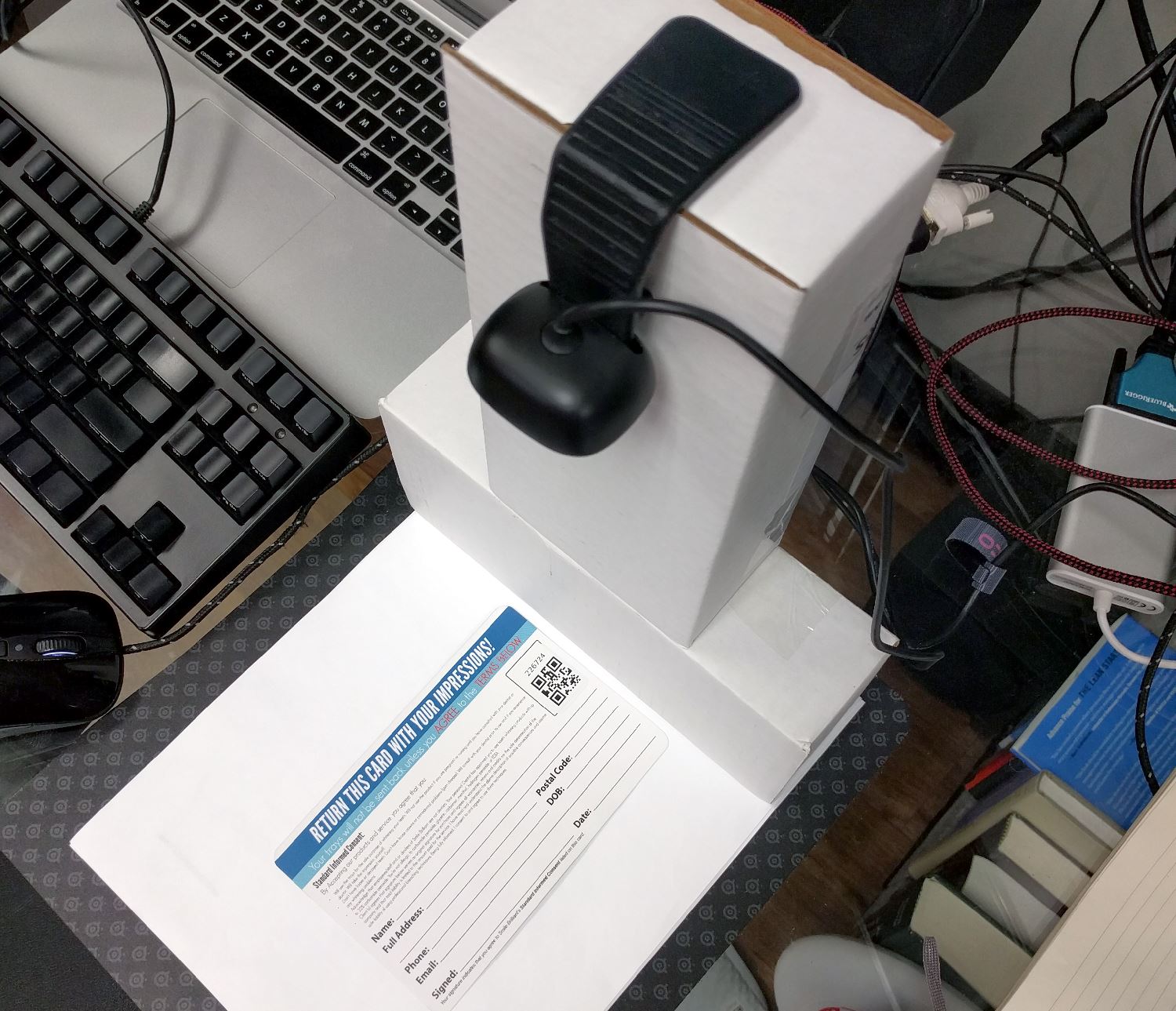
Example Setup
- Purpose: To scan QR code stickers on paper cards and plastic bags.
- Camera: Microsoft LifeCam HD-3000, 720p, fixed focus, around $30 USD.
- Small support to ensure camera is focused on subject.
- White paper backdrop to mitigate exposure adjustment.
Credits
Powered by the Emscripten JavaScript build of the C++ port of the ZXing Java library.
License
Copyright © 2016 Chris Schmich
MIT License. See LICENSE for details.
Core symbols most depended-on inside this repo
UzShape
Languages
Modules by API surface
Dependencies from manifests, versioned
For agents
$ claude mcp add instascan \
  -- python -m otcore.mcp_server <graph>