github.com/panphora/overtype @v2.4.0 sqlite
README
OverType
A lightweight markdown editor library with perfect WYSIWYG alignment using an invisible textarea overlay technique. Includes optional toolbar. ~117KB minified with all features.
Live Examples
🎮 Try it out: Interactive demos on overtype.dev - Basic Editor - Minimal setup with live preview - With Toolbar - Full formatting toolbar - Multiple Instances - Several editors on one page - View Modes - Preview synchronization - Themes - Light/dark theme switching - All Features - Complete markdown showcase
Features
- 👻 Invisible textarea overlay - Transparent input layer overlaid on styled preview for seamless editing
- 🎨 Global theming - Solar (light) and Cave (dark) themes that apply to all instances
- ⌨️ Keyboard shortcuts - Common markdown shortcuts (Cmd/Ctrl+B for bold, etc.)
- 📱 Mobile optimized - Responsive design with mobile-specific styles
- 🔄 DOM persistence aware - Recovers from existing DOM (perfect for HyperClay and similar platforms)
- 🚀 Lightweight - ~117KB minified
- 🎯 Optional toolbar - Clean, minimal toolbar with all essential formatting
- ✨ Smart shortcuts - Keyboard shortcuts with selection preservation
- 📝 Smart list continuation - GitHub-style automatic list continuation on Enter
- 🔧 Framework agnostic - Works with React, Vue, vanilla JS, and more
How it works
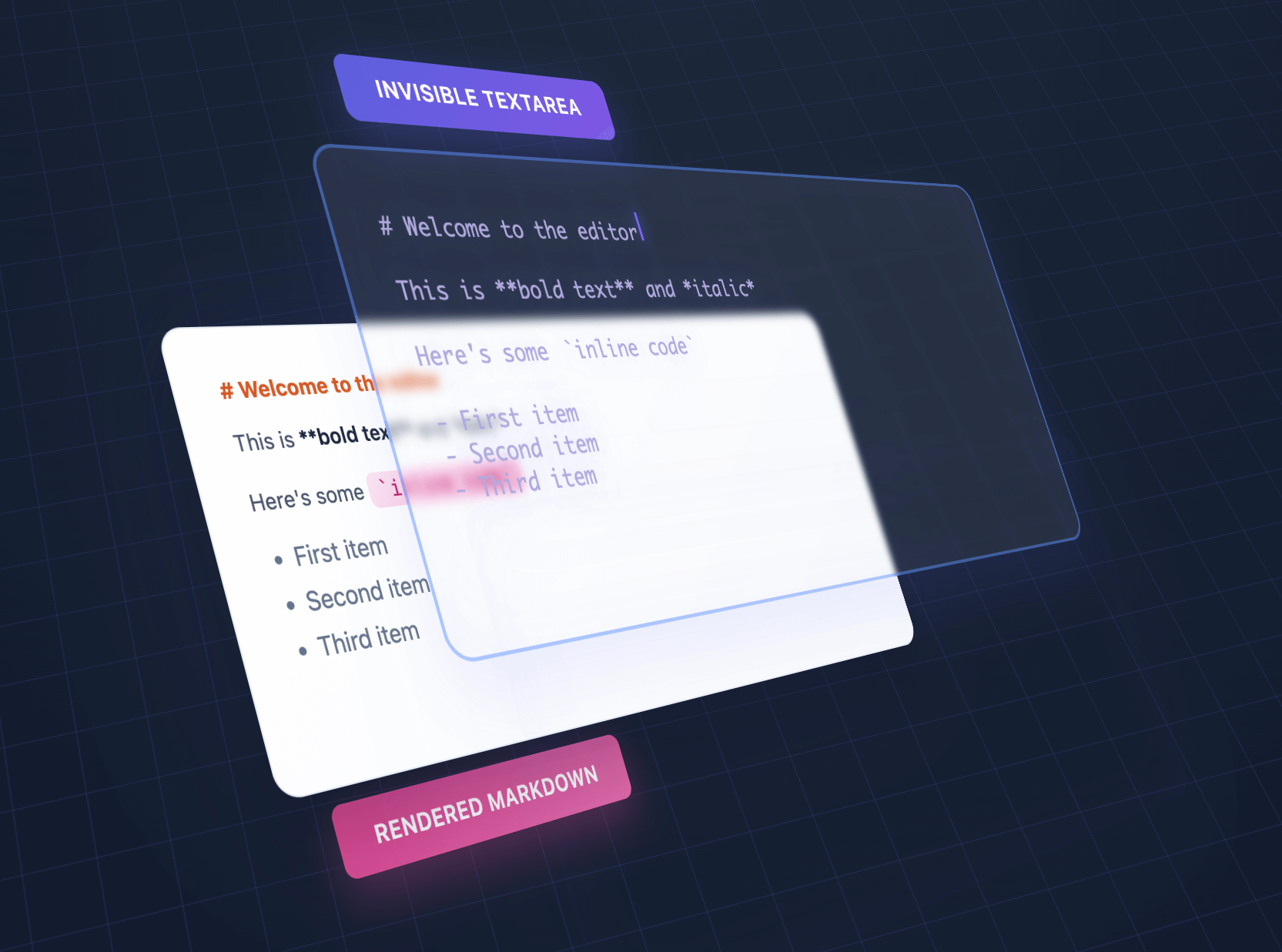
We overlap an invisible textarea on top of styled output, giving the illusion of editing styled text using a plain textarea.
Comparisons
| Feature | OverType | HyperMD | Milkdown | TUI Editor | EasyMDE |
|---|---|---|---|---|---|
| Size | ~117KB | 364.02 KB | 344.51 KB | 560.99 KB | 323.69 KB |
| Dependencies | Bundled | CodeMirror | ProseMirror + plugins | Multiple libs | CodeMirror |
| Setup | Single file | Complex config | Build step required | Complex config | Moderate |
| Approach | Invisible textarea | ContentEditable | ContentEditable | ContentEditable | CodeMirror |
| Mobile | Perfect native | Issues common | Issues common | Issues common | Limited |
| Markdown syntax | Visible | Hidden | Hidden | Toggle | Visible |
| Advanced features | Basic | Full | Full | Full | Moderate |
| Best for | Simple, fast, mobile | Full WYSIWYG | Modern frameworks | Enterprise apps | Classic editing |
Choose OverType when you need: - Tiny bundle size (10x smaller than alternatives) - Zero dependencies - single file that works immediately - Perfect native browser features (undo/redo, mobile keyboards, optional spellcheck) - Dead-simple integration without build tools - Easy to understand, modify, and extend - Excellent mobile support with visible markdown syntax
Choose other editors when you need: - Full WYSIWYG with hidden markdown syntax - Advanced features like tables, diagrams, or collaborative editing - Rich plugin ecosystems - Enterprise features and extensive customization - Framework-specific integration (React, Vue, etc.) - Complex multi-layered architecture for deep customization
Installation
NPM (bundlers: Vite, webpack, Rollup, etc.)
npm install overtype
import OverType from 'overtype';

const [editor] = new OverType('#editor', { value: '# Hello' });
OverType is ESM-first and also ships a CommonJS build, so both styles work:
// ESM — default or named import
import OverType from 'overtype';
import { OverType } from 'overtype';

// CommonJS
const { OverType } = require('overtype');
CDN: native ES module (no build step)
<script type="module">
  import OverType from 'https://cdn.jsdelivr.net/npm/overtype@latest/dist/overtype.esm.js';
  const [editor] = new OverType('#editor', { value: '# Hello' });
</script>
CDN: global script tag (IIFE)
<script src="https://cdn.jsdelivr.net/npm/overtype@latest/dist/overtype.min.js"></script>
<script>
  const [editor] = new OverType('#editor', { value: '# Hello' });
</script>
Quick Start
// Create a single editor
const [editor] = new OverType('#editor', {
  value: '# Hello World',
  theme: 'solar'
});

// Get/set content
editor.getValue();
editor.setValue('# New Content');

// Change theme for this instance
editor.setTheme('cave');
Usage
Basic Editor
<script>
  const [editor] = new OverType('#editor', {
    placeholder: 'Start typing markdown...',
    value: '# Welcome\n\nStart writing **markdown** here!',
    onChange: (value, instance) => {
      console.log('Content changed:', value);
    }
  });
</script>
Toolbar
// Enable default toolbar with all formatting buttons
const [editor] = new OverType('#editor', {
  toolbar: true,
  value: '# Document\n\nSelect text and use the toolbar!'
});

// Default toolbar: Bold, Italic, Code | Link | H1, H2, H3 | Lists, Tasks | Quote | View Mode
Custom Toolbar (v2.0):
import OverType, { toolbarButtons } from 'overtype';

const [editor] = new OverType('#editor', {
  toolbar: true,
  toolbarButtons: [
    toolbarButtons.bold,
    toolbarButtons.italic,
    toolbarButtons.separator,
    {
      name: 'save',
      icon: '<svg>...</svg>',
      title: 'Save',
      action: ({ editor, getValue }) => {
        localStorage.setItem('draft', getValue());
      }
    }
  ]
});

// Available: bold, italic, code, link, h1, h2, h3, bulletList,
// orderedList, taskList, quote, separator, viewMode
Custom buttons that behave like toggle buttons can provide isActive. When it returns true or false, OverType updates the button’s active class and aria-pressed state:
{
  name: 'customToggle',
  icon: '<svg>...</svg>',
  title: 'Custom Toggle',
  isActive: ({ editor, activeFormats }) => activeFormats.includes('bold'),
  action: ({ editor }) => {
    // Toggle your custom formatting
  }
}
Driving formatting from your own UI:
OverType re-exports the bundled markdown-actions library so you can build a fully custom toolbar (or any UI) without installing or bundling markdown-actions separately:
import OverType, { markdownActions } from 'overtype';

const [editor] = new OverType('#editor');

// Apply formatting to the editor's textarea directly
document.querySelector('#bold-btn').addEventListener('click', () => {
  markdownActions.toggleBold(editor.textarea);
  editor.textarea.focus();
});
Available actions include toggleBold, toggleItalic, toggleCode, insertLink, toggleBulletList, toggleNumberedList, toggleQuote, toggleTaskList, insertHeader, toggleH1/H2/H3, getActiveFormats, hasFormat, expandSelection, and applyCustomFormat. The same namespace is available as window.markdownActions and OverType.markdownActions in script-tag builds.
See examples/custom-toolbar.html for complete examples.
View Modes
Three modes available via toolbar dropdown or programmatically:
editor.showNormalEditMode();   // Default WYSIWYG editing
editor.showPlainTextarea();    // Raw markdown, no preview
editor.showPreviewMode();      // Read-only preview with clickable links
Task Lists
GitHub-style checkboxes render in preview mode:
const [editor] = new OverType('#editor', {
  value: '- [ ] Todo\n- [x] Done',
  toolbar: true  // Use view mode dropdown to see checkboxes
});

// Edit mode: Shows `- [ ]` and `- [x]` syntax (preserves alignment)
// Preview mode: Renders actual checkbox inputs
Syntax Highlighting
import { codeToHtml } from 'shiki';

// Global highlighter (all instances)
OverType.setCodeHighlighter((code, lang) =>
  codeToHtml(code, { lang, theme: 'nord' })
);

// Per-instance override
const [editor] = new OverType('#editor', {
  codeHighlighter: (code, lang) => myHighlighter(code, lang)
});
See docs/SYNTAX_HIGHLIGHTING.md for complete guide.
Keyboard Shortcuts
The toolbar and keyboard shortcuts work together seamlessly:
- Cmd/Ctrl + B - Bold
- Cmd/Ctrl + I - Italic
- Cmd/Ctrl + K - Insert link
- Cmd/Ctrl + Shift + 7 - Numbered list
- Cmd/Ctrl + Shift + 8 - Bullet list
- Cmd/Ctrl + ] - Indent current line or selection
- Cmd/Ctrl + [ - Outdent current line or selection
- Tab / Shift+Tab - Indent or outdent selected lines
Collapsed Tab and Shift+Tab follow normal browser focus navigation so keyboard users can leave the editor. Editing shortcuts preserve text selection, allowing you to apply multiple formats quickly.
Multiple Editors
// Initialize multiple editors at once
const editors = OverType.init('.markdown-editor', {
  theme: 'cave',
  fontSize: '16px'
});

// Each editor is independent
editors.forEach((editor, index) => {
  editor.setValue(`# Editor ${index + 1}`);
});
Form Integration
// Use with form validation
const [editor] = new OverType('#message', {
  placeholder: 'Your message...',
  textareaProps: {
    required: true,
    maxLength: 500,
    name: 'message'
  }
});

// The textarea will work with native form validation
document.querySelector('form').addEventListener('submit', (e) => {
  const content = editor.getValue();
  // Form will automatically validate required field
});
File Uploads
OverType handles paste and drop of files when fileUpload is configured. You upload to your own backend in onInsertFile and return the markdown to insert. When that markdown link is later removed from the editor, onRemoveFile fires so you can clean up the backend file.
const [editor] = new OverType('#editor', {
fileUpload: {
enabled: true,
maxSize: 10 * 1024 * 1024, // 10MB
mimeTypes: ['image/png', 'image/jpeg'], // optional whitelist; empty = accept all
batch: false, // true = one onInsertFile call per drop
// Upload to your backend, return the markdown link to insert
onInsertFile: async (file) => {
const { url } = await uploadToBackend(file);
const isImage = file.type.startsWith('image/');
return isImage ? `` : `[${file.name}](${url})`;
},
// Optional: fires when an inserted link is removed from the editor.
// Useful for deleting orphaned files from storage.
onRemoveFile: ({ url, filename, file }) => {
fetch(`/api/files/${encodeURIComponent(url)}`, { method: 'DELETE' });
}
}
});
onRemoveFile only fires for URLs that OverType originally inserted via onInsertFile. URL edits, manual paste of an existing link, or programmatic edits to non-tracked URLs do not trigger it.
See examples/file-upload.html for a complete working demo.
Custom Theme
const [editor] = new OverType('#editor', {
  theme: {
    name: 'my-theme',
    colors: {
      bgPrimary: '#faf0ca',
      bgSecondary: '#ffffff',
      text: '#0d3b66',
      h1: '#f95738',
      h2: '#ee964b',
      h3: '#3d8a51',
      strong: '#ee964b',
      em: '#f95738',
      link: '#0d3b66',
      code: '#0d3b66',
      codeBg: 'rgba(244, 211, 94, 0.2)',
      blockquote: '#5a7a9b',
      hr: '#5a7a9b',
      syntaxMarker: 'rgba(13, 59, 102, 0.52)',
      cursor: '#f95738',
      selection: 'rgba(244, 211, 94, 0.4)'
    }
  }
});
Preview & HTML Export
Generate HTML previews or export the rendered content:
const [editor] = new OverType('#editor', {
  value: '# Title\n\n**Bold** text with [links](https://example.com)'
});

// Get the raw markdown
const markdown = editor.getValue();
// Returns: "# Title\n\n**Bold** text with [links](https://example.com)"

// Get rendered HTML with syntax markers (for debugging/inspection)
const html = editor.getRenderedHTML();
// Returns HTML with <span class="syntax-marker"> elements visible

// Get clean HTML for export (no OverType-specific markup)
const cleanHTML = editor.getRenderedHTML({ cleanHTML: true });
// Returns clean HTML suitable for saving/exporting

// Convenience method for clean HTML
const exportHTML = editor.getCleanHTML();
// Same as getRenderedHTML({ cleanHTML: true })

// Get the current preview element's HTML (actual DOM content)
const previewHTML = editor.getPreviewHTML();
// Returns exactly what's shown in the editor's preview layer

// Example: Export clean HTML to server
const htmlToSave = editor.getCleanHTML();  // No syntax markers
// Example: Clone exact preview appearance
document.getElementById('clone').innerHTML = editor.getPreviewHTML();
Stats Bar
Enable a built-in stats bar that shows character, word, and line counts:
// Enable stats bar on initialization
const [editor] = new OverType('#editor', {
  showStats: true
});

// Show or hide stats bar dynamically
editor.showStats(true);  // Show
editor.showStats(false); // Hide

// Custom stats format
const [editor] = new OverType('#editor', {
  showStats: true,
  statsFormatter: (stats) => {
    // stats object contains: { chars, words, lines, line, column }
    return `<span>${stats.chars} characters</span>
            <span>${stats.words} words</span>
            <span>${stats.lines} lines</span>
            <span>Line ${stats.line}, Col ${stats.column}</span>`;
  }
});
The stats bar automatically adapts to your theme colors using CSS variables.
React Component
```jsx function MarkdownEditor({ value, onChange }) { const ref = useRef(); const editorRef = useRef();
useEffect(() => { const [instance] = Ov
Extension points exported contracts — how you extend this code
PreviewColors (Interface)Core symbols most depended-on inside this repo
parseShape
Languages
Modules by API surface
Dependencies from manifests, versioned
For agents
$ claude mcp add overtype \
  -- python -m otcore.mcp_server <graph>