github.com/openspeedtest/Speed-Test @main sqlite
README
SpeedTest by OpenSpeedTest™ - Free & Open-Source HTML5 Network Performance Estimation Tool.
SpeedTest by OpenSpeedTest™ is a Free and Open-Source HTML5 Network Performance Estimation Tool Written in Vanilla Javascript and only uses built-in Web APIs like XMLHttpRequest (XHR), HTML, CSS, JS, & SVG. No Third-Party frameworks or libraries are Required. All we need is a static web server like NGINX. I started this project in 2011 and moved to OpenSpeedTest.com dedicated Project/Domain Name in 2013.
Just launched: OpenPacketLoss. Check it out!
While OpenSpeedTest measures bandwidth, this tool helps you detect packet loss directly from your browser.
Try it: https://openpacketloss.com
Source: https://github.com/openpacketloss


No client-side software or plugin is required. You can run a network speed test from any device with a Web Browser that is IE10 or newer.


Why OpenSpeedTest
Secure by Design.
OpenSpeedTest contains Only STATIC Files like HTML,CSS & JS.
So you don't need to worry about Security Updates or Hidden Exploits that may compromise your secure environments.
Lightweight, High Performance.
OpenSpeedTest is written in Vanilla JavaScript. No Third-Party frameworks or libraries were used. SpeedTest script file size is under 8kB gzip. The unexpected side effect of using Vanilla JavaScript is High Performance.
Run a speed test from Any Device.
OpenSpeedTest will run on Any Web Browser that is IE10 or newer.
Ready for Any Display Size and Resolution.
OpenSpeedTest User interface is written in SVG.
Create Your Own SpeedTest Server.
Server Requirements :
Nginx, Apache, IIS, Express, or Any Web server that supports HTTP/1.1 or newer.
-
Accept,
GET,POST,HEAD&OPTIONS, Response200 OK. -
Accept,
POSTto Static Files, Response200 OK. -
client_max_body_size, 35 Megabytes or more. -
Timeout greater than
60 seconds. -
Disable
Access logsfor Increasing server performance. -
Improve
Time to First Byte(TTFB) -
Warning! If you run it behind a Reverse Proxy, you should increase the
post-body content lengthto 35 megabytes. - Supports
HTTP2&HTTP3. HTTP1.1is recommended for achieving maximum performance.- You Should Follow our Nginx Config.
Or, You can use OpenSpeedTest-Server.
OpenSpeedTest-Server is available for Windows, Mac, Linux, Android, iOS & Docker.
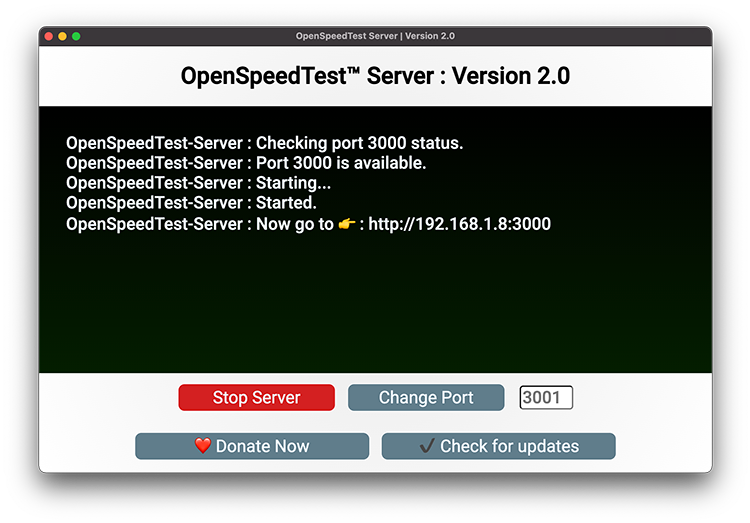
Fully Optimized and ready to use applications.
New features:
- Stress Test. (Continuous Speed Test)
To enable the stress test. Pass Stress or S keyword as a URL parameter.
http://192.168.1.5?Stress=Low
After the STRESS or S keyword, you can specify the number of seconds you need to run the StressTest in seconds, or preset values such as Low, Medium, High, VeryHigh, Extreme, Day, and Year. Will run a speed test for 300,600,900,1800,3600,86400,31557600 seconds, respectively. Also, you can feed the first letter of each parameter and its values.
http://192.168.1.5?S=L
S=L is the same as passing Stress=low
Or you can specify the number of seconds eg:5000 directly without any preset keywords.
http://192.168.1.5?Stress=5000
- Run a speed test automatically
Run a speed test automatically on page load.
http://192.168.1.5?Run
Run a speed test automatically after a few seconds.
http://192.168.1.5?Run=10 or http://192.168.1.5?R=10
You can pass multiple keywords, and it's not Case-Sensitive.
http://192.168.1.5?Run&Stress=300 OR http://192.168.1.5?R&S=300
This will start a speed test immediately and run for 300 seconds in each direction. That is 300 seconds for download and 300 seconds for upload.
- Save results to a Database
Edit Index.html
var saveData = true;

var saveDataURL = "//yourDatabase.Server.com:4500/save?data=";
- Add multiple servers. The app will choose one with the least latency automatically.
Edit Index.html
var openSpeedTestServerList = [

{"ServerName":"Home-Earth", "Download":"/downloading", "Upload":"/upload", "ServerIcon":"DefaultIcon"},

{"ServerName":"Home-Mars", "Download":"/downloading", "Upload":"/upload", "ServerIcon":"DefaultIcon"},

{"ServerName":"Home-Moon", "Download":"/downloading", "Upload":"/upload", "ServerIcon":"DefaultIcon"}

];
- Disable or change Overhead Compensation factor.
http://192.168.1.5?clean
Overhead Compensation factor, This is browser based test, Many Unknowns. Currently 4%. That is within the margin of error.
You can pass Clean or C as a URL Parameter and reset Overhead Compensation factor to Zero or set any value between 0 and 4. 1 = 1% to 4 = 4%.
Clean will not accept values above 4, so Compensation is limited to maximum 4%.
- Change the default limit of 6 parallel HTTP connections to the Server.
http://192.168.1.5?XHR=3 OR http://192.168.1.5?X=3
Allow the user to Change the default limit of 6 parallel HTTP connections to the Server. XHR will Accept values above 1 and max 32
pass XHR or X as a URL Parameter.
- Select a different server to run a speed test.
http://192.168.1.5?Host=http://192.168.55.1:90 OR http://192.168.1.5?h=http://192.168.55.1:90
Pass Host or H as a URL Parameter.
HOST will Accept only valid HTTP URLs like http://192.168.1.10:3000 or https://yourHost.com.
- Select and run one test at a time,
DOWNLOAD,UPLOAD, orPING.
http://192.168.1.5?Test=Upload OR http://192.168.1.5?T=U
TEST Allow the user to select and run one test at a time, Download, Upload, or Ping.
Pass Test or T as a URL Parameter.
- Set a PingTimeout dynamically by passing
OutorOas a URL Parameter
http://192.168.1.5?Out=7000 OR http://192.168.1.5?O=7000
If Server not responded within 5 Seconds for any requests we send ('pingSamples' times)
We will show Network Error, You can change the limit here.
In milliseconds, if you need to set 6 seconds. Change the value to 6000.
- Set the Number of ping samples by adding
PingorPas a URL Parameter
http://192.168.1.5?Ping=500 OR http://192.168.1.5?P=500
More samples = more accurate representation. Ping = 500 will send 501 requests to server to find the accurate ping value.
Take a look at index.html, you can set a custom ping sample size, threads, upload data size etc.
Self-hosted (On-Premise) / (Docker Image/Source Code)
For Headless large-scale deployments.
You have two options here. If you need a custom deployment, use our source code along with a web server of your choice. I prefer Nginx, and you can find my Nginx Configuration here. Or you can use our docker image. You can deploy it on your LAN/WAN with or without an active internet connection.
This is docker implementation using nginxinc/nginx-unprivileged:stable-alpine. uses significantly fewer resources.
- NGINX Docker image that runs NGINX as a non root, unprivileged user.
### Docker install instructions:
Install Docker and run the following command!
sudo docker run --restart=unless-stopped --name openspeedtest -d -p 3000:3000 -p 3001:3001 openspeedtest/latest
Or use docker-compose.yml
version: '3.3'
services:
    speedtest:
        restart: unless-stopped
        container_name: openspeedtest
        ports:
            - '3000:3000'
            - '3001:3001'
        image: openspeedtest/latest
-
Warning! If you run it behind a Reverse Proxy, you should increase the
post-body content lengthto 35 megabytes.
Now open your browser and direct it to:
A: For HTTP use: http://YOUR-SERVER-IP:3000
B: For HTTPS use: https://YOUR-SERVER-IP:3001
Container-Port for http is 3000
If you need to run this image on a different port for HTTP, Eg: change to 80 = -p 80:3000
Container-Port for https is 3001
If you need to run this image on a different port for HTTPS, Eg: change to 443 = -p 443:3001
Setup Free LetsEncrypt SSL with Automatic Certificate Renewal
Requirements - PUBLIC IPV4 and/or IPV6 address. - A domain name that resolves to speed test server's IP address. - Email ID
The following command will generate a Let's Encrypt certificate for your domain name and configure a cron job to automatically renew the certificate.
docker run -e ENABLE_LETSENCRYPT=True -e DOMAIN_NAME=speedtest.yourdomain.com -e USER_EMAIL=you@yourdomain.pro --restart=unless-stopped --name openspeedtest -d -p 80:3000 -p 443:3001 openspeedtest/latest
Or use docker-compose.yml
```` v
Core symbols most depended-on inside this repo
_Shape
Languages
Modules by API surface
For agents
$ claude mcp add Speed-Test \
  -- python -m otcore.mcp_server <graph>