github.com/openai/tiktoken @0.13.0 sqlite
README
⏳ tiktoken
tiktoken is a fast BPE tokeniser for use with OpenAI's models.
import tiktoken
enc = tiktoken.get_encoding("o200k_base")
assert enc.decode(enc.encode("hello world")) == "hello world"

# To get the tokeniser corresponding to a specific model in the OpenAI API:
enc = tiktoken.encoding_for_model("gpt-4o")
The open source version of tiktoken can be installed from PyPI:
pip install tiktoken
The tokeniser API is documented in tiktoken/core.py.
Example code using tiktoken can be found in the
OpenAI Cookbook.
Performance
tiktoken is between 3-6x faster than a comparable open source tokeniser:
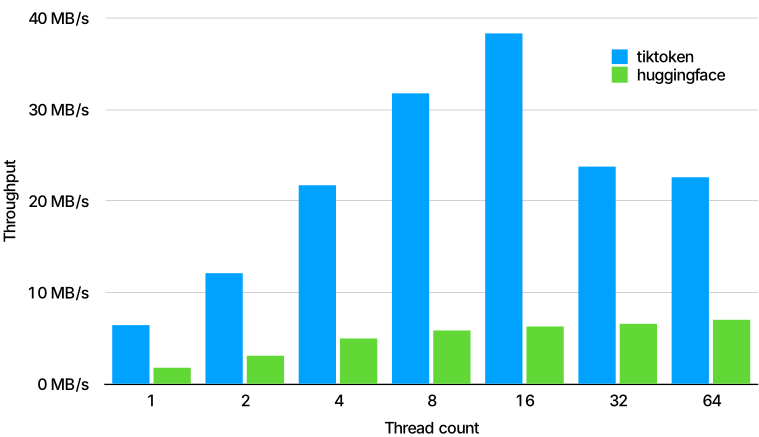
Performance measured on 1GB of text using the GPT-2 tokeniser, using GPT2TokenizerFast from
tokenizers==0.13.2, transformers==4.24.0 and tiktoken==0.2.0.
Getting help
Please post questions in the issue tracker.
If you work at OpenAI, make sure to check the internal documentation or feel free to contact @shantanu.
What is BPE anyway?
Language models don't see text like you and I, instead they see a sequence of numbers (known as tokens). Byte pair encoding (BPE) is a way of converting text into tokens. It has a couple desirable properties: 1) It's reversible and lossless, so you can convert tokens back into the original text 2) It works on arbitrary text, even text that is not in the tokeniser's training data 3) It compresses the text: the token sequence is shorter than the bytes corresponding to the original text. On average, in practice, each token corresponds to about 4 bytes. 4) It attempts to let the model see common subwords. For instance, "ing" is a common subword in English, so BPE encodings will often split "encoding" into tokens like "encod" and "ing" (instead of e.g. "enc" and "oding"). Because the model will then see the "ing" token again and again in different contexts, it helps models generalise and better understand grammar.
tiktoken contains an educational submodule that is friendlier if you want to learn more about
the details of BPE, including code that helps visualise the BPE procedure:
from tiktoken._educational import *

# Train a BPE tokeniser on a small amount of text
enc = train_simple_encoding()

# Visualise how the GPT-4 encoder encodes text
enc = SimpleBytePairEncoding.from_tiktoken("cl100k_base")
enc.encode("hello world aaaaaaaaaaaa")
Extending tiktoken
You may wish to extend tiktoken to support new encodings. There are two ways to do this.
Create your Encoding object exactly the way you want and simply pass it around.
cl100k_base = tiktoken.get_encoding("cl100k_base")

# In production, load the arguments directly instead of accessing private attributes
# See openai_public.py for examples of arguments for specific encodings
enc = tiktoken.Encoding(
    # If you're changing the set of special tokens, make sure to use a different name
    # It should be clear from the name what behaviour to expect.
    name="cl100k_im",
    pat_str=cl100k_base._pat_str,
    mergeable_ranks=cl100k_base._mergeable_ranks,
    special_tokens={
        **cl100k_base._special_tokens,
        "<|im_start|>": 100264,
        "<|im_end|>": 100265,
    }
)
Use the tiktoken_ext plugin mechanism to register your Encoding objects with tiktoken.
This is only useful if you need tiktoken.get_encoding to find your encoding, otherwise prefer
option 1.
To do this, you'll need to create a namespace package under tiktoken_ext.
Layout your project like this, making sure to omit the tiktoken_ext/__init__.py file:
my_tiktoken_extension
├── tiktoken_ext
│   └── my_encodings.py
└── setup.py
my_encodings.py should be a module that contains a variable named ENCODING_CONSTRUCTORS.
This is a dictionary from an encoding name to a function that takes no arguments and returns
arguments that can be passed to tiktoken.Encoding to construct that encoding. For an example, see
tiktoken_ext/openai_public.py. For precise details, see tiktoken/registry.py.
Your setup.py should look something like this:
from setuptools import setup, find_namespace_packages

setup(
    name="my_tiktoken_extension",
    packages=find_namespace_packages(include=['tiktoken_ext*']),
    install_requires=["tiktoken"],
    ...
)
Then simply pip install ./my_tiktoken_extension and you should be able to use your
custom encodings! Make sure not to use an editable install.
Core symbols most depended-on inside this repo
encodeShape
Languages
Modules by API surface
Used by 80 indexed graphs manifest dependencies, hub-wide
For agents
$ claude mcp add tiktoken \
  -- python -m otcore.mcp_server <graph>