github.com/neuml/txtai @v9.11.0 sqlite
README
<img src="https://raw.githubusercontent.com/neuml/txtai/master/logo.png"/>


<b>All-in-one AI framework</b>


<a href="https://github.com/neuml/txtai/releases">
    <img src="https://img.shields.io/github/release/neuml/txtai.svg?style=flat&color=success" alt="Version"/>
</a>
<a href="https://github.com/neuml/txtai">
    <img src="https://img.shields.io/github/last-commit/neuml/txtai.svg?style=flat&color=blue" alt="GitHub last commit"/>
</a>
<a href="https://github.com/neuml/txtai/issues">
    <img src="https://img.shields.io/github/issues/neuml/txtai.svg?style=flat&color=success" alt="GitHub issues"/>
</a>
<a href="https://join.slack.com/t/txtai/shared_invite/zt-37c1zfijp-Y57wMty6YOx_hyIHEQvQJA">
    <img src="https://img.shields.io/badge/slack-join-blue?style=flat&logo=slack&logocolor=white" alt="Join Slack"/>
</a>
<a href="https://github.com/neuml/txtai/actions?query=workflow%3Abuild">
    <img src="https://github.com/neuml/txtai/workflows/build/badge.svg" alt="Build Status"/>
</a>
<a href="https://coveralls.io/github/neuml/txtai?branch=master">
    <img src="https://img.shields.io/coverallsCoverage/github/neuml/txtai" alt="Coverage Status">
</a>
txtai is an all-in-one AI framework for semantic search, LLM orchestration and language model workflows.
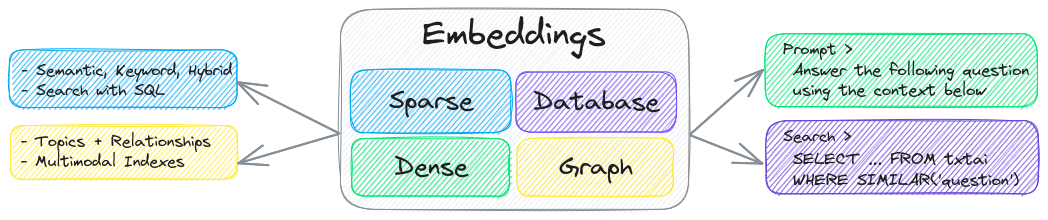
The key component of txtai is an embeddings database, which is a union of vector indexes (sparse and dense), graph networks and relational databases.
This foundation enables vector search and/or serves as a powerful knowledge source for large language model (LLM) applications.
Build autonomous agents, retrieval augmented generation (RAG) processes, multi-model workflows and more.
Summary of txtai features:
- 🔎 Vector search with SQL, object storage, topic modeling, graph analysis and multimodal indexing
- 📄 Create embeddings for text, documents, audio, images and video
- 💡 Pipelines powered by language models that run LLM prompts, question-answering, labeling, transcription, translation, summarization and more
- ↪️️ Workflows to join pipelines together and aggregate business logic. txtai processes can be simple microservices or multi-model workflows.
- 🤖 Agents that intelligently connect embeddings, pipelines, workflows and other agents together to autonomously solve complex problems
- ⚙️ Web and Model Context Protocol (MCP) APIs. Bindings available for JavaScript, Java, Rust and Go.
- 🔋 Batteries included with defaults to get up and running fast
- ☁️ Run local or scale out with container orchestration
txtai is built with Python 3.10+, Hugging Face Transformers, Sentence Transformers and FastAPI. txtai is open-source under an Apache 2.0 license.
[!NOTE]
NeuML is the company behind txtai and we provide AI consulting services around our stack. Schedule a meeting or send a message to learn more.
We're also building an easy and secure way to run hosted txtai applications with txtai.cloud.
Why txtai?
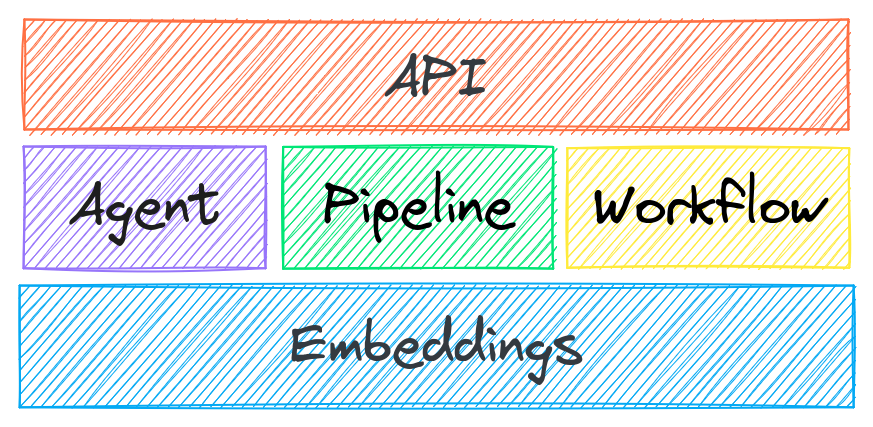
New vector databases, LLM frameworks and everything in between are sprouting up daily. Why build with txtai?
# Get started in a couple lines
import txtai

embeddings = txtai.Embeddings()
embeddings.index(["Correct", "Not what we hoped"])
embeddings.search("positive", 1)
#[(0, 0.29862046241760254)]
- Built-in API makes it easy to develop applications using your programming language of choice
# app.yml
embeddings:
    path: sentence-transformers/all-MiniLM-L6-v2
CONFIG=app.yml uvicorn "txtai.api:app"
curl -X GET "http://localhost:8000/search?query=positive"
- Run local - no need to ship data off to disparate remote services
- Work with micromodels all the way up to large language models (LLMs)
- Low footprint - install additional dependencies and scale up when needed
- Learn by example - notebooks cover all available functionality
Use Cases
The following sections introduce common txtai use cases. A comprehensive set of over 70 example notebooks and applications are also available.
Semantic Search
Build semantic/similarity/vector/neural search applications.

Traditional search systems use keywords to find data. Semantic search has an understanding of natural language and identifies results that have the same meaning, not necessarily the same keywords.
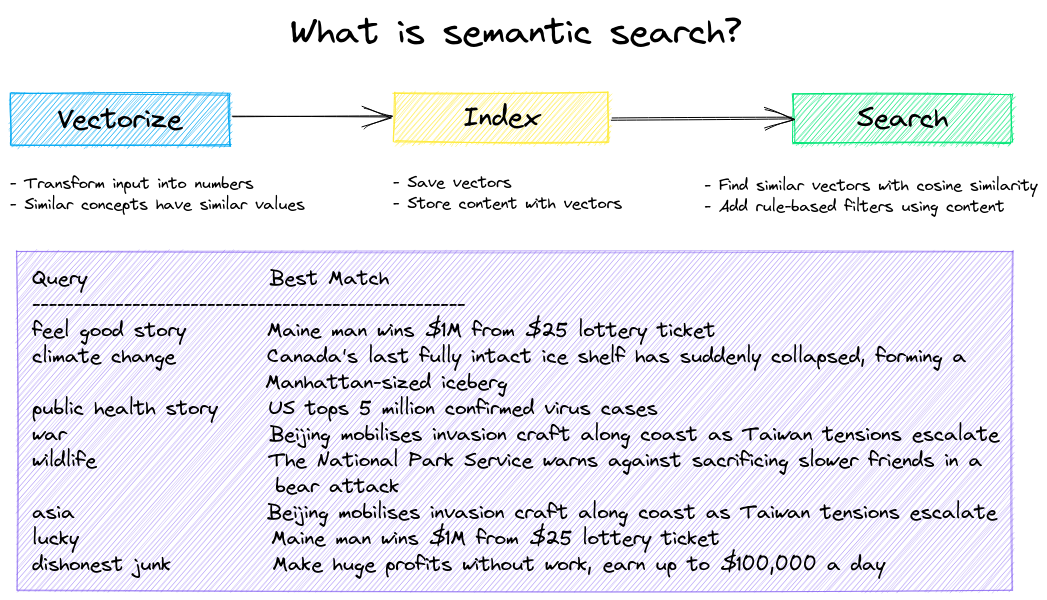
Get started with the following examples.
| Notebook | Description | |
|---|---|---|
| Introducing txtai ▶️ | Overview of the functionality provided by txtai |  |
| Similarity search with images | Embed images and text into the same space for search | |
| Build a QA database | Question matching with semantic search | |
| Semantic Graphs | Explore topics, data connectivity and run network analysis | |
LLM Orchestration
Autonomous agents, retrieval augmented generation (RAG), chat with your data, pipelines and workflows that interface with large language models (LLMs).
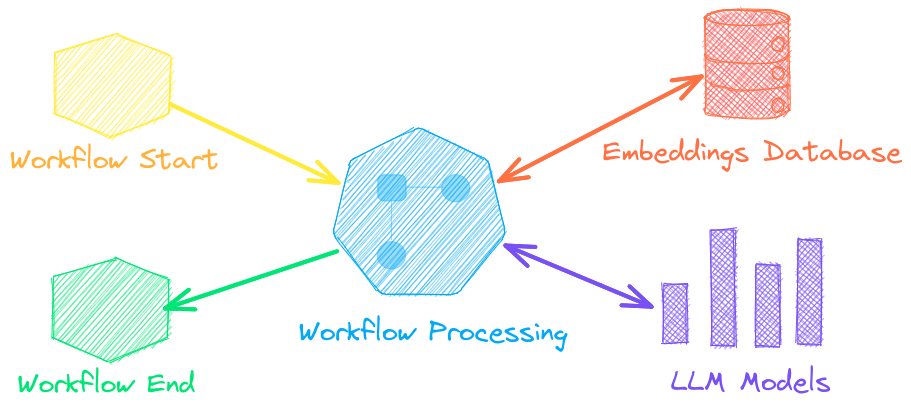
See below to learn more.
| Notebook | Description | |
|---|---|---|
| Prompt templates and task chains | Build model prompts and connect tasks together with workflows | |
| Integrate LLM frameworks | Integrate llama.cpp, LiteLLM and custom generation frameworks | |
| Build knowledge graphs with LLMs | Build knowledge graphs with LLM-driven entity extraction | |
| Parsing the stars with txtai | Explore an astronomical knowledge graph of known stars, planets, galaxies | |
Agents
Agents connect embeddings, pipelines, workflows and other agents together to autonomously solve complex problems.
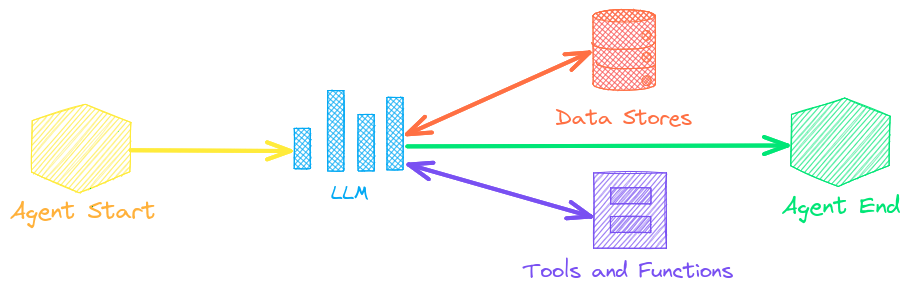
txtai agents are built on top of the smolagents framework. This supports all LLMs txtai supports (Hugging Face, llama.cpp, OpenAI / Claude / AWS Bedrock via LiteLLM). Agent prompting with agents.md and skill.md are also supported.
Check out this Agent Quickstart Example. Additional examples are listed below.
| Notebook | Description | |
|---|---|---|
| Granting autonomy to agents | Agents that iteratively solve problems as they see fit | |
| TxtAI got skills | Integrate skill.md files with your agent | |
| Agent Tools ▶️ | Learn about the txtai agent toolkit | |
| Analyzing LinkedIn Company Posts with Graphs and Agents | Exploring how to improve social media engagement with AI | |
Retrieval augmented generation
Retrieval augmented generation (RAG) reduces the risk of LLM hallucinations by constraining the output with a knowledge base as context. RAG is commonly used to "chat with your data".


Check out this RAG Quickstart Example. Additional examples are listed below.
| Notebook | Description | |
|---|---|---|
| Build RAG pipelines with txtai ▶️ | Guide on retrieval augmented generation including how to create citations | |
| RAG is more than Vector Search | Context retrieval via Web, SQL and other sources | |
| GraphRAG with Wikipedia and GPT OSS | Deep graph search powered RAG | |
| Speech to Speech RAG ▶️ | Full cycle speech to speech workflow with RAG | |
Language Model Workflows
Language model workflows, also known as semantic workflows, connect language models together to build intelligent applications.
![flows](https://raw.githubu
Core symbols most depended-on inside this repo
getShape
Languages
Modules by API surface
For agents
$ claude mcp add txtai \
  -- python -m otcore.mcp_server <graph>