github.com/n4ze3m/page-assist @v1.5.72 sqlite
README
<h1 align="center">Page Assist</h1>


<a href="https://docs.pageassist.xyz">
    Documentation
</a>
Page Assist is an open-source browser extension that provides a sidebar and web UI for your local AI model. It allows you to interact with your model from any webpage.
Installation
Page Assist supports Chromium-based browsers like Chrome, Brave, and Edge, as well as Firefox.



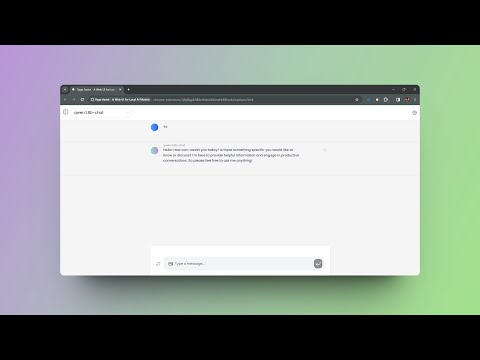
Checkout the Demo (v1.0.0):
Sponsors

|
Atlas Cloud is a full-modal AI inference platform that gives developers a single AI API to access video generation, image generation, and LLM APIs. Instead of managing multiple vendor integrations, you connect once and get unified access to 300+ curated models across all modalities. Check out Atlas Cloud's coding plan for more budget-friendly API access. |
Interested in sponsoring Page Assist? Reach out at me@n4ze3m.com.
Features
-
Sidebar: A sidebar that can be opened on any webpage. It allows you to interact with your model and see the results.
-
Web UI: A web UI that allows you to interact with your model like a ChatGPT Website.
-
Chat With Webpage: You can chat with the webpage and ask questions about the content.
want more features? Create an issue and let me know.
Manual Installation
Pre-requisites
- Bun - Installation Guide
- Ollama (Local AI Provider) - Installation Guide
-
Any OpenAI API Compatible Endpoint (like LM Studio, llamafile etc.)
-
Clone the repository
git clone https://github.com/n4ze3m/page-assist.git
cd page-assist
- Install the dependencies
bun install
- Build the extension (by default it will build for Chrome, Edge and Firefox)
bun run build
Note: If you face any issues with Bun, use npm instead of bun.
-
Load the extension (chrome)
-
Open the Extension Management page by navigating to
chrome://extensions. -
Enable Developer Mode by clicking the toggle switch next to Developer mode.
-
Click the
Load unpackedbutton and select thebuilddirectory. -
Load the extension (firefox)
-
Open the Add-ons page by navigating to
about:addons. - Click the
Extensionstab. - Click the
Manage Your Extensionsbutton. - Click the
Load Temporary Add-onbutton and select themanifest.jsonfile from thebuilddirectory.
Usage
Sidebar
Once the extension is installed, you can open the sidebar via context menu or keyboard shortcut.
Default Keyboard Shortcut: Ctrl+Shift+Y
Web UI
You can open the Web UI by clicking on the extension icon which will open a new tab with the Web UI.
Default Keyboard Shortcut: Ctrl+Shift+L
Note: You can change the keyboard shortcuts from the extension settings on the Chrome Extension Management page.
Keyboard Shortcuts
Page Assist supports various keyboard shortcuts to enhance your productivity:
Extension Shortcuts
| Action | Shortcut | Description |
|---|---|---|
| Open Sidebar | Ctrl+Shift+Y |
Opens the sidebar on any webpage |
| Open Web UI | Ctrl+Shift+L |
Opens the Web UI in a new tab |
Note: You can customize extension shortcuts from your browser's extension management page .
Application Shortcuts
| Action | Shortcut | Description |
|---|---|---|
| New Chat | Ctrl+Shift+O |
Starts a new chat conversation |
| Toggle Sidebar | Ctrl+B |
Opens/closes the chat history sidebar |
| Focus Textarea | Shift+Esc |
Focuses the message input field |
| Toggle Chat Mode | Ctrl+E |
Toggles between normal chat and chat with current page |
Development
You can run the extension in development mode to make changes and test them.
bun dev
This will start a development server and watch for changes in the source files. You can load the extension in your browser and test the changes.
Browser Support
| Browser | Sidebar | Chat With Webpage | Web UI |
|---|---|---|---|
| Chrome | ✅ | ✅ | ✅ |
| Brave | ✅ | ✅ | ✅ |
| Firefox | ✅ | ✅ | ✅ |
| Vivaldi | ✅ | ✅ | ✅ |
| Edge | ✅ | ✅ | ✅ |
| LibreWolf | ✅ | ✅ | ✅ |
| Zen Browser | ✅ | ✅ | ✅ |
| Opera | ❌ | ❌ | ✅ |
| Arc | ❌ | ❌ | ✅ |
Local AI Provider
-
Chrome AI (Gemini Nano)
-
OpenAI API Compatible endpoints (like LM Studio, llamafile etc.)
Roadmap
- [x] Firefox Support
- [x] More Local AI Providers
- [ ] More Customization Options
- [ ] Better UI/UX
Privacy
Page Assist does not collect any personal data. The only time the extension communicates with the server is when you are using the share feature, which can be disabled from the settings.
All the data is stored locally in the browser storage. You can view the source code and verify it yourself.
You learn more about the privacy policy here.
Contributing
Contributions are welcome. If you have any feature requests, bug reports, or questions, feel free to create an issue.
Support
If you like the project and want to support it, you can buy me a coffee. It will help me to keep working on the project.

or you can sponsor me on GitHub.
A huge thank you to everyone who has supported Page Assist through Ko-fi and GitHub Sponsors — your generosity keeps this project going. 💛
Blogs and Videos About Page Assist
This are some of the blogs and videos about Page Assist. If you have written a blog or made a video about Page Assist, feel free to create a PR and add it here.
-
Page Assist 介绍合集 by 百工智用公众号
-
Eine KI auf dem eigenen Rechner laufen lassen, 10 Minuten Installation by Johannes Holstein
License
MIT
Last but not least
Made in Alappuzha with ❤️
Extension points exported contracts — how you extend this code
PageAssistVector (Interface)Core symbols most depended-on inside this repo
createShape
Languages
Modules by API surface
Dependencies from manifests, versioned
For agents
$ claude mcp add page-assist \
  -- python -m otcore.mcp_server <graph>