github.com/microsoft/autogen @python-v0.7.5 sqlite
README






AutoGen
AutoGen is a framework for creating multi-agent AI applications that can act autonomously or work alongside humans.
Installation
AutoGen requires Python 3.10 or later.
# Install AgentChat and OpenAI client from Extensions
pip install -U "autogen-agentchat" "autogen-ext[openai]"
The current stable version can be found in the releases. If you are upgrading from AutoGen v0.2, please refer to the Migration Guide for detailed instructions on how to update your code and configurations.
# Install AutoGen Studio for no-code GUI
pip install -U "autogenstudio"
Quickstart
Hello World
Create an assistant agent using OpenAI's GPT-4o model. See other supported models.
import asyncio
from autogen_agentchat.agents import AssistantAgent
from autogen_ext.models.openai import OpenAIChatCompletionClient

async def main() -> None:
    model_client = OpenAIChatCompletionClient(model="gpt-4.1")
    agent = AssistantAgent("assistant", model_client=model_client)
    print(await agent.run(task="Say 'Hello World!'"))
    await model_client.close()

asyncio.run(main())
MCP Server
Create a web browsing assistant agent that uses the Playwright MCP server.
# First run `npm install -g @playwright/mcp@latest` to install the MCP server.
import asyncio
from autogen_agentchat.agents import AssistantAgent
from autogen_agentchat.ui import Console
from autogen_ext.models.openai import OpenAIChatCompletionClient
from autogen_ext.tools.mcp import McpWorkbench, StdioServerParams


async def main() -> None:
    model_client = OpenAIChatCompletionClient(model="gpt-4.1")
    server_params = StdioServerParams(
        command="npx",
        args=[
            "@playwright/mcp@latest",
            "--headless",
        ],
    )
    async with McpWorkbench(server_params) as mcp:
        agent = AssistantAgent(
            "web_browsing_assistant",
            model_client=model_client,
            workbench=mcp, # For multiple MCP servers, put them in a list.
            model_client_stream=True,
            max_tool_iterations=10,
        )
        await Console(agent.run_stream(task="Find out how many contributors for the microsoft/autogen repository"))


asyncio.run(main())
Warning: Only connect to trusted MCP servers as they may execute commands in your local environment or expose sensitive information.
Multi-Agent Orchestration
You can use AgentTool to create a basic multi-agent orchestration setup.
import asyncio

from autogen_agentchat.agents import AssistantAgent
from autogen_agentchat.tools import AgentTool
from autogen_agentchat.ui import Console
from autogen_ext.models.openai import OpenAIChatCompletionClient


async def main() -> None:
    model_client = OpenAIChatCompletionClient(model="gpt-4.1")

    math_agent = AssistantAgent(
        "math_expert",
        model_client=model_client,
        system_message="You are a math expert.",
        description="A math expert assistant.",
        model_client_stream=True,
    )
    math_agent_tool = AgentTool(math_agent, return_value_as_last_message=True)

    chemistry_agent = AssistantAgent(
        "chemistry_expert",
        model_client=model_client,
        system_message="You are a chemistry expert.",
        description="A chemistry expert assistant.",
        model_client_stream=True,
    )
    chemistry_agent_tool = AgentTool(chemistry_agent, return_value_as_last_message=True)

    agent = AssistantAgent(
        "assistant",
        system_message="You are a general assistant. Use expert tools when needed.",
        model_client=model_client,
        model_client_stream=True,
        tools=[math_agent_tool, chemistry_agent_tool],
        max_tool_iterations=10,
    )
    await Console(agent.run_stream(task="What is the integral of x^2?"))
    await Console(agent.run_stream(task="What is the molecular weight of water?"))


asyncio.run(main())
For more advanced multi-agent orchestrations and workflows, read AgentChat documentation.
AutoGen Studio
Use AutoGen Studio to prototype and run multi-agent workflows without writing code.
# Run AutoGen Studio on http://localhost:8080
autogenstudio ui --port 8080 --appdir ./my-app
Why Use AutoGen?

The AutoGen ecosystem provides everything you need to create AI agents, especially multi-agent workflows -- framework, developer tools, and applications.
The framework uses a layered and extensible design. Layers have clearly divided responsibilities and build on top of layers below. This design enables you to use the framework at different levels of abstraction, from high-level APIs to low-level components.
- Core API implements message passing, event-driven agents, and local and distributed runtime for flexibility and power. It also support cross-language support for .NET and Python.
- AgentChat API implements a simpler but opinionated API for rapid prototyping. This API is built on top of the Core API and is closest to what users of v0.2 are familiar with and supports common multi-agent patterns such as two-agent chat or group chats.
- Extensions API enables first- and third-party extensions continuously expanding framework capabilities. It support specific implementation of LLM clients (e.g., OpenAI, AzureOpenAI), and capabilities such as code execution.
The ecosystem also supports two essential developer tools:
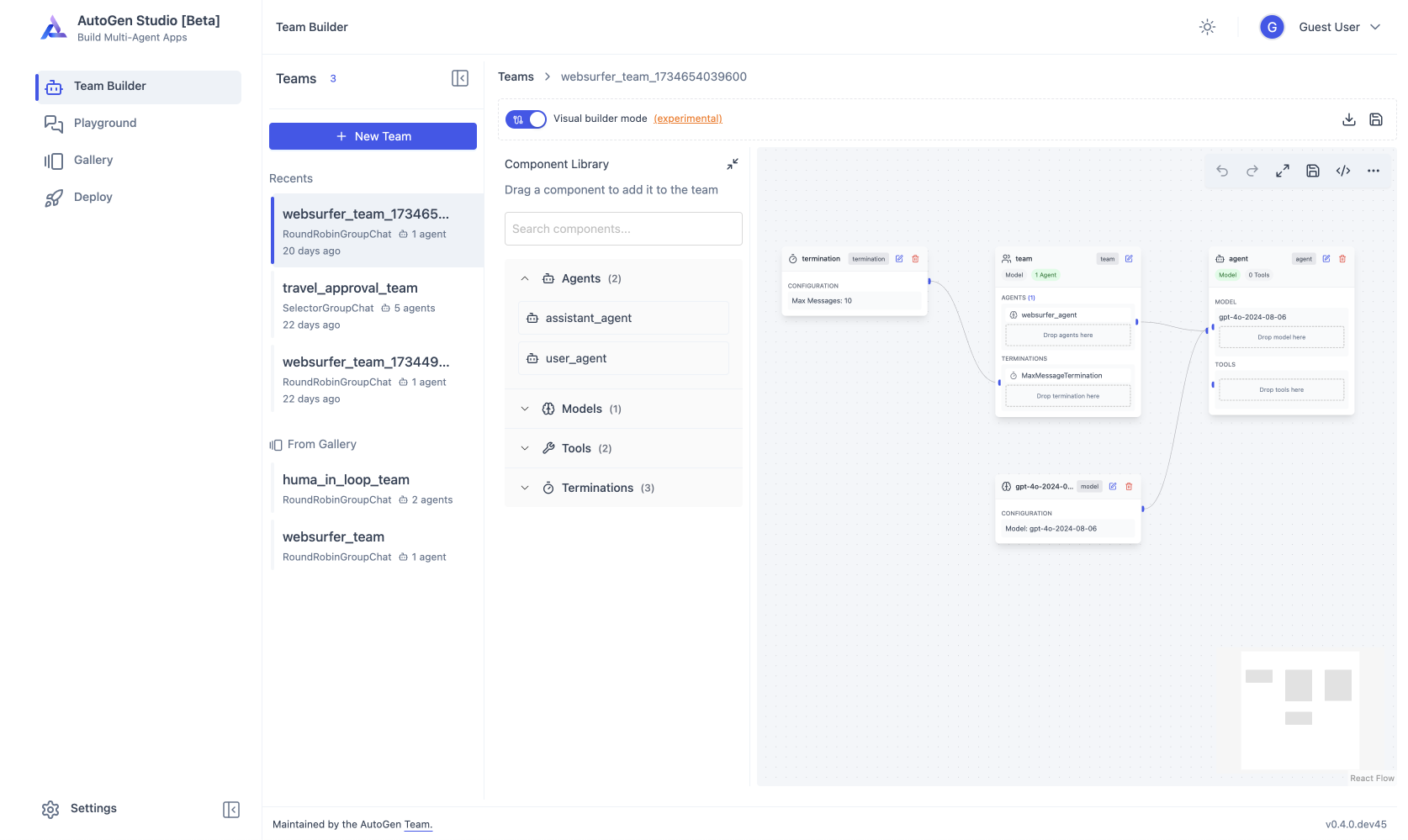
- AutoGen Studio provides a no-code GUI for building multi-agent applications.
- AutoGen Bench provides a benchmarking suite for evaluating agent performance.
You can use the AutoGen framework and developer tools to create applications for your domain. For example, Magentic-One is a state-of-the-art multi-agent team built using AgentChat API and Extensions API that can handle a variety of tasks that require web browsing, code execution, and file handling.
With AutoGen you get to join and contribute to a thriving ecosystem. We host weekly office hours and talks with maintainers and community. We also have a Discord server for real-time chat, GitHub Discussions for Q&A, and a blog for tutorials and updates.
Where to go next?
 |
 |
 |
|
|---|---|---|---|
| Installation |  |
 |
 |
| Quickstart |  |
 |
 |
| Tutorial |  |
 |
 |
| API Reference |  |
Extension points exported contracts — how you extend this code
INavItem (Interface)Core symbols most depended-on inside this repo
infoShape
Languages
Modules by API surface
Dependencies from manifests, versioned
Datastores touched
For agents
$ claude mcp add autogen \
  -- python -m otcore.mcp_server <graph>