github.com/merri-ment/lazy-line-painter @2.0.3 sqlite
README

<img alt="Bundle Size" src="https://img.shields.io/bundlephobia/min/lazy-line-painter.svg?colorB=6f6f6f&style=flat-square">
<img alt="GitHub Release" src="https://img.shields.io/github/release/merri-ment/lazy-line-painter.svg?colorB=6f6f6f&style=flat-square">
<img alt="License" src="https://img.shields.io/github/license/merri-ment/lazy-line-painter.svg?colorB=6f6f6f&style=flat-square">
<img alt="npm Version" src="https://data.jsdelivr.com/v1/package/npm/lazy-line-painter/badge">
Lazy Line Painter
lazylinepainter.com
A Modern JS library for SVG path animation
Getting Started | Documentation | Examples | Lazy Line Composer
Getting Started
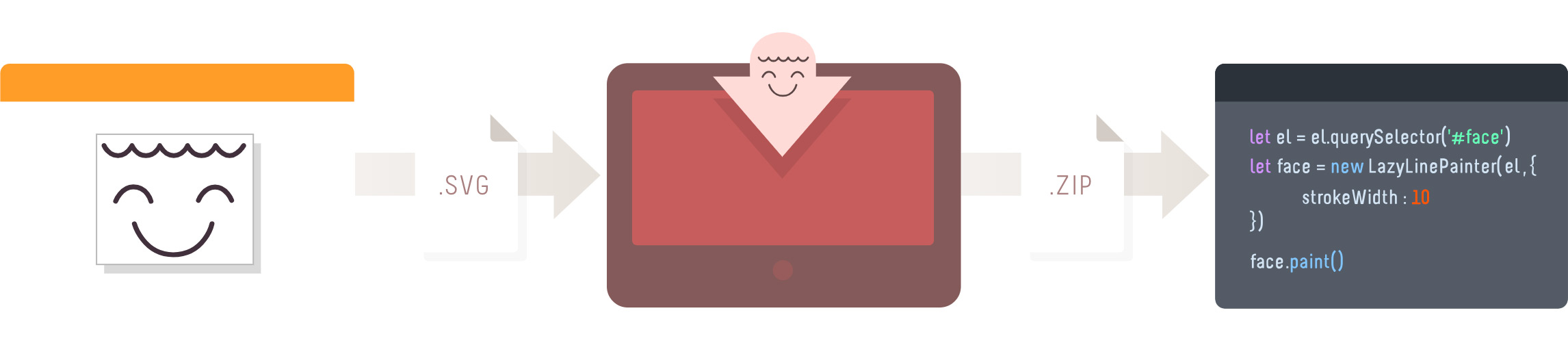 _Lazy Line Painter can be setup with minimal effort as per the Quick Start instructions.
However if a GUI is more your thing, be sure to use the Lazy Line Composer.
A free Online Editor developed specifically for SVG path animation._
NPM
pnpm i lazy-line-painter
CDN
<script src="https://cdn.jsdelivr.net/npm/lazy-line-painter@2.0.2/lib/lazy-line-painter-2.0.2.min.js"></script>
DOWNLOAD
<script src="https://github.com/merri-ment/lazy-line-painter/raw/2.0.3/libs/lazylinepainter-2.0.2.js"></script>
Quick Start
The most basic, no-frills implementation;
// import LazyLinePainter
import LazyLinePainter from "lazy-line-painter";

// select your svg
const el = document.querySelector("#my-svg");

// initialise & configure LazyLinePainter
const myAnimation = new LazyLinePainter(el, { strokeWidth: 10 });

// paint! :)
myAnimation.paint();
Documentation
Configuration
Configure on initialisation
On initialise you can pass lazylinepainter a config object as an argument containing the attritubes you wish to alter across the entire svg.
All config properties are optional.
Style attributes set in the config will override css styles.
const config = {

    // style properties
    'strokeWidth'     // Adjust width of stroke
    'strokeColor'     // Adjust stroke color
    'strokeCap'       // Adjust stroke cap  - butt  | round | square
    'strokeJoin'      // Adjust stroke join - miter | round | bevel
    'strokeOpacity'   // Adjust stroke opacity 0 - 1
    'strokeDash'      // Adjust stroke dash - '5, 5'

    // animation properties
    'delay'           // Delay before animation starts
    'reverse'         // reverse playback
    'ease'            // penner easing - easeExpoOut / easeExpoInOut / easeExpoIn etc
    'repeat'          // number of additional plays, -1 for loop
}

const svg = document.querySelector('#my-svg')
const myAnimation = new LazyLinePainter(svg, config)
Configure individual paths
Data attributes can be used to configure style & animation properties on individual paths in the SVG.
Data attributes will override both css styles & initialisation config style attributes.
<path

  // style
  data-llp-stroke-width="10"
  data-llp-stroke-color="#000000"
  data-llp-stroke-opacity="0.5"
  data-llp-stroke-cap="rounded"
  data-llp-stroke-join="mitre"

  // animation
  data-llp-stroke-dash="[2,2]"
  data-llp-duration="200" // (ms)
  data-llp-delay="200" // delay offset from start of timeline (ms)
  data-llp-reverse="true" (default = "false")
  data-llp-ease="easeInOutQuad" (default = 'easeLinear')

  />
API Reference
Methods
Paint - accepts optional playback arguments - reverse, ease, delay
const reverse = true;
const ease = "easeExpoOut";
const delay = 200;
myAnimation.paint({ reverse, ease, delay });
Erase - paint can still be called on the element after it has been erased;
myAnimation.erase();
Pause
myAnimation.pause();
Resume
myAnimation.resume();
Progress
// set - [0 - 1]
myAnimation.progress(value);

// get
const progress = myAnimation.progress();
console.log(progress);
Destroy - destroys svg & lazyline instance
myAnimation.destroy();
Events
Handle events across entire animation
myAnimation.on("start", () => {});
myAnimation.on("update", () => {});
myAnimation.on("complete", () => {});
Handle all events
Called for each shape animated within the svg.
event argument contains shape properties.
myAnimation.on('start:all', (event) => {});
myAnimation.on('update:all', (event) => { console.log(event.progress); // [0-1] });
myAnimation.on('complete:all', (event) => {});
Handle targeted events.
Listen to events on specific shapes by adding the shape-id after the colon.
event argument contains shape properties.
myAnimation.on("start:id", (event) => {});
myAnimation.on("update:id", (event) => {});
myAnimation.on("complete:id", (event) => {});
Timeline playback events
myAnimation.on("pause", () => {});
myAnimation.on("resume", () => {});
myAnimation.on("erase", () => {});
Examples
Changelog
Refer to Release notes for entire Changelog
Author
Core symbols most depended-on inside this repo
_warningShape
Languages
Modules by API surface
Dependencies from manifests, versioned
For agents
$ claude mcp add lazy-line-painter \
  -- python -m otcore.mcp_server <graph>