github.com/maxchehab/phelia @main sqlite
README
⚡ Phelia
React for Slack Apps
Build interactive Slack apps without webhooks or JSON headache. If you know React, you know how to make a Slack app.
Quick start
- Create your message with React:
```tsx import randomImage from "../utils";
export function RandomImage({ useState }: PheliaMessageProps) { const [imageUrl, setImageUrl] = useState("imageUrl", randomImage());
 return (
   <Message text="Choose a dog">
     <ImageBlock
       title="an adorable :dog:"
       alt="a very adorable doggy dog"
       imageUrl={imageUrl}
       emoji
     />
     <Divider />
     <Actions>
       <Button
         style="primary"
         action="randomImage"
         onClick={() => setImageUrl(randomImage())}
       >
         New doggy
       </Button>
     </Actions>
   </Message>
 );
} ```
- Register your component
```ts const client = new Phelia(process.env.SLACK_TOKEN);
app.post( "/interactions", client.messageHandler(process.env.SLACK_SIGNING_SECRET, [RandomImage]) );
client.postMessage(RandomImage, "@max"); ```
-
Interact with your message:
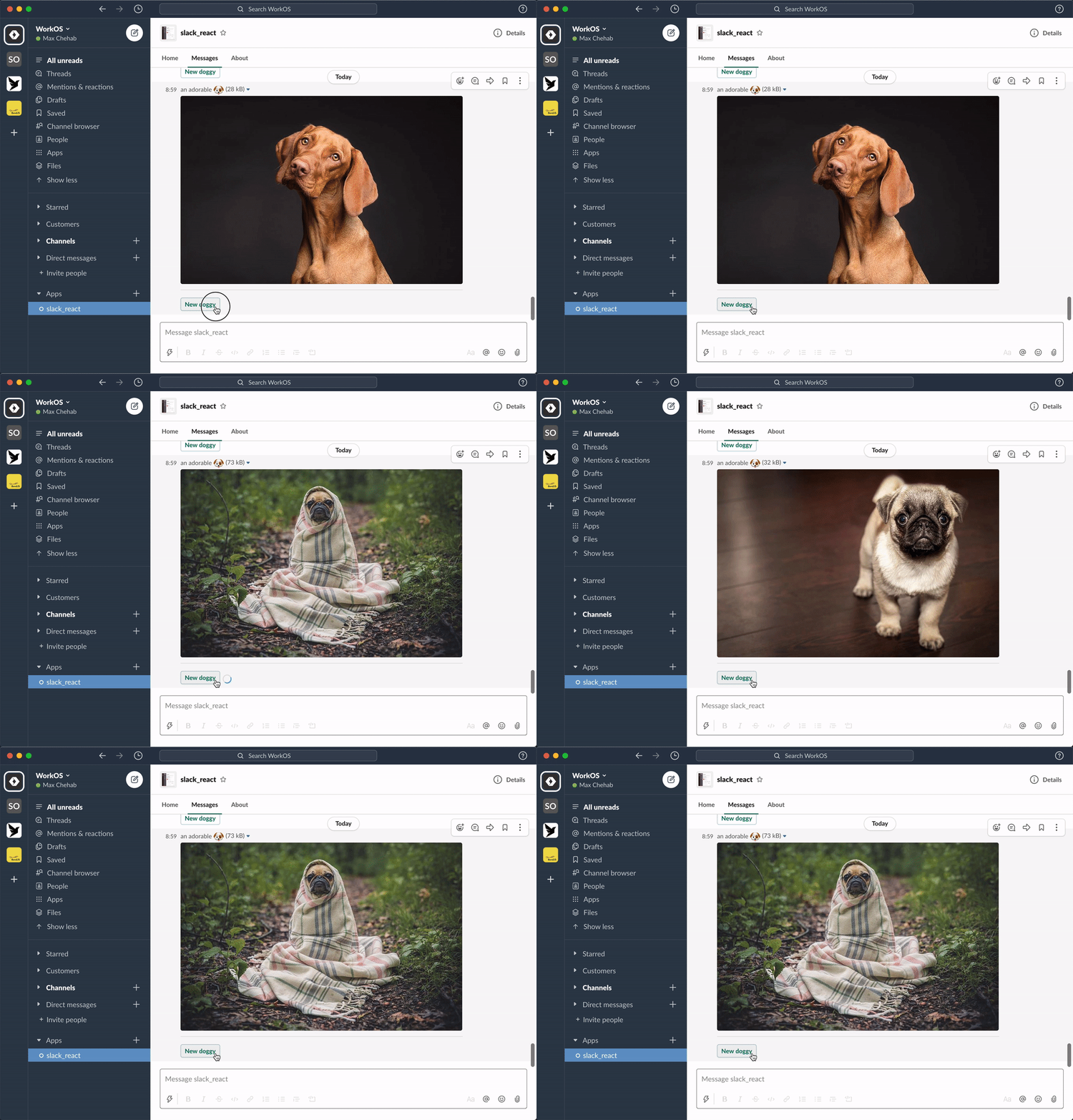
See: docs for more info or join our community Slack.
How this works
Phelia transforms React components into Slack messages by use of a custom React reconciler. Components (with their internal state and props) are serialized into a custom storage. When a user interacts with a posted message Phelia retrieves the component, re-hydrates it's state and props, and performs any actions which may result in a new state.
Components
Each component is a mapping of a specific object type for a slack block. There are 3 categories of components, each with special rules for how that component can be used with other components.
- Surface Components (Message, Home, Modal) - Root components that contains Block Components
- Block Components (Actions, Context, Divider, Image, Input, Section) - Direct descendants of a Surface Component. Contains Block Components
- Block Element Components (Text, CheckBoxes, TextField, etc) - Direct descendants of a Block Components.
Feature Support
To request a feature submit a new issue. | Component | | Example | | ---------------------------------------------------------------------------------------------------------------------- | --- | ---------------------------------------------------------------------------------------------------------------------------------- | | Actions | ✅ | Counter | | Button | ✅ | Counter | | Channel Select Menus | ✅ | Channel Select Menu | | Checkboxes | ✅ | Modal Example | | Confirmation dialog | ✅ | Random Image | | Context | ✅ | | Conversation Select Menus | ✅ | Conversation Select Menu | | Date Picker | ✅ | Birthday Picker | | Divider | ✅ | Random Image | | External Select Menus | ✅ | External Select Menu | | Home Tab | ✅ | Home App Example | | Image Block | ✅ | Random Image | | Image | ✅ | Random Image | | Input | ✅ | Modal Example | | Messages | ✅ | Server | | Modals | ✅ | Modal Example | | Multi channels select Menu | ✅ | Multi Channels Select Menu | | Multi conversations select Menu | ✅ | Multi Conversations Select Menu | | Multi external select Menu | ✅ | Multi External Select Menu | | Multi static select Menu | ✅ | Multi Static Select Menu | | Multi users select Menu | ✅ | Multi Users Select Menu | | Option group | ✅ | Static Select Menu | | Option | ✅ | | Overflow Menu | ✅ | Overflow Menu | | Plain-text input | ✅ | Modal Example | | Radio button group | ✅ | Radio Buttons | | Section | ✅ | Counter | | Static Select Menus | ✅ | Static Select Menu | | Text | ✅ | Counter | | Text | ✅ | Random Image | | User Select Menus | ✅ | User Select Menu |
Extension points exported contracts — how you extend this code
TextProps (Interface)Core symbols most depended-on inside this repo
renderShape
Languages
Modules by API surface
Dependencies from manifests, versioned
For agents
$ claude mcp add phelia \
  -- python -m otcore.mcp_server <graph>