github.com/markmarkoh/datamaps @v0.5.9
README
Datamaps

Interactive maps for data visualizations. Bundled into a single Javascript file.
Datamaps is intended to provide some data visualizations based on geographical data. It's SVG-based, can scale to any screen size, and includes everything inside of 1 script file. It heavily relies on the amazing D3.js library.
Out of the box it includes support for choropleths and bubble maps (see demos), but it's not limited to just that. Its new plugin system allows for the addition of any type of visualization over the map.
For feature requests, open an issue!
Contribution Guideliness
Demos at http://datamaps.github.io
Downloads:
- World map (94kb, 36.7kb gzip'd)
- USA only (35kb, 13.9kb gzip'd)
- USA & World (131kb, 47.1kb gzip'd)
- No preset topojson (6.8kb, 2.3kb gzip'd)
Documentation
Getting Started
- Include D3.js and Topojson on your page
- Include Datamaps.js on your page
- Add a container, set the height and width and position to relative
- Create a
new Datamaps(options), passing in at least anelementoption
Example:
<script src="https://github.com/markmarkoh/datamaps/raw/v0.5.9/cdnjs.cloudflare.com/ajax/libs/d3/3.5.3/d3.min.js"></script>
<script src="https://github.com/markmarkoh/datamaps/raw/v0.5.9/cdnjs.cloudflare.com/ajax/libs/topojson/1.6.9/topojson.min.js"></script>
<script src="https://github.com/markmarkoh/datamaps/raw/v0.5.9/datamaps.world.min.js"></script>


<script>
    var map = new Datamap({element: document.getElementById('container')});
</script>
This should render a new world map with a standard projection.
via NPM
npm install datamaps- Refer to file in
distdirectory, like:
<script src="https://github.com/markmarkoh/datamaps/raw/v0.5.9/cdnjs.cloudflare.com/ajax/libs/d3/3.5.3/d3.min.js"></script>
<script src="https://github.com/markmarkoh/datamaps/raw/v0.5.9/cdnjs.cloudflare.com/ajax/libs/topojson/1.6.9/topojson.min.js"></script>
<script src="https://github.com/markmarkoh/datamaps/raw/v0.5.9/node_modules/datamaps/dist/datamaps.world.min.js"></script>


<script>
    var map = new Datamap({element: document.getElementById('container')});
</script>
via Bower
bower install datamaps- Refer to file in
distdirectory, like:
<script src="https://github.com/markmarkoh/datamaps/raw/v0.5.9/cdnjs.cloudflare.com/ajax/libs/d3/3.5.3/d3.min.js"></script>
<script src="https://github.com/markmarkoh/datamaps/raw/v0.5.9/cdnjs.cloudflare.com/ajax/libs/topojson/1.6.9/topojson.min.js"></script>
<script src="https://github.com/markmarkoh/datamaps/raw/v0.5.9/bower_components/datamaps/dist/datamaps.world.min.js"></script>


<script>
    var map = new Datamap({element: document.getElementById('container')});
</script>
USA Only Map
A map of the USA with an Albers based projection will be default if you only include datamaps.usa.min.js, but in case you include datamaps.all.min.js:
<script>
    var map = new Datamap({
        element: document.getElementById('container'),
        scope: 'usa'
    });
</script>
Changing the default fill colors
<script>
    var map = new Datamap({
        element: document.getElementById('container'),
        fills: {
            defaultFill: 'rgba(23,48,210,0.9)' // Any hex, color name or rgb/rgba value
        }
    });
</script>
Disabling popup or hover effects
<script>
    var map = new Datamap({
        element: document.getElementById('container'),
        geographyConfig: {
            highlightOnHover: false,
            popupOnHover: false
        }
    });
</script>
Using custom maps
<script>
    var map = new Datamap({
        element: document.getElementById('container'),
        geographyConfig: {
            dataUrl: '/custom.json'
        },
        scope: 'custom',
        setProjection: function(element, options) {
            var projection, path;
            projection = d3.geo.albersUsa()
                .center([long, lat])
                .scale(element.offsetWidth)
                .translate([element.offsetWidth / 2, element.offsetHeight / 2]);
}
            path = d3.geo.path()
                .projection( projection );

            return {path: path, projection: projection};
        }
    });
</script>
By specifying a dataUrl, Datamaps will attempt to fetch that resource as TopoJSON.
If you are using a custom map, you'll probably want to specify your own setProjection method as well.
setProjection takes 2 arguments, element as a DOM element, options as the original options you passed in. It should return an object with two properties: path as a d3.geo.path, projection as a d3.geo.projection
The example above will result in albersUsa projection.
Read about other D3.js projections
You can create any country's map using custom maps.
Follow the below steps:- 1. Find the {xyz}.topo.json file for you country xyz. You can find from https://github.com/markmarkoh/datamaps/tree/master/dist. 2. Extract Datamap.prototype.{xyz}Topo json and save it file named {xyz}.topo.json 3. If the state codes contains dot(.) in the topo json, then you need to remove the dot from the code e.g, if your state code is CA.AL, remove CA. part to get 2-digit ISO code AL. If the states code are already in 2-digit ISO or do't have dot(.) then don't do any modification follow next steps. 4. Objects country name in {xyz}.topo.json should be same as you declared in the Datamap scope. e.g, for Canada, in canada.topo.json we have {"type":"Topology","objects":{"can":{"type":"GeometryCollection"}}} and we have provided scope as 'canada' in the canada.html page. So this case 'can' in canada.topo.json must be as 'canada' i.e {"type":"Topology","objects":{"canada":{"type":"GeometryCollection"}}}. 5. You need to override setProjection method, which is explained above three countires. You can refer any one. 6. Done
Here are the some examples of different countries maps.
1. Bubble map on India Geographical region

 var bubble_map = new Datamap({
            element: document.getElementById('india'),
            scope: 'india',
            geographyConfig: {
                popupOnHover: true,
                highlightOnHover: true,
                borderColor: '#444',
                borderWidth: 0.5,
                dataUrl: 'https://rawgit.com/Anujarya300/bubble_maps/master/data/geography-data/india.topo.json'
                //dataJson: topoJsonData
            },
            fills: {
                'MAJOR': '#306596',
                'MEDIUM': '#0fa0fa',
                'MINOR': '#bada55',
                defaultFill: '#dddddd'
            },
            data: {
                'JH': { fillKey: 'MINOR' },
                'MH': { fillKey: 'MINOR' }
            },
            setProjection: function (element) {
                var projection = d3.geo.mercator()
                    .center([78.9629, 23.5937]) // always in [East Latitude, North Longitude]
                    .scale(1000);
                var path = d3.geo.path().projection(projection);
                return { path: path, projection: projection };
            }
});
Set the correct projection for India map on world map with the help of Longitude and Latitute of India (you can google it India Longitude and Latitute)
Please use india.toto.json for India geopraphy json data from https://github.com/Anujarya300/bubble_maps/blob/master/data/geography-data/india.topo.json, otherwise your map wont work. (I have truncated IND. from all state ISO code(2-digit ISO code), e.g IND.JH for Jharkhand state truncated to JH)
Please note in setProjection method, I have set [78.9629, 23.5937] to locate center point for India in the world map. That means Latitude = 78.9629 E and Longitude = 23.5937 N. Remember Latitute and Longitude are always East and North. For western countries, Latitude are in West so make it convert as Negative of East. e.g 102.3421 W ==> -102.3421 E.
2. Bubble map on Canada Geographical region

var bubble_map = new Datamap({
            element: document.getElementById('canada'),
            scope: 'canada',
            geographyConfig: {
                popupOnHover: true,
                highlightOnHover: true,
                borderColor: '#444',
                borderWidth: 0.5,
                dataUrl: 'https://rawgit.com/Anujarya300/bubble_maps/master/data/geography-data/canada.topo.json'
                //dataJson: topoJsonData
            },
            fills: {
                'MAJOR': '#306596',
                'MEDIUM': '#0fa0fa',
                'MINOR': '#bada55',
                defaultFill: '#dddddd'
            },
            data: {
                'JH': { fillKey: 'MINOR' },
                'MH': { fillKey: 'MINOR' }
            },
            setProjection: function (element) {
                  var projection = d3.geo.mercator()
                .center([-106.3468, 68.1304]) // always in [East Latitude, North Longitude]
                .scale(250)
                .translate([element.offsetWidth / 2, element.offsetHeight / 2]);

                var path = d3.geo.path().projection(projection);
                return { path: path, projection: projection };
            }
        });
Set the correct projection for Canada map on world map with the help of Longitude and Latitute of Canada (you can google it Canada Longitude and Latitute)
Please use canada.toto.json for India geopraphy json data from https://github.com/Anujarya300/bubble_maps/blob/master/data/geography-data/canada.topo.json, otherwise your map wont work. (I have truncated CA. from all state ISO code(2-digit ISO code), e.g CA.TN to TN)
Please note in setProjection method, I have set [-106.3468, 68.1304] to locate center point for Canada in the world map. That means Latitude = 106.3468 W and Longitude = 68.1304 N. Remember Latitute and Longitude are always East and North. For western countries, Latitude are in West so make it convert as Negative of East. e.g 102.3421 W ==> -102.3421 E.
You can adjust this latitude and longitude co-ordinates by minor changing. e.g, if your map is not showing full view of North then you can change 68.1304 N to 70.3200 N or 71.3200 etc. if your map is not showing full view of East then you can change 32.1304 E to 70.3200 E or 30.3200 etc.
More about other countries maps
Creating a Choropleth
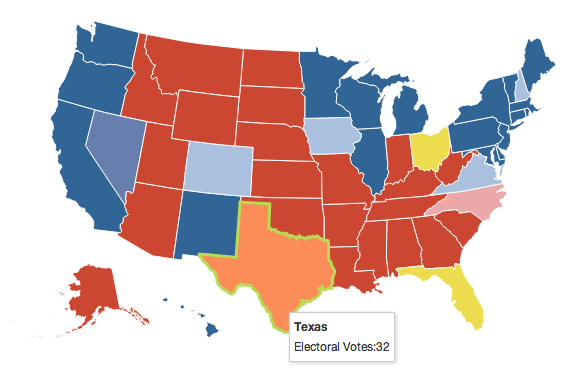
Probably the most common type of map visualization, where different states or countries are color coded.
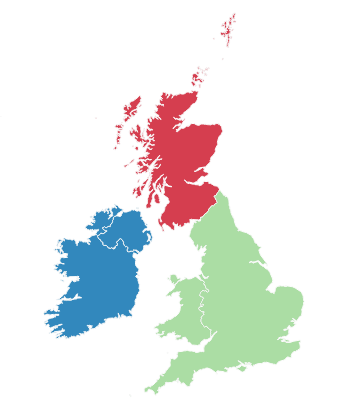
You'll need to know the 2 letter state code ('NY' for New York) or the 3 letter country code ('SCT' for Scotland) to fill in areas.
<script>
    var map = new Datamap({
        element: document.getElementById('container'),
        fills: {
            HIGH: '#afafaf',
            LOW: '#123456',
            MEDIUM: 'blue',
            UNKNOWN: 'rgb(0,0,0)',
            defaultFill: 'green'
        },
        data: {
            IRL: {
                fillKey: 'LOW',
                numberOfThings: 2002
            },
            USA: {
                fillKey: 'MEDIUM',
                numberOfThings: 10381
            }
        }
    });

    // Draw a legend for this map
    map.legend();
</script>
This will draw a world map and fill in IRL (Ireland) with the corresponding fills.LOW and USA with fills.MEDIUM.
You can also use fill: color for each state if you don't want to define a fillKey.
Colors will be applied in this order: fillKey, fill, defaultFill.
Updating a choropleth after initial drawing
map.updateChoropleth({
   USA: {fillKey: 'LOW'},
   CAN: '#0fa0fa'
});
You can specify either a literal color (as a string), or an object with a fillKey property.
Resetting a choropleth to defaultFill
The following will reset the entire map to the defaultFill and update CA to be filled green.
map.updateChoropleth({CA: 'green'}, {reset: true})
The following will reset the entire map to defaultFill
map.updateChoropleth(null, {reset: true})
The following will reset the entire map to defaultFill, but update the corresponding data of NY.
map.updateChoropleth({NY: {numberOfVoters: 55452}}, {reset: true})
You can also add a map legend with the legend plugin (used above)
Choropleth with auto-calculated color
Example highmaps_world.html explains how to create colorized map based on some quantity of things, Live Demo
Example result:

Custom popup on hover
Expanding on the previous example of using data, any property passed into data will be sent to the popupTemplate function, which can be override
Extension points exported contracts — how you extend this code
DataMapOptions (Interface)Core symbols most depended-on inside this repo
utcShape
Languages
Modules by API surface
Dependencies from manifests, versioned
For agents
$ claude mcp add datamaps \
  -- python -m otcore.mcp_server <graph>