github.com/logpai/logparser @v1.0.3 sqlite
README

Logparser





Logparser provides a machine learning toolkit and benchmarks for automated log parsing, which is a crucial step for structured log analytics. By applying logparser, users can automatically extract event templates from unstructured logs and convert raw log messages into a sequence of structured events. The process of log parsing is also known as message template extraction, log key extraction, or log message clustering in the literature.
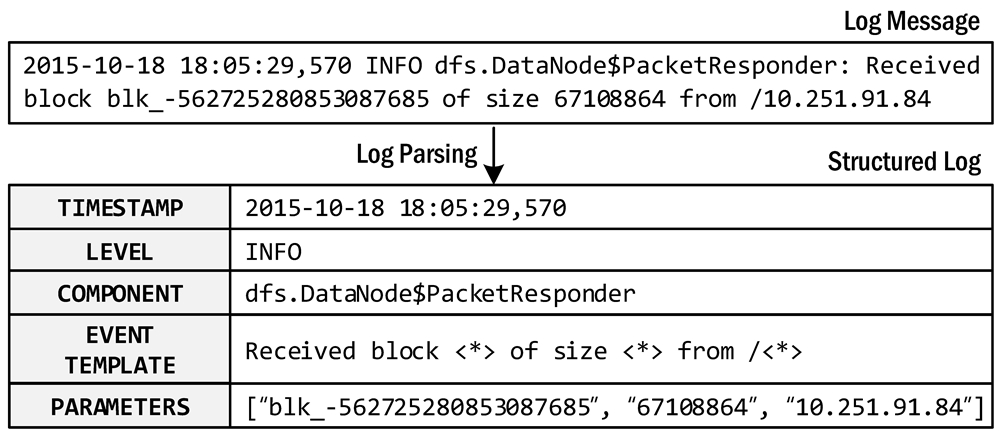
An example of log parsing
🌈 New updates
- Since the first release of logparser, many PRs and issues have been submitted due to incompatibility with Python 3. Finally, we update logparser v1.0.0 with support for Python 3. Thanks for all the contributions (#PR86, #PR85, #PR83, #PR80, #PR65, #PR57, #PR53, #PR52, #PR51, #PR49, #PR18, #PR22)!
- We build the package wheel logparser3 and release it on pypi. Please install via
pip install logparser3. - We refactor the code structure and beautify the code via the Python code formatter black.
Log parsers available:
| Publication | Parser | Paper Reference |
|---|---|---|
| IPOM'03 | SLCT | A Data Clustering Algorithm for Mining Patterns from Event Logs, by Risto Vaarandi. |
| QSIC'08 | AEL | Abstracting Execution Logs to Execution Events for Enterprise Applications, by Zhen Ming Jiang, Ahmed E. Hassan, Parminder Flora, Gilbert Hamann. |
| KDD'09 | IPLoM | Clustering Event Logs Using Iterative Partitioning, by Adetokunbo Makanju, A. Nur Zincir-Heywood, Evangelos E. Milios. |
| ICDM'09 | LKE | Execution Anomaly Detection in Distributed Systems through Unstructured Log Analysis, by Qiang Fu, Jian-Guang Lou, Yi Wang, Jiang Li. [Microsoft] |
| MSR'10 | LFA | Abstracting Log Lines to Log Event Types for Mining Software System Logs, by Meiyappan Nagappan, Mladen A. Vouk. |
| CIKM'11 | LogSig | LogSig: Generating System Events from Raw Textual Logs, by Liang Tang, Tao Li, Chang-Shing Perng. |
| SCC'13 | SHISO | Incremental Mining of System Log Format, by Masayoshi Mizutani. |
| CNSM'15 | LogCluster | LogCluster - A Data Clustering and Pattern Mining Algorithm for Event Logs, by Risto Vaarandi, Mauno Pihelgas. |
| CNSM'15 | LenMa | Length Matters: Clustering System Log Messages using Length of Words, by Keiichi Shima. |
| CIKM'16 | LogMine | LogMine: Fast Pattern Recognition for Log Analytics, by Hossein Hamooni, Biplob Debnath, Jianwu Xu, Hui Zhang, Geoff Jiang, Adbullah Mueen. [NEC] |
| ICDM'16 | Spell | Spell: Streaming Parsing of System Event Logs, by Min Du, Feifei Li. |
| ICWS'17 | Drain | Drain: An Online Log Parsing Approach with Fixed Depth Tree, by Pinjia He, Jieming Zhu, Zibin Zheng, and Michael R. Lyu. |
| ICPC'18 | MoLFI | A Search-based Approach for Accurate Identification of Log Message Formats, by Salma Messaoudi, Annibale Panichella, Domenico Bianculli, Lionel Briand, Raimondas Sasnauskas. |
| TSE'20 | Logram | Logram: Efficient Log Parsing Using n-Gram Dictionaries, by Hetong Dai, Heng Li, Che-Shao Chen, Weiyi Shang, and Tse-Hsun (Peter) Chen. |
| ICSME'22 | ULP | An Effective Approach for Parsing Large Log Files, by Issam Sedki, Abdelwahab Hamou-Lhadj, Otmane Ait-Mohamed, Mohammed A. Shehab. |
| TSC'23 | Brain | Brain: Log Parsing with Bidirectional Parallel Tree, by Siyu Yu, Pinjia He, Ningjiang Chen, Yifan Wu. |
:bulb: Welcome to submit a PR to push your parser code to logparser and add your paper to the table.
Installation
We recommend installing the logparser package and requirements via pip install.
pip install logparser3
In particular, the package depends on the following requirements.
- Python 3.6+
- regex 2022.3.2
- numpy
- pandas
- scipy
- scikit-learn
- deap (if using logparser.MoLFI)
- nltk (if using logparser.SHISO)
- gcc (if using logparser.SLCT)
- perl (if using logparser.LogCluster)
Note that regex matching in Python is brittle, so we recommend fixing the regex library to version 2022.3.2.
Get started
-
Run the demo:
For each log parser, we provide a demo to help you get started. Each demo shows the basic usage of a target log parser and the hyper-parameters to configure. For example, the following command shows how to run the demo for Drain.
cd logparser/Drain
python demo.py
After finishing running the demo, you can obtain extracted event templates and parsed structured logs in the result folder. -
Run the benchmark:
For each log parser, we provide a benchmark script to run log parsing on the loghub_2k datasets for evaluating parsing accuarcy. You can also use other benchmark datasets for log parsing.
cd logparser/Drain
python benchmark.py
The benchmarking results can be found at the Readme file of each parser, e.g., https://github.com/logpai/logparser/tree/main/logparser/Drain#benchmark.
-
Parse your own logs:
It is easy to apply logparser to parsing your own log data. To do so, you need to install the logparser3 package first. Then you can develop your own script following the below code snippet to start log parsing.
```python from logparser.Drain import LogParser
input_dir = 'PATH_TO_LOGS/' # The input directory of log file output_dir = 'result/' # The output directory of parsing results log_file = 'unknow.log' # The input log file name log_format = '
Regular expression list for optional preprocessing (default: [])
regex = [ r'(/|)([0-9]+.){3}[0-9]+(:[0-9]+|)(:|)' # IP ] st = 0.5 # Similarity threshold depth = 4 # Depth of all leaf nodes
parser = LogParser(log_format, indir=input_dir, outdir=output_dir, depth=depth, st=st, rex=regex) parser.parse(log_file) ``` The full example is shown as example/parse_your_own_logs.py.
Production use
The main goal of logparser is used for research and benchmark purpose. Researchers can use logparser as a code base to develop new log parsers while practitioners could assess the performance and scalability of current log parsing methods through our benchmarking. We strongly recommend practitioners to try logparser in your production environment. But be aware that the current implementation of logparser is far from ready for production use. Whereas we currently have no plan to do that, we do have a few suggestions for developers who want to build an intelligent production-level log parser.
- Please be aware of the [licenses of third-party libraries](https://g
Core symbols most depended-on inside this repo
formatShape
Languages
Modules by API surface
For agents
$ claude mcp add logparser \
  -- python -m otcore.mcp_server <graph>