github.com/juanmc2005/diart @v0.9.2 sqlite
README
🌿 Build AI-powered real-time audio applications in a breeze 🌿






💾 Installation | 🎙️ Stream audio | 🧠 Models 📈 Tuning | 🧠🔗 Pipelines | 🌐 WebSockets | 🔬 Research

⚡ Quick introduction
Diart is a python framework to build AI-powered real-time audio applications. Its key feature is the ability to recognize different speakers in real time with state-of-the-art performance, a task commonly known as "speaker diarization".
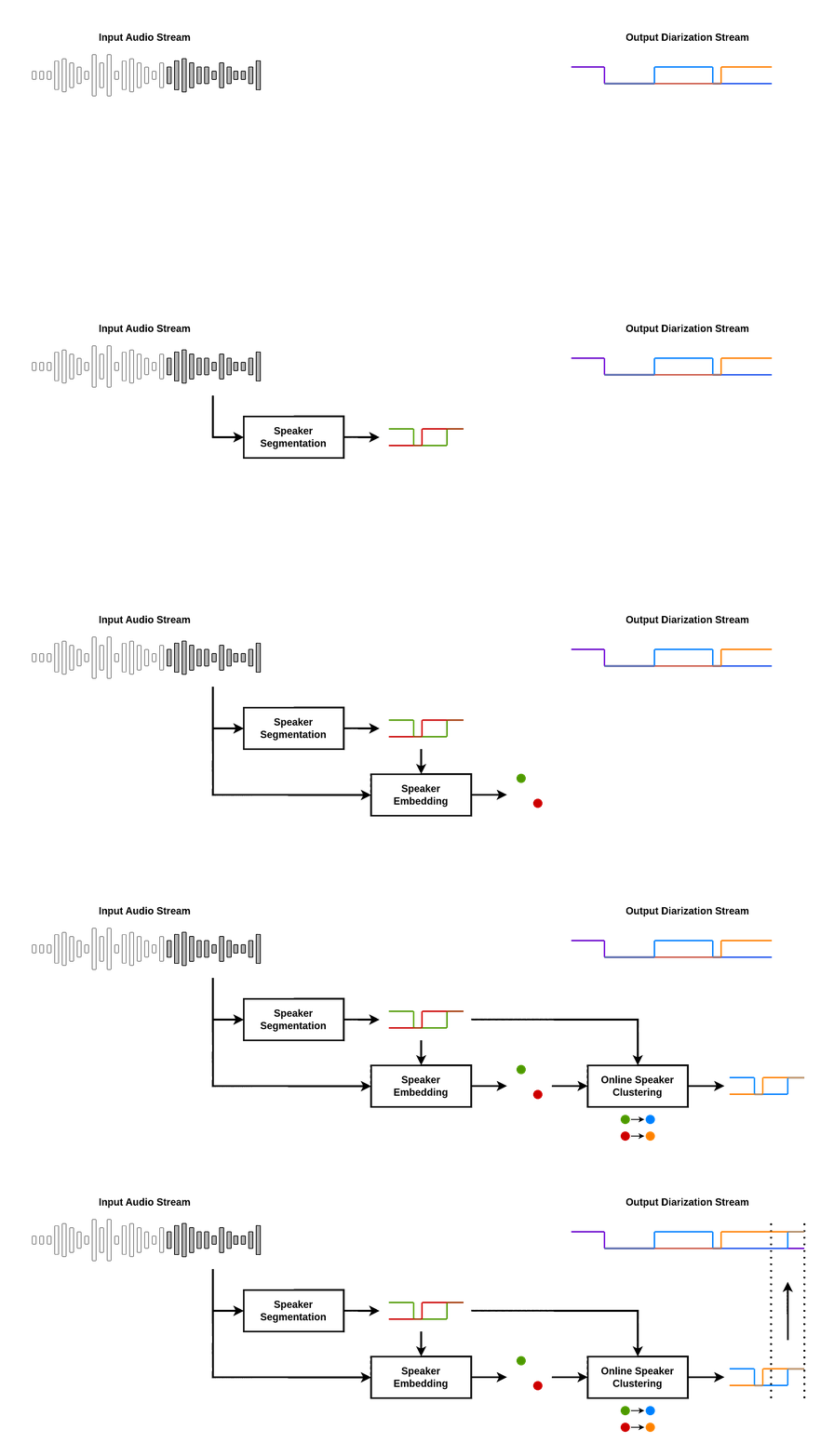
The pipeline diart.SpeakerDiarization combines a speaker segmentation and a speaker embedding model
to power an incremental clustering algorithm that gets more accurate as the conversation progresses:
With diart you can also create your own custom AI pipeline, benchmark it, tune its hyper-parameters, and even serve it on the web using websockets.
We provide pre-trained pipelines for:
- Speaker Diarization
- Voice Activity Detection
- Transcription (coming soon)
- Speaker-Aware Transcription (coming soon)
💾 Installation
1) Make sure your system has the following dependencies:
ffmpeg < 4.4
portaudio == 19.6.X
libsndfile >= 1.2.2
Alternatively, we provide an environment.yml file for a pre-configured conda environment:
conda env create -f diart/environment.yml
conda activate diart
2) Install the package:
pip install diart
Get access to 🎹 pyannote models
By default, diart is based on pyannote.audio models from the huggingface hub. In order to use them, please follow these steps:
1) Accept user conditions for the pyannote/segmentation model
2) Accept user conditions for the newest pyannote/segmentation-3.0 model
3) Accept user conditions for the pyannote/embedding model
4) Install huggingface-cli and log in with your user access token (or provide it manually in diart CLI or API).
🎙️ Stream audio
From the command line
A recorded conversation:
diart.stream /path/to/audio.wav
A live conversation:
# Use "microphone:ID" to select a non-default device
# See `python -m sounddevice` for available devices
diart.stream microphone
By default, diart runs a speaker diarization pipeline, equivalent to setting --pipeline SpeakerDiarization,
but you can also set it to --pipeline VoiceActivityDetection. See diart.stream -h for more options.
From python
Use StreamingInference to run a pipeline on an audio source and write the results to disk:
from diart import SpeakerDiarization
from diart.sources import MicrophoneAudioSource
from diart.inference import StreamingInference
from diart.sinks import RTTMWriter

pipeline = SpeakerDiarization()
mic = MicrophoneAudioSource()
inference = StreamingInference(pipeline, mic, do_plot=True)
inference.attach_observers(RTTMWriter(mic.uri, "/output/file.rttm"))
prediction = inference()
For inference and evaluation on a dataset we recommend to use Benchmark (see notes on reproducibility).
🧠 Models
You can use other models with the --segmentation and --embedding arguments.
Or in python:
import diart.models as m

segmentation = m.SegmentationModel.from_pretrained("model_name")
embedding = m.EmbeddingModel.from_pretrained("model_name")
Pre-trained models
Below is a list of all the models currently supported by diart:
| Model Name | Model Type | CPU Time* | GPU Time* |
|---|---|---|---|
🤗 pyannote/segmentation (default) |
segmentation | 12ms | 8ms |
🤗 pyannote/segmentation-3.0 |
segmentation | 11ms | 8ms |
🤗 pyannote/embedding (default) |
embedding | 26ms | 12ms |
🤗 hbredin/wespeaker-voxceleb-resnet34-LM (ONNX) |
embedding | 48ms | 15ms |
🤗 pyannote/wespeaker-voxceleb-resnet34-LM (PyTorch) |
embedding | 150ms | 29ms |
🤗 speechbrain/spkrec-xvect-voxceleb |
embedding | 41ms | 15ms |
🤗 speechbrain/spkrec-ecapa-voxceleb |
embedding | 41ms | 14ms |
🤗 speechbrain/spkrec-ecapa-voxceleb-mel-spec |
embedding | 42ms | 14ms |
🤗 speechbrain/spkrec-resnet-voxceleb |
embedding | 41ms | 16ms |
🤗 nvidia/speakerverification_en_titanet_large |
embedding | 91ms | 16ms |
The latency of segmentation models is measured in a VAD pipeline (5s chunks).
The latency of embedding models is measured in a diarization pipeline using pyannote/segmentation (also 5s chunks).
* CPU: AMD Ryzen 9 - GPU: RTX 4060 Max-Q
Custom models
Third-party models can be integrated by providing a loader function:
from diart import SpeakerDiarization, SpeakerDiarizationConfig
from diart.models import EmbeddingModel, SegmentationModel

def segmentation_loader():
    # It should take a waveform and return a segmentation tensor
    return load_pretrained_model("my_model.ckpt")

def embedding_loader():
    # It should take (waveform, weights) and return per-speaker embeddings
    return load_pretrained_model("my_other_model.ckpt")

segmentation = SegmentationModel(segmentation_loader)
embedding = EmbeddingModel(embedding_loader)
config = SpeakerDiarizationConfig(
    segmentation=segmentation,
    embedding=embedding,
)
pipeline = SpeakerDiarization(config)
If you have an ONNX model, you can use from_onnx():
from diart.models import EmbeddingModel

embedding = EmbeddingModel.from_onnx(
    model_path="my_model.ckpt",
    input_names=["x", "w"],  # defaults to ["waveform", "weights"]
    output_name="output",  # defaults to "embedding"
)
📈 Tune hyper-parameters
Diart implements an optimizer based on optuna that allows you to tune pipeline hyper-parameters to your needs.
From the command line
diart.tune /wav/dir --reference /rttm/dir --output /output/dir
See diart.tune -h for more options.
From python
from diart.optim import Optimizer

optimizer = Optimizer("/wav/dir", "/rttm/dir", "/output/dir")
optimizer(num_iter=100)
This will write results to an sqlite database in /output/dir.
Distributed tuning
For bigger datasets, it is sometimes more convenient to run multiple optimization processes in parallel. To do this, create a study on a recommended DBMS (e.g. MySQL or PostgreSQL) making sure that the study and database names match:
mysql -u root -e "CREATE DATABASE IF NOT EXISTS example"
optuna create-study --study-name "example" --storage "mysql://root@localhost/example"
You can now run multiple identical optimizers pointing to this database:
diart.tune /wav/dir --reference /rttm/dir --storage mysql://root@localhost/example
or in python:
from diart.optim import Optimizer
from optuna.samplers import TPESampler
import optuna

db = "mysql://root@localhost/example"
study = optuna.load_study("example", db, TPESampler())
optimizer = Optimizer("/wav/dir", "/rttm/dir", study)
optimizer(num_iter=100)
🧠🔗 Build pipelines
For a more advanced usage, diart also provides building blocks that can be combined to create your own pipeline.
Streaming is powered by RxPY, but the blocks module is completely independent and can be used separately.
Example
Obtain overlap-aware speaker embeddings from a microphone stream:
import rx.operators as ops
import diart.operators as dops
from diart.sources import MicrophoneAudioSource, FileAudioSource
from diart.blocks import SpeakerSegmentation, OverlapAwareSpeakerEmbedding

segmentation = SpeakerSegmentation.from_pretrained("pyannote/segmentation")
embedding = OverlapAwareSpeakerEmbedding.from_pretrained("pyannote/embedding")

source = MicrophoneAudioSource()
# To take input from file:
# source = FileAudioSource("<filename>", sample_rate=16000)

# Make sure the models have been trained with this sample rate
print(source.sample_rate)

stream = mic.stream.pipe(
    # Reformat stream to 5s duration and 500ms shift
    dops.rearrange_audio_stream(sample_rate=source.sample_rate),
    ops.map(lambda wav: (wav, segmentation(wav))),
    ops.starmap(embedding)
).subscribe(on_next=lambda emb: print(emb.shape))

source.read()
Output:
# Shape is (batch_size, num_speakers, embedding_dim)
torch.Size([1, 3, 512])
torch.Size([1, 3, 512])
torch.Size([1, 3, 512])
...
🌐 WebSockets
Diart is also compatible with the WebSocket protocol to serve pipelines on the web.
From the command line
diart.serve --host 0.0.0.0 --port 7007
diart.client microphone --host <server-address> --port 7007
Note: make sure that the client uses the same step and sample_rate than the server with --step and -sr.
See -h for more options.
From python
For customized solutions, a server can also be created in python using the WebSocketAudioSource:
from diart import SpeakerDiarization
from diart.sources import WebSocketAudioSource
from diart.inference import StreamingInference

pipeline = SpeakerDiarization()
source = WebSocketAudioSource(pipeline.config.sample_rate, "localhost", 7007)
inference = StreamingInference(pipeline, source)
inference.attach_hooks(lambda ann_wav: source.send(ann_wav[0].to_rttm()))
prediction = inference()
🔬 Powered by research
Diart is the official implementation of the paper Overlap-aware low-latency online speaker diarization based on end-to-end local segmentation by Juan Manuel Coria, Hervé Bredin, Sahar Ghannay and Sophie Rosset.
We propose to address online speaker diarization as a combination of incremental clustering and local diarization applied to a rolling buffer updated every 500ms. Every single step of the proposed pipeline is designed to take full advantage of the strong ability of a recently proposed end-to-end overlap-aware segmentation to detect and separate overlapping speakers. In particular, we propose a modified version of the statistics pooling layer (initially introduced in the x-vector architecture) to give less weight to frames where the segmentation model predicts simultaneous speakers. Furthermore, we derive cannot-link constraints from the initial segmentation step to prevent two local speakers from being wrongfully merged during the incremental clustering step. Finally, we show how the latency
Core symbols most depended-on inside this repo
toShape
Languages
Modules by API surface
Dependencies from manifests, versioned
Datastores touched
For agents
$ claude mcp add diart \
  -- python -m otcore.mcp_server <graph>