github.com/jeessy2/ddns-go @v6.17.2 sqlite
README
DDNS-GO





中文 | English
Automatically obtain your public IPv4 or IPv6 address and resolve it to the corresponding domain name service.
Features
- Support Mac, Windows, Linux system, support ARM, x86, RISC-V architecture
- Support domain service providers
AliyunAliyun ESATencentDnspodCloudflareHuaweiCallbackBaiduPorkbunGoDaddyNamecheapNameSiloDynadotDNSLANowcnEranetGcoreEdgeOneIBM NS1 ConnectRainyun - Support interface / netcard / command to get IP
- Support running as a service
- Default interval is 5 minutes
- Support configuring multiple DNS service providers at the same time
- Support multiple domain name resolution at the same time
- Support multi-level domain name
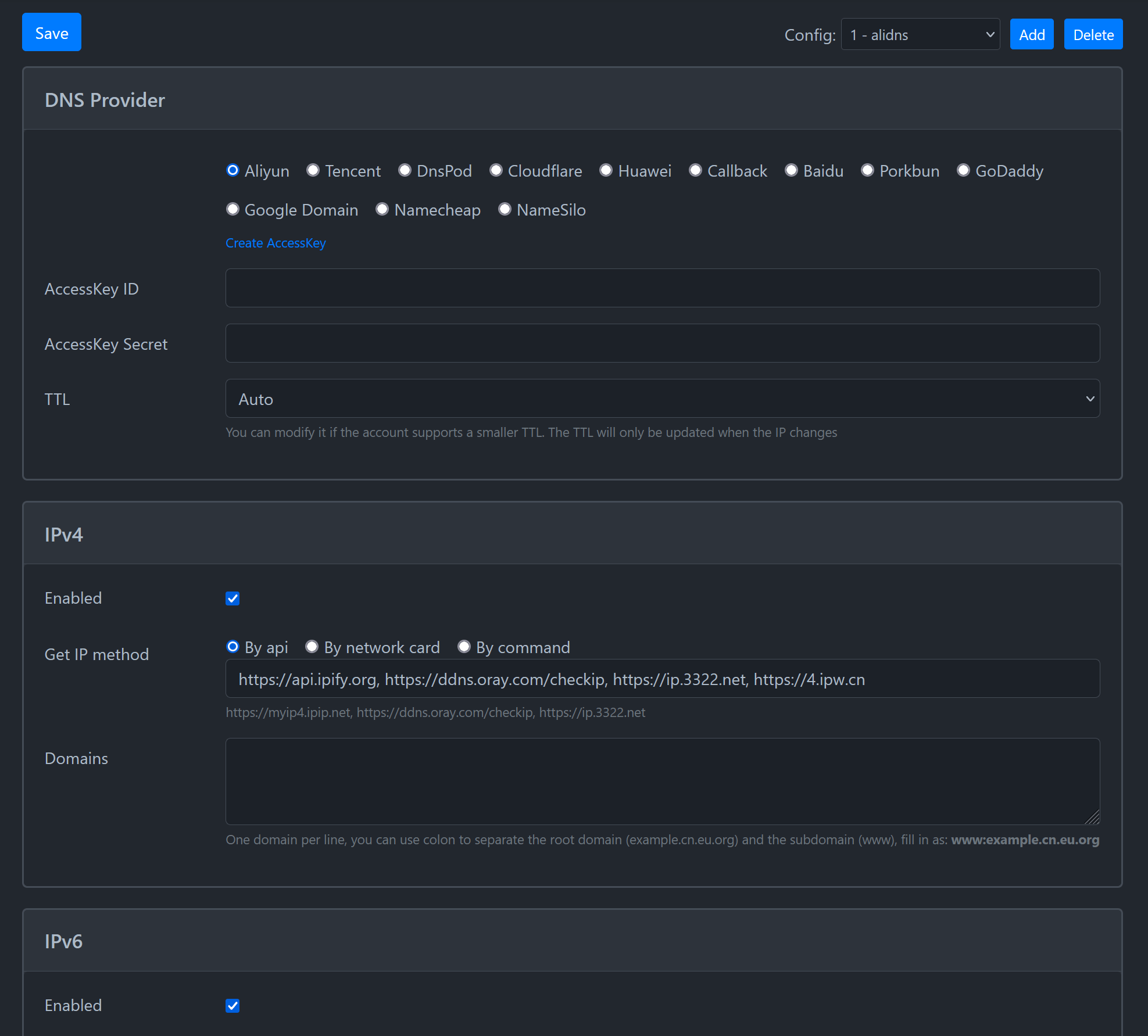
- Configured on the web page, simple and convenient
- In the web page, you can quickly view the latest 50 logs
- Support Webhook notification
- Support TTL
- Support for some domain service providers to pass custom parameters to achieve multi-IP and other functions
[!NOTE] If you enable public network access, it is recommended to use Nginx and other reverse proxy software to enable HTTPS access to ensure security.
Use in system
- Download and unzip ddns-go from Releases
- Run in service mode
- Mac/Linux:
sudo ./ddns-go -s install - Win(Run as administrator):
.\ddns-go.exe -s install - Config
- Please open the browser and visit
http://localhost:9876for initial configuration - [Optional] Uninstall service
- Mac/Linux:
sudo ./ddns-go -s uninstall - Win(Run as administrator):
.\ddns-go.exe -s uninstall - [Optional] Support installation with parameters
-llisten address-fsync frequency(seconds)-cacheTimesinterval N times compared with service providers-ccustom configuration file path-nowebdoes not start web service-skipVerifyskip certificate verification-dnscustom DNS server-resetPasswordreset password- [Optional] Examples
- 10 minutes to synchronize once, and the configuration file address is specified
bash ./ddns-go -s install -f 600 -c /Users/name/.ddns_go_config.yaml - Every 10 seconds to check the local IP changes, every 30 minutes to compare the IP changes, to achieve IP changes immediately trigger updates and will not be limited by the service providers, if the use of api to obtain IP, need to pay attention to the api side of the flow limit
bash ./ddns-go -s install -f 10 -cacheTimes 180 - reset password
bash
    ./ddns-go -resetPassword 123456
Use in docker
- Mount the host directory, use the docker host mode. You can replace
/opt/ddns-gowith any directory on your host, the configuration file is a hidden file
bash
  docker run -d --name ddns-go --restart=always --net=host -v /opt/ddns-go:/root jeessy/ddns-go
-
Please open the browser and visit
http://DOCKER_IP:9876for initial configuration -
[Optional] Use
ghcr.iomirror
bash
  docker run -d --name ddns-go --restart=always --net=host -v /opt/ddns-go:/root ghcr.io/jeessy2/ddns-go
- [Optional] Support startup with parameters
-llisten address-fSync frequency(seconds)
bash
  docker run -d --name ddns-go --restart=always --net=host -v /opt/ddns-go:/root jeessy/ddns-go -l :9877 -f 600
- [Optional] Without using docker host mode
bash
  docker run -d --name ddns-go --restart=always -p 9876:9876 -v /opt/ddns-go:/root jeessy/ddns-go
- [Optional] Reset password
bash
  docker exec ddns-go ./ddns-go -resetPassword 123456
  docker restart ddns-go
Webhook
- Support webhook, when the domain name is updated successfully or not, the URL filled in will be called back
- Support variables
| Variable name | Comments |
|---|---|
| #{ipv4Addr} | The new IPv4 |
| #{ipv4Result} | IPv4 update result: no changed success failed |
| #{ipv4Domains} | IPv4 domains,Split by , |
| #{ipv6Addr} | The new IPv6 |
| #{ipv6Result} | IPv6 update result: no changed success failed |
| #{ipv6Domains} | IPv6 domains,Split by , |
| #{timestamp} | Current UTC+0 timestamp in seconds |
-
If RequestBody is empty, it is a
GETrequest, otherwise it is aPOSTrequest
Telegram
Discord
- Discord client -> Server -> Channel Settings -> Integration -> View Webhook -> New Webhook -> Copy Webhook URL
- Input the
Webhook URLcopied from Discord in the URL -
Input in RequestBody
json
    {
        "content": "The domain name #{ipv4Domains} dynamically resolves to #{ipv4Result}.",
        "embeds": [
            {
                "description": "Domains: #{ipv4Domains}, Result: #{ipv4Result}, IP: #{ipv4Addr}",
                "color": 15258703,
                "author": {
                    "name": "DDNS"
                },
                "footer": {
                    "text": "DDNS #{ipv4Result}"
                }
            }
        ]
    }
Callback
- Support more third-party DNS service providers through custom callback
- Callback will be called as many times as there are lines in the configured domain name
- Support variables
| Variable name | Comments |
|---|---|
| #{ip} | The new IPv4/IPv6 address |
| #{domain} | Current domain |
| #{recordType} | Record type A or AAAA |
| #{ttl} | TTL |
- If RequestBody is empty, it is a GET request, otherwise it is a POST request |
Web interfaces
Extension points exported contracts — how you extend this code
DNS (Interface)Core symbols most depended-on inside this repo
LogShape
Languages
Modules by API surface
Dependencies from manifests, versioned
For agents
$ claude mcp add ddns-go \
  -- python -m otcore.mcp_server <graph>