github.com/jamiebuilds/react-loadable @v5.5.0 sqlite
README

A higher order component for loading components with dynamic imports.
Install
yarn add react-loadable
Example
import Loadable from 'react-loadable';
import Loading from './my-loading-component';

const LoadableComponent = Loadable({
  loader: () => import('./my-component'),
  loading: Loading,
});

export default class App extends React.Component {
  render() {
    return <LoadableComponent/>;
  }
}
Happy Customers:
- "I'm obsessed with this right now: CRA with React Router v4 and react-loadable. Free code splitting, this is so easy."
- "Webpack 2 upgrade & react-loadable; initial load from 1.1mb to 529kb in under 2 hours. Immense."
- "Oh hey - using loadable component I knocked 13K off my initial load. Easy win!"
- "Had a look and its awesome. shaved like 50kb off our main bundle."
- "I've got that server-side rendering + code splitting + PWA ServiceWorker caching setup done 😎 (thanks to react-loadable). Now our frontend is super fast."
- "Using react-loadable went from 221.28 KB → 115.76 KB @ main bundle. Fucking awesome and very simple API."
Users
- Analog.Cafe
- Appbase.io
- Atlassian
- Cloudflare
- Curio
- Dresez
- Flyhomes
- Gogo
- Gofore
- MediaTek MCS-Lite
- Officepulse
- Render
- Snipit
- Spectrum.chat
- Talentpair
- Tinder
- Unsplash
- Wave
If your company or project is using React Loadable, please open a PR and add yourself to this list (in alphabetical order please)
Also See:
react-loadable-visibility- Building on top of and keeping the same API asreact-loadable, this library enables you to load content that is visible on the screen.

Guide
So you've got your React app, you're bundling it with Webpack, and things are going smooth. But then one day you notice your app's bundle is getting so big that it's slowing things down.
It's time to start code-splitting your app!

Code-splitting is the process of taking one large bundle containing your entire app, and splitting them up into multiple smaller bundles which contain separate parts of your app.
This might seem difficult to do, but tools like Webpack have this built in, and React Loadable is designed to make it super simple.
Route-based splitting vs. Component-based splitting
A common piece of advice you will see is to break your app into separate routes and load each one asynchronously. This seems to work well enough for many apps– as a user, clicking a link and waiting for a page to load is a familiar experience on the web.
But we can do better than that.
Using most routing tools for React, a route is simply a component. There's nothing particularly special about them (Sorry Ryan and Michael– you're what's special). So what if we optimized for splitting around components instead of routes? What would that get us?
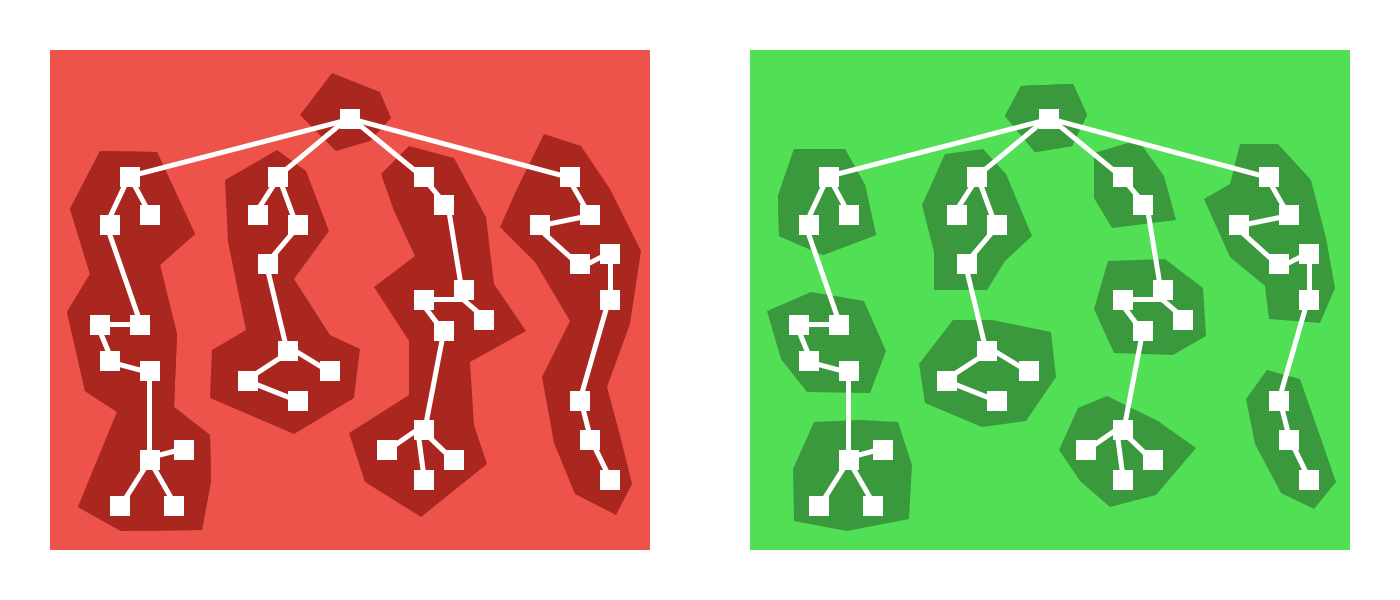
As it turns out: Quite a lot. There are many more places than just routes where you can pretty easily split apart your app. Modals, tabs, and many more UI components hide content until the user has done something to reveal it.
Example: Maybe your app has a map buried inside of a tab component. Why would you load a massive mapping library for the parent route every time when the user may never go to that tab?
Not to mention all the places where you can defer loading content until higher priority content is finished loading. That component at the bottom of your page which loads a bunch of libraries: Why should that be loaded at the same time as the content at the top?
And because routes are just components, we can still easily code-split at the route level.
Introducing new code-splitting points in your app should be so easy that you don't think twice about it. It should be a matter of changing a few lines of code and everything else should be automated.
Introducing React Loadable
React Loadable is a small library that makes component-centric code splitting incredibly easy in React.
Loadable is a higher-order component (a function that creates a component)
which lets you dynamically load any module before rendering it into your app.
Let's imagine two components, one that imports and renders another.
import Bar from './components/Bar';

class Foo extends React.Component {
  render() {
    return <Bar/>;
  }
}
Right now we're depending on Bar being imported synchronously via import,
but we don't need it until we go to render it. So why don't we just defer that?
Using a dynamic import (a tc39 proposal currently at Stage 3)
we can modify our component to load Bar asynchronously.
class MyComponent extends React.Component {
  state = {
    Bar: null
  };

  componentWillMount() {
    import('./components/Bar').then(Bar => {
      this.setState({ Bar });
    });
  }

  render() {
    let {Bar} = this.state;
    if (!Bar) {
      return

Loading...

;
    } else {
      return <Bar/>;
    };
  }
}
But that's a whole bunch of work, and it doesn't even handle a bunch of cases.
What about when import() fails? What about server-side rendering?
Instead you can use Loadable to abstract away the problem.
import Loadable from 'react-loadable';

const LoadableBar = Loadable({
  loader: () => import('./components/Bar'),
  loading() {
    return

Loading...


  }
});

class MyComponent extends React.Component {
  render() {
    return <LoadableBar/>;
  }
}
Automatic code-splitting on import()
When you use import() with Webpack 2+, it will
automatically code-split for
you with no additional configuration.
This means that you can easily experiment with new code splitting points just
by switching to import() and using React Loadable. Figure out what performs
best for your app.
Creating a great "Loading..." Component
Rendering a static "Loading..." doesn't communicate enough to the user. You also need to think about error states, timeouts, and making it a nice experience.
function Loading() {
  return

Loading...

;
}

Loadable({
  loader: () => import('./WillFailToLoad'), // oh no!
  loading: Loading,
});
To make this all nice, your loading component receives a couple different props.
Loading error states
When your loader fails, your loading component
will receive an error prop which will be an Error object (otherwise it
will be null).
function Loading(props) {
  if (props.error) {
    return

Error! <button onClick={ props.retry }>Retry</button>

;
  } else {
    return

Loading...

;
  }
}
Avoiding Flash Of Loading Component
Sometimes components load really quickly (<200ms) and the loading screen only quickly flashes on the screen.
A number of user studies have proven that this causes users to perceive things taking longer than they really have. If you don't show anything, users perceive it as being faster.
So your loading component will also get a pastDelay prop
which will only be true once the component has taken longer to load than a set
delay.
function Loading(props) {
  if (props.error) {
    return

Error! <button onClick={ props.retry }>Retry</button>

;
  } else if (props.pastDelay) {
    return

Loading...

;
  } else {
    return null;
  }
}
This delay defaults to 200ms but you can also customize the
delay in Loadable.
Loadable({
  loader: () => import('./components/Bar'),
  loading: Loading,
  delay: 300, // 0.3 seconds
});
Timing out when the loader is taking too long
Sometimes network connections suck and never resolve or fail, they just hang there forever. This sucks for the user because they won't know if it should always take this long, or if they should try refreshing.
The loading component will receive a
timedOut prop which will be set to true when the
loader has timed out.
function Loading(props) {
  if (props.error) {
    return

Error! <button onClick={ props.retry }>Retry</button>

;
  } else if (props.timedOut) {
    return

Taking a long time... <button onClick={ props.retry }>Retry</button>

;
  } else if (props.pastDelay) {
    return

Loading...

;
  } else {
    return null;
  }
}
However, this feature is disabled by default. To turn it on, you can pass a
timeout option to Loadable.
Loadable({
  loader: () => import('./components/Bar'),
  loading: Loading,
  timeout: 10000, // 10 seconds
});
Customizing rendering
By default Loadable will render the default export of the returned module.
If you want to customize this behavior you can use the
render option.
Loadable({
  loader: () => import('./my-component'),
  render(loaded, props) {
    let Component = loaded.namedExport;
    return <Component {...props}/>;
  }
});
Loading multiple resources
Technically you can do whatever you want within loader() as long as it
returns a promise and you're able to render something.
But writing it out can be a bit annoying.
To make it easier to load multiple resources in parallel, you can use
Loadable.Map.
Loadable.Map({
  loader: {
    Bar: () => import('./Bar'),
    i18n: () => fetch('./i18n/bar.json').then(res => res.json()),
  },
  render(loaded, props) {
    let Bar = loaded.Bar.default;
    let i18n = loaded.i18n;
    return <Bar {...props} i18n={i18n}/>;
  },
});
When using Loadable.Map the render() method is required. It
will be passed a loaded param which will be an object matching the shape of
your loader.
Preloading
As an optimization, you can also decide to preload a component before it gets rendered.
For example, if you need to load a new component when a button gets pressed, you could start preloading the component when the user hovers over the button.
The component created by Loadable exposes a
static preload method which does exactly this.
const LoadableBar = Loadable({
  loader: () => import('./Bar'),
  loading: Loading,
});

class MyComponent extends React.Component {
  state = { showBar: false };

  onClick = () => {
    this.setState({ showBar: true });
  };

  onMouseOver = () => {
    LoadableBar.preload();
  };

  render() {
    return (


        <button
          onClick={this.onClick}
          onMouseOver={this.onMouseOver}>
          Show Bar
        </button>
        {this.state.showBar && <LoadableBar/>}


    )
  }
}

Server-Side Rendering
When you go to render all these dynamically loaded components, what you'll get is a whole bunch of loading screens.
This really sucks, but the good news is that React Loadable is designed to make server-side rendering work as if nothing is being loaded dynamically.
Here's our starting server using Express.
import express from 'express';
import React from 'react';
import ReactDOMServer from 'react-dom/server';
import App from './components/App';

const app = express();

app.get('/', (req, res) => {
  res.send(`
    <!doctype html>
    <html lang="en">
      <head>...</head>
      <body>


${ReactDOMServer.renderToString(<App/>)}


        <script src="https://github.com/jamiebuilds/react-loadable/raw/v5.5.0/dist/main.js"></script>
      </body>
    </html>
  `);
});

app.listen(3000, () => {
  console.log('Running on http://localhost:3000/');
});
Preloading all your loadable components on the server
The first step to rendering the correct content from the server is to make sure that all of your loadable components are already loaded when you go to render them.
To do this, you can use the Loadable.preloadAll
method. It returns a promise that will resolve when all your loadable
components are ready.
Loadable.preloadAll().then(() => {
  app.listen(3000, () => {
    console.log('Running on http://localhost:3000/');
  });
});
Picking up a server-side rendered app on the client
This is where things get a little bit tricky. So let's prepare ourselves little bit.
In order for us to pick up what was rendered from the server we need to have all the same code that was used to render on the server.
To do this, we first need our loada
Core symbols most depended-on inside this repo
LoadableShape
Languages
Modules by API surface
Used by 6 indexed graphs manifest dependencies, hub-wide
Dependencies from manifests, versioned
For agents
$ claude mcp add react-loadable \
  -- python -m otcore.mcp_server <graph>