github.com/jacobgil/pytorch-grad-cam @main sqlite
README




Advanced AI explainability for PyTorch
pip install grad-cam
Documentation with advanced tutorials: https://jacobgil.github.io/pytorch-gradcam-book
This is a package with state of the art methods for Explainable AI for computer vision. This can be used for diagnosing model predictions, either in production or while developing models. The aim is also to serve as a benchmark of algorithms and metrics for research of new explainability methods.
⭐ Comprehensive collection of Pixel Attribution methods for Computer Vision.
⭐ Tested on many Common CNN Networks and Vision Transformers.
⭐ Advanced use cases: Works with Classification, Object Detection, Semantic Segmentation, Embedding-similarity and more.
⭐ Includes smoothing methods to make the CAMs look nice.
⭐ High performance: full support for batches of images in all methods.
⭐ Includes metrics for checking if you can trust the explanations, and tuning them for best performance.
| Method | What it does |
|---|---|
| GradCAM | Weight the 2D activations by the average gradient |
| HiResCAM | Like GradCAM but element-wise multiply the activations with the gradients; provably guaranteed faithfulness for certain models |
| GradCAMElementWise | Like GradCAM but element-wise multiply the activations with the gradients then apply a ReLU operation before summing |
| GradCAM++ | Like GradCAM but uses second order gradients |
| XGradCAM | Like GradCAM but scale the gradients by the normalized activations |
| AblationCAM | Zero out activations and measure how the output drops (this repository includes a fast batched implementation) |
| ScoreCAM | Perbutate the image by the scaled activations and measure how the output drops |
| EigenCAM | Takes the first principle component of the 2D Activations (no class discrimination, but seems to give great results) |
| EigenGradCAM | Like EigenCAM but with class discrimination: First principle component of Activations*Grad. Looks like GradCAM, but cleaner |
| LayerCAM | Spatially weight the activations by positive gradients. Works better especially in lower layers |
| FullGrad | Computes the gradients of the biases from all over the network, and then sums them |
| Deep Feature Factorizations | Non Negative Matrix Factorization on the 2D activations |
| KPCA-CAM | Like EigenCAM but with Kernel PCA instead of PCA |
| FEM | A gradient free method that binarizes activations by an activation > mean + k * std rule. |
| ShapleyCAM | Weight the activations using the gradient and Hessian-vector product. |
| FinerCAM | Improves fine-grained classification by comparing similar classes, suppressing shared features and highlighting discriminative details. |
| SegEigenCAM | Like EigenCAM but with gradient weighting (absolute gradients ⊙ activations) before SVD and sign correction to fix SVD sign ambiguity; designed for semantic segmentation |
| RefineCAM | A meta-method that computes a CAM at multiple layers, and then it combines them to ubtain a higher resolution and better focused CAM. It can be used with any of the other CAM methods. |
| ## Visual Examples |
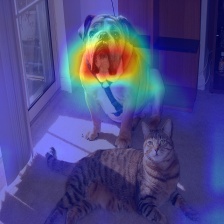
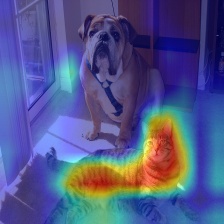
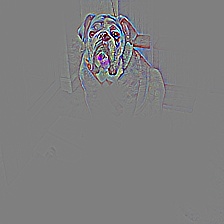
| What makes the network think the image label is 'pug, pug-dog' | What makes the network think the image label is 'tabby, tabby cat' | Combining Grad-CAM with Guided Backpropagation for the 'pug, pug-dog' class |
|---|---|---|
 |
 |
 |
Object Detection and Semantic Segmentation
| Object Detection | Semantic Segmentation |
|---|---|
 |
 |
| 3D Medical Semantic Segmentation |
|---|
 |
Explaining similarity to other images / embeddings

Deep Feature Factorization


CLIP
| Explaining the text prompt "a dog" | Explaining the text prompt "a cat" |
|---|---|
 |
 |
Classification
Resnet50:
| Category | Image | GradCAM | AblationCAM | ScoreCAM |
|---|---|---|---|---|
| Dog |  |
 |
 |
|
| Cat |  |
 |
 |
Vision Transfomer (Deit Tiny):
| Category | Image | GradCAM | AblationCAM | ScoreCAM |
|---|---|---|---|---|
| Dog |  |
 |
 |
|
| Cat |  |
 |
 |
Swin Transfomer (Tiny window:7 patch:4 input-size:224):
| Category | Image | GradCAM | AblationCAM | ScoreCAM |
|---|---|---|---|---|
| Dog |  |
 |
 |
|
| Cat |  |
 |
 |
Metrics and Evaluation for XAI


Usage examples
from pytorch_grad_cam import GradCAM, HiResCAM, ScoreCAM, GradCAMPlusPlus, AblationCAM, XGradCAM, EigenCAM, FullGrad
from pytorch_grad_cam.utils.model_targets import ClassifierOutputTarget
from pytorch_grad_cam.utils.image import show_cam_on_image
from torchvision.models import resnet50, ResNet50_Weights

model = resnet50(weights=ResNet50_Weights.DEFAULT)
target_layers = [model.layer4[-1]]
input_tensor = # Create an input tensor image for your model..
# Note: input_tensor can be a batch tensor with several images!

# We have to specify the target we want to generate the CAM for.
targets = [ClassifierOutputTarget(281)]

# Construct the CAM object once, and then re-use it on many images.
with GradCAM(model=model, target_layers=target_layers) as cam:
  # You can also pass aug_smooth=True and eigen_smooth=True, to apply smoothing.
  grayscale_cam = cam(input_tensor=input_tensor, targets=targets)
  # In this example grayscale_cam has only one image in the batch:
  grayscale_cam = grayscale_cam[0, :]
  visualization = show_cam_on_image(rgb_img, grayscale_cam, use_rgb=True)
  # You can also get the model outputs without having to redo inference
  model_outputs = cam.outputs
cam.py has a more detailed usage example.
Choosing the layer(s) to extract activations from
You need to choose the target layer to compute the CAM for. Some common choices are: - FasterRCNN: model.backbone - Resnet18 and 50: model.layer4[-1] - VGG, densenet161 and mobilenet: model.features[-1] - mnasnet1_0: model.layers[-1] - ViT: model.blocks[-1].norm1 - SwinT: model.layers[-1].blocks[-1].norm1
If you pass a list with several layers, the CAM will be averaged accross them. This can be useful if you're not sure what layer will perform best.
Adapting for new architectures and tasks
Methods like GradCAM were designed for and were originally mostly applied on classification models, and specifically CNN classification models. However you can also use this package on new architectures like Vision Transformers, and on non classification tasks like Object Detection or Semantic Segmentation.
The be able to adapt to non standard cases, we have two concepts. - The reshape transform - how do we convert activations to represent spatial images ? - The model targets - What exactly should the explainability method try to explain ?
The reshape_transform argument
In a CNN the intermediate activations in the model are a mult-channel image that have the dimensions channel x rows x cols, and the various explainabiltiy methods work with these to produce a new image.
In case of another architecture, like the Vision Transformer, the shape might be different, like (rows x cols + 1) x channels, or something else. The reshape transform converts the activations back into a multi-channel image, for example by removing the class token in a vision transformer. For examples, check here
The model_target argument
The model target is just a callable that is able to get the model output, and filter it out for the specific scalar output we want to explain.
For classification tasks, the model target will typically be the output from a specific category.
The targets parameter passed to the CAM method can then use ClassifierOutputTarget:
targets = [ClassifierOutputTarget(281)]
However for more advanced cases, you might want a different behaviour. Check here for more examples.
Tutorials
Here you can find detailed examples of how to use this for various custom use cases like object detection:
These point to the new documentation jupter-book for fast rendering. The jupyter notebooks themselves can be found under the tutorials folder in the git repository.
-
Notebook tutorial: XAI Recipes for the HuggingFace 🤗 Image Classification Models
-
Notebook tutorial: Deep Feature Factorizations for better model explainability
-
Notebook tutorial: Class Activation Maps for Object Detection with Faster-RCNN
-
Notebook tutorial: Class Activation Maps for Semantic Segmentation
-
Notebook tutorial: Adapting pixel attribution methods for embedding outputs from models
-
Notebook tutorial: May the best explanation win. CAM Metrics and Tuning
Guided backpropagation
```python from pytorch_grad_cam import GuidedBackpropReLUModel from pytorch_grad_cam.utils.image import ( show_cam_on_image, deprocess_image, preprocess_image ) gb_model = GuidedBackpropReLUModel(model=model, device=model.device()) gb = gb_model(input_t
Core symbols most depended-on inside this repo
get_2d_projectionShape
Languages
Modules by API surface
Dependencies from manifests, versioned
For agents
$ claude mcp add pytorch-grad-cam \
  -- python -m otcore.mcp_server <graph>