github.com/iterative/cml @v0.20.6 sqlite
README



What is CML? Continuous Machine Learning (CML) is an open-source CLI tool for implementing continuous integration & delivery (CI/CD) with a focus on MLOps. Use it to automate development workflows — including machine provisioning, model training and evaluation, comparing ML experiments across project history, and monitoring changing datasets.
CML can help train and evaluate models — and then generate a visual report with results and metrics — automatically on every pull request.
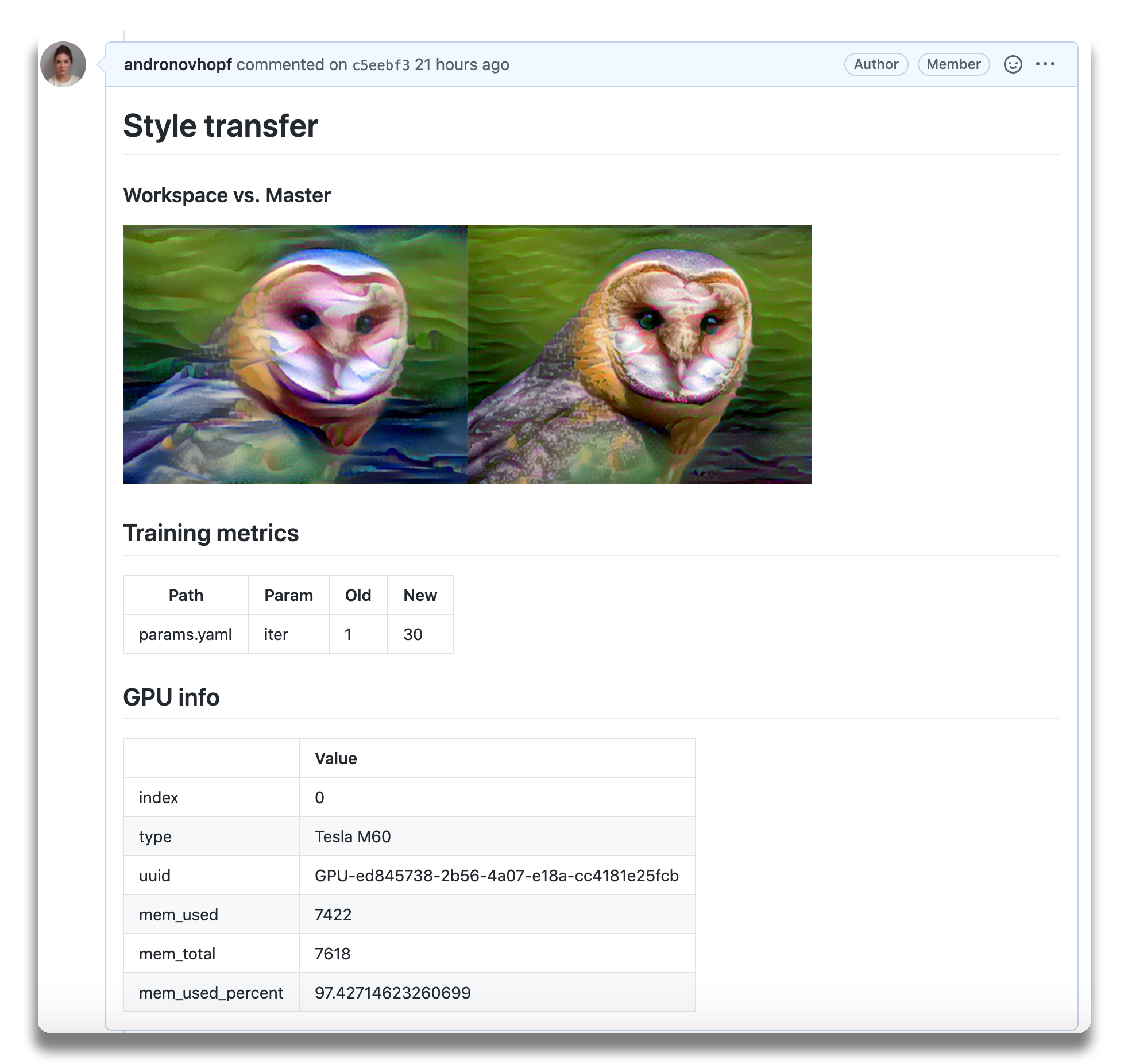 An
example report for a
neural style transfer model.
An
example report for a
neural style transfer model.
CML principles:
- GitFlow for data science. Use GitLab or GitHub to manage ML experiments, track who trained ML models or modified data and when. Codify data and models with DVC instead of pushing to a Git repo.
- Auto reports for ML experiments. Auto-generate reports with metrics and plots in each Git pull request. Rigorous engineering practices help your team make informed, data-driven decisions.
- No additional services. Build your own ML platform using GitLab, Bitbucket, or GitHub. Optionally, use cloud storage as well as either self-hosted or cloud runners (such as AWS EC2 or Azure). No databases, services or complex setup needed.
:question: Need help? Just want to chat about continuous integration for ML? Visit our Discord channel!
:play_or_pause_button: Check out our YouTube video series for hands-on MLOps tutorials using CML!
Table of Contents
- Setup (GitLab, GitHub, Bitbucket)
- Usage
- Getting started (tutorial)
- Using CML with DVC
- Advanced Setup (Self-hosted, local package)
- Example projects
Setup
You'll need a GitLab, GitHub, or Bitbucket account to begin. Users may wish to familiarize themselves with Github Actions or GitLab CI/CD. Here, will discuss the GitHub use case.
GitLab
Please see our docs on CML with GitLab CI/CD and in particular the personal access token requirement.
Bitbucket
Please see our docs on CML with Bitbucket Cloud.
GitHub
The key file in any CML project is .github/workflows/cml.yaml:
name: your-workflow-name
on: [push]
jobs:
  run:
    runs-on: ubuntu-latest
    # optionally use a convenient Ubuntu LTS + DVC + CML image
    # container: ghcr.io/iterative/cml:0-dvc2-base1
    steps:
      - uses: actions/checkout@v3
      # may need to setup NodeJS & Python3 on e.g. self-hosted
      # - uses: actions/setup-node@v3
      #   with:
      #     node-version: '16'
      # - uses: actions/setup-python@v4
      #   with:
      #     python-version: '3.x'
      - uses: iterative/setup-cml@v1
      - name: Train model
        run: |
          # Your ML workflow goes here
          pip install -r requirements.txt
          python train.py
      - name: Write CML report
        env:
          REPO_TOKEN: ${{ secrets.GITHUB_TOKEN }}
        run: |
          # Post reports as comments in GitHub PRs
          cat results.txt >> report.md
          cml comment create report.md
Usage
We helpfully provide CML and other useful libraries pre-installed on our
custom Docker images.
In the above example, uncommenting the field
container: ghcr.io/iterative/cml:0-dvc2-base1) will make the runner pull the
CML Docker image. The image already has NodeJS, Python 3, DVC and CML set up on
an Ubuntu LTS base for convenience.
CML Functions
CML provides a number of functions to help package the outputs of ML workflows (including numeric data and visualizations about model performance) into a CML report.
Below is a table of CML functions for writing markdown reports and delivering those reports to your CI system.
| Function | Description | Example Inputs |
|---|---|---|
cml runner launch |
Launch a runner locally or hosted by a cloud provider | See Arguments |
cml comment create |
Return CML report as a comment in your GitLab/GitHub workflow | <path to report> --head-sha <sha> |
cml check create |
Return CML report as a check in GitHub | <path to report> --head-sha <sha> |
cml pr create |
Commit the given files to a new branch and create a pull request | <path>... |
cml tensorboard connect |
Return a link to a Tensorboard.dev page | --logdir <path to logs> --title <experiment title> --md |
CML Reports
The cml comment create command can be used to post reports. CML reports are
written in markdown (GitHub,
GitLab, or
Bitbucket
flavors). That means they can contain images, tables, formatted text, HTML
blocks, code snippets and more — really, what you put in a CML report is up to
you. Some examples:
:spiral_notepad: Text Write to your report using whatever method you prefer. For example, copy the contents of a text file containing the results of ML model training:
cat results.txt >> report.md
:framed_picture: Images Display images using the markdown or HTML. Note that
if an image is an output of your ML workflow (i.e., it is produced by your
workflow), it can be uploaded and included automaticlly to your CML report. For
example, if graph.png is output by python train.py, run:
echo "" >> report.md
cml comment create report.md
Getting Started
- Fork our example project repository.
:warning: Note that if you are using GitLab, you will need to create a Personal Access Token for this example to work.
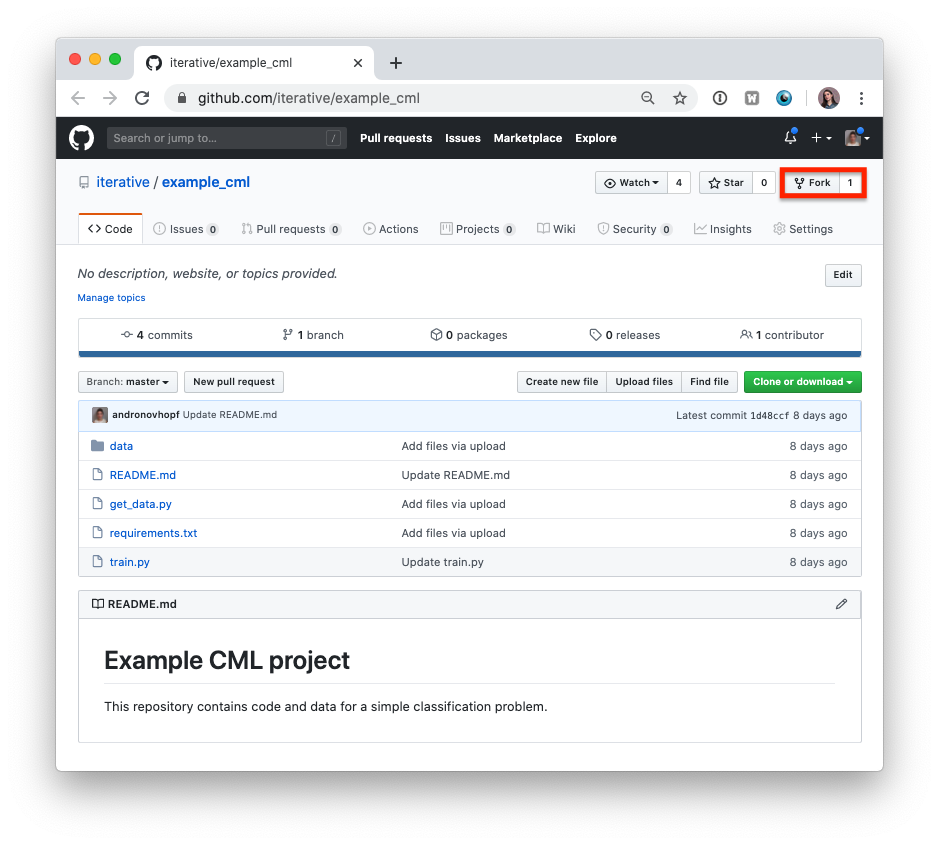
:warning: The following steps can all be done in the GitHub browser interface. However, to follow along with the commands, we recommend cloning your fork to your local workstation:
git clone https://github.com/<your-username>/example_cml
- To create a CML workflow, copy the following into a new file,
.github/workflows/cml.yaml:
name: model-training
on: [push]
jobs:
run:
runs-on: ubuntu-latest
steps:
- uses: actions/checkout@v3
- uses: actions/setup-python@v4
- uses: iterative/setup-cml@v1
- name: Train model
env:
REPO_TOKEN: ${{ secrets.GITHUB_TOKEN }}
run: |
pip install -r requirements.txt
python train.py
cat metrics.txt >> report.md
echo "" >> report.md
cml comment create report.md
-
In your text editor of choice, edit line 16 of
train.pytodepth = 5. -
Commit and push the changes:
git checkout -b experiment
git add . && git commit -m "modify forest depth"
git push origin experiment
- In GitHub, open up a pull request to compare the
experimentbranch tomain.
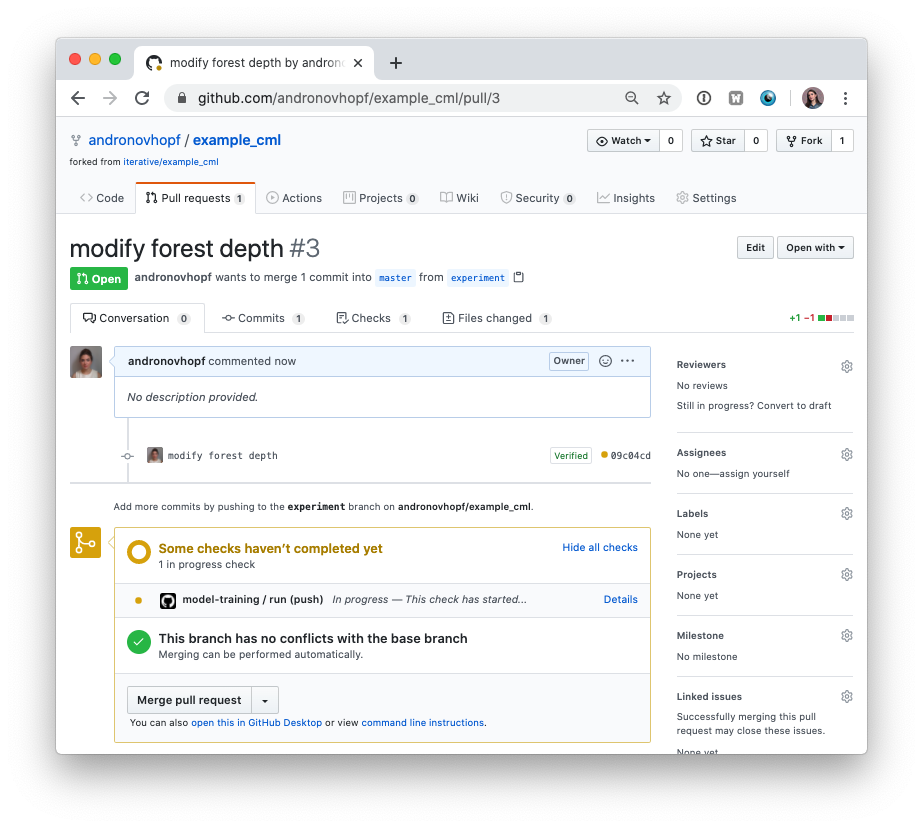
Shortly, you should see a comment from github-actions appear in the pull
request with your CML report. This is a result of the cml send-comment
function in your workflow.
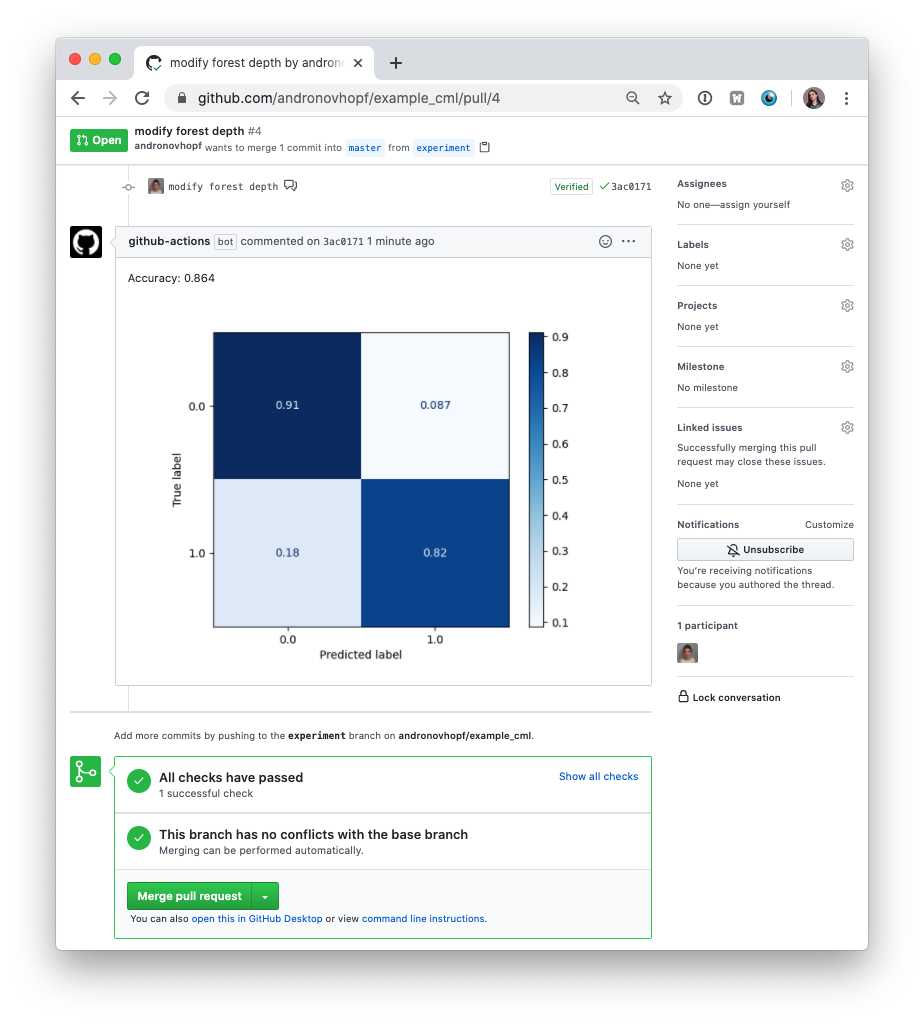
This is the outline of the CML workflow:
- you push changes to your GitHub repository,
- the workflow in your
.github/workflows/cml.yamlfile gets run, and - a report is generated and posted to GitHub.
CML functions let you display relevant results from the workflow — such as model performance metrics and visualizations — in GitHub checks and comments. What kind of workflow you want to run, and want to put in your CML report, is up to you.
Using CML with DVC
In many ML projects, data isn't stored in a Git repository, but needs to be downloaded from external sources. DVC is a common way to bring data to your CML runner. DVC also lets you visualize how metrics differ between commits to make reports like this:
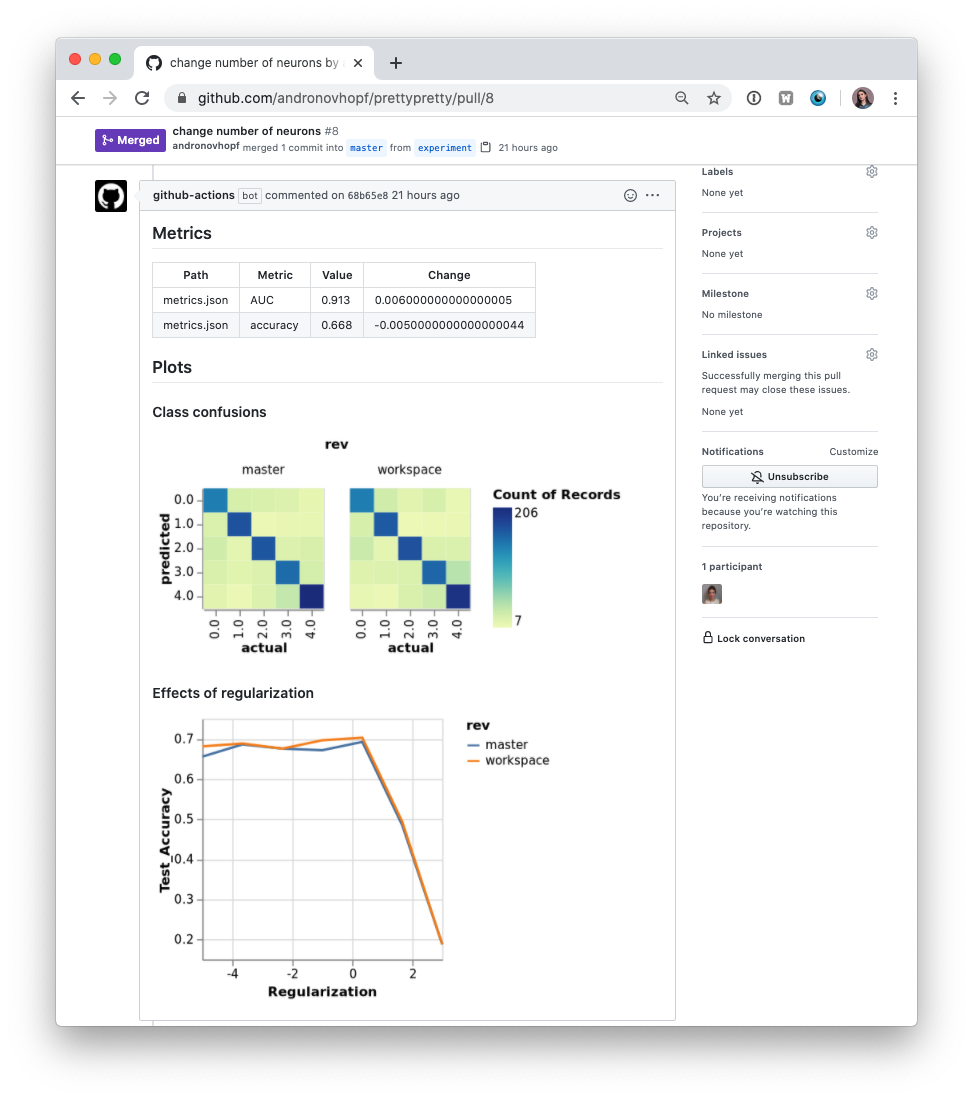
The .github/workflows/cml.yaml file used to create this report is:
name: model-training
on: [push]
jobs:
run:
runs-on: ubuntu-latest
container: ghcr.io/iterative/cml:0-dvc2-base1
steps:
- uses: actions/checkout@v3
- name: Train model
env:
REPO_TOKEN: ${{ secrets.GITHUB_TOKEN }}
AWS_ACCESS_KEY_ID: ${{ secrets.AWS_ACCESS_KEY_ID }}
AWS_SECRET_ACCESS_KEY: ${{ secrets.AWS_SECRET_ACCESS_KEY }}
run: |
# Install requirements
pip install -r requirements.txt
# Pull data & run-cache from S3 and reproduce pipeline
dvc pull data --run-cache
dvc repro
# Report metrics
echo "## Metrics" >> report.md
git fetch --prune
dvc metrics diff main --show-md >> report.md
# Publish confusion matrix diff
echo "## Plots" >> report.md
echo "### Class confusions" >> report.md
dvc plots diff --target classes.csv --template confusion -x actual -y predicted --show-vega main > vega.json
vl2png vega.json -s 1.5 > confusion_plot.png
echo "" >> report.md
# Publish regularization function diff
echo "### Effects of regularization" >> report.md
dvc plots diff --target estimators.csv -x Regularization --show-vega main > vega.json
vl2png vega.json -s 1.5 > plot.png
echo "" >> report.md
cml comment create report.md
:warning: If you're using DVC with cloud storage, take note of environment variables for your storage format.
Configuring Cloud Storage Providers
There are many supported could storage providers. Here are a few examples for some of the most frequently used providers:
S3 and S3-compatible storage (Minio, DigitalOcean Spaces, IBM Cloud Object Storage...)
# Github
env:
  AWS_ACCESS_KEY_ID: ${{ secrets.AWS_ACCESS_KEY_ID }}
  AWS_SECRET_ACCESS_KEY: ${{ secrets.AWS_SECRET_ACCESS_KEY }}
  AWS_SESSION_TOKEN: ${{ secrets.AWS_SESSION_TOKEN }}
:point_right:
AWS_SESSION_TOKENis optional.:point_right:
AWS_ACCESS_KEY_IDandAWS_SECRET_ACCESS_KEYcan also be used bycml runnerto launch EC2 instances. See [Environment Variables].
Azure
env:
  AZURE_STORAGE_CONNECTION_STRING:
    ${{ secrets.AZURE_STORAGE_CONNECTION_STRING }}
  AZURE_STORAGE_CONTAINER_NAME: ${{ secrets.AZURE_STORAGE_CONTAINER_NAME }}
Aliyun
env:
  OSS_BUCKET: ${{ secrets.OSS_BUCKET }}
  OSS_ACCESS_KEY_ID: ${{ secrets.OSS_ACCESS_KEY_ID }}
  OSS_ACCESS_KEY_SECRET: ${{ secrets.OSS_ACCESS_KEY_SECRET }}
  OSS_ENDPOINT: ${{ secrets.OSS_ENDPOINT }}
Google Storage
:warning: Normally,
GOOGLE_APPLICATION_CREDENTIALSis the path of thejsonfile containing the credentials. However in the action this secret variable is the contents of the file. Copy thejsoncontents and add it as a secret.
env:
  GOOGLE_APPLICATION_CREDENTIALS: ${{ secrets.GOOGLE_APPLICATION_CREDENTIALS }}
Google Drive
:warning: After configuring your Google Drive credentials you will find a
jsonfile atyour_project_path/.dvc/tmp/gdrive-user-credentials.json. Copy its contents and add it as a secret variable.
env:
  GDRIVE_CREDENTIALS_DATA: ${{ secrets.GDRIVE_CREDENTIALS_DATA }}
Advanced Setup
Self-hosted (On-premise or Cloud) Runners
GitHub Actions are run on GitHub-hosted runners by default. However, there are many great reasons to use your own runners: to take advantage of GPUs, orchestrate your team's shared computing resources, or train in the cloud.
:point_up: Tip! Check out the official GitHub documentation to get started setting up your own self-hosted runner.
Allocating Cloud Compute Resources with CML
When a workflow requires computational resources (such as GPUs), CML can au