github.com/ineo6/hosts @v1.0.1 sqlite
README
GitHub Hosts
这个有什么用?最直观的效果是GitHub图片可以正常加载,网页也稳定了。
GitHub Hosts主要是通过修改host的方式加速GitHub访问,解决图片无法加载以及访问速度慢的问题。
- 主站: https://github.com/ineo6/hosts
- 镜像: https://gitee.com/ineo6/hosts
全新的GitHub访问加速工具,等待试用和反馈中,点击 FastDev 直达。
特点就是稳定!
使用方式
1. 远程hosts
现在新增了DNS获取方案,欢迎使用并反馈。
请查看 next hosts
内容定时更新,最近更新时间:2022-04-23 20:20:40。
# New!欢迎使用基于DNS的新方案
# https://gitee.com/ineo6/hosts/raw/master/next-hosts
# GitHub Host Start

185.199.108.154              github.githubassets.com
140.82.113.22                central.github.com
185.199.108.133              desktop.githubusercontent.com
185.199.108.153              assets-cdn.github.com
185.199.108.133              camo.githubusercontent.com
185.199.108.133              github.map.fastly.net
199.232.69.194               github.global.ssl.fastly.net
140.82.114.4                 gist.github.com
185.199.108.153              github.io
140.82.112.4                 github.com
140.82.112.6                 api.github.com
185.199.108.133              raw.githubusercontent.com
185.199.108.133              user-images.githubusercontent.com
185.199.108.133              favicons.githubusercontent.com
185.199.108.133              avatars5.githubusercontent.com
185.199.108.133              avatars4.githubusercontent.com
185.199.108.133              avatars3.githubusercontent.com
185.199.108.133              avatars2.githubusercontent.com
185.199.108.133              avatars1.githubusercontent.com
185.199.108.133              avatars0.githubusercontent.com
185.199.108.133              avatars.githubusercontent.com
140.82.112.9                 codeload.github.com
52.217.135.81                github-cloud.s3.amazonaws.com
52.216.186.75                github-com.s3.amazonaws.com
52.217.201.201               github-production-release-asset-2e65be.s3.amazonaws.com
54.231.130.161               github-production-user-asset-6210df.s3.amazonaws.com
52.217.92.116                github-production-repository-file-5c1aeb.s3.amazonaws.com
185.199.108.153              githubstatus.com
64.71.144.211                github.community
185.199.108.133              media.githubusercontent.com
185.199.108.133              objects.githubusercontent.com
185.199.108.133              raw.github.com

# Please Star : https://github.com/ineo6/hosts
# Mirror Repo : https://gitee.com/ineo6/hosts

# Update at: 2022-04-23 20:20:40

# GitHub Host End
2. 本地 hosts 服务
本地 hosts 服务获取到的ip是经过本地测试,所以成功率较高。
而且会定时获取最新的ip,尽可能保证访问。
注意,该方案需要结合SwitchHosts一起使用,或者你也可以直接访问地址,手动复制。
macOS (Intel)
执行下面命令, 服务会运行在: http://localhost:8888
curl -L https://github.com/ineo6/hosts/releases/download/v1.0.0/hosts-server-pkg-mac-x64.tar.gz | tar xzvf -
xattr -d com.apple.quarantine ./hosts-server-pkg-mac-x64/hosts-server
./hosts-server-pkg-mac-x64/hosts-server --port=8888
macOS (Apple Silicon)
执行下面命令, 服务会运行在: http://localhost:8888
curl -L https://github.com/ineo6/hosts/releases/download/v1.0.0/hosts-server-pkg-mac-arm64.tar.gz | tar xzvf -
./hosts-server-pkg-mac-arm64/hosts-server --port=8888
Windows
下载 https://github.com/ineo6/hosts/releases/download/v1.0.0/hosts-server-pkg-win-x64.zip,解压后执行下面命令,服务会运行在: http://localhost:8888
.\hosts-server.exe --port=8888
配置hosts教程
通过 SwitchHosts 自动更新
这里推荐使用 SwitchHosts 配置hosts,操作很简单,支持跨平台。
注意:首次使用先备份下本地hosts。
详细介绍可以阅读 SwitchHosts! 还能这样管理hosts,后悔没早点用 。
操作步骤
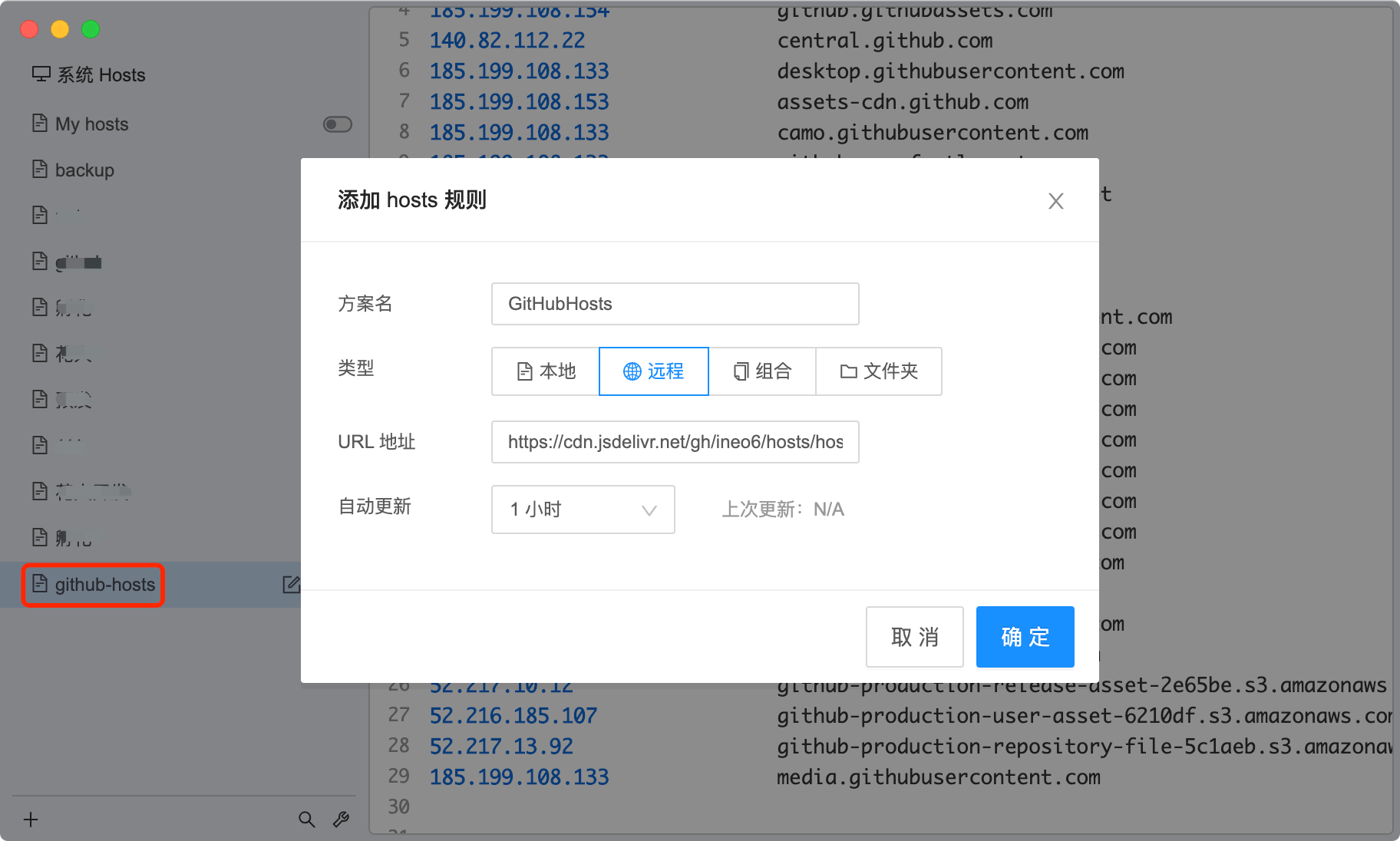
添加一条规则:
- 方案名:GitHub(可以自行命名)
- 类型:远程
- URL 地址:https://gitee.com/ineo6/hosts/raw/master/hosts
- 自动更新:1个小时(时间可自行调整)
这样就可以和最新的hosts保持同步。
手动配置
macOS
hosts文件位置:/etc/hosts。
macOS系统下修改需要按照如下方式:
1:首先,打开(访达)Finder。
2:使用组合键Shift+Command+G打开"前往文件夹",输入框中输入/etc/hosts。
3:然后就会跳转到hosts文件位置。
注意:如果你使用
VS Code,可以直接用VS Code修改和保存,不需要复制文件。
复制hosts文件到桌面上,鼠标右键右击它,选择「打开方式」—「文本编辑」,打开这个hosts文件,把前面的hosts内容复制进来。
然后把你修改好的hosts文件替换掉:/etc/hosts 文件。
注意:如果弹出密码输入框,你需要输入你当前登录账号对应的密码。
最后刷新缓存:
sudo killall -HUP mDNSResponder
Windows
hosts文件位置:C:/windows/system32/drivers/etc/hosts。
将前文hosts内容追加到hosts文件,然后刷新DNS缓存:
ipconfig /flushdns
我的作品
- GitMaster:开发者助手,代码仓库结构浏览器扩展
- Weekly 周刊:我的前端周刊,GitHub周刊
- homebrew-install:Homebrew快速安装教程和脚本
- GitHub Hosts:GitHub最新hosts,定时更新
- mp-ci:微信小程序、小游戏发布助手(CI)
Extension points exported contracts — how you extend this code
UpdateConfig (Interface)Core symbols most depended-on inside this repo
findIpShape
Languages
Modules by API surface
Dependencies from manifests, versioned
For agents
$ claude mcp add hosts \
  -- python -m otcore.mcp_server <graph>