github.com/iamcco/markdown-preview.nvim @v0.0.10 sqlite
README
✨ Markdown Preview for (Neo)vim ✨
Powered by ❤️
Introduction
It only works on vim >= 8.1 and neovim
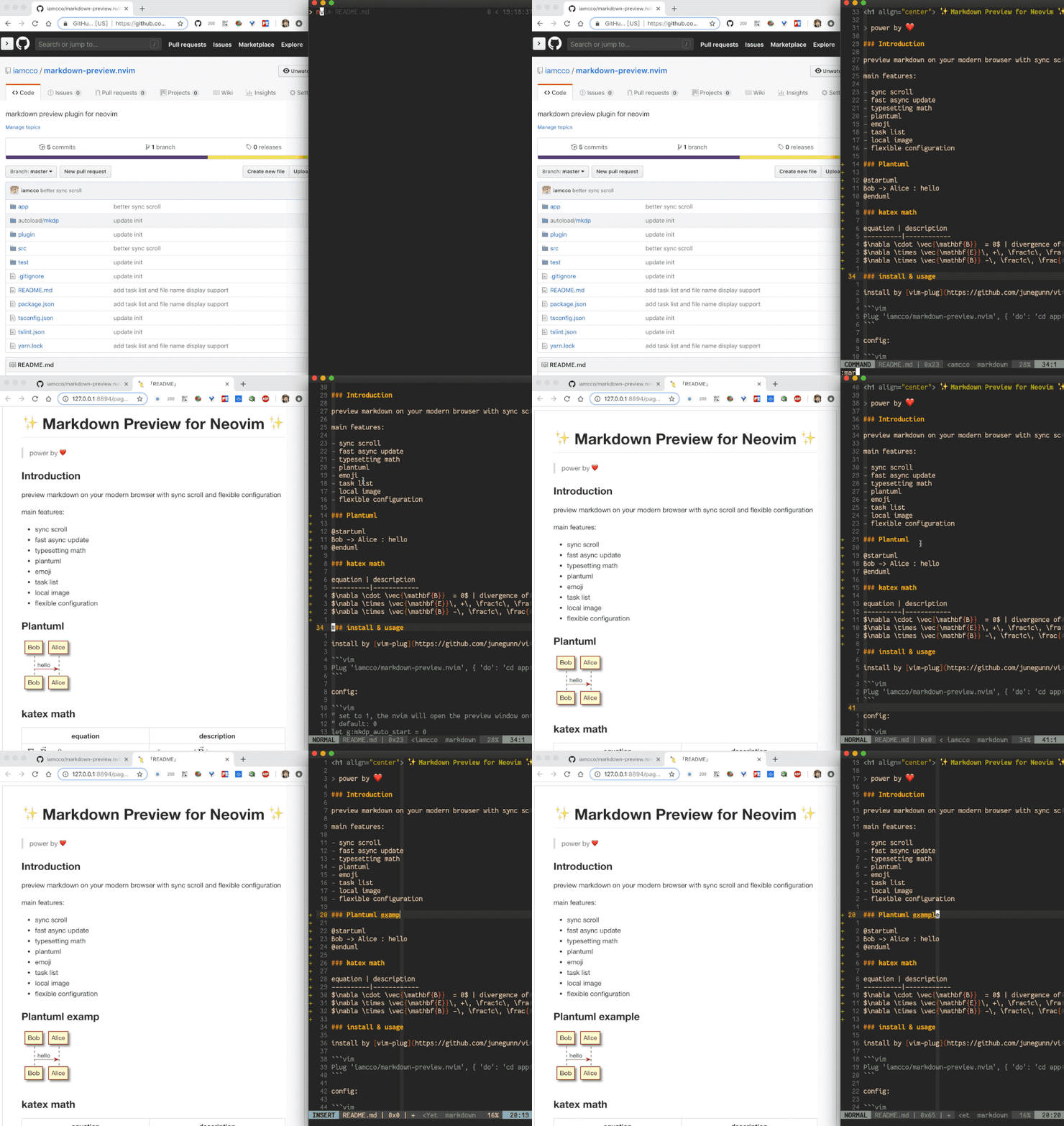
Preview markdown on your modern browser with synchronised scrolling and flexible configuration
Main features:
- Cross platform (macos/linux/windows)
- Synchronised scrolling
- Fast asynchronous updates
- Katex for typesetting of math
- Plantuml
- Mermaid
- Chart.js
- sequence-diagrams
- flowchart
- dot
- Toc
- Emoji
- Task lists
- Local images
- Flexible configuration
Note it's no need mathjax-support-for-mkdp plugin for typesetting of math
install & usage
Install with vim-plug:
" If you don't have nodejs and yarn
" use pre build, add 'vim-plug' to the filetype list so vim-plug can update this plugin
" see: https://github.com/iamcco/markdown-preview.nvim/issues/50
Plug 'iamcco/markdown-preview.nvim', { 'do': { -> mkdp#util#install() }, 'for': ['markdown', 'vim-plug']}


" If you have nodejs and yarn
Plug 'iamcco/markdown-preview.nvim', { 'do': 'cd app && yarn install' }
Or install with dein:
call dein#add('iamcco/markdown-preview.nvim', {'on_ft': ['markdown', 'pandoc.markdown', 'rmd'],
                    \ 'build': 'sh -c "cd app && yarn install"' })
Or with minpac:
call minpac#add('iamcco/markdown-preview.nvim', {'do': 'packloadall! | call mkdp#util#install()'})
Or with Vundle:
Place this in your .vimrc or init.vim,
Plugin 'iamcco/markdown-preview.nvim'
... then run the following in vim (to complete the Plugin installation):
:source %
:PluginInstall
:call mkdp#util#install()
Or with Packer.nvim:
Add this in your init.lua or plugins.lua
use {'iamcco/markdown-preview.nvim'}
add plugin in ~/.local/share/nvim/site/pack/packer/start/ directory:
cd ~/.local/share/nvim/site/pack/packer/start/
git clone https://github.com/iamcco/markdown-preview.nvim.git
cd markdown-preview.nvim
yarn install
yarn build
Please make sure that you have installed node.js and yarn.
Open nvim and run :PackerInstall to make it workable
Config:
" set to 1, nvim will open the preview window after entering the markdown buffer
" default: 0
let g:mkdp_auto_start = 0

" set to 1, the nvim will auto close current preview window when change
" from markdown buffer to another buffer
" default: 1
let g:mkdp_auto_close = 1

" set to 1, the vim will refresh markdown when save the buffer or
" leave from insert mode, default 0 is auto refresh markdown as you edit or
" move the cursor
" default: 0
let g:mkdp_refresh_slow = 0

" set to 1, the MarkdownPreview command can be use for all files,
" by default it can be use in markdown file
" default: 0
let g:mkdp_command_for_global = 0

" set to 1, preview server available to others in your network
" by default, the server listens on localhost (127.0.0.1)
" default: 0
let g:mkdp_open_to_the_world = 0

" use custom IP to open preview page
" useful when you work in remote vim and preview on local browser
" more detail see: https://github.com/iamcco/markdown-preview.nvim/pull/9
" default empty
let g:mkdp_open_ip = ''

" specify browser to open preview page
" default: ''
let g:mkdp_browser = ''

" set to 1, echo preview page url in command line when open preview page
" default is 0
let g:mkdp_echo_preview_url = 0

" a custom vim function name to open preview page
" this function will receive url as param
" default is empty
let g:mkdp_browserfunc = ''

" options for markdown render
" mkit: markdown-it options for render
" katex: katex options for math
" uml: markdown-it-plantuml options
" maid: mermaid options
" disable_sync_scroll: if disable sync scroll, default 0
" sync_scroll_type: 'middle', 'top' or 'relative', default value is 'middle'
"   middle: mean the cursor position alway show at the middle of the preview page
"   top: mean the vim top viewport alway show at the top of the preview page
"   relative: mean the cursor position alway show at the relative positon of the preview page
" hide_yaml_meta: if hide yaml metadata, default is 1
" sequence_diagrams: js-sequence-diagrams options
" content_editable: if enable content editable for preview page, default: v:false
" disable_filename: if disable filename header for preview page, default: 0
let g:mkdp_preview_options = {
    \ 'mkit': {},
    \ 'katex': {},
    \ 'uml': {},
    \ 'maid': {},
    \ 'disable_sync_scroll': 0,
    \ 'sync_scroll_type': 'middle',
    \ 'hide_yaml_meta': 1,
    \ 'sequence_diagrams': {},
    \ 'flowchart_diagrams': {},
    \ 'content_editable': v:false,
    \ 'disable_filename': 0
    \ }

" use a custom markdown style must be absolute path
" like '/Users/username/markdown.css' or expand('~/markdown.css')
let g:mkdp_markdown_css = ''

" use a custom highlight style must absolute path
" like '/Users/username/highlight.css' or expand('~/highlight.css')
let g:mkdp_highlight_css = ''

" use a custom port to start server or empty for random
let g:mkdp_port = ''

" preview page title
" ${name} will be replace with the file name
let g:mkdp_page_title = '「${name}」'

" recognized filetypes
" these filetypes will have MarkdownPreview... commands
let g:mkdp_filetypes = ['markdown']

" set default theme (dark or light)
" By default the theme is define according to the preferences of the system
let g:mkdp_theme = 'dark'
Mappings:
" normal/insert
<Plug>MarkdownPreview
<Plug>MarkdownPreviewStop
<Plug>MarkdownPreviewToggle

" example
nmap <C-s> <Plug>MarkdownPreview
nmap <M-s> <Plug>MarkdownPreviewStop
nmap <C-p> <Plug>MarkdownPreviewToggle
Commands:
" Start the preview
:MarkdownPreview

" Stop the preview"
:MarkdownPreviewStop
Custom Examples
Toc:
one of
${toc}
[[toc]]
[toc]
[[_toc_]]
Image Size:

plantuml:
@startuml
Bob -> Alice : hello
@enduml
Or
``` plantuml
Bob -> Alice : hello
```
katex:
$\sqrt{3x-1}+(1+x)^2$

$$\begin{array}{c}

\nabla \times \vec{\mathbf{B}} -\, \frac1c\, \frac{\partial\vec{\mathbf{E}}}{\partial t} &
= \frac{4\pi}{c}\vec{\mathbf{j}}    \nabla \cdot \vec{\mathbf{E}} & = 4 \pi \rho \\

\nabla \times \vec{\mathbf{E}}\, +\, \frac1c\, \frac{\partial\vec{\mathbf{B}}}{\partial t} & = \vec{\mathbf{0}} \\

\nabla \cdot \vec{\mathbf{B}} & = 0

\end{array}$$
mermaid:
``` mermaid
gantt
    dateFormat DD-MM-YYY
    axisFormat %m/%y

    title Example
    section example section
    activity :active, 01-02-2019, 03-08-2019
```
js-sequence-diagrams:
``` sequence-diagrams
Andrew->China: Says
Note right of China: China thinks\nabout it
China-->Andrew: How are you?
Andrew->>China: I am good thanks!
```
flowchart:
``` flowchart
st=>start: Start|past:>http://www.google.com[blank]
e=>end: End|future:>http://www.google.com
op1=>operation: My Operation|past
op2=>operation: Stuff|current
sub1=>subroutine: My Subroutine|invalid
cond=>condition: Yes
or No?|approved:>http://www.google.com
c2=>condition: Good idea|rejected
io=>inputoutput: catch something...|future

st->op1(right)->cond
cond(yes, right)->c2
cond(no)->sub1(left)->op1
c2(yes)->io->e
c2(no)->op2->e
```
dot:
``` dot
digraph G {

  subgraph cluster_0 {
    style=filled;
    color=lightgrey;
    node [style=filled,color=white];
    a0 -> a1 -> a2 -> a3;
    label = "process #1";
  }

  subgraph cluster_1 {
    node [style=filled];
    b0 -> b1 -> b2 -> b3;
    label = "process #2";
    color=blue
  }
  start -> a0;
  start -> b0;
  a1 -> b3;
  b2 -> a3;
  a3 -> a0;
  a3 -> end;
  b3 -> end;

  start [shape=Mdiamond];
  end [shape=Msquare];
}
```
chart:
``` chart
{
  "type": "pie",
  "data": {
    "labels": [
      "Red",
      "Blue",
      "Yellow"
    ],
    "datasets": [
      {
        "data": [
          300,
          50,
          100
        ],
        "backgroundColor": [
          "#FF6384",
          "#36A2EB",
          "#FFCE56"
        ],
        "hoverBackgroundColor": [
          "#FF6384",
          "#36A2EB",
          "#FFCE56"
        ]
      }
    ]
  },
  "options": {}
}
```
FAQ
Question: Why is the synchronised scrolling lagging?
Answer: set updatetime to a small number, for instance: set updatetime=100
WSL 2 issue: Can not open browser when using WSL 2 with terminal Vim.
if you are using Ubuntu you can install xdg-utils using
sudo apt-get install -y xdg-utilscheckout issue 199 for more detail.
Question: How can I change the dark/light theme?
Answer: The default theme is based on your system preferences. There is a button hidden in the header to change the theme. Place your mouse over the header to reveal it.
Question: How can I pass CLI options to the browser, like opening in a new window?
Answer: Add the following to your NVIM init script:
  function OpenMarkdownPreview (url)
    execute "silent ! firefox --new-window " . a:url
  endfunction
  let g:mkdp_browserfunc = 'OpenMarkdownPreview'
Replace "firefox" with "chrome" if you prefer. Both browsers recognize the --new-window option.
About vim support
Vim support is powered by vim-node-rpc
This plugin is integrated with vim-node-rpc, therefore you don't need to install vim-node-rpc
Reference
- coc.nvim
- vim-node-rpc
- chart.js
- highlight
- neovim/node-client
- next.js
- markdown.css
- markdown-it
- markdown-it-katex
- markdown-it-plantuml
- markdown-it-chart
- mermaid
- opener
- sequence-diagrams
- socket.io
Buy Me A Coffee ☕️


Extension points exported contracts — how you extend this code
IApp (Interface)Core symbols most depended-on inside this repo
nShape
Languages
Modules by API surface
Dependencies from manifests, versioned
For agents
$ claude mcp add markdown-preview.nvim \
  -- python -m otcore.mcp_server <graph>