github.com/hotheadhacker/seedbox-lite @main sqlite
README
🎬 SeedBox Lite
Stream Torrents Instantly




A modern, lightweight torrent streaming application with instant playback
Features • Screenshots • Quick Start • Installation • Documentation
🚀 Overview
SeedBox Lite is a cutting-edge torrent streaming platform that allows you to watch movies and TV shows instantly without waiting for complete downloads. Built with modern web technologies, it provides a Netflix-like experience with powerful torrent capabilities.
✨ Key Highlights
- 🎯 Instant Streaming - Start watching immediately as the torrent downloads
- 🔐 Password Protection - Secure access with authentication
- 📱 Mobile Optimized - Perfect responsive design for all devices
- 🎥 Smart Video Player - Advanced player with subtitles and fullscreen support
- ⚡ Fast Setup - Deploy in minutes with Docker or PM2
- 🌐 Cross-Platform - Works on Windows, macOS, and Linux
- 🎨 Modern UI - Clean, intuitive interface inspired by popular streaming services
🎯 Features
Core Streaming Features
- Torrent to Stream - Convert any movie/TV torrent to instant streaming
- Progress Tracking - Real-time download progress and cache management
- Smart Caching - Intelligent caching system with configurable limits
- Multiple Formats - Support for MP4, MKV, AVI, and more video formats
- Subtitle Support - Automatic subtitle detection and loading
User Experience
- Netflix-Style Interface - Familiar and intuitive design
- Mobile-First Design - Optimized for smartphones and tablets
- Native Fullscreen - True fullscreen experience on mobile devices
- Gesture Controls - Double-tap to fullscreen, intuitive video controls
- Responsive Layout - Adapts perfectly to any screen size
Technical Features
- Password Authentication - Secure access control
- CORS Enabled - Cross-origin resource sharing for flexible deployment
- Health Monitoring - Built-in health checks and monitoring
- Production Ready - Optimized for production deployments
- Docker Support - Easy containerized deployment
- PM2 Integration - Process management for Node.js applications
Mobile Optimizations
- iOS Safari Support - Native fullscreen using WebKit APIs
- Android Chrome - Optimized for Android mobile browsers
- Range Requests - HTTP range support for smooth video seeking
- Mobile Viewport - Proper viewport handling for app-like experience
- Touch Optimized - Gesture-friendly video controls
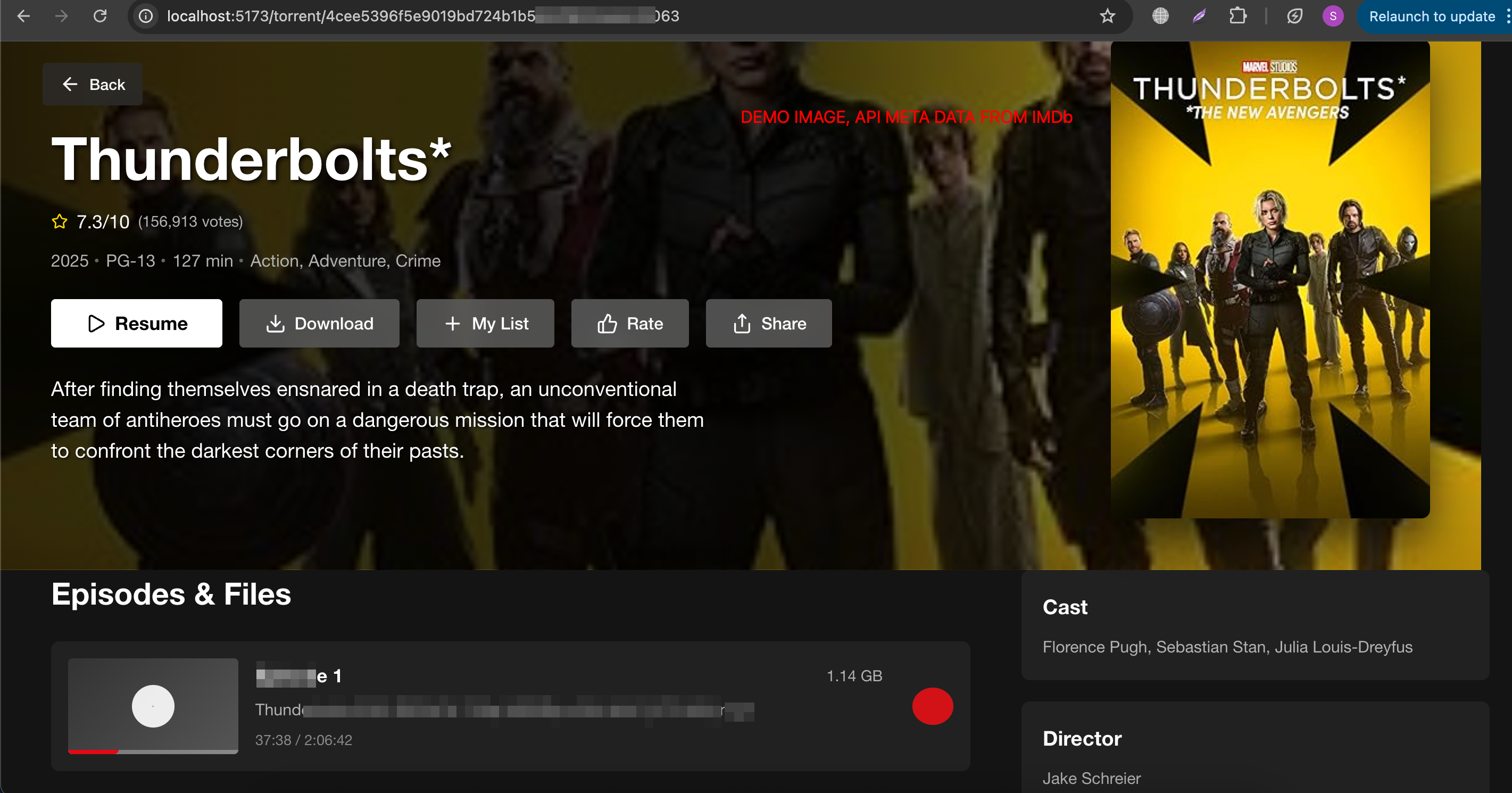
📸 Screenshots
🚀 Quick Start
Using Docker (Recommended)
# Clone the repository
git clone https://github.com/hotheadhacker/seedbox-lite.git
cd seedbox-lite

# Start with Docker Compose
docker-compose up -d

# Access the application
open http://localhost:5174
Using PM2
# Clone and install dependencies
git clone https://github.com/hotheadhacker/seedbox-lite.git
cd seedbox-lite

# Install backend dependencies
cd server && npm install

# Install frontend dependencies
cd ../client && npm install

# Build frontend
npm run build

# Start with PM2
pm2 start ecosystem.config.js
📋 Prerequisites
System Requirements
- Node.js 18+
- npm 8+
- Docker 20+ (for Docker deployment)
- PM2 (for PM2 deployment)
Operating System Support
- ✅ Windows 10/11
- ✅ macOS 10.15+
- ✅ Ubuntu 18.04+
- ✅ Debian 10+
- ✅ CentOS 7+
Browser Support
- ✅ Chrome 90+
- ✅ Firefox 88+
- ✅ Safari 14+
- ✅ Edge 90+
- ✅ Mobile browsers (iOS Safari, Android Chrome)
🛠 Installation
Method 1: Docker Deployment (Recommended)
Step 1: Clone Repository
git clone https://github.com/hotheadhacker/seedbox-lite.git
cd seedbox-lite
Step 2: Configure Environment
# Copy and edit environment variables
cp .env.example .env
nano .env
Key Environment Variables:
# Server Configuration
NODE_ENV=production
SERVER_PORT=3001
ACCESS_PASSWORD=your_secure_password

# Frontend Configuration
FRONTEND_URL=http://localhost:5174
VITE_API_BASE_URL=http://localhost:3001

# Docker Ports
BACKEND_PORT=3001
FRONTEND_PORT=5174
Step 3: Deploy
# Start all services
docker-compose up -d

# Check status
docker-compose ps

# View logs
docker-compose logs -f
Step 4: Access Application
- Frontend: http://localhost:5174
- Backend API: http://localhost:3001
- Default Login: Password set in
ACCESS_PASSWORD
Method 2: PM2 Deployment
Step 1: System Setup
# Install Node.js 18+
curl -fsSL https://deb.nodesource.com/setup_18.x | sudo -E bash -
sudo apt-get install -y nodejs

# Install PM2 globally
npm install -g pm2
Step 2: Application Setup
# Clone repository
git clone https://github.com/hotheadhacker/seedbox-lite.git
cd seedbox-lite

# Install backend dependencies
cd server
npm install
cd ..

# Install and build frontend
cd client
npm install
npm run build
cd ..
Step 3: Configure Environment
# Backend environment
cd server
cp .env.example .env
nano .env
Backend .env Configuration:
NODE_ENV=production
SERVER_PORT=3001
SERVER_HOST=0.0.0.0
ACCESS_PASSWORD=your_secure_password
FRONTEND_URL=http://localhost:5174
Step 4: Start Services
# Start backend with PM2
cd server
pm2 start ecosystem.config.js

# Serve frontend with nginx or serve
cd ../client/dist
npx serve -s . -l 5174

# Or use PM2 for frontend
pm2 start "npx serve -s . -l 5174" --name "seedbox-frontend"
Step 5: PM2 Management
# View running processes
pm2 list

# View logs
pm2 logs

# Restart services
pm2 restart all

# Save PM2 configuration
pm2 save
pm2 startup
Method 3: Development Setup
Step 1: Clone and Install
git clone https://github.com/hotheadhacker/seedbox-lite.git
cd seedbox-lite

# Install backend dependencies
cd server
npm install

# Install frontend dependencies
cd ../client
npm install
Step 2: Configure Development Environment
# Backend environment
cd server
cp .env.example .env
Development .env:
NODE_ENV=development
SERVER_PORT=3000
SERVER_HOST=localhost
ACCESS_PASSWORD=seedbox123
FRONTEND_URL=http://localhost:5173
Step 3: Start Development Servers
# Terminal 1: Start backend
cd server
npm run dev

# Terminal 2: Start frontend
cd client
npm run dev
🧪 Testing
Docker Testing
# Health check
curl http://localhost:3001/api/health
curl http://localhost:5174/health

# API endpoints
curl -X POST http://localhost:3001/api/auth/login \
  -H "Content-Type: application/json" \
  -d '{"password":"your_password"}'

# Cache stats
curl http://localhost:3001/api/cache/stats
PM2 Testing
# Check PM2 status
pm2 list
pm2 logs seedbox-backend
pm2 logs seedbox-frontend

# Test API endpoints
curl http://localhost:3001/api/health
curl http://localhost:5174
Frontend Testing
cd client
npm test

# Run Cypress e2e tests
npm run test:e2e

# Accessibility testing
npm run test:a11y
Backend Testing
cd server
npm test

# API integration tests
npm run test:integration

# Load testing
npm run test:load
📚 Configuration
Environment Variables Reference
Backend Variables
| Variable | Default | Description |
|---|---|---|
NODE_ENV |
production |
Application environment |
SERVER_PORT |
3001 |
Backend server port |
SERVER_HOST |
0.0.0.0 |
Backend server host |
ACCESS_PASSWORD |
seedbox123 |
Authentication password |
MAX_CACHE_SIZE |
5GB |
Maximum cache size |
CLEANUP_INTERVAL |
1h |
Cache cleanup interval |
Frontend Variables
| Variable | Default | Description |
|---|---|---|
VITE_API_BASE_URL |
http://localhost:3001 |
Backend API URL |
FRONTEND_URL |
http://localhost:5174 |
Frontend URL |
Docker Variables
| Variable | Default | Description |
|---|---|---|
BACKEND_PORT |
3001 |
Docker backend port mapping |
FRONTEND_PORT |
5174 |
Docker frontend port mapping |
Advanced Configuration
Nginx Configuration (Production)
server {
    listen 80;
    server_name your-domain.com;

    location / {
        proxy_pass http://localhost:5174;
        proxy_set_header Host $host;
        proxy_set_header X-Real-IP $remote_addr;
    }

    location /api/ {
        proxy_pass http://localhost:3001;
        proxy_set_header Host $host;
        proxy_set_header X-Real-IP $remote_addr;
    }
}
SSL/HTTPS Setup
# Install Certbot
sudo apt install certbot python3-certbot-nginx

# Get SSL certificate
sudo certbot --nginx -d your-domain.com

# Auto-renewal
sudo crontab -e
# Add: 0 12 * * * /usr/bin/certbot renew --quiet
🔧 Troubleshooting
Common Issues
Port Conflicts
# Check if ports are in use
lsof -i :3001
lsof -i :5174

# Kill processes using ports
sudo kill -9 $(lsof -ti:3001)
sudo kill -9 $(lsof -ti:5174)
Docker Issues
# Rebuild containers
docker-compose down
docker-compose up --build

# Clear Docker cache
docker system prune -a

# Check container logs
docker-compose logs seedbox-backend
docker-compose logs seedbox-frontend
PM2 Issues
# Reset PM2
pm2 kill
pm2 start ecosystem.config.js

# Check PM2 logs
pm2 logs --lines 50

# Monitor PM2 processes
pm2 monit
Permission Issues
# Fix file permissions
sudo chown -R $USER:$USER .
chmod +x deploy.sh

# Docker permission issues
sudo usermod -aG docker $USER
newgrp docker
Mobile Video Issues
- Ensure CORS is enabled in backend
- Check video format compatibility
- Verify range request support
- Test with different browsers
📖 API Documentation
Authentication Endpoints
POST /api/auth/login
{
  "password": "your_password"
}
Torrent Endpoints
GET /api/torrents/search?q=movie+name
POST /api/torrents/add
{
  "magnetLink": "magnet:..."
}
Streaming Endpoints
GET /api/stream/:torrentId/:fileIndex
Range requests supported for video seeking
Cache Management
GET /api/cache/stats
POST /api/cache/clear
🛡 Security
Best Practices
- Change default password immediately
- Use HTTPS in production
- Keep dependencies updated
- Enable firewall rules
- Regular security audits
Security Headers
The application includes security headers: - X-Frame-Options: SAMEORIGIN - X-Content-Type-Options: nosniff - X-XSS-Protection: 1; mode=block - Referrer-Policy: no-referrer-when-downgrade
🚀 Deployment
Production Deployment Checklist
- [ ] Change default passwords
- [ ] Configure HTTPS/SSL
- [ ] Set up monitoring
- [ ] Configure backups
- [ ] Set up log rotation
- [ ] Configure firewall
- [ ] Test mobile compatibility
- [ ] Verify video streaming
- [ ] Test authentication
- [ ] Monitor performance
Scaling
For high-traffic deployments: - Use load balancer (nginx/HAProxy) - Scale backend horizontally - Implement Redis for session storage - Use CDN for static assets - Monitor resource usage
📞 Support
Getting Help
Contributing
- Fork the repository
- Create feature branch
- Make changes
- Add tests
- Submit pull request
⚠️ Legal Disclaimer
IMPORTANT: Please read this disclaimer carefully before using SeedBox Lite.
SeedBox Lite is an open-source project provided for educational and personal use only. We do not endorse, promote, or facilitate copyright infringement, illegal streaming, or piracy in any form. This software is designed to be used with legal content only.
- We do not host, store, or distribute any content. All torrents and media are accessed through your own connections.
- This application is intended for use with content that you have the legal right to access and stream.
- Users are solely responsible for how they use this software and for ensuring compliance with all applicable laws in their jurisdiction.
- The creators and contributors of SeedBox Lite take no responsibility for how this software is used.
- Using torrents to download or share copyrighted materials without permission may be illegal in your country.
By using SeedBox Lite, you acknowledge that you understand these terms and agree to use the software responsibly and legally.
📄 License
This project is licensed under the Custom Non-Commercial License - see the LICENSE file for details.
Important License Restrictions: - This software is provided for personal, educational, and non-commercial use only - Commercial use is strictly prohibited without explicit written permission - Redistribution must include this license and copyright notice - No warranty or liability is provided with this software
🙏 Acknowledgments
- WebTorrent for torrent streaming capabilities
- React team for the amazing framework
- Docker community for containerization
- All contributors and users
**Made with ❤️ by
Core symbols most depended-on inside this repo
formatTimeShape
Languages
Modules by API surface
Dependencies from manifests, versioned
For agents
$ claude mcp add seedbox-lite \
  -- python -m otcore.mcp_server <graph>