github.com/happydog-intj/JsBridge @2.0.0 sqlite
README
JsBridge
inspired and modified from this and wechat jsBridge file, with some bugs fix and feature enhancement.
This project make a bridge between Java and JavaScript.
It provides safe and convenient way to call Java code from js and call js code from java.
Demo
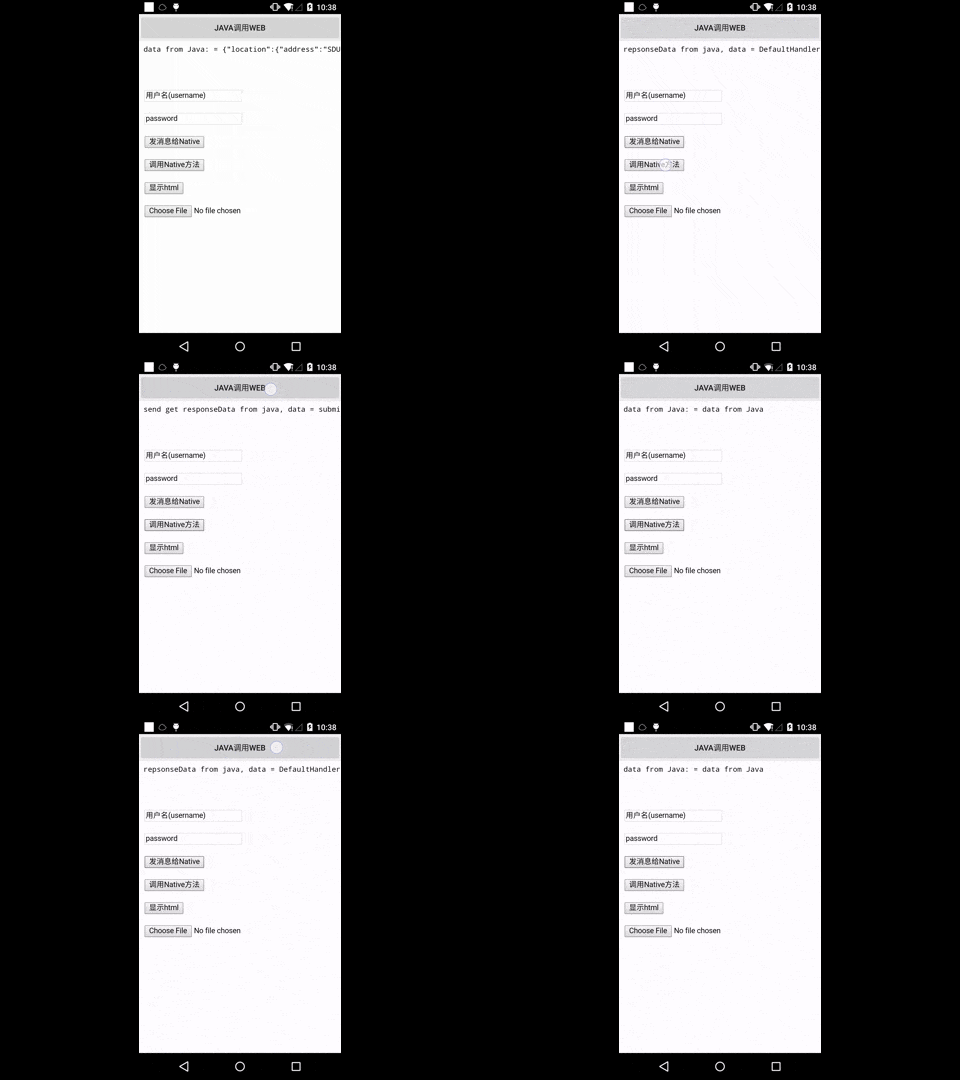
Usage
JitPack.io
I strongly recommend https://jitpack.io
repositories {
    // ...
    maven { url "https://jitpack.io" }
}

dependencies {
    compile 'com.github.lzyzsd:jsbridge:2.0.0'
}
Use it in Java
add com.github.lzyzsd.jsbridge.BridgeWebView to your layout, it is inherited from WebView.
Register a Java handler function so that js can call
    webView.registerHandler("submitFromWeb", new BridgeHandler() {
        @Override
        public void handler(String data, CallBackFunction function) {
            Log.i(TAG, "handler = submitFromWeb, data from web = " + data);
            function.onCallBack("submitFromWeb exe, response data from Java");
        }
    });
js can call this Java handler method "submitFromWeb" through:
    WebViewJavascriptBridge.callHandler(
        'submitFromWeb'
        , {'param': str1}
        , function(responseData) {
            document.getElementById("show").innerHTML = "send get responseData from java, data = " + responseData
        }
    );
You can set a default handler in Java, so that js can send message to Java without assigned handlerName
webView.setDefaultHandler(new DefaultHandler());
    window.WebViewJavascriptBridge.doSend(
        data
        , function(responseData) {
            document.getElementById("show").innerHTML = "repsonseData from java, data = " + responseData
        }
    );
Register a JavaScript handler function so that Java can call
    WebViewJavascriptBridge.registerHandler("functionInJs", function(data, responseCallback) {
        document.getElementById("show").innerHTML = ("data from Java: = " + data);
        var responseData = "Javascript Says Right back aka!";
        responseCallback(responseData);
    });
Java can call this js handler function "functionInJs" through:
    webView.callHandler("functionInJs", new Gson().toJson(user), new CallBackFunction() {
        @Override
        public void onCallBack(String data) {

        }
    });
You can also define a default handler use init method, so that Java can send message to js without assigned handlerName
for example:
    window.WebViewJavascriptBridge.init(function(message, responseCallback) {
        console.log('JS got a message', message);
        var data = {
            'Javascript Responds': 'Wee!'
        };
        console.log('JS responding with', data);
        responseCallback(data);
    });
webView.send("hello");
will print 'JS got a message hello' and 'JS responding with' in webview console.
Notice
This lib will inject a WebViewJavascriptBridge Object to window object.
You can listen to WebViewJavascriptBridgeReady event to ensure window.WebViewJavascriptBridge is exist, as the blow code shows:
    if (window.WebViewJavascriptBridge) {
        //do your work here
    } else {
        document.addEventListener(
            'WebViewJavascriptBridgeReady'
            , function() {
                //do your work here
            },
            false
        );
    }
Or put all JsBridge function call into window.WVJBCallbacks array if window.WebViewJavascriptBridge is undefined, this task queue will be flushed when WebViewJavascriptBridgeReady event triggered.
Copy and paste setupWebViewJavascriptBridge into your JS:
function setupWebViewJavascriptBridge(callback) {
    if (window.WebViewJavascriptBridge) {
        return callback(WebViewJavascriptBridge);
    }
    if (window.WVJBCallbacks) {
        return window.WVJBCallbacks.push(callback);
    }
    window.WVJBCallbacks = [callback];
}
Call setupWebViewJavascriptBridge and then use the bridge to register handlers or call Java handlers:
setupWebViewJavascriptBridge(function(bridge) {
    bridge.registerHandler('JS Echo', function(data, responseCallback) {
        console.log("JS Echo called with:", data);
        responseCallback(data);
    });
    bridge.callHandler('ObjC Echo', {'key':'value'}, function(responseData) {
        console.log("JS received response:", responseData);
    });
});
It same with https://github.com/marcuswestin/WebViewJavascriptBridge, that would be easier for you to define same behavior in different platform between Android and iOS. Meanwhile, writing concise code.
License
This project is licensed under the terms of the MIT license.
Extension points exported contracts — how you extend this code
WebViewJavascriptBridge (Interface)Core symbols most depended-on inside this repo
loadUrlShape
Languages
Modules by API surface
For agents
$ claude mcp add JsBridge \
  -- python -m otcore.mcp_server <graph>