github.com/guptarohit/asciigraph @v0.10.0 sqlite
README
asciigraph




Go package to make lightweight ASCII line graphs ╭┈╯.
Installation
go get -u github.com/guptarohit/asciigraph@latest
Usage
Basic graph
package main

import (
    "fmt"
    "github.com/guptarohit/asciigraph"
)

func main() {
    data := []float64{3, 4, 9, 6, 2, 4, 5, 8, 5, 10, 2, 7, 2, 5, 6}
    graph := asciigraph.Plot(data)

    fmt.Println(graph)
}
Running this example would render the following graph:
  10.00 ┤        ╭╮
   9.00 ┤ ╭╮     ││
   8.00 ┤ ││   ╭╮││
   7.00 ┤ ││   ││││╭╮
   6.00 ┤ │╰╮  ││││││ ╭
   5.00 ┤ │ │ ╭╯╰╯│││╭╯
   4.00 ┤╭╯ │╭╯   ││││
   3.00 ┼╯  ││    ││││
   2.00 ┤   ╰╯    ╰╯╰╯
Multiple Series
package main

import (
    "fmt"
    "github.com/guptarohit/asciigraph"
)

func main() {
    data := [][]float64{{0, 1, 2, 3, 3, 3, 2, 0}, {5, 4, 2, 1, 4, 6, 6}}
    graph := asciigraph.PlotMany(data)

    fmt.Println(graph)
}
Running this example would render the following graph:
 6.00 ┤    ╭─
 5.00 ┼╮   │
 4.00 ┤╰╮ ╭╯
 3.00 ┤ │╭│─╮
 2.00 ┤ ╰╮│ ╰╮
 1.00 ┤╭╯╰╯  │
 0.00 ┼╯     ╰
Custom Y-axis value formatting
Use YAxisValueFormatter(...) to control how values printed on the Y-axis are rendered.
This is useful for human-readable units like bytes, durations, or domain-specific labels.
package main

import (
    "fmt"

    "github.com/guptarohit/asciigraph"
)

func main() {
    data := []float64{
        30 * 1024 * 1024 * 1024,
        70 * 1024 * 1024 * 1024,
        2 * 1024 * 1024 * 1024,
    }

    graph := asciigraph.Plot(data,
        asciigraph.Height(5),
        asciigraph.Width(45),
        asciigraph.YAxisValueFormatter(func(v float64) string {
            return fmt.Sprintf("%.2f GiB", v/1024/1024/1024)
        }),
    )

    fmt.Println(graph)
}
Running this example would render the following graph:
 70.00 GiB ┤                 ╭──────╮
 56.40 GiB ┤         ╭───────╯      ╰────╮
 42.80 GiB ┤  ╭──────╯                   ╰───╮
 29.20 GiB ┼──╯                              ╰────╮
 15.60 GiB ┤                                      ╰───╮
  2.00 GiB ┤                                          ╰─
X-axis Support
Use XAxisRange(min, max) to add a labeled X-axis below the graph.
XAxisTickCount(n) controls how many tick marks appear (default 5, minimum 2).
package main

import (
    "fmt"
    "github.com/guptarohit/asciigraph"
)

func main() {
    data := []float64{3, 4, 9, 6, 2, 4, 5, 8, 5, 10, 2, 7, 2, 5, 6}
    graph := asciigraph.Plot(data,
        asciigraph.XAxisRange(0, 14),
        asciigraph.XAxisTickCount(3),
    )

    fmt.Println(graph)
}
Running this example would render the following graph:
 10.00 ┤        ╭╮
  9.00 ┤ ╭╮     ││
  8.00 ┤ ││   ╭╮││
  7.00 ┤ ││   ││││╭╮
  6.00 ┤ │╰╮  ││││││ ╭
  5.00 ┤ │ │ ╭╯╰╯│││╭╯
  4.00 ┤╭╯ │╭╯   ││││
  3.00 ┼╯  ││    ││││
  2.00 ┤   ╰╯    ╰╯╰╯
       └┬──────┬──────┬
        0      7     14
Colored graphs
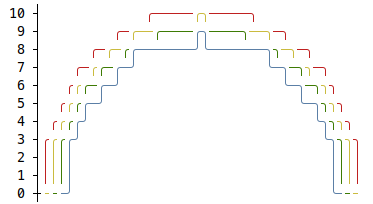
package main

import (
    "fmt"
    "github.com/guptarohit/asciigraph"
)

func main() {
    data := make([][]float64, 4)

    for i := 0; i < 4; i++ {
        for x := -20; x <= 20; x++ {
            v := math.NaN()
            if r := 20 - i; x >= -r && x <= r {
                v = math.Sqrt(math.Pow(float64(r), 2)-math.Pow(float64(x), 2)) / 2
            }
            data[i] = append(data[i], v)
        }
    }
    graph := asciigraph.PlotMany(data, asciigraph.Precision(0), asciigraph.SeriesColors(
        asciigraph.Red,
        asciigraph.Yellow,
        asciigraph.Green,
        asciigraph.Blue,
    ))

    fmt.Println(graph)
}
Running this example would render the following graph:
Gradient (heatmap) coloring
Instead of a solid color per series, SeriesColorGradient colors each point by
its value along a palette — warm tones for high values, cool tones for low ones.
The built-in HeatmapSpectrum provides a ready-made cool-to-warm palette, or you
can pass your own color stops (lowest value first).
package main

import (
    "fmt"
    "github.com/guptarohit/asciigraph"
)

func main() {
    data := []float64{1, 2, 3, 4, 5, 6, 7, 8, 9, 8, 7, 6, 5, 4, 3, 2, 1}
    graph := asciigraph.Plot(data,
        asciigraph.Height(10),
        asciigraph.SeriesColorGradient(asciigraph.HeatmapSpectrum...),
    )
    fmt.Println(graph)
}
Running this example would render the following graph:

Threshold coloring
ColorAbove and ColorBelow highlight points that breach a threshold —
useful for flagging alerts, like a CPU usage spike or a disk space warning —
without recoloring the whole series. ColorAbove colors points strictly above
its threshold (value > threshold) and ColorBelow strictly below (value <
threshold). Points in between keep their normal color — the series color, or
the gradient color when SeriesColorGradient is set. These take precedence over
SeriesColorGradient and SeriesColors; when both thresholds match the same
point, ColorAbove wins.
package main

import (
    "fmt"
    "github.com/guptarohit/asciigraph"
)

func main() {
    data := []float64{42, 48, 55, 81, 85, 91, 87, 34, 12, 17, 10, 18, 55, 50}
    graph := asciigraph.Plot(data,
        asciigraph.Height(10),
        asciigraph.Width(25),
        asciigraph.LowerBound(0),
        asciigraph.UpperBound(100),
        asciigraph.Caption("CPU usage % (red: critical, green: idle)"),
        asciigraph.ColorAbove(asciigraph.Red, 80),
        asciigraph.ColorBelow(asciigraph.Green, 25),
    )
    fmt.Println(graph)
}
Running this example would render the following graph — the spike above 80% in red and the dip below 25% in green:

On the CLI, the same thresholds are available via the -ca and -cb flags,
each taking a color,value pair:
seq 1 100 | asciigraph -h 10 -ca red,80 -cb green,25
Legends for colored graphs
The graph can include legends for each series, making it easier to interpret.
package main

import (
    "fmt"
    "github.com/guptarohit/asciigraph"
    "math"
)

func main() {
    data := make([][]float64, 3)
    for i := 0; i < 3; i++ {
        for x := -12; x <= 12; x++ {
            v := math.NaN()
            if r := 12 - i; x >= -r && x <= r {
                v = math.Sqrt(math.Pow(float64(r), 2)-math.Pow(float64(x), 2)) / 2
            }
            data[i] = append(data[i], v)
        }
    }
    graph := asciigraph.PlotMany(data,
        asciigraph.Precision(0),
        asciigraph.SeriesColors(asciigraph.Red, asciigraph.Green, asciigraph.Blue),
        asciigraph.SeriesLegends("Red", "Green", "Blue"),
        asciigraph.Caption("Series with legends"))
    fmt.Println(graph)
}
Running this example would render the following graph:
CLI Installation
This package also brings a small utility for command line usage.
Assuming $GOPATH/bin is in your $PATH, install CLI with following command:
go install github.com/guptarohit/asciigraph/cmd/asciigraph@latest
or pull Docker image:
docker pull ghcr.io/guptarohit/asciigraph:latest
or download binaries from the releases page.
CLI Usage
```bash ✘ 0|125 16:19:23
asciigraph --help Usage of asciigraph: asciigraph [options] Options: -ac axis color y-axis color of the plot -b buffer data points buffer when realtime graph enabled, default equal to
width-c caption caption for the graph -ca above color points above a threshold: "color,value" (e.g. "red,4") -cb below color points below a threshold: "color,value" (e.g. "green,2") -cc caption color caption color of the plot -d delimiter data delimiter for splitting data points in the input stream (default ",") -f fps set fps to control how frequently graph to be rendered when realtime graph enabled (default 24) -g gradient gradient palette coloring points by value: "spectrum" for the built-in heatmap, or comma-separated color stops low to high (e.g. "blue,cyan,green") -h height height in text rows, 0 for auto-scaling -lb lower bound lower bound set the minimum value for the vertical axis (ignored if series contains lower values) (default +Inf) -lc label color y-axis label color of the plot -o offset offset in columns, for the label (default 3) -p precision precision of data point labels along the y-axis (default 2) -r realtime enables realtime graph for data stream -sc series colors comma-separated series colors corresponding to each series -sl series legends comma-separated series legends corresponding to each series -sn number of series number of series (columns) in the input data (default 1) -ub upper bound upper bound set the maximum value for the vertical axis (ignored if series contains larger values) (default -Inf) -w width width in columns, 0 for auto-scaling -xmax value x-axis maximum value (default NaN) -xmin value x-axis minimum value (default NaN) -xt tick count x-axis tick count (default 5, minimum 2) asciigraph expects data points from stdin. Invalid values are logged to stderr.
Feed it data points via stdin:
```bash
seq 1 72 | asciigraph -h 10 -c "plot data from stdin" -xmin 0 -xmax 40 -xt 5
or use Docker image:
seq 1 72 | docker run -i --rm ghcr.io/guptarohit/asciigraph -h 10 -c "plot data from stdin" -xmin 0 -xmax 40 -xt 5
Output:
 72.00 ┤                                                                  ╭────
 64.90 ┤                                                           ╭──────╯
 57.80 ┤                                                    ╭──────╯
 50.70 ┤                                             ╭──────╯
 43.60 ┤                                      ╭──────╯
 36.50 ┤                              ╭───────╯
 29.40 ┤                       ╭──────╯
 22.30 ┤                ╭──────╯
 15.20 ┤         ╭──────╯
  8.10 ┤  ╭──────╯
  1.00 ┼──╯
       └┬─────────────────┬─────────────────┬────────────────┬─────────────────┬
        0                10                20               30                40
                                  plot data from stdin
Example of real-time graph for data points stream via stdin:

command for above graph
ping -i.2 google.com | grep -oP '(?<=time=).*(?=ms)' --line-buffered | asciigraph -r -h 10 -w 40 -c "realtime plot data (google ping in ms) from stdin"
Example of multi-series real-time graph for data points stream via stdin:

command for above graph
{unbuffer paste -d, <(ping -i 0.4 google.com | sed -u -n -E 's/.*time=(.*)ms.*/\1/p') <(ping -i 0.4 duckduckgo.com | sed -u -n -E 's/.*time=(.*)ms.*/\1/p') } | asciigraph -r -h 15 -w 60 -sn 2 -sc "blue,red" -c "Ping Latency Comparison" -sl "Google, DuckDuckGo"
Acknowledgement
This package started as golang port of asciichart.
Contributing
Feel free to make a pull request! :octocat:
Extension points exported contracts — how you extend this code
Option (Interface)Core symbols most depended-on inside this repo
PlotManyShape
Languages
Modules by API surface
Used by 1 indexed graphs manifest dependencies, hub-wide
For agents
$ claude mcp add asciigraph \
  -- python -m otcore.mcp_server <graph>