github.com/goldbergyoni/nodejs-testing-best-practices @1.0 sqlite
README

A detailed guide to modern testing with Node.js
1. ✅ 50+ Best Practices List - Detailed instructions on how to write modern tests in the RIGHT way
2. 📊 Example application - A Complete showcase of a typical Node.js backend with performant tests setup (40 tests in 5 seconds! including database!)
3. 🚀 Advanced topics - Go well beyond the basics. This guide covers hot topics like testing with data(base), testing interactions with external services including contracts, testing with message queues and more
Authors

Yoni Goldberg

Michael Salomon

Daniel Gluskin
Lessons Written in Blood: Hard-Won Insights from Consulting with 50 Companies
Table of contents
Strategy & Workflow- Which tests should you write in 2025? (5 best practices)Database And Infrastructure Setup- Optimizing your DB, MQ and other infra for testing (6 best practices)Web Server Setup- Good practices for starting and stopping the backend API (3 best practices)The Test Anatomy- The bread and butter of a component test (6 best practices)Integration- Techniques for testing collaborations with 3rd party components (8 best practices)Dealing With Data- Patterns and practices for testing the application data and database (8 best practices)Message Queue- Correctly testing flows that start or end at a queue (8 best practices)Mocking(6 best practices)
Example Application
Our Showcase- An example Node.js component that embodies selected list of important best practices
Other Recipes
More Examples And Platforms- A list of more examples that cover more platforms and topics
✅ Best Practices
Section 1: Strategy and Workflow
⚪️ 1. Always START with integration/component tests
🏷 Tags: #strategic
:white_check_mark: Do: No matter when testing starts, the first tests to write should be component tests. But what exactly are component/integration tests? They focus on testing an entire component (e.g., a microservice) as-is, through its API, with all layers included—database and all—while faking anything extraneous. This approach delivers both high confidence (it's like the production environment!) and a great developer experience.
Why start here? When a new sprint or feature begins, the first known details are about the component's expected behavior. Developers can immediately outline what the API/MQ will receive and what kind of response it should return. Naturally, testing this public interface first makes the most sense. This powerful testing approach brings immense value: it is realistic, demands less effort than covering every function with tests, requires close to zero mocking, triggers high coverage, and keeps the tester focused on what truly matters
On the other hand, writing unit tests for inner functions before the overall outcome is clear is a wasted effort. Even classic TDD books emphasize this approach—check out the the double verification loop model.
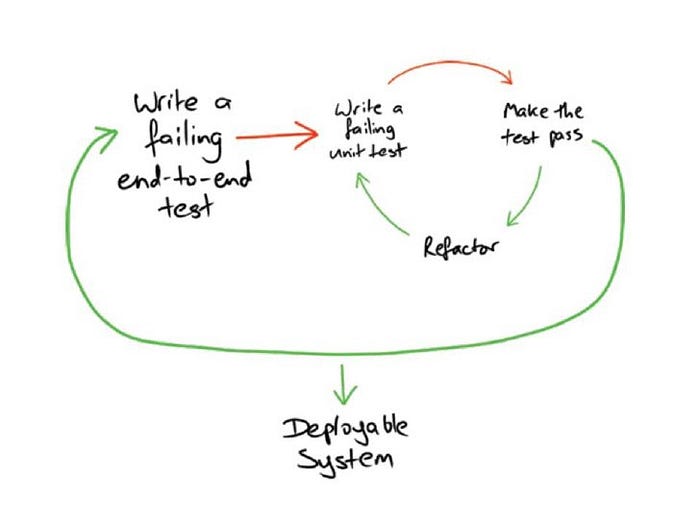
At the end of the day, every input and output of a component must be covered with component tests. This is the bread and butter of your testing strategy—the Swiss Army knife that catches 99% of the bugs. This strategy is known as the 'Testing Diamond'

⚪️ 2. Run a very few E2E, selectively consider unit tests
🏷 Tags: ``
:white*check_mark: Do: Write just a tiny handful of E2E tests on top of component tests like 3-10, tests, maybe a couple more for larger components, but nothing beyond that. While "E2E" means different things to different testers, in a backend context, it refers to tests that run against live collaborators (i.e., multiple microservices) on a real infrastructure. Since component tests catch 99% of bugs, E2E tests should focus on different risks: configuration issues, misunderstandings with third-party services, infrastructure problems, and similar surprises. Catching these issues requires only a few well-placed tests
When are unit tests needed? Only when dealing with non-trivial logic or algorithms. If a module has significant complexity, isolating it from distractions can make testing easier. This article greatly outlines when unit tests shine
⚪️ 3. Cover features, not functions
🏷 Tags: ``
Focus your tests on features, not just functions. Features represent the core behavior of your application—often reflected in API routes—and testing them ensures an automated focus on what truly matters. This approach also helps set the right priorities and often requires fewer tests than function-level testing.
Coverage reports are a great way to see which controllers, modules, and folders are exercised by tests. They help identify which critical features have been tested and, just as importantly, highlight gaps where essential functionality might still be missing. To verify meaningful coverage, compare test reports with requirements, check coverage reports to confirm key features are included, and ensure core routes and messages are covered by tests
⚪️ 4. Write the tests during coding, never after
🏷 Tags: #strategic
:white_check_mark: Do: Write tests when it's most convenient—before or during coding—but never after everything is built. Waiting too long means losing the anti-regression safety net that tests provide
Imagine a developer spends three hours writing great, fully working code (let’s call this point "A"). Then, she codes for six more hours, only to realize that a bug was introduced five hours ago. If she had written tests at point A, they would have caught the issue immediately, preventing wasted effort. Like in rock climbing, tests secure progress—the earlier they are written, the less risk of falling back due to regressions
Tests should also be designed for frequent execution, running every few minutes like a robot assistant watching our back. They should constantly validate that recent changes haven’t broken anything, giving instant feedback and keeping development smooth
That said, writing tests too early (e.g., strict TDD) can lead to unnecessary refactoring as the design evolves. The sweet spot is when both requirements and implementation are clear enough—not necessarily perfect, but solid. For some modules, that clarity comes before writing code; for others, it follows some experimentation. Either way, the goal is simple: write tests early enough to provide a safety net without slowing development. Whether that's before coding or 45 minutes into it is a matter of personal style, not strategy
⚪️ 5. Test the five known backend exit doors (outcomes)
🏷 Tags: #strategic
:white_check_mark: Do: When planning your tests, consider covering the five typical backend flow's outputs. That is, when your test is triggering some action (e.g., API call), a reaction is happening, something meaningful occurs and calls for testing. Note that we don't care about how things work. Our focus is on outcomes, things that are noticeable from the outside and might affect the user. These outcomes/reactions can be put in 5 categories:
• Response - The test invokes an action (e.g., via API) and gets a response. It's now concerned with checking the response data correctness, schema, and HTTP status
• A new state - After invoking an action, some data is probably modified. For example, when updating a user - It might be that the new data was not saved. Commonly and mistakenly, testers check only the response and not whether the data is updated correctly. Testing data and databases raises multiple interesting challenges that are greatly covered below in the 📗 section 'Dealing with data'
• Calls to external services - After invoking an action, the app might call an external component via HTTP or any other transport. For example, a call to send SMS, email or charge a credit card. Anything that goes outside and might affect the user - Should be tested. Testing integrations is a broad topic which is discussed in the 📗 section 'Testing integrations' below
• Message queues - The outcome of a flow might be a message in a queue. In our example application, once a new order was saved the app puts a message in some MQ product. Now other components can consume this message and continue the flow. This is very similar to testing integrations only working with message queues is different technically and tricky. The 📗 section 'Message Queues' below delve into this topic
• Observability - Some things must be monitored, like errors or remarkable business events. When a transaction fails, not only we expect the right response but also correct error handling and proper logging/metrics. This information goes directly to a very important user - The ops user (i.e., production SRE/admin). Testing error handler is not very straightforward - Many types of errors might get thrown, some errors should lead to process crash, and there are many other corners to cover. We plan to write the 📗 section on 'Observability and errors' soon, but the example application already contains examples in the file "createOrder.observabilityCheck.test.ts"

Section 2: Infrastructure and database setup
⚪️ 1. Use Docker-Compose to host the database and other infrastructure
🏷 Tags: #strategic
:white_check_mark: Do: All the databases, message queues and infrastructure that is being used by the app should run in a docker-compose environment for testing purposes. Only this technology check all these boxes: A mature and popular technology that can be reused among developer machines and CI. One setup, same files, run everywhere. Sweet value but one remarkable caveat - It's different from the production runtime platform. Things like memory limits, deployment pipeline, graceful shutdown and a-like act differently in other environments - Make sure to test those using pre-production tests over the real environment. Note that the app under test should not necessarily be part of this docker-compose and can keep on running locally - This is usually more comfortable for developers.
👀 Alternatives: A popular option is manual installation of local database - This results in developers working hard to get in-sync with each other ("Did you set the right permissions in the DB?") and configuring a different setup in CI ❌; Some use local Kubernetes or Serverless emulators which act almost like the real-thing, sounds promising but it won't work over most CIs vendors and usually more complex to setup in developers machine❌;
✏ Code Examples
# docker-compose.yml
version: '3.6'
services:
  database:
    image: postgres:11
    command: postgres -c fsync=off -c synchronous_commit=off -c full_page_writes=off -c random_page_cost=1.0
    environment:
      - POSTGRES_USER=myuser
      - POSTGRES_PASSWORD=myuserpassword
      - POSTGRES_DB=shop
    container_name: 'postgres-for-testing'
    ports:
      - '54310:5432'
    tmpfs: /var/lib/postgresql/data
⚪️ 2. Start docker-compose using code in the global setup process
🏷 Tags: #strategic
:white_check_mark: Do: In a typical multi-process test runner (e.g. Mocha, Jest), the infrastructure should be started in a global setup/hook (Jest global setup), Mocha global fixture using custom code that spin up the docker-compose file. This takes away common workflows pains - The DB is an explicit dependency of the test, no more tests failing because the DB is down. A new developer onboarded? Get them up to speed with nothing more than git clone && npm test. Everything happens automatically, no tedious README.md, no developers wonder what setup steps did they miss. In addition, going with this approach maximizes the test performance: the DB is not instantiated per process or per file, rather once and only once. On the global teardown phase, all the containers should shutoff (See a dedicated bullet b
Core symbols most depended-on inside this repo
startShape
Languages
Modules by API surface
Dependencies from manifests, versioned
Datastores touched
For agents
$ claude mcp add nodejs-testing-best-practices \
  -- python -m otcore.mcp_server <graph>