github.com/gocraft/work @v0.5.1 sqlite
README
gocraft/work 
gocraft/work lets you enqueue and processes background jobs in Go. Jobs are durable and backed by Redis. Very similar to Sidekiq for Go.
- Fast and efficient. Faster than this, this, and this. See below for benchmarks.
- Reliable - don't lose jobs even if your process crashes.
- Middleware on jobs -- good for metrics instrumentation, logging, etc.
- If a job fails, it will be retried a specified number of times.
- Schedule jobs to happen in the future.
- Enqueue unique jobs so that only one job with a given name/arguments exists in the queue at once.
- Web UI to manage failed jobs and observe the system.
- Periodically enqueue jobs on a cron-like schedule.
- Pause / unpause jobs and control concurrency within and across processes
Enqueue new jobs
To enqueue jobs, you need to make an Enqueuer with a redis namespace and a redigo pool. Each enqueued job has a name and can take optional arguments. Arguments are k/v pairs (serialized as JSON internally).
package main

import (
    "github.com/gomodule/redigo/redis"
    "github.com/gocraft/work"
)

// Make a redis pool
var redisPool = &redis.Pool{
    MaxActive: 5,
    MaxIdle: 5,
    Wait: true,
    Dial: func() (redis.Conn, error) {
        return redis.Dial("tcp", ":6379")
    },
}

// Make an enqueuer with a particular namespace
var enqueuer = work.NewEnqueuer("my_app_namespace", redisPool)

func main() {
    // Enqueue a job named "send_email" with the specified parameters.
    _, err := enqueuer.Enqueue("send_email", work.Q{"address": "test@example.com", "subject": "hello world", "customer_id": 4})
    if err != nil {
        log.Fatal(err)
    }
}
Process jobs
In order to process jobs, you'll need to make a WorkerPool. Add middleware and jobs to the pool, and start the pool.
package main

import (
    "github.com/gomodule/redigo/redis"
    "github.com/gocraft/work"
    "os"
    "os/signal"
)

// Make a redis pool
var redisPool = &redis.Pool{
    MaxActive: 5,
    MaxIdle: 5,
    Wait: true,
    Dial: func() (redis.Conn, error) {
        return redis.Dial("tcp", ":6379")
    },
}

type Context struct{
    customerID int64
}

func main() {
    // Make a new pool. Arguments:
    // Context{} is a struct that will be the context for the request.
    // 10 is the max concurrency
    // "my_app_namespace" is the Redis namespace
    // redisPool is a Redis pool
    pool := work.NewWorkerPool(Context{}, 10, "my_app_namespace", redisPool)

    // Add middleware that will be executed for each job
    pool.Middleware((*Context).Log)
    pool.Middleware((*Context).FindCustomer)

    // Map the name of jobs to handler functions
    pool.Job("send_email", (*Context).SendEmail)

    // Customize options:
    pool.JobWithOptions("export", work.JobOptions{Priority: 10, MaxFails: 1}, (*Context).Export)

    // Start processing jobs
    pool.Start()

    // Wait for a signal to quit:
    signalChan := make(chan os.Signal, 1)
    signal.Notify(signalChan, os.Interrupt, os.Kill)
    <-signalChan

    // Stop the pool
    pool.Stop()
}

func (c *Context) Log(job *work.Job, next work.NextMiddlewareFunc) error {
    fmt.Println("Starting job: ", job.Name)
    return next()
}

func (c *Context) FindCustomer(job *work.Job, next work.NextMiddlewareFunc) error {
    // If there's a customer_id param, set it in the context for future middleware and handlers to use.
    if _, ok := job.Args["customer_id"]; ok {
        c.customerID = job.ArgInt64("customer_id")
        if err := job.ArgError(); err != nil {
            return err
        }
    }

    return next()
}

func (c *Context) SendEmail(job *work.Job) error {
    // Extract arguments:
    addr := job.ArgString("address")
    subject := job.ArgString("subject")
    if err := job.ArgError(); err != nil {
        return err
    }

    // Go ahead and send the email...
    // sendEmailTo(addr, subject)

    return nil
}

func (c *Context) Export(job *work.Job) error {
    return nil
}
Special Features
Contexts
Just like in gocraft/web, gocraft/work lets you use your own contexts. Your context can be empty or it can have various fields in it. The fields can be whatever you want - it's your type! When a new job is processed by a worker, we'll allocate an instance of this struct and pass it to your middleware and handlers. This allows you to pass information from one middleware function to the next, and onto your handlers.
Custom contexts aren't really needed for trivial example applications, but are very important for production apps. For instance, one field in your context can be your tagged logger. Your tagged logger augments your log statements with a job-id. This lets you filter your logs by that job-id.
Check-ins
Since this is a background job processing library, it's fairly common to have jobs that that take a long time to execute. Imagine you have a job that takes an hour to run. It can often be frustrating to know if it's hung, or about to finish, or if it has 30 more minutes to go.
To solve this, you can instrument your jobs to "checkin" every so often with a string message. This checkin status will show up in the web UI. For instance, your job could look like this:
func (c *Context) Export(job *work.Job) error {
    rowsToExport := getRows()
    for i, row := range rowsToExport {
        exportRow(row)
        if i % 1000 == 0 {
            job.Checkin("i=" + fmt.Sprint(i))   // Here's the magic! This tells gocraft/work our status
        }
    }
}
Then in the web UI, you'll see the status of the worker:
| Name | Arguments | Started At | Check-in At | Check-in |
|---|---|---|---|---|
| export | {"account_id": 123} | 2016/07/09 04:16:51 | 2016/07/09 05:03:13 | i=335000 |
Scheduled Jobs
You can schedule jobs to be executed in the future. To do so, make a new Enqueuer and call its EnqueueIn method:
enqueuer := work.NewEnqueuer("my_app_namespace", redisPool)
secondsInTheFuture := 300
_, err := enqueuer.EnqueueIn("send_welcome_email", secondsInTheFuture, work.Q{"address": "test@example.com"})
Unique Jobs
You can enqueue unique jobs so that only one job with a given name/arguments exists in the queue at once. For instance, you might have a worker that expires the cache of an object. It doesn't make sense for multiple such jobs to exist at once. Also note that unique jobs are supported for normal enqueues as well as scheduled enqueues.
enqueuer := work.NewEnqueuer("my_app_namespace", redisPool)
job, err := enqueuer.EnqueueUnique("clear_cache", work.Q{"object_id_": "123"}) // job returned
job, err = enqueuer.EnqueueUnique("clear_cache", work.Q{"object_id_": "123"}) // job == nil -- this duplicate job isn't enqueued.
job, err = enqueuer.EnqueueUniqueIn("clear_cache", 300, work.Q{"object_id_": "789"}) // job != nil (diff id)
Periodic Enqueueing (Cron)
You can periodically enqueue jobs on your gocraft/work cluster using your worker pool. The scheduling specification uses a Cron syntax where the fields represent seconds, minutes, hours, day of the month, month, and week of the day, respectively. Even if you have multiple worker pools on different machines, they'll all coordinate and only enqueue your job once.
pool := work.NewWorkerPool(Context{}, 10, "my_app_namespace", redisPool)
pool.PeriodicallyEnqueue("0 0 * * * *", "calculate_caches") // This will enqueue a "calculate_caches" job every hour
pool.Job("calculate_caches", (*Context).CalculateCaches) // Still need to register a handler for this job separately
Run the Web UI
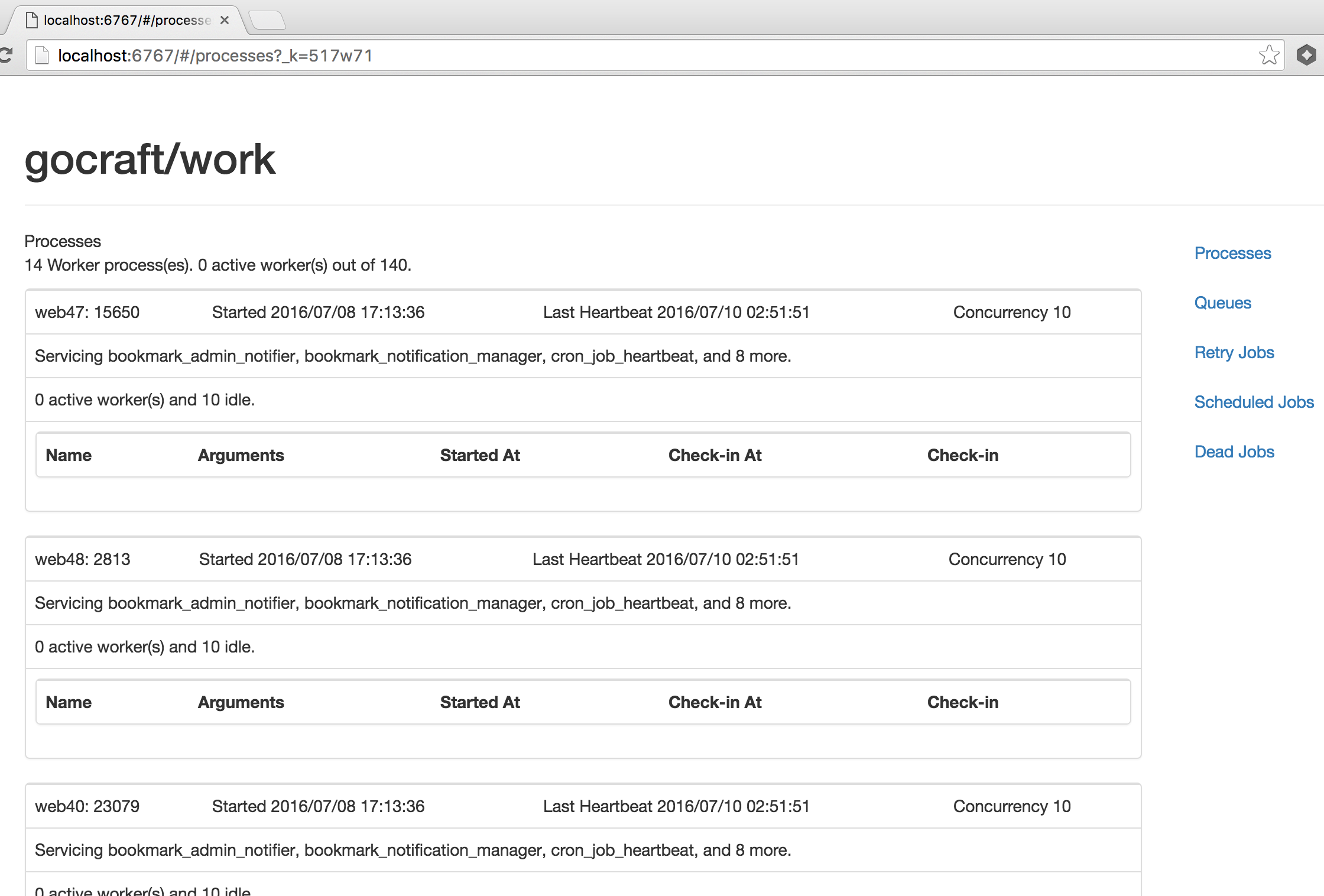
The web UI provides a view to view the state of your gocraft/work cluster, inspect queued jobs, and retry or delete dead jobs.
Building an installing the binary:
go get github.com/gocraft/work/cmd/workwebui
go install github.com/gocraft/work/cmd/workwebui
Then, you can run it:
workwebui -redis="redis:6379" -ns="work" -listen=":5040"
Navigate to http://localhost:5040/.
You'll see a view that looks like this:
Design and concepts
Enqueueing jobs
- When jobs are enqueued, they're serialized with JSON and added to a simple Redis list with LPUSH.
- Jobs are added to a list with the same name as the job. Each job name gets its own queue. Whereas with other job systems you have to design which jobs go on which queues, there's no need for that here.
Scheduling algorithm
- Each job lives in a list-based queue with the same name as the job.
- Each of these queues can have an associated priority. The priority is a number from 1 to 100000.
- Each time a worker pulls a job, it needs to choose a queue. It chooses a queue probabilistically based on its relative priority.
- If the sum of priorities among all queues is 1000, and one queue has priority 100, jobs will be pulled from that queue 10% of the time.
- Obviously if a queue is empty, it won't be considered.
- The semantics of "always process X jobs before Y jobs" can be accurately approximated by giving X a large number (like 10000) and Y a small number (like 1).
Processing a job
- To process a job, a worker will execute a Lua script to atomically move a job its queue to an in-progress queue.
- A job is dequeued and moved to in-progress if the job queue is not paused and the number of active jobs does not exceed concurrency limit for the job type
- The worker will then run the job and increment the job lock. The job will either finish successfully or result in an error or panic.
- If the process completely crashes, the reaper will eventually find it in its in-progress queue and requeue it.
- If the job is successful, we'll simply remove the job from the in-progress queue.
- If the job returns an error or panic, we'll see how many retries a job has left. If it doesn't have any, we'll move it to the dead queue. If it has retries left, we'll consume a retry and add the job to the retry queue.
Workers and WorkerPools
- WorkerPools provide the public API of gocraft/work.
- You can attach jobs and middleware to them.
- You can start and stop them.
- Based on their concurrency setting, they'll spin up N worker goroutines.
- Each worker is run in a goroutine. It will get a job from redis, run it, get the next job, etc.
- Each worker is independent. They are not dispatched work -- they get their own work.
Retry job, scheduled jobs, and the requeuer
- In addition to the normal list-based queues that normal jobs live in, there are two other types of queues: the retry queue and the scheduled job queue.
- Both of these are implemented as Redis z-sets. The score is the unix timestamp when the job should be run. The value is the bytes of the job.
- The requeuer will occasionally look for jobs in these queues that should be run now. If they should be, they'll be atomically moved to the normal list-based queue and eventually processed.
Dead jobs
- After a job has failed a specified number of times, it will be added to the dead job queue.
- The dead job queue is just a Redis z-set. The score is the timestamp it failed and the value is the job.
- To retry failed jobs, use the UI or the Client API.
The reaper
- If a process crashes hard (eg, the power on the server turns off or the kernal freezes), some jobs may be in progress and we won't want to lose them. They're safe in their in-progress queue.
- The reaper will look for worker pools without a heartbeat. It will scan their in-progress queues and requeue anything it finds.
Unique jobs
- You can enqueue unique jobs such that a given name/arguments are on the queue at once.
- Both normal queues and the scheduled queue are considered.
- When a unique job is enqueued, we'll atomically set a redis key that includes the job name and arguments and enqueue the job.
- When the job is processed, we'll delete that key to permit another job to be enqueued.
Periodic jobs
- You can tell a worker pool to enqueue jobs periodically using a cron schedule.
- Each worker pool will wake up every 2 minutes, and if jobs haven't been scheduled yet, it will schedule all the jobs that would be executed in the next five minutes.
- Each periodic job that runs at a given time has a predictable byte pattern. Since jobs are scheduled on the scheduled job queue (a Redis z-set), if the same job is scheduled twice for a given time, it can only exist in the z-set once.
Paused jobs
- You can pause jobs from being processed from a specific queue by setting a "paused" redis key (see
redisKeyJobsPaused) - Conversely, jobs in the queue will resume being processed once the paused redis key is removed
Job concurrency
- You can control job concurrency using
JobOptions{MaxConcurrency: <num>}. - Unlike the WorkerPool concurrency, this controls the limit on the number jobs of that type that can be active at one time by within a single redis instance
- This works by putting a precondition on enqueuing function, meaning a new job will not be scheduled if we are at or over a job's
MaxConcurrencylimit - A redis key (see
redisKeyJobsLock) is used as a counting semaphore in order to track job concurrency per job type - The default value is
0, which means "no limit on job concurrency" - Note: if you want to run jobs "single threaded" then you can set the
MaxConcurrencyaccordingly:
worker_pool.JobWithOptions(jobName, JobOptions{MaxConcurrency: 1}, (*Context).WorkFxn)
Terminology reference
- "worker pool" - a pool of workers
- "worker" - an individual worker in a single goroutine. Gets a job from redis, does job, gets next job...
- "heartbeater" or "worker pool heartbeater" - goroutine owned by worker pool that runs concurrently with workers. Writes the worker pool's config/status (aka "heartbeat") every 5 seconds.
- "heartbeat" - the status written by