github.com/gocircuit/circuit @main sqlite
README
Circuit


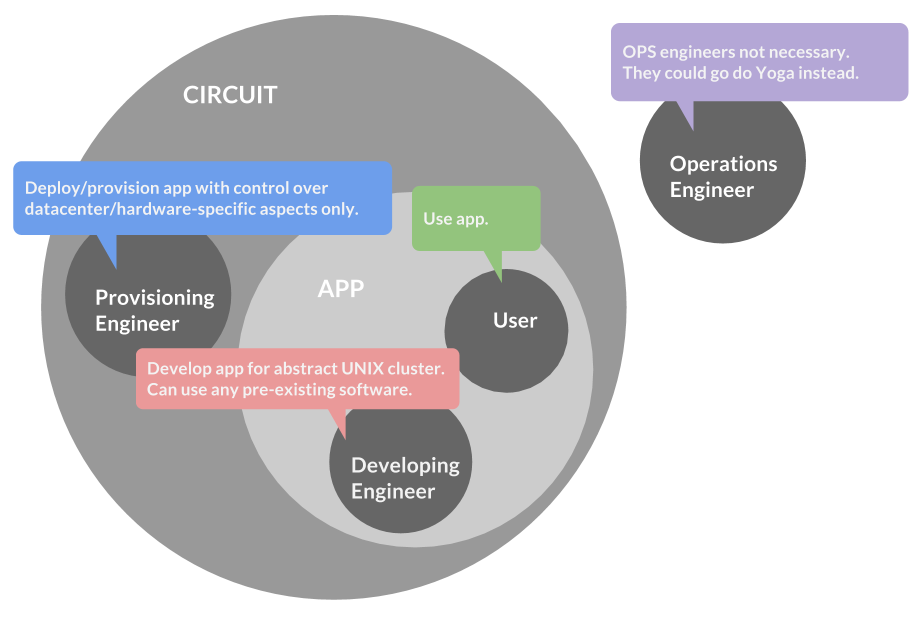
The CIRCUIT is a new way of thinking. It is deceptively similar to existing software, while being quite different.
Circuit is a programmable platform-as-a-service (PaaS) and/or Infrastructure-as-a-Service (IaaS), for management, discovery, synchronization and orchestration of services and hosts comprising cloud applications.
Circuit was designed to enable clear, accountable and safe interface between the human engineering roles in a technology enterprise, ultimately increasing productivity. Engineering role separation in a typical circuit-based architecture is illustrated above.
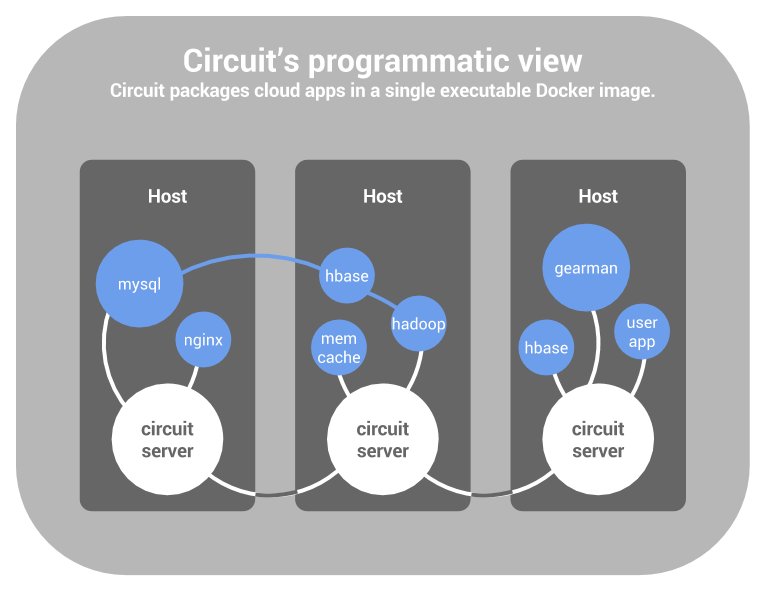
Users of circuit are
- Operations engineers, who sustain cloud applications at host, process and network level
- Data scientists, who develop distributed compute pipelines by linking together and distributing third-party utilities
- Manufacturers of distributed software, who wish to codify installation and maintenance procedures in a standardized fashion instead of communicating them through documentation (viz. MySQL)
A few technical features of circuit:
- Single- and multi-datacenter out-of-the-box
- Authentication and security of system traffic
- TCP- and UDP multicast-based (similarly to mDNS) internal node discovery
- Zero-configuration/blind-restart for ease on the host provisioning side
- Global, point-of-view consistent key/value space, where keys are hierarchical paths and values are control objects for data, processes, synchronizations, and so on.
- Consistency guarantees at ultra-high churn rates of physical hosts
- Command-line and programmatic access to the API
- Integration with Docker
In a typical circuit scenario:
- Provisioning engineers ensure newly provisioned machines start the zero-configuration circuit server as a daemon on startup.
- Operations engineers program start-up as well as dynamic-response behavior via command-line tool or language bindings.
Adoption considerations:
- Small footprint: Circuit daemons leave almost no communication and memory footprint when left idle. This makes circuit ideal for incremental adoption alongside pre-existing architectures
- Immediate impact: Even short and simple circuit scripts save manual time going forward
- Knowledge accounting: Circuit scripts can replace textual post-mortem reports with executable discovery, diagnosis, action and inaction recipes.
- Circuit servers log all operations in their execution orders, enabling maximum visibility during post-factum debugging and analysis.
Programming environment:
- Circuit programs (sequences of invocations of the circuit API) are not declarative (as in Puppet, Chef, etc.). They are effectively imperative programs in the CSP concurrency model, which allows engineers to encode complex dynamic response behavior, spanning multiple data centers.
Find comparisons to other technologies—like Zookeeper, etcd, CoreOS, raft, Consul, Puppet, Chef, and so forth—in the wiki.
Incomparable but related works
- Google Cloud Platform and Kubernetes
- Hashicorp Consul
- Puppet
- Chef
- Ansible
- CoreOS
- Apache Zookeeper
- Polymer (Google)
- Julia (MIT)
- and so on.
None of these related products sees the cluster as a closed system. In this way, the circuit is different than all. This is explained in precise terms in the next section.
Integration
The circuit is a tiny server process which runs instances on a cluster of machines to form an efficient, churn-resilient network, which enables distributed process orchestration and synchronization from any one machine.
Some of the target applications of the circuit are:
- Automatic dynamic orchestration of complex compute pipelines, as in numerical computation, for instance
- Packaging and distribution of universal distributed binaries that can self-organize into complex cloud apps
- Incremental automation of small and large OPS engineering workflows
Dive straight into it with the Quick Start slide deck.
For a conceptual introduction to The Circuit, check out the GopherCon 2014 Video. Since this video was recorded, the API-via-file-system approach was abandoned in favor of a simpler command-line tool and a Go client library.
Also take a look at the faux animated illustration of the Advanced Tutorial: Watchbot with a back channel.
The circuit is a tool for executing and synchronizing UNIX processes across entire clusters by means of a command-line tool and a client library.
The circuit comes as one binary, which serves the purpose of a server and a command-line client.
Build
The Circuit comprises one small binary. It can be built for Linux and Darwin.
Given that the Go Language compiler is installed, you can build and install the circuit binary with one line:
go get github.com/gocircuit/circuit/cmd/circuit
Run the servers
Circuit servers can be started asynchronously (and in any order) using the command
circuit start -if eth0 -discover 228.8.8.8:7711
The same command is used for all instances. The -if option specifies the
desired network interface to bind to, while the -discover command
specifies a desired IP address of a UDP multicast channel to be used for automatic
server-server discover.
The -discover option can be omitted by setting the environment variable
CIRCUIT_DISCOVER to equal the desired multicast address.
Alternative advanced server startup
To run the circuit server on the first machine, pick a public IP address and port for it to listen on, and start it like so
circuit start -a 10.0.0.1:11022
The circuit server will print its own circuit URL on its standard output. It should look like this:
circuit://10.0.0.1:11022/78517/Q56e7a2a0d47a7b5d
Copy it. We will need it to tell the next circuit server to “join” this one in a network, i.e. circuit.
Log onto another machine and similarly start a circuit server there, as well.
This time, use the -j option to tell the new server to join the first one:
circuit start -a 10.0.0.2:11088 -j circuit://10.0.0.1:11022/78517/Q56e7a2a0d47a7b5d
You now have two mutually-aware circuit servers, running on two different hosts in your cluster.
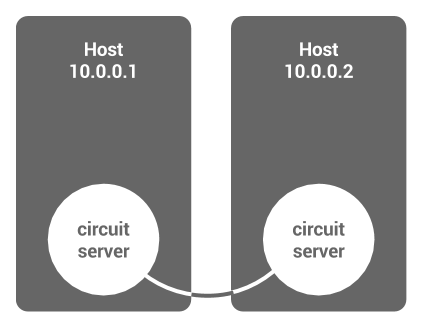
You can join any number of additional hosts to the circuit environment in a similar fashion, even billions. The circuit uses a modern expander graph-based algorithm for presence awareness and ordered communication, which is genuinely distributed; It uses communication and connectivity sparingly, hardly leaving a footprint when idle.
Programming metaphor
The purpose of each circuit server is to host a collection of control primitives, called elements, on behalf of the user. On each server the hosted elements are organized in a hierarchy (similarly to the file system in Apache Zookeeper), whose nodes are called anchors. Anchors (akin to file system directories) have names and each anchor can host one circuit element or be empty.
The hierarchies of all servers are logically unified by a global circuit root anchor, whose children are the individual circuit server hierarchies. A typical anchor path looks like this
/X317c2314a386a9db/hi/charlie
The first component of the path is the ID of the circuit server hosting the leaf anchor.
Except for the circuit root anchor (which does not correspond to any particular circuit server), all other anchors can store a process or a channel element, at most one, and additionally can have any number of sub- anchors. In a way, anchors are like directories that can have any number of subdirectories, but at most one file.
Creating and interacting with circuit elements is the mechanism through which the user controls and reflects on their distributed application. This can be accomplished by means of the included Go client library, or using the command-line tool embodied in the circuit executable itself.
Process elements are used to execute, monitor and synchronize OS-level processes at the hosting circuit server. They allow visibility and control over OS processes from any machine in the circuit cluster, regardless of the physical location of the underlying OS process.
Channel elements are a synchronization primitive, similar to the channels in Go, whose send and receive sides are accessible from any location in the circuit cluster, while their data structure lives on the circuit server hosting their anchor.
Use
Once the circuit servers are started, you can create, observe and control
circuit elements (i) interactively—using the circuit binary which doubles as a command-line client—as
well as (ii) programmatically—using the circuit Go client package github.com/gocircuit/circuit/client.
In fact, the circuit command-line tool is simply a front-end for the Go client library.
Clients (the tool or your own) dial into a circuit server in order to interact with the entire system. All servers are equal citizens in every respect and, in particular, any one can be used as a choice for dial-in.
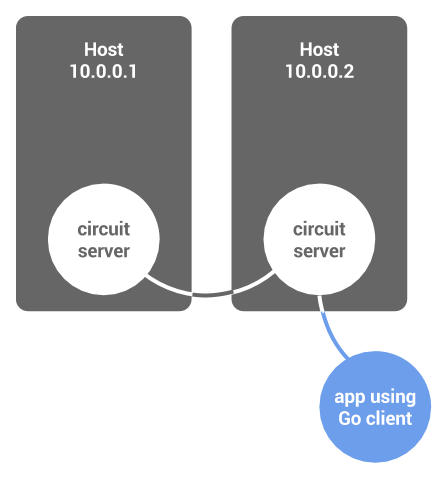
The tool (described in more detail later) is essentially a set of commands that allow you to traverse the global hierarchical namespace of circuit elements, and interact with them, somewhat similarly to how one uses the Zookeeper namespace.
For example, to list the entire circuit cluster anchor hierarchy, type in
circuit ls /
So, you might get something like this in response
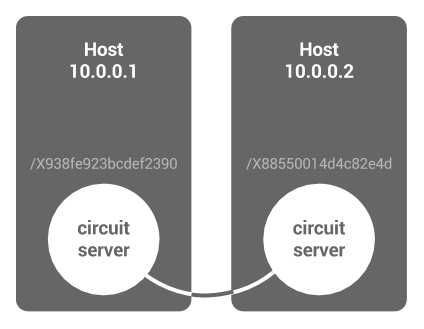
/X88550014d4c82e4d
/X938fe923bcdef2390
The two root-level anchors correspond to the two circuit servers.
Pointing the tool to your circuit cluster
Before you can use the circuit tool, you need to tell it how to locate
one circuit server for us a dial-in point.
There are two ways to provide the dial-in server address to the tool:
-
If the circuit servers were started with the
-discoveroption or theCIRCUIT_DISCOVERenvironment variable, the command-line tool can use the same methods for finding a circuit server. E.g.circuit ls -discover 228.8.8.8:7711 /...
Or,
export CIRCUIT_DISCOVER=228.8.8.8:7711
circuit ls /...
- With the command-line option
-d, like e.g.circuit ls -d circuit://10.0.0.1:11022/78517/Q56e7a2a0d47a7b5d /
Or, equivalently, by setting the environment variable CIRCUIT to point to a file
whose contents is the desired dial-in address. For example, (in bash):
    echo circuit://10.0.0.1:11022/78517/Q56e7a2a0d47a7b5d > ~/.circuit
    export CIRCUIT="~/.circuit"
    circuit ls /
A list of available tool commands is shown on the help screen
circuit help
A more detailed explanation of their meaning and function can be found
in the documentation of the client package, github.com/gocircuit/client.
Example: Make a process
Here are a few examples. To run a new process on some chosen cluster machine, first see what machines are available:
circuit ls /...
/X88550014d4c82e4d
/X938fe923bcdef2390
Run a new ls process:
circuit mkproc /X88550014d4c82e4d/pippi << EOF
{
    "Path": "/bin/ls",
    "Args":["/"]
}
EOF

See what happened:
circuit peek /X88550014d4c82e4d/pippi
Close the standard input to indicate no intention to write to it:
cat /dev/null | circuit stdin /X88550014d4c82e4d/pippi
Read the output (note that the output won't show until you close the standard input first, as shown above):
circuit stdout /X88550014d4c82e4d/pippi
Remove the process element from the anchor hierarchy
circuit scrub /X88550014d4c82e4d/pippi
Example: Make a docker container
Much like for the case of OS processes, the circuit can create, manage and synchronize Docker containers, and attach the corresponding docker elements to a path in the anchor file system.
To allow creation of docker elements, any individual server must be started with the -docker switch. For instance:
circuit start -if eth0 -discover 228.8.8.8:7711 -docker
To create and execute a new docker container, using the tool:
circuit mkdkr /X88550014d4c82e4d/docky << EOF
{
    "Image": "ubuntu",
    "Memory": 1000000000,
    "CpuShares": 3,
    "Lxc": ["lxc.cgroup.cpuset.cpus = 0,1"],
    "Volume": ["/webapp", "
Extension points exported contracts — how you extend this code
RR (Interface)Core symbols most depended-on inside this repo
newOptionShape
Languages
Modules by API surface
Datastores touched
For agents
$ claude mcp add circuit \
  -- python -m otcore.mcp_server <graph>