github.com/getagentseal/codeburn @mac-v0.9.15 sqlite
README

See where your AI spend goes.
<a href="https://www.npmjs.com/package/codeburn"><img src="https://img.shields.io/npm/v/codeburn.svg?color=F97316" alt="npm version" /></a>
<a href="https://www.npmjs.com/package/codeburn"><img src="https://img.shields.io/npm/dt/codeburn.svg?color=F97316" alt="total downloads" /></a>
<a href="https://github.com/getagentseal/codeburn/blob/main/LICENSE"><img src="https://img.shields.io/npm/l/codeburn.svg?color=F97316" alt="license" /></a>
<a href="https://github.com/getagentseal/codeburn"><img src="https://img.shields.io/badge/node-%3E%3D22-F97316.svg" alt="node version" /></a>
<a href="https://discord.gg/w2sw8mCqep"><img src="https://img.shields.io/badge/discord-join-F97316?logo=discord&logoColor=white" alt="Discord" /></a>
<a href="https://x.com/_codeburn"><img src="https://img.shields.io/badge/%40__codeburn-F97316?logo=x&logoColor=white" alt="Follow @_codeburn on X" /></a>
<a href="https://github.com/sponsors/iamtoruk"><img src="https://img.shields.io/badge/sponsor-♥-F97316?logo=github" alt="Sponsor" /></a>
CodeBurn is a free, open-source, local-first tool that tracks AI coding token usage and cost across 31 tools and agents (Claude Code, Cursor, Codex, Gemini, Grok and more), broken down by model, project, and task.
You pay for Claude, Codex, Cursor, and a stack of other AI tools. The bill tells you the total. It never tells you that half of it went to conversation instead of code, or that an expensive model burned your budget on work a cheaper one would have one-shot.
CodeBurn does. It reads the session files your tools already write to disk and breaks down every token and dollar by task, model, tool, and project, across 31 AI tools.
Everything runs locally. No wrapper, no proxy, no API keys, nothing leaves your machine. Pricing comes from LiteLLM, refreshed daily.
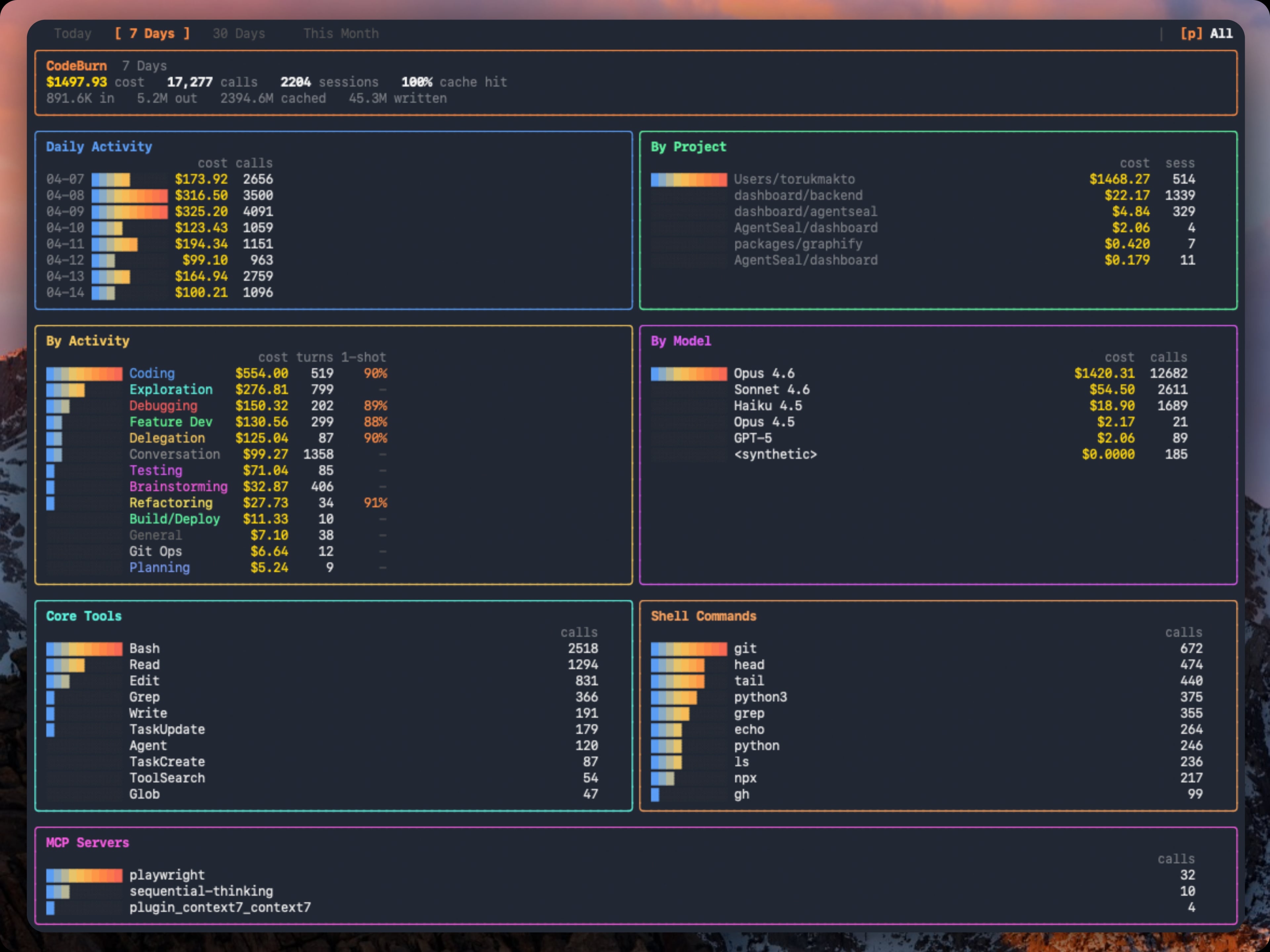
A week across every tool you use, in one screen.
Quick start · Find waste · Compare models · Track what shipped · Supported tools · Commands · Features · How it reads data
Quick start
Run it instantly, no install needed:
npx codeburn
That opens the interactive dashboard (last 7 days by default). Arrow keys switch periods, q quits. That is the 30-second version. You now know where your AI budget goes.
Install it for a permanent codeburn command:
npm install -g codeburn
Also runs via bunx codeburn or dx codeburn, or brew install codeburn on macOS.
Menu bar app for macOS, with your spend always in the menu bar:
codeburn menubar
Requires Node.js 22.13+ and at least one supported tool with session data on disk. For Cursor and OpenCode, better-sqlite3 installs automatically.
Your month at a glance
codeburn overview                                    # this month, clean tables
codeburn overview --no-color                         # plain text, ready to paste
codeburn overview --from 2026-06-01 --to 2026-06-15  # any date range
codeburn overview -p all                             # all time
codeburn overview --provider claude                  # one tool only
codeburn overview prints a copy-pasteable summary of where your AI spend went: totals (cost, tokens, cache hit), a breakdown by tool and by top model, your highest-value days, top projects, a per-day table, and activity and tool usage. Pipe it anywhere (into pbcopy, a PR, Slack, or a tweet); color drops automatically when the output is not a terminal, or pass --no-color.
CodeBurn  June 2026

Totals
  Cost       $2,795.10
  Tokens     3.49B   in 23.9M / out 20.2M / cache-w 72.5M / cache-r 3.38B
  Calls      14,755   sessions 753
  Cache hit  99.3%

By tool
┌──────────┬───────────┬────────┬───────┐
│ Tool     │      Cost │ Tokens │ Share │
├──────────┼───────────┼────────┼───────┤
│ claude   │ $2,662.37 │  3.34B │   95% │
│ codex    │   $119.12 │ 128.1M │    4% │
└──────────┴───────────┴────────┴───────┘

(plus Top models, Highest-value days, Top projects, a per-day table, By activity, and Tools)
Find and fix waste
codeburn optimize                       # scan the last 30 days
codeburn optimize -p today              # today only
codeburn optimize -p week               # last 7 days
codeburn optimize --provider claude     # restrict to one provider
codeburn optimize --format json         # setup health + findings as JSON
codeburn optimize scans your sessions and your ~/.claude/ setup for waste patterns:
- Files Claude re-reads across sessions (same content, same context, over and over)
- Low Read:Edit ratio (editing without reading leads to retries and wasted tokens)
- Wasted bash output (uncapped
BASH_MAX_OUTPUT_LENGTH, trailing noise) - Unused MCP servers still paying their tool-schema overhead every session
- Ghost agents, skills, and slash commands defined in
~/.claude/but never invoked - Bloated
CLAUDE.mdfiles (with@-importexpansion counted) - Cache creation overhead and junk directory reads
- Context-heavy sessions where effective input/cache tokens swamp output
- Possibly low-worth expensive sessions with no edit turns or repeated retries
when no
git/ghdelivery command is observed
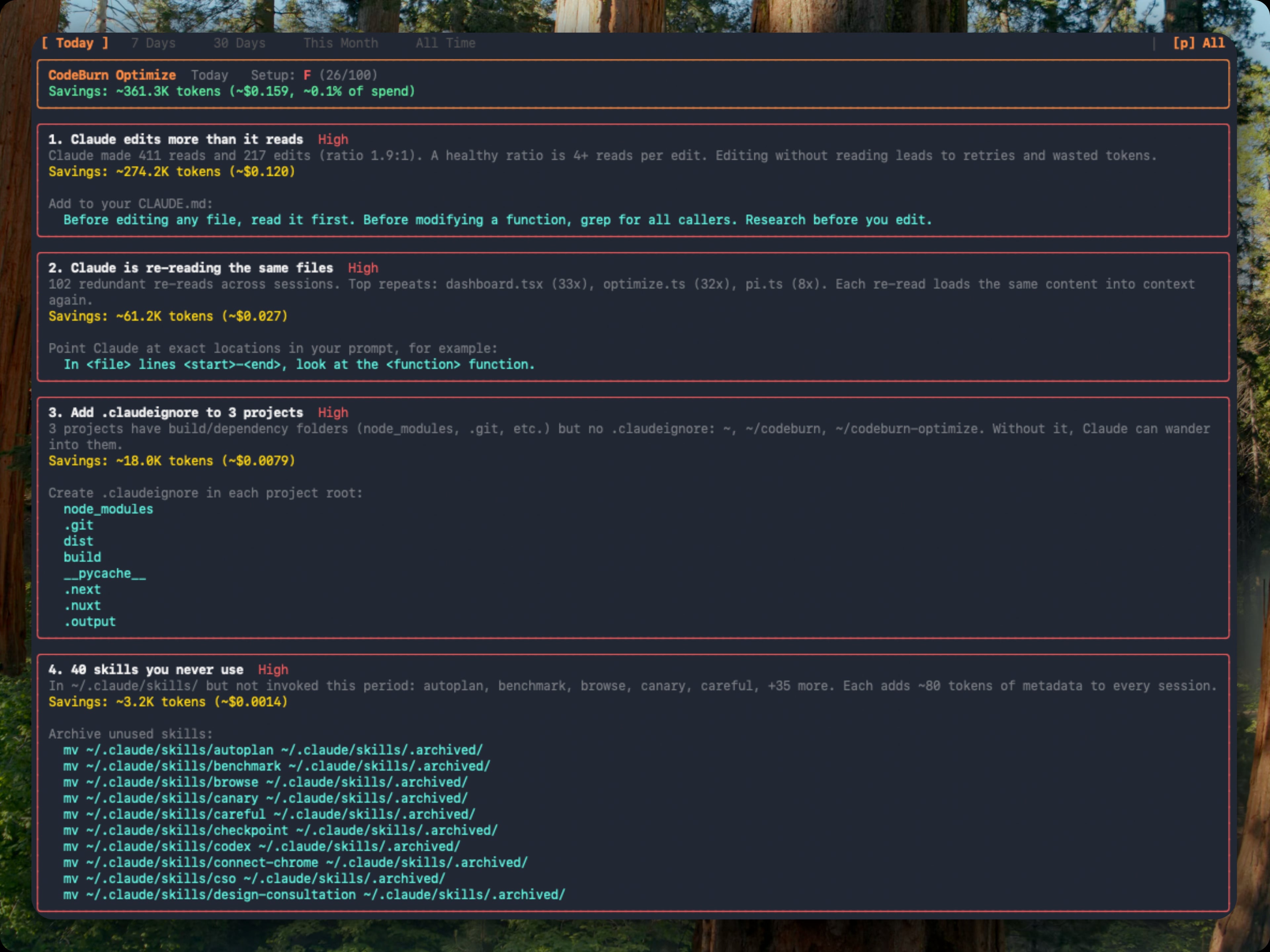
Each finding shows the estimated token and dollar savings plus a ready-to-paste fix: a CLAUDE.md line, an environment variable, or a mv command to archive unused items. Findings are ranked by urgency (impact weighted against observed waste) and rolled up into an A to F setup health grade. Repeat runs classify each finding as new, improving, or resolved against a 48-hour recent window.
You can also open it inline from the dashboard: press o when a finding count appears in the status bar, b to return.
Compare models
codeburn compare                        # interactive model picker (default: last 6 months)
codeburn compare -p week                # last 7 days
codeburn compare -p today               # today only
codeburn compare --provider claude      # Claude Code sessions only
Which model is actually better for your work? Press c in the dashboard, or run codeburn compare. Arrow keys switch periods, b to return.
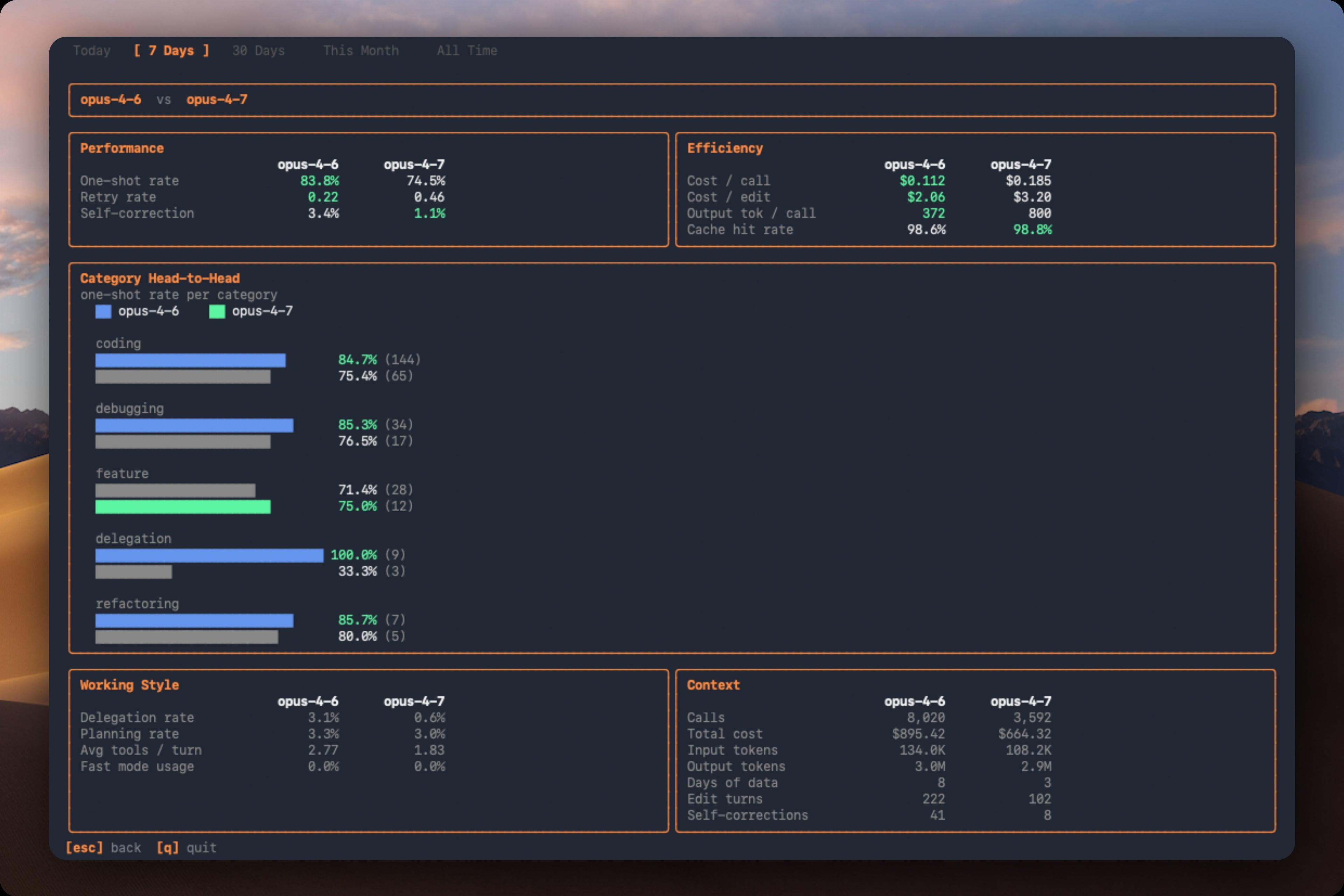
| Section | Metric | What it measures |
|---|---|---|
| Performance | One-shot rate | Edits that succeed without retries |
| Performance | Retry rate | Average retries per edit turn |
| Performance | Self-correction | Turns where the model corrected its own mistake |
| Efficiency | Cost per call | Average cost per API call |
| Efficiency | Cost per edit | Average cost per edit turn |
| Efficiency | Output tokens per call | Average output tokens per call |
| Efficiency | Cache hit rate | Proportion of input from cache |
Also compares per-category one-shot rates, delegation rate, planning rate, average tools per turn, and fast mode usage.
Track what shipped
codeburn yield                  # last 7 days (default)
codeburn yield -p today         # today only
codeburn yield -p 30days        # last 30 days
codeburn yield -p month         # this calendar month
codeburn yield --format json    # productive/reverted/abandoned spend as JSON
Did the spend actually ship? codeburn yield correlates AI sessions with git commits by timestamp:
| Category | Meaning |
|---|---|
| Productive | Commits from this session landed in main |
| Reverted | Commits were later reverted |
| Abandoned | No commits near session, or commits never merged |
Requires a git repository. Run from your project directory.
Browser dashboard
codeburn web                    # opens http://localhost:4747 in your browser
codeburn web -p 30days          # start on a different period
codeburn web --port 8080        # pick a port (falls back to a free one if taken)
codeburn web --no-open          # start the server without opening a browser
A local web dashboard with the same task, model, tool, and project breakdowns as the TUI, rendered with charts. Everything is read from disk on your machine and the server binds to localhost; nothing is uploaded.
Combine usage across your devices
See one total across your laptop, desktop, and work machine on the same network. On each other device, share its usage:
codeburn share --pair # opens a pairing window and prints a PIN
Then add it once from your main device (the PIN authorizes the pairing):
codeburn devices add            # find nearby devices and pair, or: add <host> --pin <pin>
codeburn devices                # combined totals by machine
codeburn devices rm <name>      # forget a device
Pairing is PIN-authorized and stays on your local network. You can also discover and pair devices straight from the browser dashboard.
Menu bar
codeburn menubar
One command: downloads the latest .app, installs into ~/Applications, and launches it. Re-run with --force to reinstall. Native Swift and SwiftUI app lives in mac/ (see mac/README.md for build details).
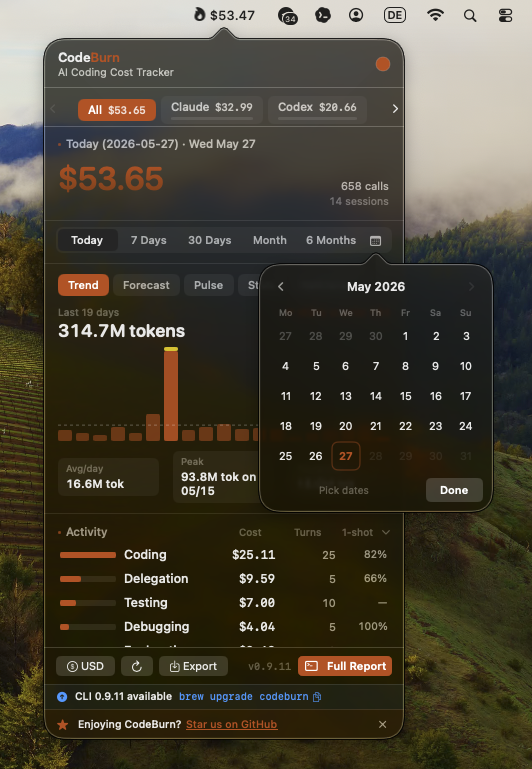
The menubar icon shows the spend period selected in Settings (Today by default; Week, Month, and 6 Months are also available). Non-today periods add a short suffix such as $42 / mo so the menu bar value stays clear. Click to open a popover with agent tabs, period switcher (Today, 7 Days, 30 Days, Month, All), Trend, Forecast, Pulse, Stats, and Plan insights, activity and model breakdowns, optimize findings, and CSV/JSON export. Refreshes every 30 seconds.
You can also set the menubar status period from Terminal:
defaults write org.agentseal.codeburn-menubar CodeBurnMenubarPeriod -string month
Allowed values are today, week, month, and sixMonths. Relaunch the app to apply external defaults changes.
Compact mode shrinks the menubar item to fit the text, dropping decimals (e.g. $110 instead of $110.20):
defaults write org.agentseal.codeburn-menubar CodeBurnMenubarCompact -bool true
Relaunch the app to apply. To revert: defaults delete org.agentseal.codeburn-menubar CodeBurnMenubarCompact.
Supported tools
CodeBurn auto-detects which AI tools you use. Each logo links to its provider doc.


 <a
<a
Extension points exported contracts — how you extend this code
Window (Interface)Core symbols most depended-on inside this repo
parseShape
Languages
Modules by API surface
Dependencies from manifests, versioned
For agents
$ claude mcp add codeburn \
  -- python -m otcore.mcp_server <graph>