github.com/funstory-ai/BabelDOC @v0.6.3 sqlite
README






PDF scientific paper translation and bilingual comparison library.
- Online Service: Beta version launched Immersive Translate - BabelDOC Free usage quota is available; please refer to the FAQ section on the page for details.
- Self-deployment: PDFMathTranslate-next support for BabelDOC, available for self-deployment + WebUI with more translation services.
- Provides a simple command line interface.
- Provides a Python API.
- Mainly designed to be embedded into other programs, but can also be used directly for simple translation tasks.
[!TIP]
How to use BabelDOC in Zotero
Immersive Translate Pro members can use the immersive-translate/zotero-immersivetranslate plugin
PDFMathTranslate self-deployed users can use the guaguastandup/zotero-pdf2zh plugin
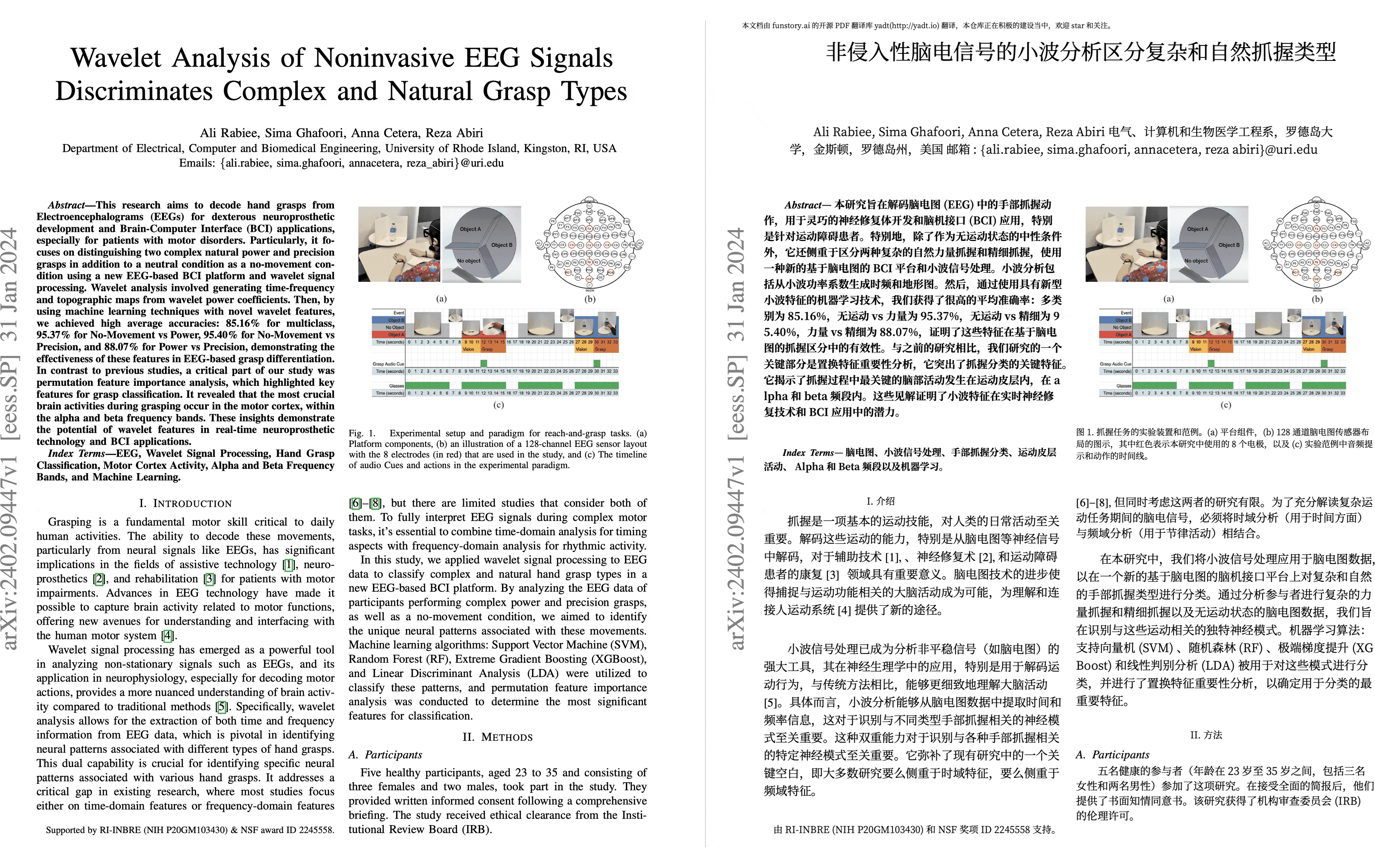
Preview
We are hiring
Getting Started
Install from PyPI
We recommend using the Tool feature of uv to install BabelDOC.
-
First, you need to refer to uv installation to install uv and set up the
PATHenvironment variable as prompted. -
Use the following command to install BabelDOC:
uv tool install --python 3.12 BabelDOC

babeldoc --help
- Use the
babeldoccommand. For example:
babeldoc --openai --openai-model "gpt-4o-mini" --openai-base-url "https://api.openai.com/v1" --openai-api-key "your-api-key-here"  --files example.pdf

# multiple files
babeldoc --openai --openai-model "gpt-4o-mini" --openai-base-url "https://api.openai.com/v1" --openai-api-key "your-api-key-here"  --files example1.pdf --files example2.pdf
Install from Source
We still recommend using uv to manage virtual environments.
-
First, you need to refer to uv installation to install uv and set up the
PATHenvironment variable as prompted. -
Use the following command to install BabelDOC:
# clone the project
git clone https://github.com/funstory-ai/BabelDOC

# enter the project directory
cd BabelDOC

# install dependencies and run babeldoc
uv run babeldoc --help
- Use the
uv run babeldoccommand. For example:
uv run babeldoc --files example.pdf --openai --openai-model "gpt-4o-mini" --openai-base-url "https://api.openai.com/v1" --openai-api-key "your-api-key-here"

# multiple files
uv run babeldoc --files example.pdf --files example2.pdf --openai --openai-model "gpt-4o-mini" --openai-base-url "https://api.openai.com/v1" --openai-api-key "your-api-key-here"
[!TIP] The absolute path is recommended.
Advanced Options
[!NOTE] This CLI is mainly for debugging purposes. Although end users can use this CLI to translate files, we do not provide any technical support for this purpose.
End users should directly use Online Service: Beta version launched Immersive Translate - BabelDOC 1000 free pages per month.
End users who need self-deployment should use PDFMathTranslate 2.0
If you find that an option is not listed below, it means that this option is a debugging option for maintainers. Please do not use these options.
Language Options
--lang-in,-li: Source language code (default: en)--lang-out,-lo: Target language code (default: zh)
[!TIP] Currently, this project mainly focuses on English-to-Chinese translation, and other scenarios have not been tested yet.
(2025.3.1 update): Basic English target language support has been added, primarily to minimize line breaks within words([0-9A-Za-z]+).
HELP WANTED: Collecting word regular expressions for more languages
PDF Processing Options
--files: One or more file paths to input PDF documents.--pages,-p: Specify pages to translate (e.g., "1,2,1-,-3,3-5"). If not set, translate all pages--split-short-lines: Force split short lines into different paragraphs (may cause poor typesetting & bugs)--short-line-split-factor: Split threshold factor (default: 0.8). The actual threshold is the median length of all lines on the current page * this factor--skip-clean: Skip PDF cleaning step--dual-translate-first: Put translated pages first in dual PDF mode (default: original pages first)--disable-rich-text-translate: Disable rich text translation (may help improve compatibility with some PDFs)--enhance-compatibility: Enable all compatibility enhancement options (equivalent to --skip-clean --dual-translate-first --disable-rich-text-translate)--use-alternating-pages-dual: Use alternating pages mode for dual PDF. When enabled, original and translated pages are arranged in alternate order. When disabled (default), original and translated pages are shown side by side on the same page.--watermark-output-mode: Control watermark output mode: 'watermarked' (default) adds watermark to translated PDF, 'no_watermark' doesn't add watermark, 'both' outputs both versions.--max-pages-per-part: Maximum number of pages per part for split translation. If not set, no splitting will be performed.--no-watermark: [DEPRECATED] Use --watermark-output-mode=no_watermark instead.--translate-table-text: Translate table text (experimental, default: False)--formular-font-pattern: Font pattern to identify formula text (default: None)--formular-char-pattern: Character pattern to identify formula text (default: None)--show-char-box: Show character bounding boxes (debug only, default: False)--skip-scanned-detection: Skip scanned document detection (default: False). When using split translation, only the first part performs detection if not skipped.--ocr-workaround: Use OCR workaround (default: False). Only suitable for documents with black text on white background. When enabled, white rectangular blocks will be added below the translation to cover the original text content, and all text will be forced to black color.--auto-enable-ocr-workaround: Enable automatic OCR workaround (default: False). If a document is detected as heavily scanned, this will attempt to enable OCR processing and skip further scan detection. See "Important Interaction Note" below for crucial details on how this interacts with--ocr-workaroundand--skip-scanned-detection.--primary-font-family: Override primary font family for translated text. Choices: 'serif' for serif fonts, 'sans-serif' for sans-serif fonts, 'script' for script/italic fonts. If not specified, uses automatic font selection based on original text properties.--only-include-translated-page: Only include translated pages in the output PDF. This option is only effective when--pagesis used. (default: False)--merge-alternating-line-numbers: Enable post-processing to merge alternating line-number layouts (keep the number paragraph as an independent paragraph b; merge adjacent text paragraphs a and c across it whenlayout_idandxobj_idmatch, digits are ASCII and spaces only). Default: off.--skip-form-render: Skip form rendering (default: False). When enabled, PDF forms will not be rendered in the output.--skip-curve-render: Skip curve rendering (default: False). When enabled, PDF curves will not be rendered in the output.--only-parse-generate-pdf: Only parse PDF and generate output PDF without translation (default: False). This skips all translation-related processing including layout analysis, paragraph finding, style processing, and translation itself. Useful for testing PDF parsing and reconstruction functionality.--remove-non-formula-lines: Remove non-formula lines from paragraph areas (default: False). This removes decorative lines that are not part of formulas, while protecting lines in figure/table areas. Useful for cleaning up documents with decorative elements that interfere with text flow.--non-formula-line-iou-threshold: IoU threshold for detecting paragraph overlap when removing non-formula lines (default: 0.9). Higher values are more conservative and will remove fewer lines.-
--figure-table-protection-threshold: IoU threshold for protecting lines in figure/table areas when removing non-formula lines (default: 0.9). Higher values provide more protection for structural elements in figures and tables. -
--rpc-doclayout: RPC service host address for document layout analysis (default: None) --working-dir: Working directory for translation. If not set, use temp directory.--no-auto-extract-glossary: Disable automatic term extraction. If this flag is present, the step is skipped. Defaults to enabled.--save-auto-extracted-glossary: Save automatically extracted glossary to the specified file. If not set, the glossary will not be saved.
[!TIP] - Both
--skip-cleanand--dual-translate-firstmay help improve compatibility with some PDF readers ---disable-rich-text-translatecan also help with compatibility by simplifying translation input - However, using--skip-cleanwill result in larger file sizes - If you encounter any compatibility issues, try using--enhance-compatibilityfirst - Use--max-pages-per-partfor large documents to split them into smaller parts for translation and automatically merge them back. - Use--skip-scanned-detectionto speed up processing when you know your document is not a scanned PDF. - Use--ocr-workaroundto fill background for scanned PDF. (Current assumption: background is pure white, text is pure black, this option will also auto enable--skip-scanned-detection)
Translation Service Options
--qps: QPS (Queries Per Second) limit for translation service (default: 4)--ignore-cache: Ignore translation cache and force retranslation--no-dual: Do not output bilingual PDF files--no-mono: Do not output monolingual PDF files--min-text-length: Minimum text length to translate (default: 5)--openai: Use OpenAI for translation (default: False)--custom-system-prompt: Custom system prompt for translation.--add-formula-placehold-hint: Add formula placeholder hint for translation. (Currently not recommended, it may affect translation quality, default: False)--disable-same-text-fallback: Disable fallback translation when LLM output matches input text. (default: False)--pool-max-workers: Maximum number of worker threads for internal task processing pools. If not specified, defaults to QPS value. This parameter directly sets the worker count, replacing previous QPS-based dynamic calculations.--no-auto-extract-glossary: Disable automatic term extraction. If this flag is present, the step is skipped. Defaults to enabled.
[!TIP]
- Currently, only OpenAI-compatible LLM is supported. For more translator support, please use PDFMathTranslate 2.0.
- It is recommended to use models with strong compatibility with OpenAI, such as:
glm-4-flash,deepseek-chat, etc.- Currently, it has not been optimized for traditional translation engines like Bing/Google, it is recommended to use LLMs.
- You can use litellm to access multiple models.
--custom-system-prompt: It is mainly used to add the/no_thinkinstruction of Qwen 3 in the prompt. For example:--custom-system-prompt "/no_think You are a professional, authentic machine translation engine."
OpenAI Specific Options
--openai-model: OpenAI model to use (default: gpt-4o-mini)--openai-base-url: Base URL for OpenAI API--openai-api-key: API key for OpenAI service--enable-json-mode-if-requested: Enable JSON mode for OpenAI requests (default: False)--term-pool-max-workers: Maximum number of wo
Core symbols most depended-on inside this repo
addShape
Languages
Modules by API surface
Dependencies from manifests, versioned
For agents
$ claude mcp add BabelDOC \
  -- python -m otcore.mcp_server <graph>