github.com/fabiofalci/sconsify @v0.5.0
Chat with this repoWhat it actually does AI analysis from the code graph — generated when you open this
README
A spotify console app

Important notice: libspotify is no longer available for download. If you have installed, then sconsify should be working. Unfortunately, we don't know for how long.
A very early stage of a spotify console application.
Requirements: Libspotify SDK & PortAudio & Spotify user subscribed to the Premium tier of the Spotify Service (Libspotify SDK terms of use).
Installation
-
Download current version 0.4.0
-
Install dependencies:
Archlinux
$ pacman -S portaudio
$ yaourt -S libspotify
Ubuntu & debian
$ curl http://apt.mopidy.com/mopidy.gpg | sudo apt-key add - && sudo curl -o /etc/apt/sources.list.d/mopidy.list http://apt.mopidy.com/mopidy.list
$ sudo apt-get update && sudo apt-get install -y libportaudio2 libspotify12 --no-install-recommends
Fedora Workstation
Install libspotify-devel from rpmfusion-nonfree. Install instructions
$ sudo dnf install libspotify portaudio
OSX
Install brew, the missing package manager for OS X and
$ brew tap homebrew/binary
$ brew install portaudio
Then, download libspotify 12.1.51 for Mac OS X/Darwin
Uncompress the file and copy libspotify.framework to /Library/Frameworks (optional)
$ wget https://developer.spotify.com/download/libspotify/libspotify-12.1.51-Darwin-universal.zip
$ sudo cp -R ./libspotify-12.1.51-Darwin-universal/libspotify.framework /Library/Frameworks
sconsify will load libspotify from /usr/local/opt/libspotify/lib/libspotify. User should create a symbolic link to /usr/local/opt/libspotify/lib/libspotify
$ mkdir -p /usr/local/opt/libspotify/lib
$ ln -s /Library/Frameworks/libspotify.framework/libspotify /usr/local/opt/libspotify/lib
- Run
./sconsify
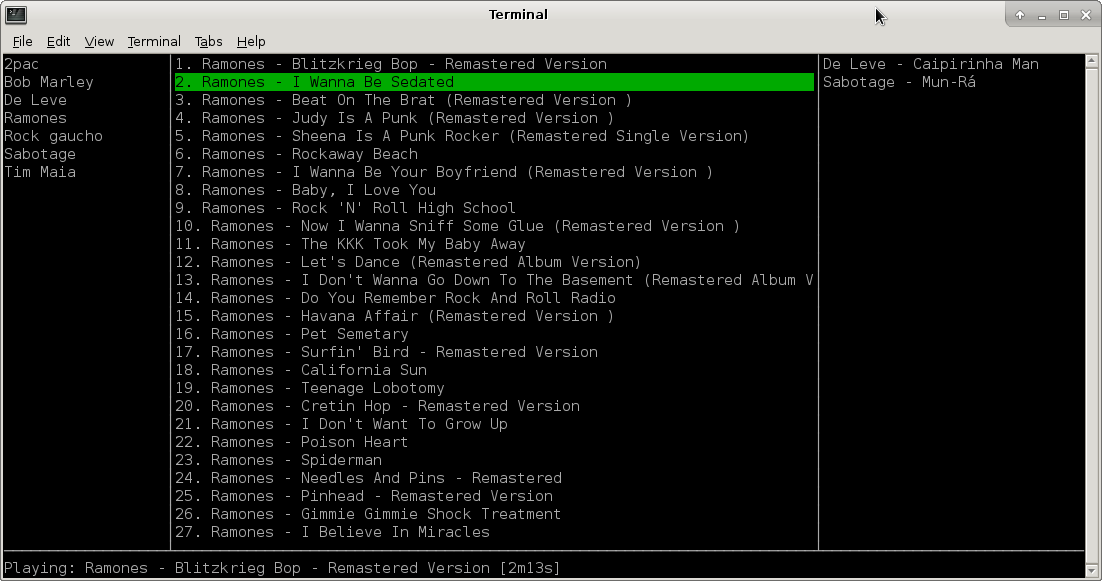
Modes
There are 2 modes:
-
Console user interfacemode: it presents a text user interface with playlists and tracks. -
No user interfacemode: it doesn't present user interface and just shuffle tracks.
Parameters
-
-username="": Spotify username. If not present username will be asked. -
Password will be asked. To not be asked you can set an environment variable with your password
export SCONSIFY_PASSWORD=password. Be aware your password will be exposed as plain text. -
-ui=true/false: Run Sconsify with Console User Interface. If false then no User Interface will be presented and it'll only shuffle tracks. -
-playlists="": Select just some playlists to play. Comma separated list.
No UI Parameters
-
-noui-repeat-on=true/false: Play your playlist and repeat it after the last track. -
-noui-silent=true/false: Silent mode when no UI is used. -
-noui-shuffle=true/false: Shuffle tracks or follow playlist order.
UI mode keyboard
-
← ↓ ↑ → for navigation.
-
spaceorenter: play selected track. -
>: play next track. -
p: pause. -
/: open a search field.
Search fields: album, artist or track.
    album:help
    artist:the beatles
    track:let it be
Aliases al = album, ar = artist, tr = track:
    al:help
    ar:the beatles
    tr:let it be
-
s: shuffle tracks from current playlist. Press again to go back to normal mode. -
S: shuffle tracks from all playlists. Press again to go back to normal mode. -
u: queue selected track to play next. -
dd: delete selected element (playlist, track) from the UI (it doesn't save the change to spotify playlist). -
D: delete all tracks from the queue if the focus is on the queue. -
PageUpPageDownHomeEnd. -
Control Corq: exit.
Vi navigation style:
-
hjklfor navigation. -
NjandNkwhere N is a number: repeat the command N times. -
gg: go to first element. -
G: go to last element. -
NggandNGwhere N is a number: go to element at position N. -
Temporary playlist. Type
cin the queue view, type a name and then a temporary playlist will appear containing all songs in the queue view.
No UI mode keyboard
-
>: play next track. -
Control C: exit.
Interprocess commands
Sconsify starts a server for interprocess commands using sconsify -command <command>. Available commands: replay, play_pause, next.
i3 bindings for multimedia keys:
    bindsym XF86AudioPrev exec sconsify -command replay
    bindsym XF86AudioPlay exec sconsify -command play_pause
    bindsym XF86AudioNext exec sconsify -command next
macOS: create a new service in Automator. Then pick Library > Utilities > Run Shell Script. Drag it to the workflow. Pick no input and then add to the script /path/to/sconsify -command replay, save it. Go to Keyboard Shortcuts > Services in System Settings, find the service you've just saved and type the desired shortcut. Repeat for each command (replay, play_pause, next).
sconsifyrc
Similar to .ackrc you can define default parameters in ~/.sconsify/sconsifyrc:
-username=your-username
-noui-silent=true
-noui-repeat-on=false
How to build
Install go (same version from Dockerfile), glide and get a Spotify application key and copy as a byte array to /sconsify/spotify/spotify_key_array.key.
var key = []byte{
    0x02, 0xA2, ...
    ...
    0xA1}
-
osx only:
brew install pkgconfig -
make build
When building for OSX you may face an issue where it doesn't get your application key. Just retry the build that eventually it will get the key.
Extension points exported contracts — how you extend this code
Printer (Interface)Core symbols most depended-on inside this repo
NameShape
Languages
Modules by API surface
For agents
$ claude mcp add sconsify \
  -- python -m otcore.mcp_server <graph>