github.com/error311/FileRise @v3.21.0
Chat with this repoWhat it actually does AI analysis from the code graph — generated when you open this
README
FileRise






FileRise is a self-hosted web file manager and storage hub with WebDAV, sharing, and per-folder ACLs. Drag & drop uploads, OnlyOffice integration, and optional folder-level encryption at rest — all in one PHP app you control.
Quick links: Website • Docs • Live demo • Install • FileRise Pro
- Built for: anyone who wants a fast, self-hosted file manager, storage hub, client portal, and AI workflow workspace on their own infrastructure.
- Core (MIT): full open-source FileRise feature set (ACLs, folder and file sharing, uploads, tags/search, PDF previews, and more), plus multiple local roots and WebDAV sources for storage-hub workflows.
-
Pro: adds user groups, client portals, automation, additional source adapters, gateway shares, search everywhere/audit tooling, and a permissions-aware AI workspace for structured extraction, organization, approvals, and scoped copilots.
- FileRise Pro AI Chat: Extract Invoice Fields to JSON and CSV


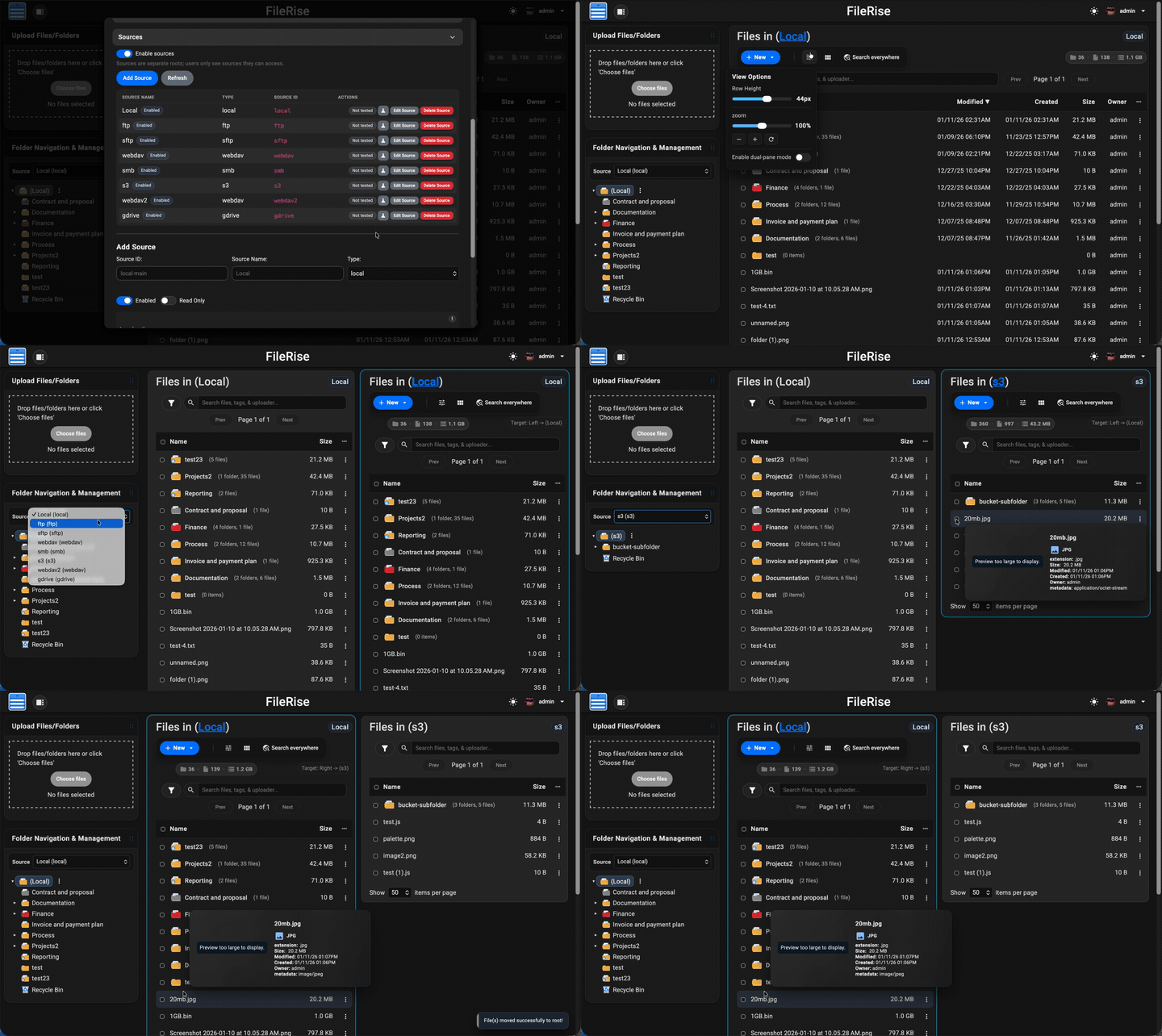
Table of contents
- Quick links
- Install (Docker – recommended)
- Manual install (PHP web server)
- After install (5 minutes)
- Data & backups
- First-run security checklist
- Optional dependencies
- WebDAV & ONLYOFFICE (optional)
- Security & updates
- Community, support & contributing
- AI Disclosure
- License & third-party code
- Press
Highlights
- 💾 Self-hosted “cloud drive” – Runs on Docker (recommended) or on a standard PHP web server. No external database required.
- 🔐 Granular per-folder ACLs – Manage View (all/own), Upload, Create, Edit, Rename, Move, Copy, Delete, Extract, Share, and more — all enforced consistently across the UI, API, and WebDAV.
- 🔗 Link File (authenticated deep links) – Generate internal links to specific files, require login + ACL checks, and open directly to the target in the app.
- 🤝 Folder and file sharing – Share folders for browsing or upload-only file requests, protect links with passwords/expiration, and share individual files with generated links.
- 📥 File Request links (upload-only) – Share upload-only links so external users can submit files into a folder without browsing existing files.
- 📄 PDF viewing + optional local PDF thumbnails – View PDFs inline in the preview modal, and optionally enable first-page PDF thumbnails for gallery cards and hover previews using
pdftoppm. - 🔐 Folder-level encryption at rest (optional) – Encrypt entire folders (and all descendants) on disk using modern authenticated encryption.
- Opt-in per folder with inherited protection for subfolders
- Files are stored encrypted on disk and transparently decrypted on download
- Master key can be generated by FileRise or supplied via environment variable
- When enabled, incompatible features (WebDAV, sharing, ZIP operations, OnlyOffice) are automatically disabled for safety
- 🔄 Fast drag-and-drop uploads – Chunked, resumable uploads with pause/resume and progress tracking. If your connection drops, FileRise resumes automatically.
- 🪟 Dual-pane mode + keyboard shortcuts – Optional two-pane file browser for fast workflows (copy/move between panes, compare folders, and operate without the mouse). Shortcut overlay + hotkeys (F3 preview, F4 edit, F5 copy, F6 move, F7 new folder, Del delete,
/search). - 🌳 Scales to huge trees – Tested with 100k+ folders in the sidebar tree without choking the UI.
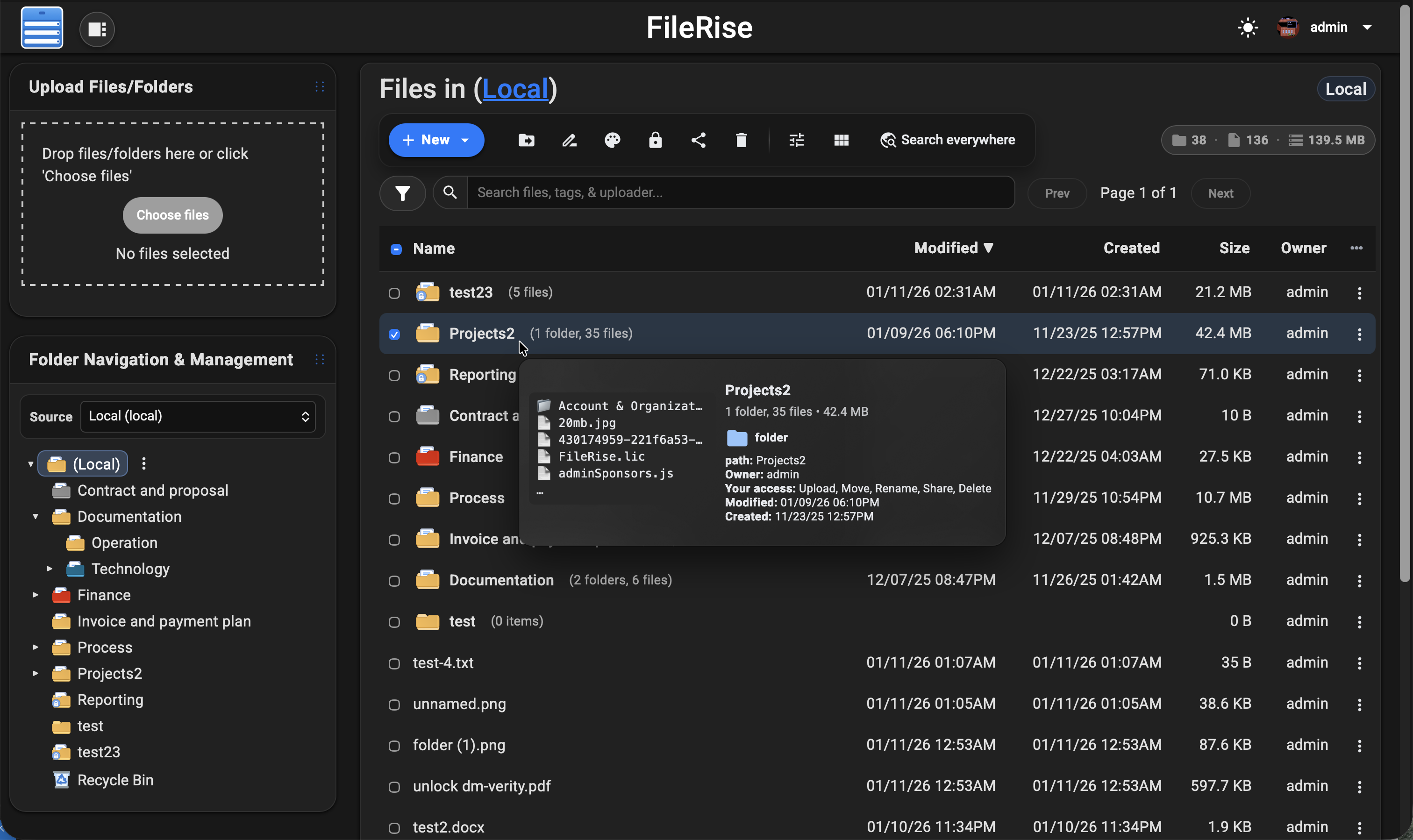
- 🌈 Visual organization – Color-code folders in the tree, inline list, and folder strip, plus tag files with color-coded labels for fast visual scanning.
- 👀 Hover preview “peek” cards – On desktop, hover files or folders to see thumbnails (images/video), quick metadata (size, timestamps, tags), and effective permissions. Per-user toggle stored in
localStorage. - 🎬 Smart media handling – Track per-file video watch progress with a “watched” indicator, remember last volume/mute state, and reset progress when needed.
- 🧩 OnlyOffice support (optional) – Edit DOCX/XLSX/PPTX using your own Document Server; ODT/ODS/ODP supported as well. PDFs can be viewed inline.
- 🌍 WebDAV (ACL-aware) – Mount FileRise as a drive from macOS, Windows, Linux, or Cyberduck/WinSCP. Listings, uploads, overwrites, deletes, and folder creation all honor the same ACLs as the web UI.
- 🏷️ Tags, search & trash – Tag files, search by name/tag/uploader/content via fuzzy search, and recover mistakes using a Trash with time-based retention.
- 📚 API + live docs – OpenAPI spec served at
api.php?spec=1(fromopenapi.json.dist) with a Redoc UI atapi.php(login required). - 📊 Storage / disk usage summary – CLI scanner with snapshots, total usage, and per-volume breakdowns surfaced in the admin panel.
- 🎨 Polished, responsive UI – Dark/light mode, mobile-friendly layout, in-browser previews, and a built-in code editor powered by CodeMirror.
- 🌐 Internationalization – English, Spanish, French, German, Polish, Russian, Japanese and Simplified Chinese included; community translations welcome.
- 🔑 Login + SSO – Local users, TOTP 2FA, and OIDC (Auth0 / Authentik / Keycloak / etc.) with optional auto-provisioning, IdP-driven admin role assignment, and Pro user-group mapping.
- 🛡️ ClamAV virus scanning (Core) + Pro virus log – Optional ClamAV upload scanning, with a Pro virus detection log in the admin panel and CSV export.
- 🌐 Reverse proxy & subpath aware – Designed to run cleanly behind Nginx, Traefik, Caddy, or Apache:
- Supports installs under a subpath (e.g.
https://example.com/files) - Correct URL generation for assets, APIs, portals, PWA, and share links
- If the proxy strips the prefix, set
FR_BASE_PATHor sendX-Forwarded-Prefix - Explicit “Published URL” setting for proxy / firewall environments
- Works with
X-Forwarded-*headers and Kubernetes ingress setups - 👥 Pro: user groups, client portals, global search, storage explorer & audit logs – Group-based ACLs, brandable client upload portals, ACL-aware global search across files, folders, users, and permissions, an ncdu-style storage explorer for identifying large folders/files and reclaiming disk space directly from the UI, and Pro Audit Logs (configurable activity logging with filters + CSV export for tracking key actions across web, WebDAV, shares, and portals).
- ⚙️ Pro: Automation (Webhooks + Jobs) – Send FileRise events to other apps/services using managed webhook endpoints with async delivery, retries, queue visibility, and job history from Admin.
- 🤖 Pro: AI workflows + workspace – Use a permissions-aware AI workspace for structured extraction, folder organization, watched-folder workflows, approval-gated bulk actions, and scoped share/portal copilots with cited answers and admin controls.
- 🌐 Sources (Core + Pro adapters) – Turn FileRise into a storage hub by connecting multiple backends and switching between them in the UI:
- Core: Multiple local roots (additional local paths)
- Core: WebDAV sources (Nextcloud / ownCloud / FileRise)
- Pro: S3-compatible (AWS S3 / MinIO / Wasabi / Backblaze B2 S3 / etc.)
- Pro: SMB/CIFS, SFTP, FTP
- Pro: Google Drive, OneDrive, Dropbox
- Works with dual-pane so you can copy/move via drag & drop or toolbar actions between sources, with per-source Trash
- 🔌 Pro: Gateway Shares v2 (SFTP / S3 / MCP) – Expose selected source roots through managed gateways for external clients and workflows:
- Managed start/stop/restart/status/log controls from Admin
- SFTP gateway for tools like FileZilla, WinSCP, and rclone
- S3 gateway for S3-compatible clients and automation
- Scoped MCP users/tokens mapped to FileRise user + source/root scope
- AI/tool integrations stay ACL-scoped and auditable
Full list of features: Full Feature Wiki
💡 Looking for FileRise Pro (brandable header, user groups, client upload portals, license handling)? Check out filerise.net – FileRise Core stays fully open-source (MIT).
Quick links
- 🚀 Live demo: Demo (username:
demo/ password:demo) - 🧩 FileRise Pro: filerise.net
- 📚 Docs & Wiki: Wiki
- Features overview
- FAQ
- Troubleshooting and common errors
- Logs and diagnostics
- Screenshots
- Installation & setup
- Common env vars
- Env vars (full reference)
- Admin Panel
- Pro MCP AI quickstart
- ACL & permissions
- ACL recipes
- WebDAV (mount)
- WebDAV via curl
- ONLYOFFICE
- OIDC & SSO
- Nginx setup
- Kubernetes / k8s
- Backup & restore
- Upgrade & migration
- Maintenance scripts
- Reverse proxy & subpath
- 🐳 Docker image:
- Docker Hub: Docker
- Build pipeline / tags: Workflow
- ⎈ Community Helm chart (unofficial): dofevine/charts/filerise (community-maintained, not maintained by FileRise core)
- 💬 Discord: Discord
- 📝 Changelog: Changelog
Support checklist (please include)
If you open an issue/discussion, please include:
- FileRise version + install method (Docker tag / release ZIP / git)
- Reverse proxy (Nginx / Traefik / Caddy) + subpath (yes/no)
- Browser console errors (if any)
- Server/container logs around the error
Install (Docker – recommended)
The easiest way to run FileRise is the official Docker image.
✅ Tip: For stability, pin a version tag (example:
error311/filerise-docker:vX.Y.Z) instead of:latest. See Releases for current versions.
Option A – Quick start (docker run)
Pristine Docker installs can omit PERSISTENT_TOKENS_KEY. FileRise will generate a unique key on first start and persist it in metadata/persistent_tokens.key.
If you prefer to manage the key yourself, set one before first start:
export PERSISTENT_TOKENS_KEY="$(openssl rand -hex 32)"
```bash docker run -d \ --name filerise \ -p 8080:80 \ -e TIMEZONE="America/New_York" \ -e TOTAL_UPLOAD_SIZE="10G" \ -e SECURE="false" \ -e SCAN_ON_START="true" \ -e
Extension points exported contracts — how you extend this code
Core symbols most depended-on inside this repo
Shape
Languages
Modules by API surface
For agents
$ claude mcp add FileRise \
  -- python -m otcore.mcp_server <graph>